Incognito Isn't Invisible: What Google's Settlement Means for Tracking
Callum is going to propose. He has the speech, roughly. He has the location, a lookout on kunanyi with a view that does most of the work for him. What he does not have is a ring, and the only computer in the house is the family laptop, which his partner also uses to check the footy scores and, on Sundays, to look up whether you can freeze a pavlova.1
So Callum does what millions of people do. He opens Chrome, presses Ctrl, Shift and N, and a dark window appears with a little icon of a man in a hat and glasses. He has gone Incognito. He spends forty minutes comparing sapphires on three jewellers' websites, reads a sizing guide with the concentration of a bomb disposal technician, and closes the window. No history. No awkward autocomplete next Sunday when someone types "p" into the address bar. The spy has left the building.
Now let us follow the spy. On the first jeweller's site, a small piece of code from an analytics company noted the page he viewed, the time, his rough location and the make of his laptop. A second piece of code, from an advertising company, did much the same, and then a third. His internet provider saw which websites he visited. And because the sites ran Google's tags, Google received a record of the visit too. Nobody wrote "Callum" on any of it. But the spy in the hat and glasses was, in effect, tiptoeing through a market where every stall-holder was quietly taking notes and all of them were looking straight at him.
Breathe out. Nobody is reading Callum's diary, and nobody has stolen the ring. Incognito did exactly what it does. It kept the visit off the laptop. The problem is that the little man in the hat suggests rather more than that, and for years the wording around him did too.
On 1 April 2024, that gap got a price list. In a filing in a US federal court, the people who sued Google over Incognito mode set out a settlement in which Google would delete or "remediate" billions of data records from private browsing sessions, rewrite how it describes Incognito, and keep third-party cookies blocked in Incognito by default for five years. The same filing quotes Google's own staff describing Incognito as "effectively a lie" and a "confusing mess". Google, for its part, told CNN the case was "meritless" and that it never associates data with users in Incognito. It was, by every account, not an April Fools' joke.
My plan is to follow Callum's forty minutes from the outside. First, what a private window promises and why most of us read more into it. Then what one page view looks like from the website's side of the counter, down to the fields in a single request. Then the oddest part of the case, how Google could tell you were Incognito even though Chrome never said so. Then the settlement itself, field by field, and finally what all of it means if you are the one running the website with the tags on it.
Let's get into it.
Part 1: What Incognito Actually Promises
Start with something you already do without thinking about it. When you borrow a friend's car, you might reset the trip meter before you hand it back, and if the car has a navigation system you might clear the recent destinations. Dr Brydon Wang at the Queensland University of Technology used exactly this picture when the ABC asked him about Incognito in January: you wipe the journey from the car's navigation and maybe the odometer, and that is Incognito. "It doesn't stop anyone along the road or who is watching you through surveillance cameras from tracking where you have been."
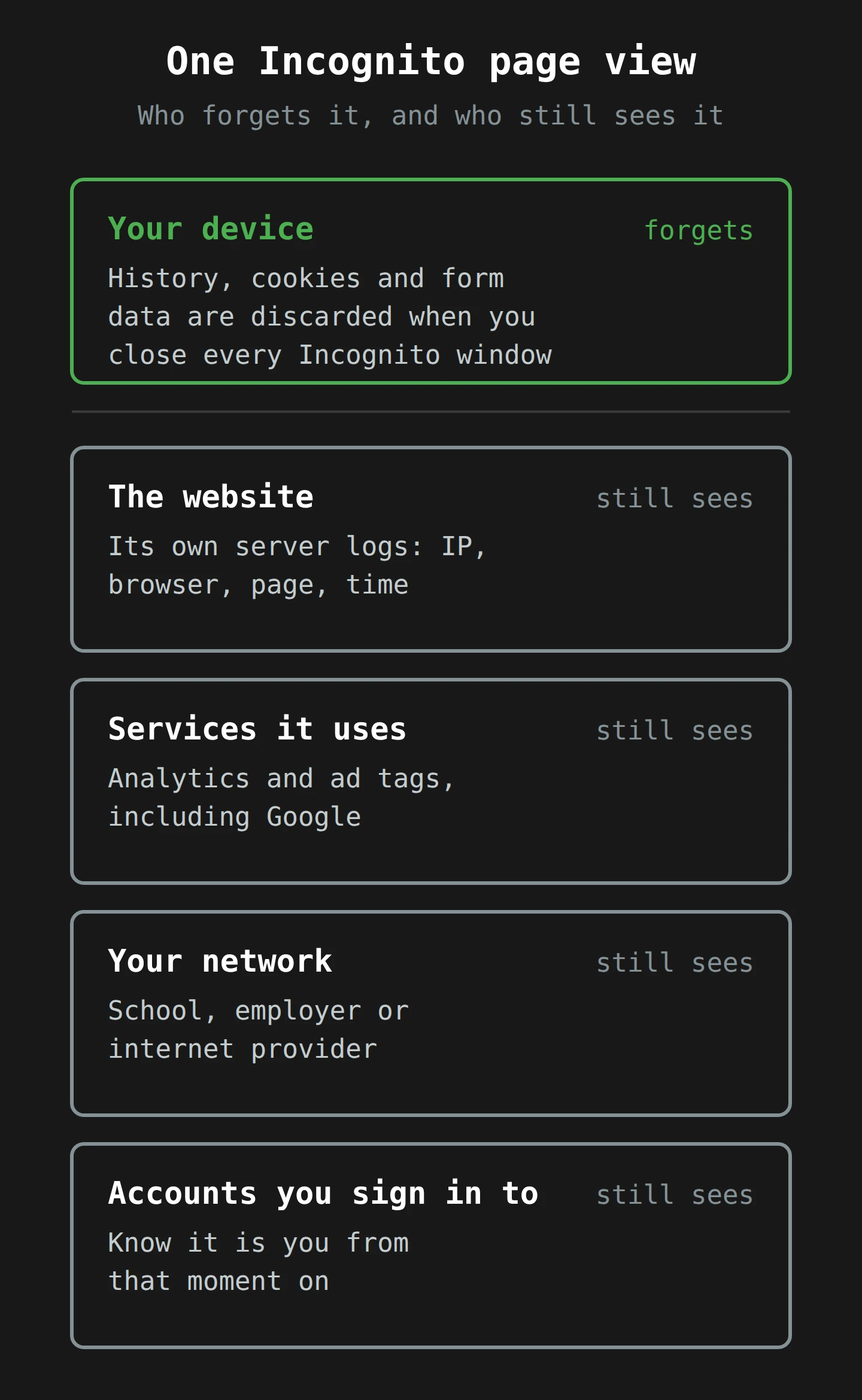
That is the whole idea in one sentence, and Google's own help page says much the same thing if you read it slowly. As of April 2024, Chrome's Incognito help page says that in Incognito "none of your browsing history, cookies and site data, or information entered in forms are saved on your device". It then lists what Incognito does not do. It does not stop your activity "from being visible to websites you visit and the services they use, your school, employer, or your Internet Service Provider".
The name for this is local privacy: privacy from other people who use the same device. The other kind, privacy from the websites and networks at the far end of the wire, is remote privacy. Incognito delivers the first and almost none of the second. Everything in this article comes back to that split.
What actually gets forgotten
Here is what a private window does, mechanically.
- A separate cookie jar. When you open the first Incognito window, Chrome starts a new, empty store for cookies and site data. Sites you visit can write cookies into it, and those cookies work normally while the session lasts. That is why you can still log in to things in Incognito.
- Nothing written to history. Pages you visit do not go into the browser's history list or its autocomplete.
- Everything binned at the end. When you close the last Incognito window, Chrome discards that session's cookies and site data. Closing one tab is not enough; the help page is clear that the session ends only when all Incognito windows are closed.2
- Downloads and bookmarks stay. Files you download and bookmarks you make are saved in any mode. Callum's ring-sizing PDF is sitting in his Downloads folder right now, a small paper trail with a large potential for surprise.
Notice what is on that list. It is all about the device. None of it changes what leaves the computer.
Why the hat and glasses matter
If the mechanism is that simple, why did it end up in court? Partly because people do not read help pages; they read icons and the first line of a splash screen. For years, Chrome greeted every private window with "you've gone Incognito" and "now you can browse privately", next to a man in a hat and glasses. According to NPR's account of the court record, a Google engineer wrote to colleagues in 2018: "We need to stop calling it incognito and stop using a Spy Guy icon."
Researchers had measured the problem by then. In a 2018 study at the University of Chicago and Leibniz University Hannover, Yuxi Wu and colleagues showed 460 people one of 13 private browsing explanations from six browsers, then asked what private mode would do in twenty scenarios. The results are a catalogue of hopeful thinking:
- 56.3% believed that if you were logged in to a Google account, your searches in private mode would not be saved. Most mixed up the browser's local history with Google's.
- 40.2% believed websites could not estimate your location.
- 37.0% believed their employer could not track them, and 22.0% thought the same of their internet provider.
- 25.2% believed websites could not see their IP address.
The authors' own summary of the browsers' real behaviour is blunt: the guarantee about history "does not at all apply to remote services". One finding is a little awkward for the story that follows. Of all the explanations they tested, Chrome's desktop wording was the only one that helped people more than a meaninglessly vague control text did. It was the best of a weak field, and people still got the remote questions wrong.
I find this both funny and slightly sad. The browser makers were not hiding the limits. They put them in sentences that sat beside a picture of a spy, and the picture won.
Part 2: The Inn With a Very Tidy Room
To see what a website sees, it helps to stop thinking of the web as a place you look at and start thinking of it as a place you check in to.
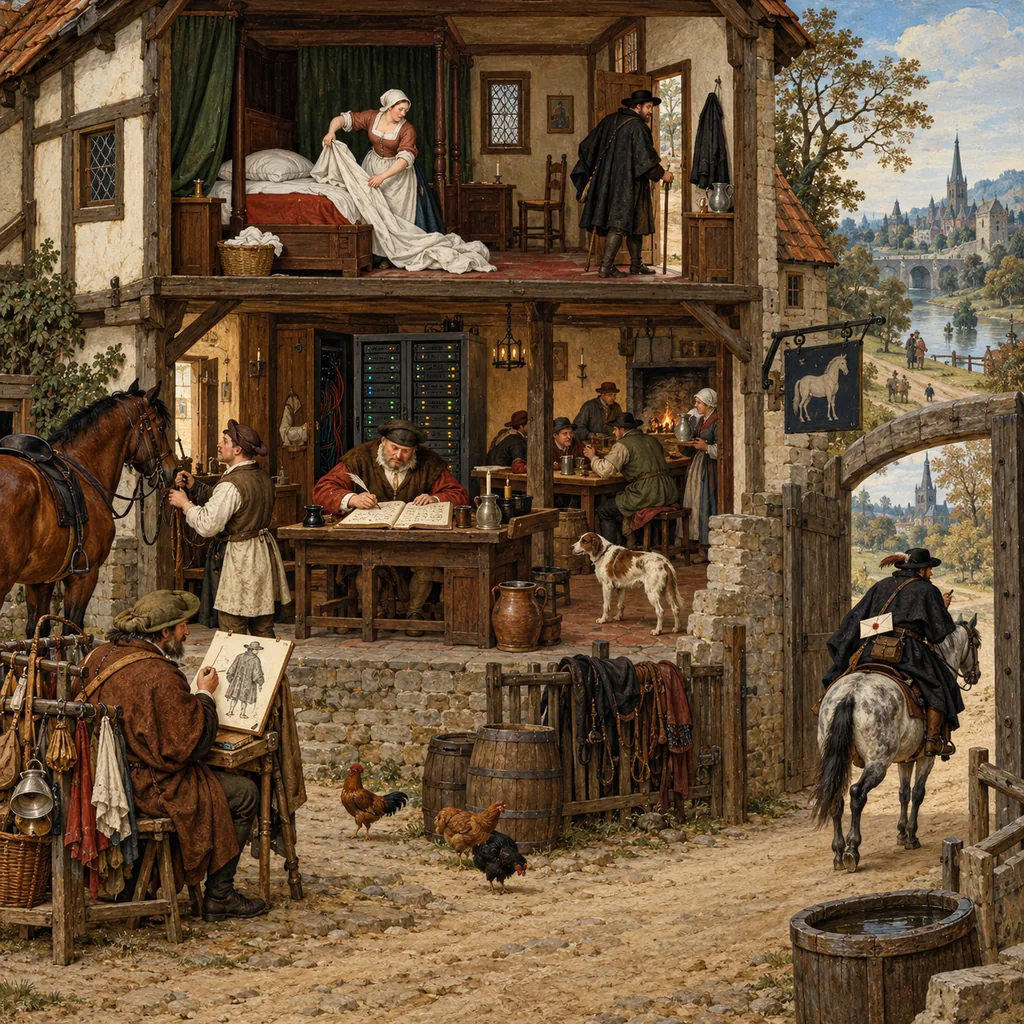
Picture an old coaching inn. You arrive, take a room, stay the night and leave. Incognito is the inn's outstanding housekeeping: the moment you check out, the maid strips the bed, empties the bin and wipes the mirror. The next guest in that room will never know you were there. But you still walked past the front desk. The innkeeper wrote your arrival in the register. The stable boy noticed your horse. And the inn, it turns out, has arrangements with a few businesses in town, which get a short note about each guest so they know who is staying.
I have committed to an inn now, so we will follow it all the way down.
One request, four facts
When Callum's browser loads a page, it sends an HTTP request, a short message that says "please send me this page". A request carries a few facts about the sender whether you like it or not, and private mode does not change any of them.
- The IP address. This is the network address the reply has to go back to. It is not written in the request so much as on the envelope: the server cannot answer without it. It often gives away a rough location, and on a home connection it can stay the same for weeks. This is the front desk noting which room number to send breakfast to.
- The user agent. A line of text in which the browser describes itself: the browser and its version, the operating system, sometimes the device. Think of it as the guest's coat and boots.
- The URL. The exact page, including the path (
/rings/sapphire-oval-1-2ct) and often a set of query parameters, the bits after a question mark that record things like which ad was clicked or which filters were set. - Cookies. Any small text values this site has stored in the current cookie jar. In a new Incognito session the jar starts empty, so on the first request there are none. After that, the site's own cookies come back with every request, exactly as in a normal window.
That is the guest at the front desk. Now for the arrangements with the businesses in town.
The tags are the messengers
Most commercial websites include code from other companies: an analytics tool, an ad platform's conversion tag, a chat widget, a video player. Each one is a tag, a small script the page loads and runs. When Callum's browser runs Google's analytics tag, it sends its own request, from his browser to Google's servers, with the page URL, the time and the identifier in a cookie. That request carries the same IP address and user agent as before, because it comes from the same browser.
In inn terms, each tag is a messenger the inn keeps on hand, who rides off to their employer with a note about every guest. Incognito does not stop the messengers. It cannot. As far as the website is concerned, running the tag is displaying the page.
Google's own privacy policy says so. As of 10 April 2024, the current version, effective 28 March 2024, says that information from sites using Google's ads and analytics "is collected regardless of which browser or browser mode you use", and that in Incognito "third party sites and apps that integrate our services may still share information with Google when you visit them". Callum's forty minutes produced a front-desk record on three jewellers' servers and a set of messenger notes for each company whose tags those sites ran, and every one of them heard about it.
A new guest, but a familiar coat
Here is where the case gets interesting. The help page says that in Incognito, "Websites see you as a new user and won't know who you are, as long as you don't sign in." That is true at the level of cookies. Google Analytics, for example, recognises a returning browser through a first-party cookie called _ga, which Google lists with a lifetime of two years. A new Incognito session has no _ga cookie, so the tag makes a new one, and in the reports Callum turns up as a brand-new visitor.
But a cookie is only one way to recognise someone. The front desk can also go on the coat.
The plaintiffs' lawyers quote a Google document on this point, and it is the most useful sentence in the whole 32-page motion: "IP address + UA (user agent) can reveal individual user with high probability". One household's IP address, plus one exact browser version on one exact operating system, narrows the field a lot. Add the screen size, installed fonts, time zone and how the graphics chip draws a test image, and you have a browser fingerprint: a profile of the browser that is unusual enough to pick out one visitor without storing anything on their device at all. In 2010, the Electronic Frontier Foundation's Peter Eckersley tested 470,161 browsers and found that 83.6% had a unique fingerprint.3 I went through the methods in the fingerprinting post; the short version is that a fresh cookie jar does nothing to your coat and boots.
None of this proves that Google actually joined Incognito visits to people. Google says it does not: its spokesperson told CNN, "We never associate data with users when they use Incognito mode." The plaintiffs argued the opposite, and, according to their motion, at summary judgment in August 2023 the judge found they had set out evidence that Google stored their data with unique identifiers. The case settled before a jury had to decide. What the record does show is that the raw ingredients for recognising someone were in the logs, which is why the settlement goes after those ingredients field by field.
What the network sees
One more layer, briefly, because it is the one people forget. Even if no website kept a thing, the connection itself runs through your internet provider, and on a work laptop through your employer's network. Since most sites use HTTPS, those parties usually cannot read the pages, but they can see which sites you connect to, and the domain name lookups that come first can be even more revealing. I wrote about plugging that particular leak in the DNS over TLS post last month. Incognito does not touch any of it.
So the inn picture holds. Housekeeping is impeccable, the front desk keeps its register, the messengers ride out, and the road outside has its own watchers. Callum's room is spotless.
Part 3: The Tell in the Missing Header
There is one more mechanism, and it is the strangest part of the case. Chrome does not announce that you are in Incognito. Google's help page says so directly: "Chrome doesn't tell websites, including Google, when you're browsing privately in Incognito mode." And yet, according to the court record, Google's logs contained fields that labelled traffic as probably Incognito. How do you detect something that never announces itself?
You notice what is missing.
When silence is a signal
Start with something familiar. A colleague signs every email "Cheers, M". One day an email arrives with no sign-off at all. Nothing in it says "I am annoyed", but you know. The absence is the message.
Websites discovered this trick years ago. Chrome used to switch off a storage feature called the FileSystem API in Incognito, so that a private session could not leave files on the disk. That was a sensible privacy choice. It also meant a site could simply ask for the FileSystem API and, if it got an error, conclude that the visitor was in a private window. News publishers used this to stop people reading past their free-article limit. Google fixed it in Chrome 76 in 2019 and, in its blog post about the fix, said that "any approach based on private browsing detection undermines the principles of Incognito Mode." Keep that sentence in mind.
The X-Client-Data header
When Chrome talks to Google's own servers, it can add an extra line to the request called the X-Client-Data header. According to Google's Chrome privacy whitepaper, it lists which "variations" (small experiments and feature trials) are active in that copy of Chrome, so that Google can measure whether, say, a networking change makes YouTube load faster. Google describes the combination as "non-identifying", because it is based on a "13-bit low entropy value", which allows for only 8,192 different values.4
The plaintiffs saw it differently. Their complaint, as summarised in the court's 2021 order refusing to dismiss the case, called the header "a unique digital string of characters" and alleged that it "is not present when a Chrome user has enabled Incognito Mode". If that is right, you do not need Chrome to say "this user is Incognito". You only need to notice that a Chrome browser, which would normally send the header, has not sent it. No sign-off. The colleague is annoyed.

The detection bits
During the case, it emerged that Google's logs contained exactly this kind of inference. The motion calls them private browsing "detection bits": fields inside Google's logs used to label browsing data as "Incognito" or "private". The magistrate judge handling discovery found that Google had created these bits "to look specifically at whether there is an X-Client Data header in the request", and sanctioned Google twice, in May 2022 and March 2023, for not disclosing them and their logs during discovery. The first sanctions order alone came with nearly US$1 million in fees and limits on what Google could argue at trial.5
Two things are worth separating here, because the coverage tends to blur them. First, Google denies the claims, admits no liability in the settlement, and says it never associates Incognito data with users. Second, the case was never only about the bits. The plaintiffs' complaint was that Google collected private browsing data through its tags at all, while telling users they could "browse privately". The bits matter because they show that the absence of a signal can be logged and analysed like any other field, even by a company whose own blog said detection "undermines the principles of Incognito Mode".
For the inn, this is the receptionist who notices that you did not sign the guest book in your usual way, and writes "probably travelling under a false name" in the margin.
Part 4: What the Settlement Would Actually Do
Now to the deal itself. A quick note on status first, because it matters. The case was filed in June 2020, certified as a US-wide class action in December 2022, survived Google's attempt to end it at summary judgment in August 2023, and was set for trial in February 2024. The parties agreed a term sheet in late December 2023. The full settlement agreement and the plaintiffs' motion to approve it were filed on 1 April 2024. The motion is unopposed: Google supports approval, while disputing how the motion describes the facts. Judge Yvonne Gonzalez Rogers has a hearing on 30 July 2024. Until she approves it, everything below is what Google has agreed to do, not what a court has ordered.

Who is in the class
The class is narrower than the headlines suggest. It covers people who used Chrome in Incognito, or Safari, Edge or Internet Explorer in a private mode, from 1 June 2016, who had a Google account but were not signed in to it, and who visited non-Google sites that ran Google's tracking or advertising code. The certification is US-wide; the plaintiffs' expert put the class at about 136 million people. If you are reading this in Hobart, you are almost certainly not in it, though, as we will see, the changes reach you anyway.
The words: what Chrome now says
The first part of the deal is disclosure. Google agreed to finish changing its wording by 31 March 2024, and it started early. In January, gHacks reported a new Incognito screen in Chrome Canary, the nightly test build. Here is the before and after, word for word.
Before:
Now you can browse privately, and other people who use this device won't see your activity. However, downloads, bookmarks and reading list items will be saved.
After:
Others who use this device won't see your activity, so you can browse more privately. This won't change how data is collected by websites you visit and the services they use, including Google. Downloads, bookmarks and reading list items will be saved.
Look at the changes. "Browse privately" becomes "browse more privately". The device benefit moves to the front, where it belongs. And one sentence names the remote side outright, Google included. That sentence is the settlement in miniature. Alongside it, the agreement requires changes to the "Learn more" privacy tour behind the screen, the privacy policy wording quoted in Part 2, and the retirement of two older documents, the Chrome Privacy Notice and the Chrome privacy whitepaper.
The motion is not gentle about why. It quotes internal Google documents calling Incognito "effectively a lie" and "a problem of professional ethics and basic honesty", and an email from Google's chief marketing officer to its CEO about "really fuzzy, hedging language that is almost more damaging." Those are the plaintiffs' selections from discovery, and Google disputes the motion's characterisation. They are still quite something to read in a court filing.
The records: what "remediate" means, field by field
The second part is the data, and this is where the engineering gets satisfying. "Delete billions of records" makes a great headline, but the agreement is more precise, and the precision tells you which fields matter.
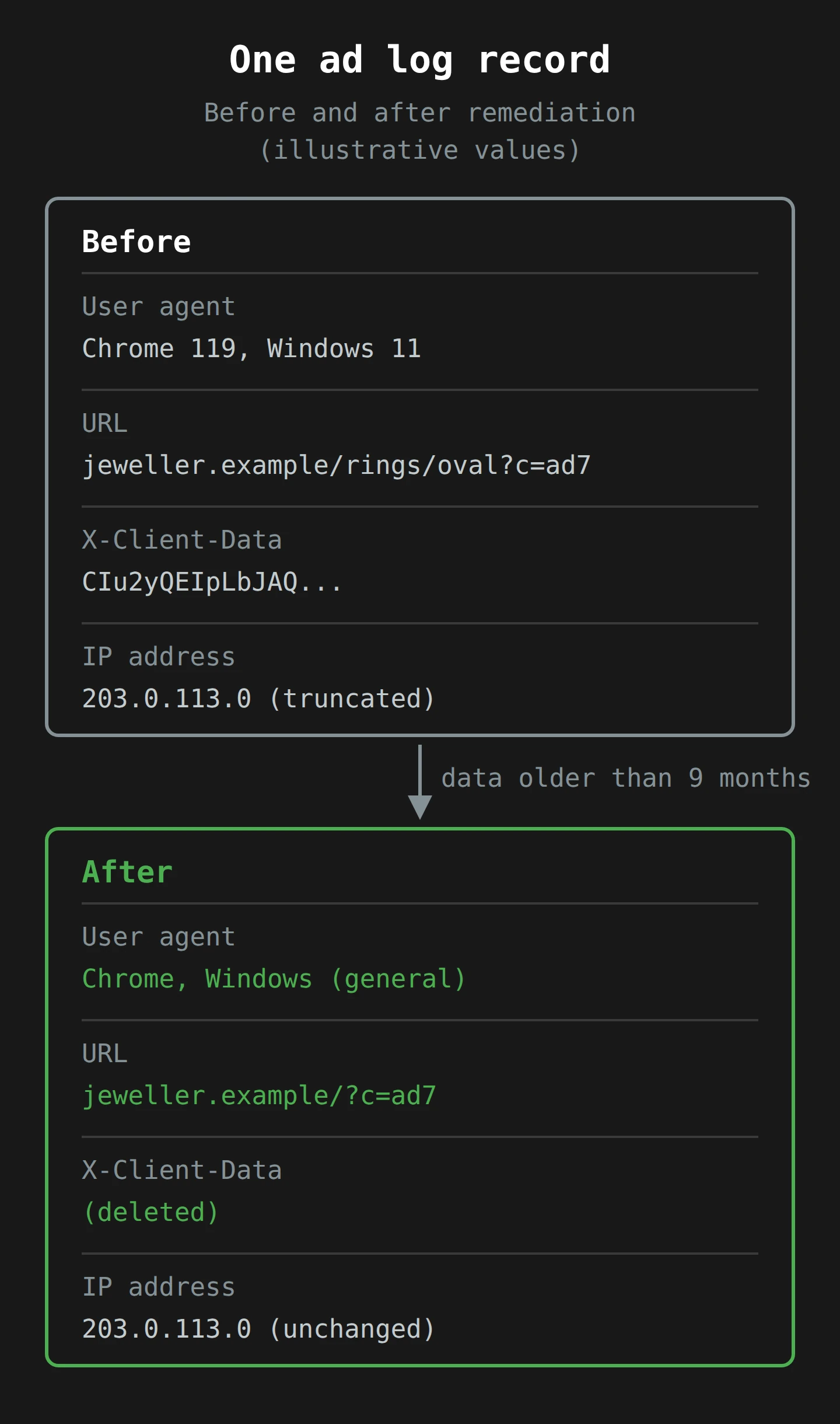
For private browsing data older than nine months in certain Google display ads logs, Google agreed to field-based remediation. In section III.2(a) of the agreement, that means three things:
- Generalise the user agent. The exact browser, version and operating system string becomes something vaguer. The coat becomes "a coat".
- Delete detailed URLs, while keeping the domain and URL parameters. The record still says the visit was to a jeweller's site, but no longer which page.6
- Delete the X-Client-Data value. The field that the detection bits were built on goes.
IP addresses in those logs are, in the agreement's words, "already truncated at nine months", meaning the last part of the address is cut off so it points to a neighbourhood rather than a house. Remember the Google document from Part 2: IP plus user agent "can reveal individual user with high probability". Truncate one and generalise the other, and that pairing loses most of its power. Separately, Google agreed to shorten how long it keeps certain logs. Data older than the new limit is deleted wholesale, and data it still keeps that is older than nine months gets the same field-based treatment.
Google's own estimate in the agreement is that the remediation and the deletion will each touch "billions of event records". It applies to data collected up to December 2023, when the term sheet was signed; later data falls under the new wording. The clock is also generous: the work is due by the later of final approval or 275 days after Google finished the disclosure changes. Google also agreed not to refill the cleaned fields from other sources, and may keep copies where another law or court requires it.
The four detection bits get their own clause. Google agreed to remove them from its code so they are no longer logged, and said it made a good faith effort to confirm there are no others for inferring Incognito. The receptionist's margin note is gone, and so is the column it was written in.
The cookies: blocked by default, for five years
The third part locks in a Chrome setting. Since 2020, Chrome has blocked third-party cookies in Incognito by default: cookies set by a domain other than the site you are on, which is how an ad network recognises the same browser across many sites.7 Google announced this on 19 May 2020, a fortnight before the lawsuit was filed, and rolled it out gradually. In the settlement, Google agrees that the lawsuit was a "substantial catalyst" for the full rollout, and it agrees to keep the block for five years after final approval.
The plaintiffs' expert estimated that blocking Google's own third-party cookies in Incognito already costs Google nearly US$500 million a year in global revenue. Treat that as an expert's number in an advocate's brief, but it tells you the setting is not a trivial one.
What it does not do
Now the gaps, because Google spokesperson José Castañeda's line that the plaintiffs "originally wanted $5 billion and are receiving zero" is accurate as far as it goes.
- No money for the class. The court refused to certify a damages class in 2022, so the settlement covers only injunctive relief: changes in behaviour. Class members keep the right to sue Google individually for damages, and the motion says some are already doing so in California state courts.
- The headline value is the plaintiffs' number. The motion values the relief at over US$5 billion, using an expert's estimate of what the data was worth. Google did not contest that value in the filing, but it did not agree to it either.
- No admission. The agreement states that Google admits no liability and denies all the claims.
- No change to what websites collect. This is the big one for anyone running a site. The settlement makes Google say clearly that Incognito does not stop collection by websites "and the services they use". It does not stop that collection. The messengers still ride.
Google's statement put it this way to NPR: it is "happy to delete old technical data that was never associated with an individual and was never used for any form of personalization." Both things can be true at once. Old records can be technical, unlinked to a name, and still worth cleaning, because a precise IP, an exact user agent and a full URL are the material that makes linking possible.
Part 5: What This Means If You Run the Website
Here is the turn I promised. Most people reading this are not class members. Many are the inn. If your site runs analytics, ad conversion tags, a pixel or two and a chat widget, you are one of the "websites you visit and the services they use" that the new Incognito screen warns about. The settlement is about Google, but the logic applies to every tag on your pages.
Your tags do not check the browser mode
Nothing in a standard analytics or ads tag behaves differently in a private window, apart from starting with an empty cookie jar. If a tag sends a page URL with an email address in a query parameter, it sends it in Incognito too. If your chat widget records full session details, it records them for Callum. The sentence Google has agreed to put on every Incognito screen describes your stack as much as Google's.
Two practical consequences follow.
Private browsing inflates your "new users". Every Incognito session looks like a brand-new visitor with a fresh _ga cookie, and if a person converts in a private window after researching in a normal one, the journey splits in two. Your reports never join the two halves. Nothing is broken; the browser is working as designed. Just do not read too much into the new-user figure.
Do not try to detect Incognito. You might be tempted, for paywalls or fraud scoring, to infer private browsing from what is missing. Google's own blog called that approach one that "undermines the principles of Incognito Mode", and the detection bits were at the heart of two sanctions orders. If Google's lawyers could not make that look good, yours will not either.
The browser makers are moving the line
Incognito's narrow promise is also shifting under everyone's feet, which affects your data whether or not anybody sues anybody.
- Chrome. On 4 January 2024, Google began testing Tracking Protection, which blocks third-party cookies by default for 1% of Chrome users globally. Its stated plan, as of April 2024, is to phase out third-party cookies for everyone in the second half of 2024, subject to the UK Competition and Markets Authority's concerns.
- Safari. Apple went further for its private windows. Safari 17, released in September 2023, blocks known trackers and fingerprinting in Private Browsing, removes known tracking query parameters from links, and adds noise to browser features that fingerprinting scripts read. If your campaign links depend on a click identifier in the URL, some of those visits will now arrive without it. That is on top of the long-running rules in Intelligent Tracking Prevention.
So the gap between "private from your housemate" and "private from the internet" is closing a little, but from the browser side, not from the website side. The browsers are getting stricter about what leaves the device. That makes what you choose to collect on purpose matter more, not less.
Your privacy policy is now being compared with Google's
There is a quieter lesson in the disclosure half of the deal. The court was not only interested in what Google collected. It was interested in whether ordinary people were told. The judge's summary judgment ruling, as the motion quotes it, focused on Google's "failure to explicitly notify users it would be among the third parties recording their communications with other websites."
Your privacy policy probably has a paragraph about "third-party service providers". Read it next to the new Incognito sentence. Does it name the companies whose tags run on your site? Does it say what they receive? Does it say whether those companies can use the data for their own purposes? If a reader would be surprised by the list of messengers leaving your inn, the wording is not doing its job.
Part 6: Six Checks to Run This Week
Here is a short list you can do with a browser, a spreadsheet and about the time it takes for a pot of tea to go cold.
- Follow your own spy. Open your site in an Incognito window with the browser's developer tools open on the Network tab. Load your three most important pages and complete one conversion. Write down every domain that receives a request. That list is your messengers. Compare it with the third parties named in your privacy policy. Each domain should either be on the policy or be gone.
- Read the URLs your tags send. In the same Network tab, click on the analytics and ads requests and look at the page URL they carry. Look for email addresses, names, phone numbers, order numbers or search terms in query parameters. If you find any, fix the form or the redirect that puts them there. URLs are the field Google is cutting out of its own records; do not hand them over in your own.
- Check your consent, in Incognito. A private window is the closest thing to a first-time visitor. Before you click anything on the consent banner, check which tags have already fired. If tags that need consent fire before it, that is the problem to fix first.
- Trim what you keep. Check the retention settings in your analytics and ad tools, and in any server logs. Google agreed to shorten retention on some of its logs and to cut precise fields after nine months. Ask whether you need full IP addresses, full user agents or full URLs for longer than a few months. If the answer is "we have never looked at them", you probably do not.
- Re-read your own "private" words. Search your site and app for "private", "anonymous" and "secure". Each one is a promise. Make sure each one says what it covers and what it does not, in the plain sentence order that Chrome's new screen uses: what we protect, then what we do not.
- Brief your analysts on the new-user problem. Tell whoever reads your dashboards that private sessions, cookie blocking and Safari's link cleaning all make visitors look newer and journeys look shorter. Set expectations now, before the third-party cookie phase-out makes it louder.8
None of these needs a lawyer or a new tool. They need someone to look at what actually leaves the browser, which is the one thing Incognito was never designed to do for you.
Final Thoughts
Back to Callum, closing the laptop lid with the quiet satisfaction of a man who believes he has covered his tracks. He has, in the sense that matters to him most: his partner will not open the laptop on Sunday and find a sapphire ring in the history. Incognito kept that promise perfectly. What it never promised, despite the hat and the glasses, was that the jewellers, their analytics, their ad networks and Google would not notice him walk through the market.
The one thing to take from the settlement is that split: private from people who share your device, not private from the internet. The new Chrome wording finally says it in one plain sentence, and if Judge Gonzalez Rogers approves the deal in July, Google will clean the fields in its old records that made the second kind of privacy hardest to keep.
If you run a website, your next step is the first check above: open your own site in a private window and count the messengers. It takes ten minutes. The list is usually longer than anyone expected.
As for Callum, I am told she said yes. Mostly because I made him up, and he deserves a win. Now, if you'll excuse me, I think my tea is ready, and unlike everything else in this article, it does not need to know who I am.
Notes
-
You can, as it happens, though the cream goes on after thawing. This is the second most sensitive search in Callum's household. ↩
-
On Chrome desktop, a number next to the Incognito icon means more than one Incognito window or tab is open. The session, and its cookies, last until the final one is closed. ↩
-
The 2010 sample came from people who chose to visit the EFF's test site, so it leaned towards technical, privacy-minded users. Eckersley says plainly that it cannot tell you how unique browsers are across the whole web, only that uniqueness is common. ↩
-
Thirteen bits is two to the power of thirteen, or 8,192 possible values. On its own that is not enough to tell millions of browsers apart. Next to an IP address, a timestamp and a user agent, it is one more column to sort by. ↩
-
The sanctions came from Magistrate Judge van Keulen, who handled discovery in the case. The motion says Google's own lawyer described the discovery effort as "herculean", which is perhaps the only point on which both sides fully agreed. ↩
-
The plaintiffs' motion describes this more broadly, saying Google will keep only the domain-level part of the URL. The signed agreement, which is the binding text, says detailed URLs are deleted "while retaining domain and URL parameters". So the query string can survive even where the path does not. ↩
-
First-party cookies belong to the site in the address bar; third-party cookies belong to someone else's code embedded in it. The difference, with more biscuits than strictly necessary, is in the cookie party post. ↩
-
Server-side tagging changes where the messengers leave from, but not whether they leave. If you move tags to your own server, the list from check one should get shorter, not just harder to see. ↩