Key Events: GA4 Renames Conversions, and Why Your Numbers Still Won't Match
It is Monday morning, the weekly marketing meeting, and you have brought the good news. "We had 212 conversions last week," you say, reading from Google Analytics. A personal best. Somebody claps.
Then the agency joins the call. They are reading from Google Ads. "We've got 148 conversions," they say, cheerfully, as if 148 and 212 were the same number said with different accents.
Silence. Somebody asks which one is right. You say yours, because it is bigger and it came from Google. The agency says theirs, because it is the one Google uses to spend the money. Both of you are, in your defence, holding a number that Google gave you and labelled "conversions". By ten o'clock the whiteboard has two columns and an arrow that points nowhere. By half past, the finance lead has proposed that you average them, "to be fair to both", and report 180 conversions. You now have three numbers, and one of them describes a week that did not happen.
So you open Google Analytics to settle it once and for all, and the word "Conversions" has gone. In its place, in the menu where it has always been, it says "Key events".
Put the kettle on. Nobody is lying to you, nobody's tag is broken (probably), and the menu has not been hacked. Google has finally admitted, in writing, that the one word "conversion" was counting two different things. In its release note dated 27 March 2024, it says that conversions in Analytics "were measured differently from how Google Ads conversions are measured, leading to discrepancies across platforms". The fix it chose is a new name. In Google Analytics 4 (GA4), the actions that matter to your business are now "key events". The word "conversion" now means the Google Ads thing, and only the Google Ads thing.
That is good news, but it is a name change, not a reconciliation. The 212 and the 148 will still disagree next week. The difference is that you can now say what each one is.
So here is the plan. We'll start at a cider stall, where two honest people count the same sales and get different totals. Then we'll go through exactly what Google changed this week, and take the old gap apart into its real mechanisms: who is allowed to take credit, how the credit is split, which day a sale lands on, how long the door stays open, and how often a repeat counts. A made-up customer called Tom will buy one mixed case of cider and appear in two reports, in two different months. We'll finish with a list of things to relabel and check before the Easter long weekend.
Let's get into it.
Part 1: One Word, Two Ledgers

The stall and the flyer boy
Picture a cider stall at a Saturday market by the water in Hobart. The stallholder, Priya, sells jugs of Huon Valley cider, and every time a jug goes, she drops the coins in a pot and makes a tally mark on a board. At the end of the day she counts the marks. Forty-one jugs. That is her number, and it is correct.
Priya has also hired a boy to stand at the top of the street and hand out flyers. She pays him a small commission on every sale that comes from a flyer. So the boy keeps his own tally. Every time a customer arrives at the stall holding one of his flyers, he makes a mark. At the end of the day he has nineteen marks. That is his number, and it is also correct.
Nobody at that market would say that the stall sold nineteen jugs, or that the boy brought in forty-one customers. Both people count "sales". They count different sales, for different reasons, with different rules. Priya's tally tells her how the business is going. The boy's tally tells her what the flyers are worth, and how much to pay him.
Now make it a little harder, because real markets are never this tidy.
A woman takes a flyer at nine, walks past the stall, buys a coffee, chats to her neighbour, and comes back at two to buy a jug. Does the boy get his mark? Under Priya's rules, he does, as long as the woman still has the flyer in her hand. Under a stricter rule ("only if they buy within an hour") he does not. A man takes a flyer and also hears about the cider from his sister and also smells it from across the street. Who gets the credit? The boy will say: him, obviously, there is a flyer in the man's pocket. The sister would say otherwise, but she is not on commission.
And here is my favourite. The boy keeps his tally by the day he handed out the flyer, because that is the day he did his work. Priya keeps hers by the day the coins hit the pot. A flyer from last Saturday that turns into a sale this Saturday lands in two different weeks on the two boards.
None of this is a mistake. It is two people with two jobs, keeping two honest ledgers. The trouble starts only when both of them write the word "sales" at the top of the board, and someone in an office far away reads both boards and expects them to match.
That is the whole story of this week's change. GA4 was Priya's board. Google Ads was the flyer boy's. Both wrote "conversions" at the top.
From goals, to conversions, to key events
You have used this idea for years, under different names.
In Universal Analytics, the version of Google Analytics most of us grew up with, the important actions were called goals. You told it that a visit to the thank-you page was a goal, and it counted them. When GA4 arrived, it threw out goals and rebuilt everything around events: every page view, every scroll, every click is an event with a name and some details attached.1 An event that mattered to the business, you could mark as a conversion, and GA4 would count it in its own reports. (I went through the wider move from Universal Analytics to GA4 in What To Know Before The Deadline Arrives.)
Meanwhile, next door, Google Ads had its own conversions: the actions that an advertiser tells Google Ads to count and to optimise its bids for. You could create them with the Google Ads tag, or you could import them from Google Analytics. Either way, the Google Ads conversion was a flyer-boy tally. It counted only the sales it could tie to an ad, by its own rules.
So by early 2024, a GA4 property and a linked Google Ads account could both show you a number called "conversions" for the same purchase event, and the two numbers would almost never agree. Ask anybody who has sat in the meeting from the introduction. It happens every week, in every agency, and the conversation has a shape you could set to music.
As of this week, GA4 has rubbed the word off its own board. Its tally is now called key events. The word "conversion" stays with Google Ads.
Jose Uzcategui at the analytics consultancy Ayudante wrote about the change on 22 March, and he put his finger on why it stings: "conversions" has been a core term in Google Analytics "for about two decades", and Google has renamed it "without changing the definition". He is right on both counts. A key event is counted exactly the way a GA4 conversion was counted last month. The thing that changed is the label, and what the old label is now free to mean.
Part 2: What Google Changed This Week
The release note
Google's entry in the GA4 release notes, titled "Conversions and key events" and dated 27 March 2024, is short. The key sentences are these. Events that measure actions that are important to the success of your business "are now called 'key events'". And: "A 'conversion' now refers to an important action that you want to use to measure the performance of your ad campaigns and optimize your bidding strategy."
Then comes the claim that matters most to the meeting from the introduction: with "an aligned definition of 'conversion' across Google Ads and Analytics, you can now, for the first time, view consistent conversion-based performance metrics in both Google Ads and Analytics reports".
Read that one slowly, because it is easy to hear more in it than it says. It does not say your GA4 number will now match your Google Ads number. It says that the thing GA4 calls a conversion will now be the same thing Google Ads calls a conversion. Your key events will still disagree with your conversions, for all the reasons in Part 3. Google has stopped two different counts sharing one name.
The release note also ties the change to an earlier one. On 22 February, Google started moving its advertising reports into one Advertising section, so that "Reports" is for behaviour on your site and "Advertising" is for campaign performance. One condition in that note is easy to miss: access to the Advertising section "will require a link to at least one Google Ads, AdSense, AdMob, Google Ad Manager or Google Marketing Platform account". Keep that in mind for later. If you do not run Google ads, you will mostly see key events from now on.
This is a gradual change
The release note is dated today, but the help page that explains the change was up earlier. A Wayback Machine capture of Google's help page "Conversions vs. key events" from 21 March already has the full explanation, under a banner: "Gradual feature rollout: This feature is not yet available for all Google Analytics properties." Ayudante's post the next day said the rollout was "still on its initial stages".
So if you open two GA4 properties this afternoon and one says "Conversions" and the other says "Key events", nothing is broken. You are looking at a staged rollout from the inside.2
Event, key event, conversion
The help page gives the cleanest picture of the new model, and it is worth learning as three steps.
An event is anything GA4 collects. A page view. A scroll. A form submission. A purchase.
A key event is "an event that measures an action that's particularly important to the success of your business". You make one by marking an event as a key event in GA4. Google's own example is a nice one, because it is not a sale: if a visitor scrolls to 90% of a lead-generation page, you know they have read the page and seen the sign-up form, so you might mark that scroll event as a key event.3 Key events show up in your GA4 reports, with credit spread across every channel that led to them.
A conversion "is created in Google Ads from a Google Analytics key event". It is the thing Google Ads bids against. In Google's words, "Unlike key events, conversions are eligible for bidding and reporting in Google Ads." Once you create one, Google shares the data between the two products, so the same conversion count shows in Google Ads and in GA4's Advertising section.
So the help page draws it as a chain: Event → Key Event → Conversion. The first two live in GA4, and the last one lives in Google Ads.
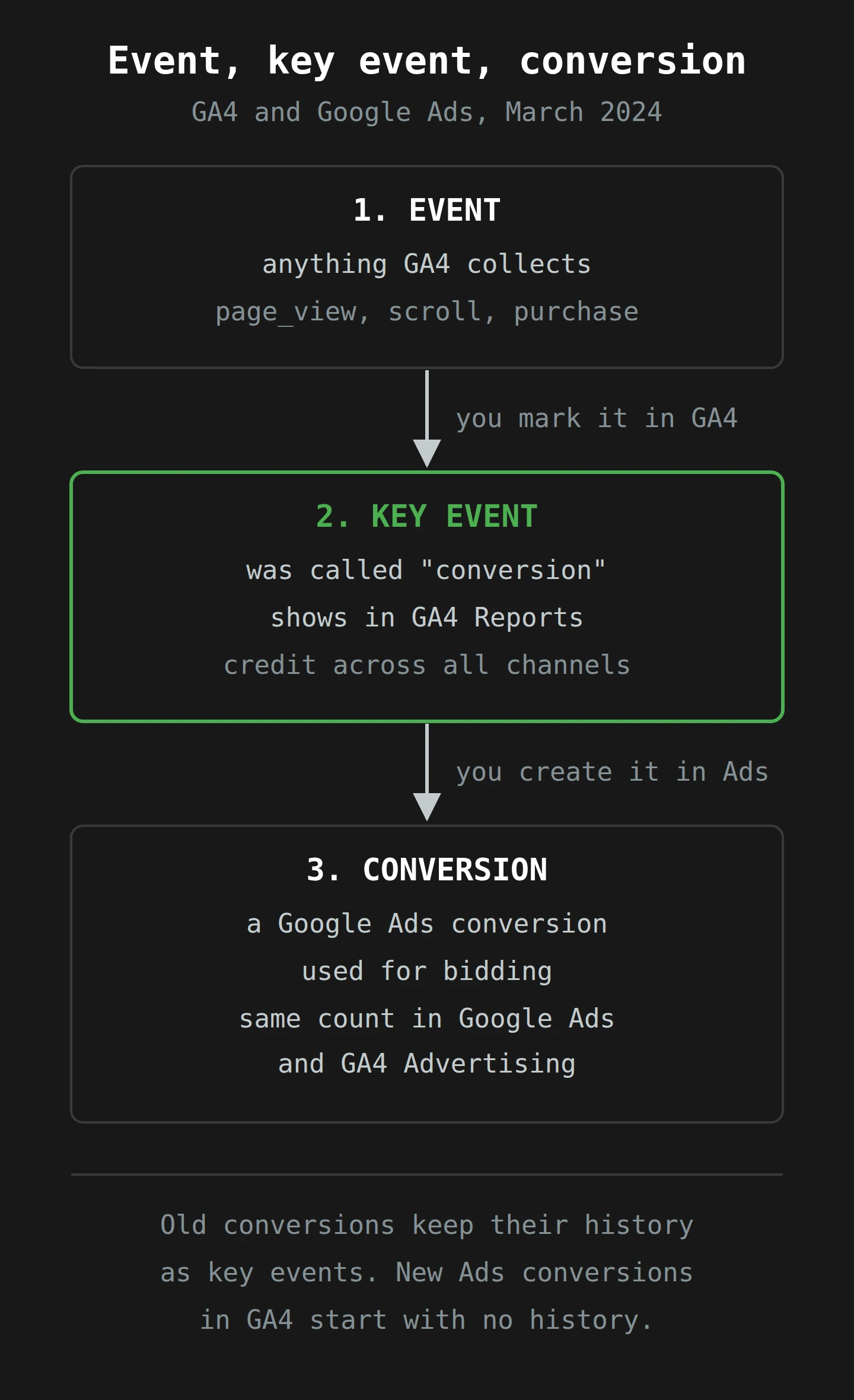
Back at the market, this is easy. Every jug Priya sells is an event. The jugs she cares about enough to tally are key events. The tally marks the flyer boy is paid on are conversions. The boy now has his own board, with his own word at the top, and Priya's board has a new heading.
What happens to your existing setup
Here is the reassuring part, and the help page says it plainly: "You don't need to take any action on your existing setup." Every event you had marked as a conversion carries on as a key event, counted the same way. Your history comes with it: you "can also continue to access your historical conversion data as key event data", so your year-on-year comparisons still work.
If you already import GA4 conversions into Google Ads for bidding, those keep working too, and you do not need to change your bidding setup. Google Ads still calls them conversions, because in Google Ads they always were.
The change is in what you do next time. To create a new Google Ads conversion from GA4 data, you now start from a key event and create the conversion inside Google Ads. For each key event, you can create one web conversion and one app conversion in each linked Google Ads account. And if you create a Google Ads conversion from an event that is not a key event, GA4 marks it as a key event for you.
Three smaller details from the same page will matter to someone on your team:
- Google Ads conversions that appear in GA4 "do not have historical data associated with them". Your old conversion history lives on as key events. The new conversion figures in GA4's Advertising section start from scratch.
- Asked whether the Google Ads conversions will be exported to BigQuery, Google answers: "No, there's no plan for Google Ads conversions to be exported through BigQuery." If your data team builds reports from the BigQuery export, they will see events, and nothing new called a conversion.
- Conversions in other Google ad platforms, such as Campaign Manager 360 and Display & Video 360, are unaffected by the rename.
That is the change. Now for the reason the meeting went wrong.
Part 3: Why the Two Numbers Never Agreed

Google's release note gives the cause in one line: the two products measured conversions differently. Its own help page on importing GA4 conversions into Google Ads is just as direct: "the Analytics Conversions metric is calculated differently from the conversion tracking metrics in Google Ads", and a difference "doesn't necessarily mean that your measurement implementation is wrong".
"Calculated differently" covers a lot of ground. Let's take it apart, one rule at a time, with the market in mind.
Difference 1: who is allowed to take credit
At the market, the boy only counts customers with flyers. He does not care about the woman who came because she read a review, or the man who walks past every Saturday.
GA4 is Priya. It counts every key event, whatever brought the visitor: a Google ad, a newsletter, a search result, a link in a forum, someone typing your address from memory. It then shares the credit across all of those channels.
Google Ads is the boy. It only reports conversions it can link to a Google ad interaction. If the customer never touched an ad, the sale does not exist on the Google Ads board.
There is a setting for exactly this, and it is worth knowing it exists. In GA4's attribution settings, there is a choice of which channels can receive credit for web conversions shared with Google Ads:
- Google paid channels: only Google Ads paid channels are eligible for credit.
- Paid and organic channels: all channels are eligible, "but only credit assigned to Google Ads channels will appear in your Google Ads accounts".
Since June 2023, the default for a newly linked account has been Google paid channels. Note the line at the end of the setting's description: it "does not impact reporting in Google Analytics 4". It changes what the boy may claim on his board. It does not change Priya's board, the key events. (The new help page on key events adds one twist: with the rename, the same setting also decides which channels can take credit for the Google Ads conversions shown in GA4's Advertising section. Your key events are still not affected.)
Difference 2: how the credit is split
Now the man with the flyer, the sister and the smell of cider. One sale, three reasons. Who gets it?
You make this kind of judgement all the time. A group dinner where four people share three bottles of wine, and someone has to decide who pays for what. Most people use a simple rule: split it evenly, or the person who ordered the last bottle pays for it. Analytics people call the rule an attribution model, and they have the same two families. A rules-based model follows a fixed rule ("all credit to the last click", "split it evenly"). A data-driven model learns the split from your own data.
When credit is split, a sale stops being a whole number. The attribution settings page still uses the simplest case, from a model that has since been retired: under a linear model, if a visitor clicks keyword 1, then keyword 2, then converts, "each keyword will display 0.5 in the Conversions column from that conversion". If you have ever seen 37.6 conversions in a report and wondered who bought 0.6 of a product, this is who.4
In April 2023, when Google announced that it was retiring most rules-based models, it said it had made data-driven attribution the default in both GA4 and Google Ads, because it "uses advanced AI to understand the impact each touchpoint has on a conversion". The first click, linear, time decay and position-based models were removed from GA4 in late 2023. Also in April 2023, Google started importing "fractional, cross-channel web conversion credits" from GA4 into Google Ads. So the flyer boy's board can now receive 0.4 of a sale, if the model decides that his flyer was 40% of the reason.
The result: GA4 shows the whole sale, split across all its channels. Google Ads shows only the slice it is allowed to claim. Add up the Google Ads slices and you will never reach the GA4 total, because the slices that belong to email and search were never sent.
I wrote about attribution models at length in The Art of Attribution, so I will not repeat it here. Some of the models in that post have since been retired, which is its own small lesson about writing down which rule you used.

Difference 3: which day the sale lands on
This is the one that ruins month-end reports, and the one that surprises people most.
The flyer boy logs a sale on the day he handed out the flyer. Google Ads does the same. Google's help page on data discrepancies between Google Ads and Analytics puts it exactly: "Google Ads reports conversions against the date/time of the click that led to the conversion. Analytics uses the date/time of the conversion itself."
That page is labelled "[UA]", for Universal Analytics, so I want to be careful. The rule it describes is about how Google Ads dates its conversions, and Google's own GA4 import page still links to it as the place to learn "why you may see some discrepancies". The same page also notes a column in Google Ads called "All conv. (by conv. time)", which reports conversions by the date they happened rather than the date of the click. That column exists because the default view does not. GA4's own attribution settings page works from the other end: its example window looks back from the day the conversion happened, so GA4 files the sale on that day.
Think about what this does to a monthly report. A customer clicks an ad on 28 February and buys on 25 March. GA4 puts the key event in March. Google Ads puts the conversion in February. If you sent February's report on 1 March, the Google Ads figure for February is now one higher than the figure in your report, and it will keep creeping up for weeks. Nobody changed the data. The boy has simply added a mark to last month's board, as he is entitled to.
Difference 4: how long the door stays open
Each board also has a time limit. How long after the flyer is the boy still allowed to claim a sale?
In Google Ads, this is the conversion window: "the period of time after an ad interaction (such as an ad click or video view) during which a conversion, such as a purchase, is recorded in Google Ads", per Google's help page on conversion windows. For conversions imported from GA4, you can set it from 7 to 90 days, and the default is 30. Change it, and the new window applies only from that day forward.
GA4 has its own window in the attribution settings, and it has different defaults. For most key events it is 90 days, with 30 or 60 days as the other choices. For the acquisition events first_open and first_visit, it is 30 days, or 7. Google's example: "a 30-day conversion window will result in January 30th conversions being attributed only to touchpoints occurring from January 1-30".
So on the default settings, a customer who clicks an ad and buys 45 days later is a sale with paid-search credit in GA4, and nothing at all in Google Ads. The boy's flyer was too old.
Difference 5: how many times you count
Suppose a customer submits your contact form three times in one visit, because the button was slow and they are an enthusiastic clicker. One lead or three?
GA4 lets you choose, per key event, with a counting method. Once per event counts all three. Once per session counts one. Google recommends once per event. Once per session is the "legacy" option, because it is how Universal Analytics counted goals. Here is the catch: if your GA4 conversions were created from your old Universal Analytics goals, by the migration tool or an automatically created property, they defaulted to once per session. Many properties have a mix of both, and nobody remembers choosing.
Google Ads is a separate product with its own settings, and I will not guess at yours, because I have not seen your account. The point is that a repeat can count differently on the two boards, so it is worth one look at each key event before you compare totals.
There is one more source of difference, the sales nobody saw directly. Google fills some gaps with modelling, which I have tucked into a footnote, because it is a whole article on its own.5
Tom buys a mixed case
Let's run all of this through one customer. Tom lives in Launceston. He is real in the sense that he is in this paragraph, and nowhere else.
On Wednesday 28 February, Tom searches for Tasmanian cider, clicks Priya's Google ad, looks at the mixed case, and leaves to make dinner.
On Monday 4 March, Priya's newsletter arrives. Tom clicks through, puts the mixed case in his cart, and leaves again, because he has remembered that he is meant to be cutting back.
On Monday 25 March, Tom decides that Easter is a valid exception. He searches for the shop by name, clicks the ordinary search result, and buys the mixed case. The site sends a purchase event, which Priya marked as a key event long ago, back when it was called a conversion.
Here is what each board records.
GA4 records one key event on 25 March. With the default data-driven model, the credit is shared between the three visits: paid search, email and organic search, in proportions the model decides. In the Reports section, the paid search share is a fraction, not a whole sale.
Google Ads records the sale too, because Priya created a conversion from the purchase key event. The click was 26 days before the purchase, inside the default 30-day window. With the default setting of Google paid channels, the ad is the only eligible channel, so it can take the full credit. With paid and organic channels, it takes only the ad's share. Either way, Google Ads files the conversion on 28 February, the day of the click.
So Priya's March report shows one more key event than Google Ads shows for March. Her February report, sent weeks ago, is now one conversion behind the Google Ads figure for February. And if Tom had waited until 30 March, 31 days after his click, Google Ads would not have recorded the sale at all, while GA4, with its 90-day window, would still have given the ad some credit. Same sale. Same tags. A different month, a different share, and a different total.
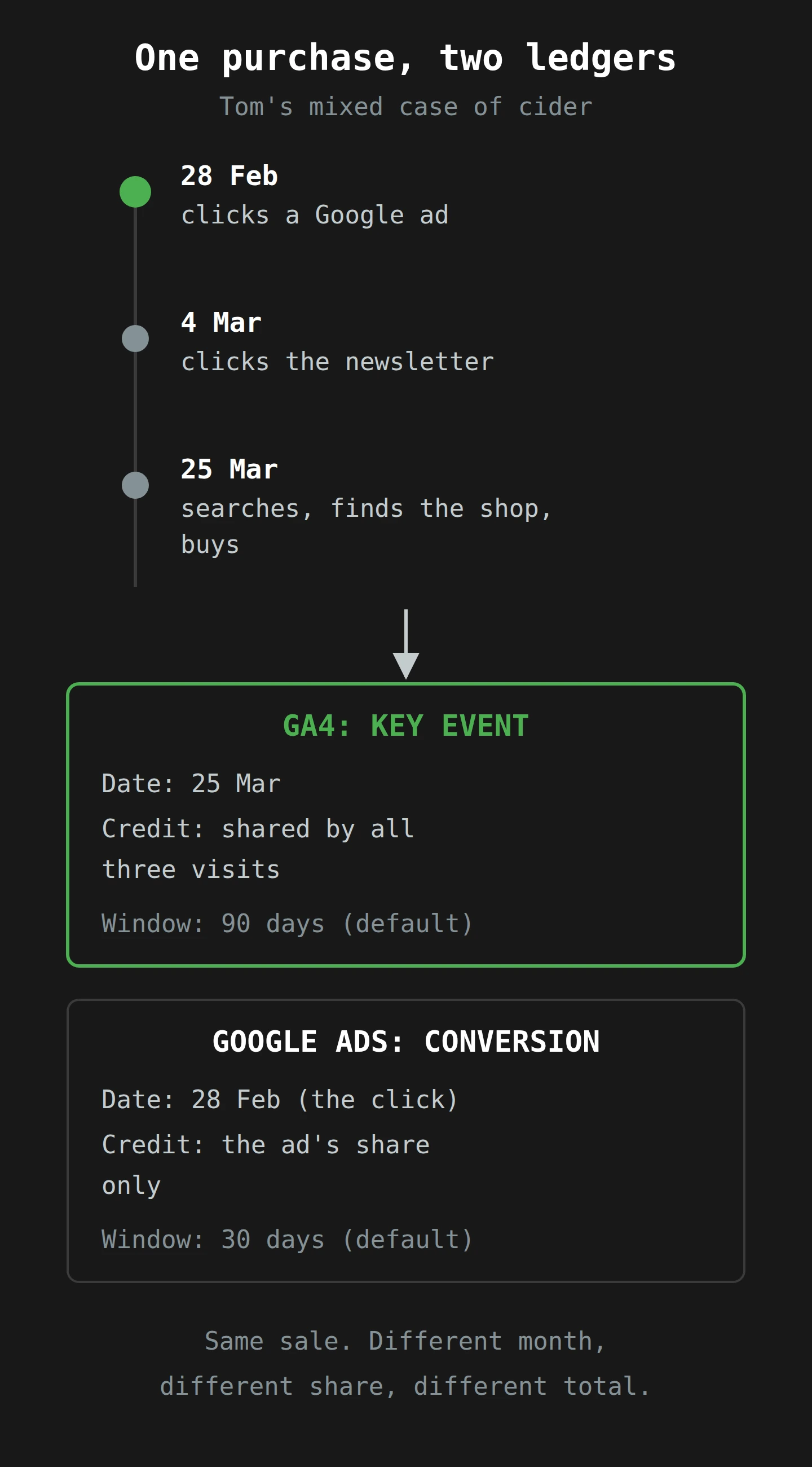
Now scale Tom up to a few thousand customers a week, each with their own path, and you have the 212 and the 148. Neither is wrong. They answer two different questions. "How many people did the important thing?" is Priya's board. "How many of those can Google Ads claim, under its rules, for the purpose of deciding what to bid tomorrow?" is the boy's. You could put the two numbers side by side in a meeting every week until the end of time and never make them agree, because they were never measuring the same thing.
Part 4: What the New Name Fixes, and What It Doesn't
Somewhere around here, a reader mutters "so why didn't they rename it years ago?" at their screen. I can't hear you from Tasmania, but I can guess, and I suspect a few people at Google muttered it too.
A name is a promise about what a number measures. Researchers have a term for whether a measure really captures the thing it claims to: construct validity. I wrote about it for testing and CRO in Are You Really Tracking That?, and this change is a neat case of it. "Conversion" was one construct, the important thing a customer did, measured in two different ways that gave different results. Every meeting from the introduction was an argument about which measure the word meant. Splitting the word does not change either measure. It makes the label on each one honest.
What it fixes
The argument about the word. From now on, if someone in GA4 says "conversion", they mean the same thing as someone in Google Ads. If they mean the GA4 tally, they should say key event. You can still disagree about the numbers, but you can no longer talk past each other while using the same word.
A shared conversion figure in both products. Once you create a Google Ads conversion from a key event, Google shares it, so GA4's Advertising section shows the same conversion data as Google Ads. Google says this is the first time that has been possible. If your agency and your in-house team both look at conversions in the Advertising section, the 148 should now be the same 148 on both screens.
A cleaner place for behaviour. Key events live in the Reports section, where they describe what people do on your site. That fits the 22 February split between behaviour (Reports) and campaigns (Advertising).
What it doesn't fix
The gap itself. Every mechanism in Part 3 is still there. Your key events and your conversions will differ next week by roughly the amount they always did, for the same reasons.
Your history. Your old GA4 conversions carry on, with their history, as key events. The new Google Ads conversions in GA4 start empty. For a while, any year-on-year chart of "conversions" in the Advertising section will have nothing on the left side of it, and someone will ask why.
Your warehouse. If your reporting runs on the BigQuery export, nothing called a Google Ads conversion is coming, and Google has said it has no plan to send one. You will rebuild the key event counts from events, as before, and any Google Ads conversion figure comes from Google Ads.
Organisations without ads. If you do not run Google Ads, the Advertising section needs a linked account before you can see it. In practice, you will mostly see key events. That is fine. It is also why your dashboards are about to have a different word on them.
Everyone's vocabulary. This is the bit Ayudante worried about, and I think it is the real cost. Every training course, every screenshot in every slide deck, every dashboard your agency built and every Looker Studio report with "Conversions" in a chart title now uses the old word. The data under them has not changed. The word on top of them means something else from this week. Expect a period where "conversions" in a meeting could mean either thing, and where you have to ask.6
Part 5: What to Do Before the Long Weekend

Good Friday is this week, so here is a list you can work through before you go. None of it is urgent in the sense of "your tracking breaks on Tuesday". Google says you do not have to do anything. All of it is urgent in the sense that the next meeting about 212 and 148 is already in your calendar.
1. Check which version your property is on
Open each GA4 property you look after. Look in Admin for the page where you mark important events. If it is called "Key events", you have the change. If it still says "Conversions", you do not have it yet, and you will soon. Write down which properties have it, because a team that looks at two properties may see two different vocabularies this week.
2. Review your key event list
This is a good excuse to do a small cleanup. Open the list and ask, for each key event, "is this action important to the success of the business?" That is Google's own test. Some properties have twenty conversions from a migration, half of which nobody has looked at since. Unmark the ones that do not earn a place. A key event that nobody uses still clutters every report that lists them.
Then check the counting method of each one. If a key event came from an old Universal Analytics goal, it may still be set to once per session. Decide whether that is what you want. Changes apply only to future data, so write down the date you changed it.
3. Decide which key events should become conversions
Only some key events need to be Google Ads conversions: the ones you want Google Ads to bid on. A newsletter sign-up might be a key event and not a conversion. A purchase is probably both. Google's 90% scroll example is a good one to think with: it is useful as a key event, and you probably do not want to pay for scrolls.
If you already import GA4 conversions into Google Ads, you do not need to redo them. For new ones, create the conversion in Google Ads, from the key event. And while you are in Google Ads, check that a GA4 conversion and an older conversion action (an old Universal Analytics goal, or a Google Ads tag) are not both counting the same purchase as primary actions. Google's import help page explains primary and secondary actions: Google Ads sets GA4 conversions to secondary when Universal Analytics goals already exist, "to prevent counting the same event twice for bidding". Only one of the pair should be primary.
4. Write down your attribution settings, in both products
In GA4, go to Admin, then Attribution settings, and note three things: the reporting attribution model, the channels that can receive credit for conversions shared with Google Ads, and the two windows. In Google Ads, note the conversion window for each conversion action you use.
Put them in a short table, side by side. It will look something like this:
| Setting | GA4 (key events) | Google Ads (conversions) |
|---|---|---|
| Who can get credit | All channels | Google Ads interactions only |
| Window | 90 days (default) | 30 days (default) |
| Date of the sale | Date of the key event | Date of the ad click |
That small table, pasted into the top of your report, will end more arguments than any amount of reconciliation. Most people in the meeting have never seen these settings, and they are the whole answer.
5. Relabel every report and dashboard
Search your dashboards, spreadsheets and slide templates for the word "conversions". For each one, ask which board it came from.
- If the number comes from GA4 Reports, an Exploration, or the BigQuery export, rename it key events.
- If it comes from Google Ads, or from the Advertising section in GA4, keep conversions, and say "Google Ads conversions" if there is any room for doubt.
- If a chart puts the two side by side, add a note that says why they differ. A single line will do: "Key events count all channels by the date of the sale; Google Ads conversions count ad-led sales by the date of the click."
Add a note to any trend chart that crosses this week, too. The numbers do not change, but someone will see the new word and assume they did.
6. Tell your agency, your finance team and your data team
Each of them needs one different sentence.
- Your agency: "From now on, when we say conversions, we mean Google Ads conversions. When we mean the GA4 total, we will say key events."
- Your finance lead: "The two numbers will never match. Here is the table that explains why. Please do not average them."
- Your data team: "The Google Ads conversions in GA4 have no history and are not in the BigQuery export. Key events are counted the same way as before."
If your team also uses Google Consent Mode, now is a good time to remind them how modelled data fills some gaps, which I covered in Google Consent Mode. Modelled figures are one more reason the boards can differ.
7. Pick a month-end rule
Last, decide when a month's Google Ads conversions are final. Because Google Ads dates a sale by the click, a month keeps growing until its window closes. With a 30-day window, February's figure can still change until the end of March. Some teams report Google Ads figures a few weeks late, so they stop moving. Others report them on time with a note that they will grow. Either is fine. Pick one, write it down, and stop being surprised.
Final Thoughts
Back at the Monday meeting, the whiteboard still has two columns. That was right. The 212 is Priya's board, every key event that happened last week, with the credit shared across every channel. The 148 is the flyer boy's board, the Google Ads conversions, dated by the click and counted under Google Ads' rules. Both numbers are correct. The 180 is the only number on the whiteboard that is wrong, and the finance lead should rub it out.
What changed this week is the heading on the boards. GA4's tally is now key events. The word conversion means the Google Ads tally. Google did not make the numbers agree, and it never could, because they answer two different questions. It has made it possible to say which question you are asking.
So before the long weekend, do the small things: check which properties have the new name, review your key events, write your attribution settings in one table, and relabel every chart that says "conversions" without saying whose. Next Monday, when somebody asks which number is right, you can say "both", and show them why.
Now, if you'll excuse me, I have a mixed case of cider to not buy until Easter, and a cup of tea to drink while I don't.
Notes
-
Each event has a name, such as
page_vieworpurchase, and can carry parameters, such as the page address or the order value. GA4 collects some events automatically and some only when you set them up. ↩ -
Google often turns a feature on for some properties first and the rest over the following weeks. The help page that explains a change can go live before your own property shows it, which is a good reason to read the help page date and the banner, not only the menu. ↩
-
Google's help page uses this example to show that a key event does not have to be a sale. Reading a sign-up page to the end is a sign of intent, even when the visitor does not sign up. ↩
-
The fractions add back up to one sale across all the channels that shared it. A report that only shows one channel shows only that channel's slices, so its total can end in a decimal. ↩
-
Google says it uses modelling to estimate conversions that it cannot observe directly, for example when it cannot link a visit across devices or when a visitor's choices limit tracking. Google's older discrepancy page lists modelled conversions as a likely reason when Google Ads shows more than Analytics after every other check. ↩
-
Ayudante's post notes that "conversions" has been a core term in Google Analytics for about two decades. That is a lot of training videos to re-record, and I do not envy whoever has the job. ↩