Safari 26: Fingerprints Off the Glass
It is Tuesday, 16 September 2025, and you are having the most Australian kind of crisis: one that started in California while you were asleep. Apple shipped Safari 26 overnight. By the time the kettle has boiled, your LinkedIn feed has four posts that say, in slightly different fonts, "SAFARI JUST KILLED YOUR GCLID". One has a skull emoji. One has a skull emoji and a graph that goes down.
You open the Google Ads account. Conversions from yesterday look normal, but yesterday was mostly Safari 18, so that proves nothing. You open GA4. It looks fine too, which is worse, because now you do not know whether it is fine or whether it is broken in a way that looks fine. By half past ten you have drafted a Slack message to the CEO that begins "Nothing to worry about yet", which, as everyone in the building knows, means "worry now".
By lunch you have read that Safari 26 now blocks all tracking, blocks only some tracking, blocks fingerprinting but not cookies, blocks cookies but not fingerprinting, strips click IDs from every link, strips them only in Private Browsing, and (my favourite) turns on a setting that Apple says is on and a well-known Safari developer says is not. Somewhere a consultant is selling a "Safari 26 Readiness Audit" for AU$4,950 plus GST, and a small, cynical part of you wonders if you should buy one, just to have someone to blame.
Put the phone face down. Your gclid is, as of this week, almost certainly fine. Something did change in Safari 26, and it matters, but the thing that changed is narrower, stranger and more interesting than the posts say. It is also aimed at a real problem. Browser fingerprinting has spread for years: a 2020 study found fingerprinting scripts on more than 10% of the top 100,000 websites and over a quarter of the top 10,000. And from 16 February 2025, Google stopped prohibiting the businesses that use its advertising products from fingerprinting, a change the UK's Information Commissioner's Office called, in plain words, "irresponsible". Safari is about a quarter of all Australian web browsing, and nearly 30% on phones.1 So the question "what does Safari 26 do to my tags?" deserves an answer better than a skull emoji.
Here is the plan. We will start with how you recognise a person you have never been introduced to, because that is all fingerprinting is. Then we will read, line by line, what Apple actually shipped, and why its own naming set half the internet off in the wrong direction. We will meet a maître d' with a very short list, sort the real data loss from the myths, and finish with a (made-up) marketer in the Huon Valley who tests her whole tag stack in one week, with nothing more expensive than a cup of tea.
Let's get into it.
Part 1: How You Recognise a Guest You Have Never Met
You already do fingerprinting. You do it every day, and you are very good at it.
Think about the regulars at your local café. You do not know most of their names. You have never seen their licences. And yet you know the man who orders a long black at 7:40, wears a Collingwood scarf in a city where that takes real courage, and always taps his card twice as if the first tap was a rehearsal. If he walked in wearing a hat, you would still know him. No single fact identifies him: plenty of people drink long blacks, and there are (regrettably) other Collingwood supporters in Hobart. It is the combination that does it. Each small, common fact cuts the crowd down, and after four or five of them the crowd is one person.
That is the whole idea. Everything else is detail about which facts, and how many.
From the café to the browser
A browser gives any web page a remarkable number of these small, common facts, mostly for good reasons. A page needs to know the size of your screen so it can lay itself out. It can ask how many processor cores your device has, so it can decide how much work to do at once. It can ask which voices your device can use for text-to-speech, so it can read an article aloud. None of these is secret, and none identifies you alone. Many people have a 390-pixel-wide phone screen.
But browsers also leak facts that nobody meant to share. Draw some text and shapes on an invisible canvas (the web's drawing surface), then read the pixels back. Different combinations of graphics hardware, drivers, operating system and fonts produce very slightly different pixels. The picture looks the same to you. To a script, it is a signature. The same trick works with sound: generate a short tone with the Web Audio API, read back the numbers, and tiny differences in how each system does its maths show up in the tenth decimal place.
I wrote about the many kinds of this in Browser Fingerprinting: The Unseen World of Tracking. The WebKit team's own list is a good map: they separate device fingerprinting (hardware and software), network and geographic position fingerprinting (your IP address, your connection's speed), user settings fingerprinting (dark mode, font size, locale), user behaviour fingerprinting (how you scroll and type), and user traits fingerprinting (guessing your age or health from what you do). They single out settings fingerprinting as "extra hurtful since it exploits how users customize their web experience to fit their needs". Turn up your font size because your eyes are tired, and you have made yourself easier to follow.
Why a few facts are enough
Now the mechanism under the café. Each fact you learn about a person has a certain amount of entropy, a measure of how much it narrows the crowd. The unit is the bit, and each bit halves the crowd. A fact shared by half of all devices gives you one bit. A fact shared by one device in a thousand gives you about ten.
Bits add up. There are about eight billion people. Halve eight billion 33 times and you get to one.2 So a fingerprinting script does not need anything that looks private. It needs about 33 bits of ordinary facts: screen size, core count, time zone, the list of voices, the canvas signature, the audio signature. Each one sounds harmless. Together they are a name tag.
And here is why regulators dislike it so much. You can delete a cookie. You cannot delete your graphics card. The ICO put it simply: when you click "clear all site data", you are controlling cookies and other storage, but a fingerprint "relies on signals that you cannot easily wipe", so a site "could immediately identify you again". WebKit calls this per-site user recall: you clear your data or open a private window to start fresh, and the fingerprint quietly remembers you anyway.
What browsers can do about it
There are only a few moves available, and WebKit lists them. You can make everyone look the same, which it calls "herd immunity". You can make each person look different on every site, and different again after each fresh start, usually by adding small amounts of random noise. Or you can stop giving out the facts at all.
Safari has done some of each for years. It removed the Do Not Track setting partly because, in WebKit's own words, it "ironically was used as a fingerprinting vector". It shows web pages only web fonts and the fonts that ship with the system, not the ones you installed. And since Safari 17, a setting called Advanced Tracking and Fingerprinting Protection adds tiny amounts of noise to canvas and audio readback and fixes the reported screen size to the window size.3 Hold on to that setting's name. It is about to cause a great deal of trouble.
Part 2: What Apple Actually Shipped (and What It Called It)
Apple announced Safari 26 at WWDC on 9 June 2025, alongside the new Liquid Glass design (hence the title of this article, and my apologies). The iOS 26 press release had one line about privacy in Safari:
"Browsing in Safari gets even more private with advanced fingerprinting protection extending to all browsing by default."
That is from Apple Newsroom. The macOS Tahoe release said nearly the same: "Safari now offers advanced fingerprinting protection in all browsing by default."
Read that with Part 1 in mind. Safari already had a setting called "Advanced Tracking and Fingerprinting Protection". It had three options: off, Private Browsing, or all browsing. Its default was Private Browsing. So when Apple said "advanced fingerprinting protection" would extend to "all browsing by default", almost everyone read it as "the default for that setting moves from Private Browsing to all browsing". That would have been big news, because that setting also strips click IDs from links. We will come back to that.
The paragraph that says what it does
The technical detail is in the WebKit team's release post, WebKit Features in Safari 26.0, published on 15 September 2025, the day Safari 26 shipped. The whole privacy section is one paragraph. It is worth reading slowly, because every clause matters:
"Safari 26.0 now prevents known fingerprinting scripts from reliably accessing web APIs that may reveal device characteristics, such as screen dimensions, hardware concurrency, the list of voices available through the SpeechSynthesis API, Pay payment capabilities, web audio readback, 2D canvas and more. Safari additionally prevents these scripts from setting long-lived script-written storage such as cookies or LocalStorage. And lastly, Safari prevents known fingerprinting scripts from reading state that could be used for navigational tracking, such as query parameters and
document.referrer."
(The "Pay" is Apple Pay; the Apple logo in the original does not survive being copied as text.)
Three things jump out.
First, the subject of every sentence is known fingerprinting scripts. Not all scripts. Not third-party scripts. Scripts that Safari already knows to be fingerprinters. The final release notes put it in one line: "Added support for preventing fingerprinting for known tracking scripts."
Second, it does three separate things to those scripts. It stops them reading device facts reliably. It stops them keeping long-lived storage. And it stops them reading the query string and the referrer. That last one is the part marketers should care about, and we will spend Part 3 on it.
Third, the paragraph never names the feature. It does not say "Advanced Tracking and Fingerprinting Protection". It does not say which setting controls it. The same paragraph, word for word apart from "Safari beta", first appeared in the WWDC post on 9 June, so the gap between the press release and the technical post was there for three months.
An engineer clears it up, in a bug report
The clearest answer came from the least glamorous place: a WebKit bug report. Jeff Johnson, who makes Safari extensions and writes about Safari as Lapcat Software, had filed a bug in November 2024 because the Advanced Tracking and Fingerprinting Protection setting treated his extension's code as a third-party tracker. On 3 September 2025 he added that, since Safari 26 apparently enabled the setting by default everywhere, this was about to become "a major problem".
Wenson Hsieh, a WebKit engineer at Apple, replied the same day. First: "This protection applies only to a subset of scripts". Johnson asked which protections he meant. The answer, in comment 10:
"I am referring to protections that are new in Safari 26, which are not guarded by the 'Use advanced tracking and fingerprinting protection' setting. Instead, these new protections are a part of Intelligent Tracking Prevention, and are thus guarded by 'Prevent cross-site tracking' in Safari's privacy settings."
So there are two switches, and they do two different jobs:
- Prevent cross-site tracking. This is Intelligent Tracking Prevention (ITP), which I first wrote about in What is Intelligent Tracking Prevention (ITP). It is on by default, in every window. The new Safari 26 rules for known fingerprinting scripts live here.
- Advanced tracking and fingerprinting protection. This is the older setting, from Safari 17. Its default is still Private Browsing only. Johnson confirmed this with a neat test: he deleted Safari's two preference keys for the setting, relaunched, and found it back at "Private Browsing". In his words, "the default setting has not changed since Safari 18".
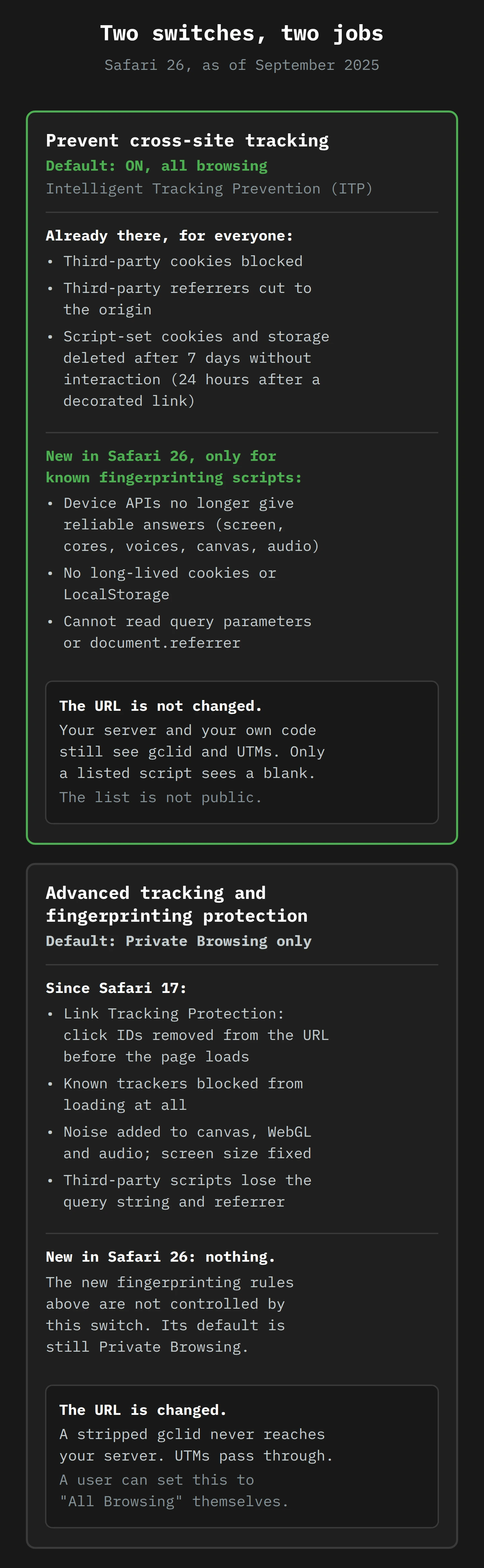
Apple's press release was, then, technically true. Some advanced fingerprinting protection does now apply to all browsing by default. It is simply not the protection that has almost the same name. If you have ever named a file final_v2_FINAL_actual.docx, you will recognise the problem.
What nobody outside Apple can see
Two limits are worth saying plainly, because they shape everything in the practical section.
The first: Apple does not publish the list of "known fingerprinting scripts". Billy Grace's Vasco Meerman, who tested several Safari 26 betas, notes that WebKit "doesn't publish a list". You cannot look up whether your vendor is on it.
The second: at the end of September, I have not found a clean, published reproduction of the new behaviour from anyone outside Apple. Johnson, who knows Safari's internals better than most, wrote on 29 September that he "was not able to reproduce the behavior (vaguely) described in the WebKit blog post, despite running some tests specifically for that purpose". He asked Apple's Safari evangelist and got no reply. His conclusion is fair: "how can we honestly tell people that Safari 26 improves your privacy when we don't even know what it does?"
That does not mean the feature does nothing. It means you should test effects on your own site rather than trust anyone's summary, including this one.
Part 3: What a Listed Script Loses (or, The Maître d' With a List)

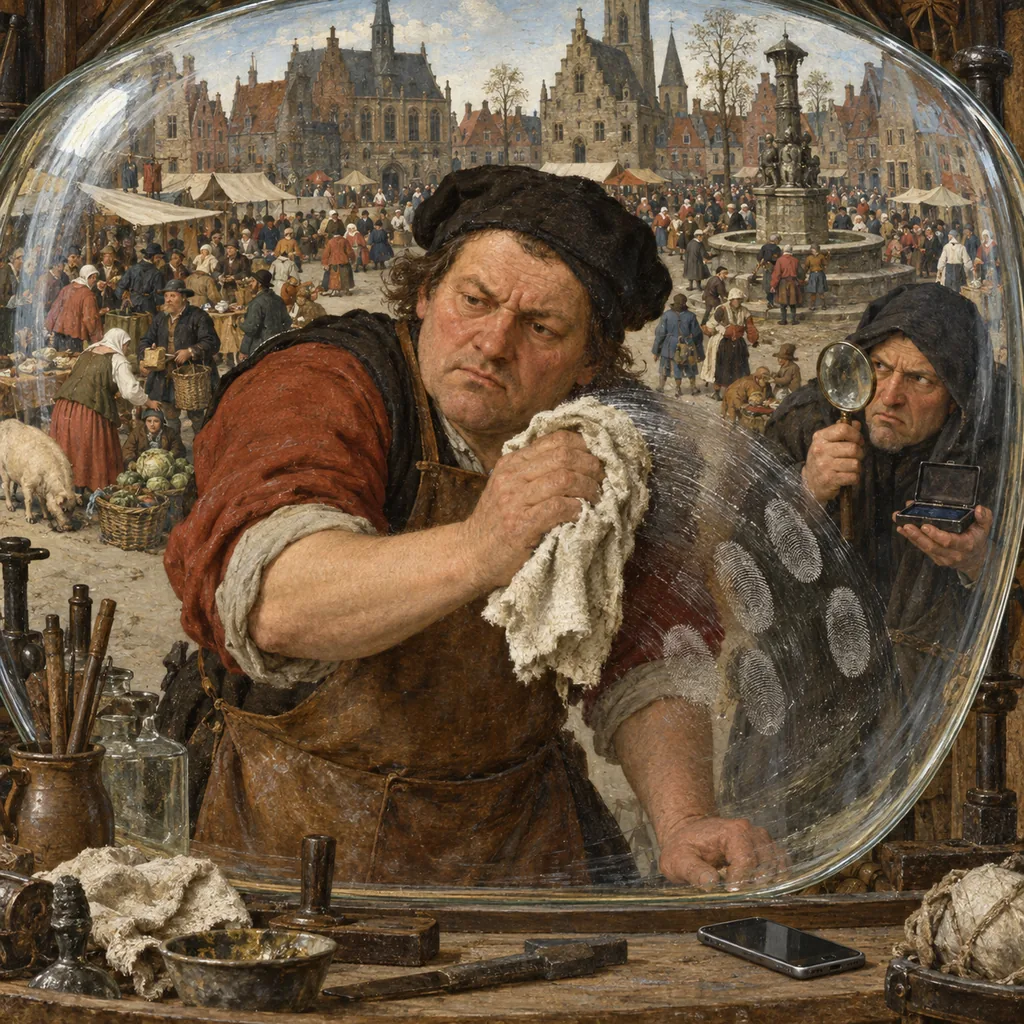
Picture a very good restaurant in Battery Point. The maître d' has run the door for twenty-two years. He keeps a short, handwritten list in the inside pocket of his jacket: the names of a few gossip columnists who have, in the past, written unkind things about the guests.
When a columnist arrives, he does not turn them away. That would cause a scene, and some of them are also paying customers. Instead, he seats them, and then quietly makes their evening useless. Their menu has no prices, so they cannot report what anyone spent. The reservation book is closed when they walk past, so they cannot see who booked. Nobody tells them who recommended the restaurant to whom. And at closing time, their notebook is taken at the door and returned, pages blank, the next morning. Everyone else in the room eats, talks and pays as normal.
That, as far as the published paragraph goes, is Safari 26. The page still loads every script. The known fingerprinting scripts still run. They just stop getting the answers they came for. (We have committed to the restaurant now, so the scripts are columnists for the rest of this section.)
Let's take the three restrictions one at a time. For each, it helps to know what ITP already did for everyone, so you can see what is really new.
Restriction 1: the device questions stop being reliable
What was already there. ITP does not add noise to device APIs for everyone. Private Browsing and the Advanced Tracking and Fingerprinting Protection setting do: since Safari 17, they inject noise into canvas and WebGL readback and audio samples, and report the screen size as the window size.
What is new. A known fingerprinting script now gets unreliable answers for screen dimensions, hardware concurrency (the number of processor cores the page reports), the text-to-speech voice list, Apple Pay capabilities, audio readback and 2D canvas, "and more". The key word in Apple's paragraph is "reliably". The mechanism in Private Browsing was to add noise that changes per site and per session, so a signature taken today does not match one taken tomorrow. WebKit has not said whether Safari 26 uses the same method for listed scripts, but "reliably" points that way.
What it means for you. Unless your business is fingerprinting, almost nothing. Analytics tools record screen size for reports, and a listed script that sees an odd one will give you an odd bar in a chart. Fraud and bot-detection vendors are the real exception, and we will come back to them.
Restriction 2: no long-lived notebooks
What was already there. ITP has capped storage for years. JavaScript can write a cookie with document.cookie, and it can write to LocalStorage. For everyone, ITP deletes all cookies created in JavaScript and all other script-writeable storage after 7 days without user interaction with the site. If a visitor arrives by a link with a click ID attached (what WebKit calls link decoration), ITP caps JavaScript cookies on that landing page at 24 hours. I covered how those caps turned first-party cookies into a moving target in Cookie Party.
What is new. A known fingerprinting script cannot set "long-lived" script-written storage at all. Apple does not say how long "long-lived" is. The practical reading: if a listed script sets a visitor ID in a cookie, expect it to last for the session, not for a week.
What it means for you. Cookies set by your web server, in the HTTP response, are not "script-written". Cookies set by your own first-party code are not set by a known fingerprinting script. Neither is touched by this rule. Only listed scripts lose their notebooks.
Restriction 3: the reservation book is closed
This is the one with real consequences for marketing, so let's go slowly.
When a visitor lands on your page from an ad, the URL usually carries a query string: the part after the ?. For example:
https://cider.example/range?utm_source=google&utm_medium=cpc&gclid=Cj0KCQ...
Any script on the page can read that. It uses location.search (which returns ?utm_source=google&…) or location.href (the whole address). The page can also tell where the visitor came from with document.referrer, which returns the address of the previous page. Analytics and ad tags depend on both: the query string carries campaign tags and click IDs, and the referrer tells them "this visit came from Google" or "this one came from an email".
What was already there. ITP already downgrades third-party referrers to their origin for everyone. WebKit's own example: https://www.social.example/feed?clickID=123456 shows up as https://www.social.example/. You learn the site, not the page or the click.
What is new. A known fingerprinting script now gets nothing useful from the query string or the referrer. Apple has not said exactly what the script sees. In the older Private Browsing version of this protection, WebKit's post says third-party scripts that read the URL get "a version of the URL that has no query parameters or fragment", and the referrer is hidden. The bug thread shows the same thing from the other side: with the old protection on, a script reading window.location.search got an empty string, "".
What it means for you. This is the part that the skull-emoji posts missed. The URL has not changed. Your web server still receives the full query string. Your own first-party code still reads it. Google's tag still reads it, unless Google's tag is on Apple's list (and I have seen no evidence that it is). Only the columnist gets a menu with no prices.
Part 4: The Click-ID Panic, and the Line That Went Missing
So where did "Safari 26 kills your gclid" come from? Partly from the press release. But mostly, I think, from one line in Apple's own release notes.
Apple publishes release notes for every Safari beta. Using the Internet Archive's Wayback Machine, I went back to the notes as they stood during the beta. The notes for the first beta, captured in June, list one privacy feature: preventing fingerprinting for known tracking scripts. The notes for the beta released on 7 July, captured on 9 August, list two:
"Added support for filtering tracking paramaters in links in regular browsing mode."
"Added support for preventing fingerprinting for known tracking scripts."
"Filtering tracking parameters in links in regular browsing mode" is exactly the sentence that marketers had been dreading since 2023.4 It means stripping click IDs for everyone, not only in private windows. It is no surprise that it spread.
Then look at the final release notes of 15 September. The fingerprinting line is there. The link filtering line is gone.
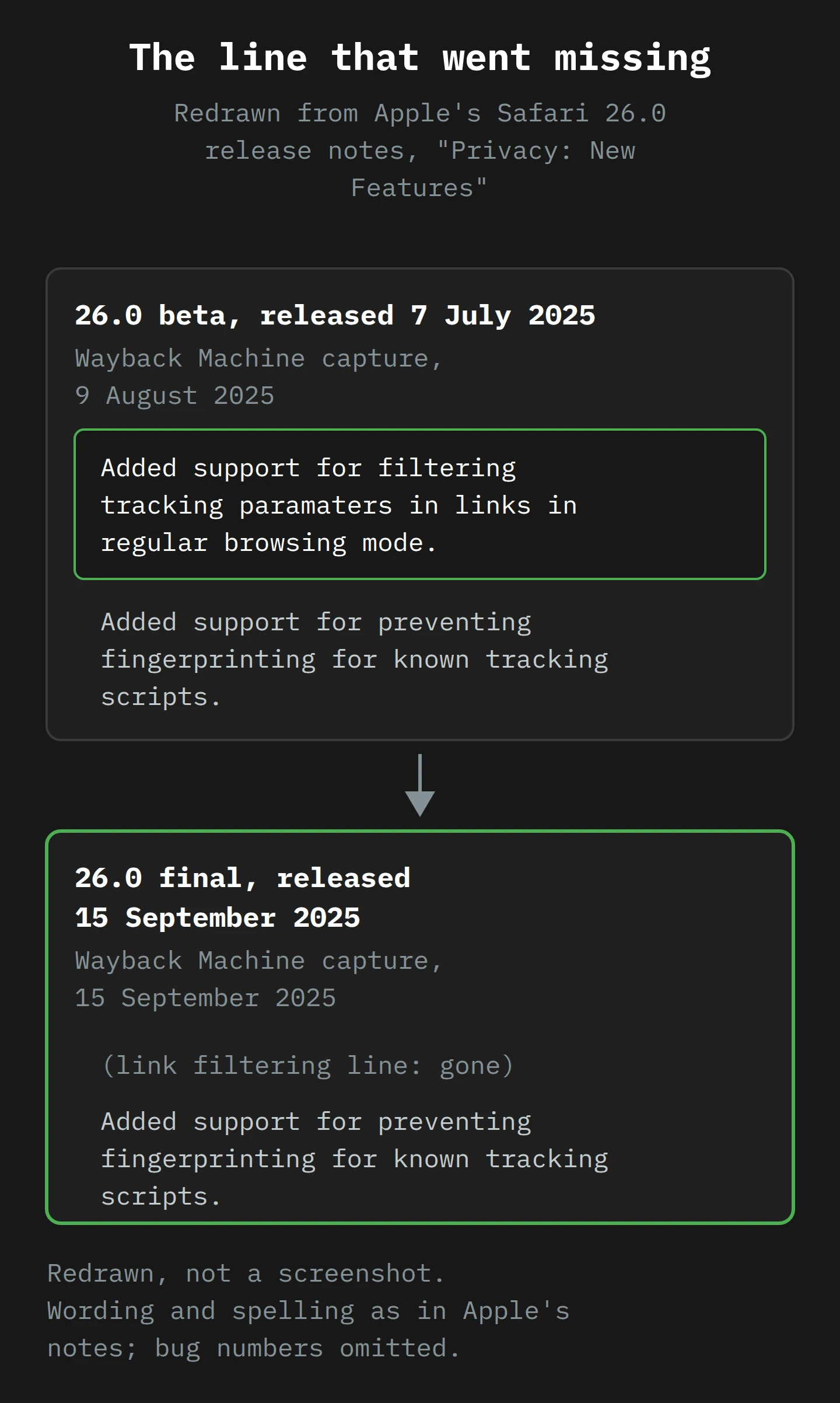
I found no announcement of the removal. The line just was not in the final notes. So a lot of September's advice was written about a feature from a beta, for a release that did not include it.
What the testers found
The people who tested the builds, rather than read the notes, found the same thing. On 4 September, Meerman tested Safari 26 beta 9 on macOS and iOS and found that "UTM campaign parameters and click IDs (gclid, fbclid, etc.) all passed through in regular browsing". In Private Browsing, gclid was removed and utm_medium stayed. In Safari Technology Preview, Apple's experimental build, gclid was stripped even in regular browsing, which suggests Apple is at least trying it.
On 9 September, DMPG's Manon De Prez wrote that the release notes "caused some panic", and that while there had been signs of stripping in regular browsing, "it was not implemented in the public beta". Stape, which sells server-side tagging and had every commercial reason to predict doom, wrote in an update dated 12 September that in the Safari 26 beta "the gclid is not removed by default" in normal browsing, only in Private mode.
So, as of the end of September 2025: Safari 26.0 does not strip click IDs from links in normal browsing by default. I would bet it arrives in a later version. I would not rebuild your attribution this week on the strength of a line Apple deleted.
Strip versus hide
This is the distinction that clears up most of the confusion, so it gets its own heading.
Think of a parcel with a name tag on it.
Stripping is what Link Tracking Protection does. It arrived in Safari 17 as part of the Advanced Tracking and Fingerprinting Protection setting. When you click a link, Safari removes a list of known click-level parameters from the URL before the page is requested, "such that these values are never propagated over the network". The tag is torn off the parcel at the post office. Your server never sees it. Your first-party code never sees it. Server-side tagging never sees it. Nothing downstream can recover it, because it was never sent.
Hiding is what the new Safari 26 rule does. The parcel arrives with its tag. Your server reads it. Your own code reads it. Only when a known fingerprinting script asks to look is the tag covered with a hand.
Two more things about stripping, because they are easy to get wrong:
- UTM parameters survive both. Link Tracking Protection removes parameters "identified as being used for pervasive cross-site tracking granular to users or clicks". WebKit's example shows a
campaignparameter passing through, because it describes a campaign, not a person. Every tester I read foundutm_source,utm_mediumandutm_campaignintact. If you have been putting off tidying your UTMs, this is your sign: they are now the most reliable campaign signal Safari gives you. (Mastering UTM Tags still holds up.) - Stripping is already happening to some of your visitors. In Private Browsing, and when someone taps a link in Apple's Mail or Messages apps, click IDs have been removed since Safari 17. Any user can also turn the setting on for all browsing. None of that is new in Safari 26.5
Part 5: Real Data Loss, and the Myths
With the mechanism in place, we can sort the September claims into piles. I will put the myths first, because they are the ones costing people sleep.
Myth: "Safari 26 strips gclid and fbclid from every link"
Not in 26.0, not by default. The line promising it was in the July beta notes and is not in the final notes. Testers found click IDs intact in regular browsing. They are stripped in Private Browsing, from Mail and Messages, and for users who set the advanced setting to "All Browsing", as they have been since Safari 17.
Myth: "Advanced Tracking and Fingerprinting Protection is now on for everyone"
No. Apple's press release says "advanced fingerprinting protection", which sounds the same and is not. The setting with the long name still defaults to Private Browsing. The new rules sit under "Prevent cross-site tracking".
Myth: "Your UTMs are gone"
No. UTMs describe campaigns, not people, and every protection Safari has shipped so far lets them through.
Myth: "Server-side tagging fixes Safari 26"
This one is half true. Server-side tagging, which I described in What is Server-Side Tagging, helps against ITP's storage caps, because a cookie set by your server in an HTTP response is not "script-written". But against stripping, it does nothing: if the gclid never left the browser, no server can read it. And against the new rule, you may not need it at all, because the URL reaches your server intact anyway.
Real: listed vendors lose attribution, quietly
If a script your site loads is on Apple's list, that script now sees no query string and no referrer, and cannot keep a long-lived ID. If that script is how a vendor attributes conversions, the vendor will record more "direct" traffic and fewer returning users from Safari 26, even though your server logs show every click ID arriving. The symptom is a gap between systems, not a drop everywhere. That is exactly the kind of gap you can test for.
Who is likely to be on the list? Apple has not said, and I will not guess at named companies. The paragraph is aimed at scripts that fingerprint, so the obvious candidates are vendors whose product is device identification: some ad-tech identity tools, and some fraud and bot-detection services. That second group matters, because some of their work is legitimate.
Real: fraud and bot tools may get weaker in Safari
A fraud-detection script that fingerprints devices to spot a card-testing bot looks, to a browser, exactly like a fingerprinting script. If yours is on the list, its Safari 26 signals got noisier. Ask the vendor directly whether they have seen a change in Safari 26 and what they recommend. If the answer is "we have not looked", that is also an answer.
Real: the old setting still breaks innocent things
The new rule is narrow. The old Advanced Tracking and Fingerprinting Protection setting is not. Johnson found in 2024 that it appears to work so that if Safari blocks one third-party tracking script on a page, every third-party script on that page loses the query string. In the same bug thread, another developer reported that their login panel, opened by ?sidebar=login, stopped working with advanced tracking protection on. Their JavaScript was served from a separate CDN domain, and they asked whether that was the cause.6 Meerman found that in Private Browsing, Safari blocked Google Tag Manager loaded from googletagmanager.com, so every tag inside the container failed to fire.
Private Browsing visitors are a minority. But if your site reads its own query string with a script served from another domain, those visitors may already see a broken site, and it has nothing to do with tracking.
Part 6: Mirela Tests Her Tag Stack

Meet Mirela. She runs digital marketing for a cider maker in the Huon Valley. (She and the cider maker are made up. The Huon Valley and its apples are real, and I will not hear a word against either.) The site runs Google Ads and Meta ads, GA4 through Google Tag Manager, a consent banner, and a fraud-screening script on the checkout. About a third of her traffic is Safari. Her CEO has read the LinkedIn posts and would like to know, by Friday, "how bad it is".
Mirela decides to answer with evidence. She has an iPhone on iOS 26, a Mac on Safari 26, and a free week.
Monday: set a baseline
She opens GA4 and builds one simple comparison: sessions, conversions, and the share of sessions with the default channel "Direct", split by browser and browser version. She looks at Safari 26 against Safari 18 for the days since 15 September, and at Chrome for the same days as a control.
She also exports one day of web server access logs and counts how many landing-page requests carry gclid= or fbclid=, by user agent. This is her ground truth: what actually arrived at the server, before any script ran.7
Tuesday: test stripping, in three places
She uses a page that shows exactly what the server received. httpbin.org/get does this: it echoes back the query string it got. Meerman used it for the same test. She visits:
https://httpbin.org/get?utm_medium=test&gclid=TEST123&fbclid=TEST456
in three ways, on both devices:
- A normal Safari window. Result: all three parameters are in the response.
- A Private Browsing window. Result:
utm_mediumis there.gclidandfbclidare gone. - A link she texts to herself in Messages, then taps. Result: the same as Private Browsing.
Now she knows that stripping affects her private-window visitors and anyone who taps her links in Messages or Mail. It does not affect a normal Safari 26 window. She writes that down in plain words, because the CEO will not read a table.
Wednesday: test hiding, with one switch
This is the clever part, and it uses Wenson Hsieh's clue from the bug thread: the new rules are controlled by "Prevent cross-site tracking". So she can turn them off and compare.
She lands on her own site from a test URL with a UTM and a gclid, in a normal Safari window, and records what each vendor received: the GA4 DebugView event, the Meta Events Manager test event, and the fraud vendor's dashboard. Then she goes to Safari's settings, turns off Prevent cross-site tracking, clears the site's data, and does exactly the same visit again.
Anything that is the same in both runs is not affected by the new rule. Anything that differs, a missing campaign, a missing referrer, a different device profile, is a sign that the script involved is being treated as a known fingerprinting script. For Mirela, GA4 and Meta record the same thing both times. The fraud vendor's device report is different between the runs. She adds a line to her notes to ask the vendor, and turns Prevent cross-site tracking back on straight away.8
Thursday: check what lasts
She opens Safari's Web Inspector (Develop menu on the Mac, with the iPhone plugged in for the phone), goes to the Storage tab, and looks at every cookie and LocalStorage item after her test landing. For each, she notes who set it, whether it was set by the server (it will not appear in document.cookie if it is HttpOnly) or by script, and its expiry.
Script-set cookies from a decorated landing already expire within 24 hours under ITP, so she is not surprised to see that. What she is looking for is anything new: a vendor's ID that now expires at the end of the session. She also opens the console in a Private window, where Safari logs a line of the form Blocked connection to known tracker: tracker.example for every tracker it blocks. Two of her tags appear there. That is Private Browsing only, but it tells her which parts of her stack disappear for those visitors.
Friday: write the one-page answer
Her note to the CEO has four lines:
- Safari 26 did not remove our click IDs in normal browsing. Tested on 23 September; the server receives gclid and fbclid as before.
- Private Browsing, Mail and Messages still remove click IDs, as they have since 2023. UTMs survive, so our UTM tagging carries campaign data for those visitors.
- One vendor, the fraud script, behaves differently in Safari 26. We have asked them about it.
- Next check: repeat Tuesday's test with every Safari update, because Apple listed click-ID stripping in its July beta notes and tried it in Safari Technology Preview, so it may ship later.
The CEO reads it, says "so, not bad then", and goes to make a cup of tea. Mirela counts this as a success. Most weeks, it is the only kind available.
What to Do This Week
You can do all of this with a Safari 26 device, a spreadsheet and a free afternoon.
- Split your reports by Safari version. Compare Safari 26 with Safari 18 and with Chrome since 15 September: conversions, the share of "Direct" traffic, and new against returning users. A change in Safari 26 alone is the one worth investigating.
- Count click IDs at the server. Take one day of access logs and count landing requests with
gclid,fbclidormsclkid, by browser. That is what arrived before any script ran. Compare it with what each ad platform says it received. - Test stripping in three places. Visit an echo page such as
httpbin.org/getwith a UTM and click IDs, in a normal window, a Private window, and from a link in Messages or Mail. - Test hiding with the switch. Land on your site with test parameters, record what each vendor receives, turn off Prevent cross-site tracking, clear the site's data, repeat, compare. Turn the setting back on.
- Inspect storage. In Web Inspector, list each cookie and LocalStorage item after landing: who set it, server or script, and when it expires.
- Check your own query-string code. If your site reads
location.searchfor anything functional (a login panel, a filter, a promo code) from a script on another domain, test it in a Private window. Serve it from your own domain if it breaks. - Ask your fingerprinting vendors. Fraud, bot-detection and identity vendors should be able to tell you what changed in Safari 26. Ask for their test results, not their reassurance.
- Tidy your UTMs. They are the campaign signal that Safari lets through every time.
- Check your consent position. If any tool you use fingerprints for advertising, the ICO's view is that consent rules apply to it like cookies, and that it is "a high bar to meet". A browser blocking it is a hint about what regulators think of it too.
- Put a repeat test in the calendar. Re-run steps 3 and 4 with every Safari update. The July beta shows Apple is working on stripping in regular browsing, and when it arrives, you want to find out from your own test, not from LinkedIn.
Final Thoughts
Back to that Tuesday morning, the Slack draft and the skull emoji. The panic was about the wrong thing. It was about a line in a beta that Apple quietly removed, and a press release that used almost the same name as a different setting.
What Safari 26 actually did is narrower and, I think, better aimed. It did not take the name tag off the parcel. It covered the tag only when a known fingerprinter tries to read it, and it made the device questions those scripts rely on stop giving reliable answers. For most sites, that changes very little. For vendors whose product is recognising your visitors without asking, it changes a lot, and that is rather the point.
The one thing to take away: know which of your tools would lose something if a browser stopped answering its questions, and test for it on your own site, with the one switch Apple gave you. Then do it again when the next Safari update arrives, because Apple has shown us, in its own release notes, what it is working on next.
Now, if you'll excuse me, I have a cup of tea going cold beside a Web Inspector window, and I would like to drink at least one of them while it is still useful.
Notes
-
StatCounter puts Safari at 24.56% of all Australian browsing in August 2025, and 29.55% on mobile. StatCounter measures page views on sites that use its counter, so treat the figures as a guide rather than a census. ↩
-
Two to the power of 33 is about 8.6 billion, which is just more than the number of people alive. In practice a fingerprint needs fewer bits, because a tracker only has to tell apart the visitors to its own sites, not everyone on Earth. ↩
-
Safari 17's protection sets
screen.widthandscreen.heightto the window's inner width and height, and reports the screen position as (0, 0). A script asking how big your monitor is gets told, politely, how big this window is. ↩ -
Apple's beta notes spell it "paramaters". I have left the typo in the quote, partly for accuracy and partly because it is reassuring to know release notes are written by people. ↩
-
Apple's intended replacement for click IDs is Web AdAttributionKit, formerly called Private Click Measurement. It reports that an ad click led to a conversion without identifying the person, and WebKit brought it to Private Browsing in Safari 17. ↩
-
Counting by device got harder in Safari 26 too: on iOS 26 and iPadOS 26, Safari's user agent string now reports a frozen OS version, the last one released before iOS 26. So the iOS version in your logs is no longer a reliable way to find iOS 26 visitors. ↩
-
Do not leave "Prevent cross-site tracking" off on a device you use every day. It controls all of ITP, including third-party cookie blocking, not only the new Safari 26 rules. ↩