No Consent, No Conversions: The Letter, the Ping and the Model
It is a Tuesday in late July, and Sanne is having her first cup of tea of the day at the kitchen bench in Hobart, laptop open, reading the overnight numbers for her small online shop. She sells merino socks, the good kind, knitted in Tasmania and posted all over the world. About a third of her orders come from Germany and the Netherlands, where, it turns out, people take cold feet very seriously.
The Google Ads dashboard loads. Australia: fine. New Zealand: fine. Germany: zero conversions. The Netherlands: zero. Not low. Zero. Three days of zero, in fact, which is statistically unlikely for two countries full of people who all own feet.
She checks the shop. Real people in Munich and Utrecht are still buying socks. Google simply is not counting them. She refreshes the dashboard, which does nothing, and then again, which also does nothing, but with more feeling.
Then she finds the email. It had been sitting in a folder she never opens, under a newsletter about lanolin. It begins "Dear Advertiser", which is never how a good email begins, and it says that her site does "not comply with Google's EU User Consent Policy" and that Google "will now take action including disabling personalised and non-personalised ads, remarketing and conversion tracking functionality". There is a form to fill in, an email address to write to, and a quiet sense that a large machine in California has looked at her sock shop and found it wanting.
By lunchtime, Sanne has read three blog posts. One says Google has declared war on every website in Europe. One says she must buy something by Friday. The third is mostly about lanolin.
First, the calm part. Google has not changed the rules overnight, and the sock shop is not doomed. What happened is more specific, and much more fixable. Google has a consent policy it has audited since 2015. In July 2025, some advertisers got letters that said, in effect, "we asked you to fix this, you didn't, so we are switching off the parts that depend on it". When the story reached the trade press, Search Engine Land reported that "as of July 21, if your website isn't using Consent Mode v2, Google effectively turned off key advertising features across EU traffic". Google's Ads Liaison, commenting on the post that started it, wrote a line that deserves more attention than it got: "Confirming that nothing is new or updated here."
Both can be true. To see how, we need two different ways a conversion can disappear, which almost every post I have read this month blends into one.
So here is my plan. First, the letter: what Google's policy actually says, and why an audit can switch off a whole account's tracking. Then the machinery: what consent mode is, what basic and advanced mode really send before anyone clicks "Accept", and what Google's models can and cannot fill in afterwards. Then we will read the consent state straight off the wire, two cryptic parameters called gcs and gcd, and finish with Sanne checking her own site, one door at a time.
Let's get into it.
Part 1: The Letter, and the Policy Behind It
Picture a small inn on the east coast of Tasmania. By the door there is a visitors' book on a lectern. The council has a rule: if you want to use the council's clever guest-counting service, you must ask each guest whether they are happy to write their name in the book, keep a record of the answer, and tell guests how to cross their name out later. Every so often, an inspector turns up, walks in the front door like any other guest, and checks.
That is, near enough, Google's EU user consent policy. It is short, and it is worth reading in full, because the blog posts about it are much longer than the policy itself.
What the policy says
The policy applies to anyone whose agreement with Google includes it, or who uses a Google product that includes it. Google's help page names "advertising products like Google Ads, or Google Marketing Platform". For end users in the European Economic Area (EEA), the UK and Switzerland, you must get "legally valid consent" for two things: the use of cookies or other local storage where the law requires it, and "the collection, sharing, and use of personal data for personalization of ads". When you ask, you must keep records of the consents people give, and tell them clearly how to withdraw consent. You must also name every party that may collect or use their data because you use a Google product.
And then the sentence that matters for Sanne: "If you fail to comply with this policy, we may limit or suspend your use of the Google product and/or terminate your agreement."
This is a contract term, not a law. But Google's help page says the policy "reflects certain requirements of two European privacy laws", the General Data Protection Regulation (GDPR) and the ePrivacy Directive. The GDPR sets the standard for what counts as consent. The ePrivacy Directive is the one that requires consent before a site stores or reads information on a person's device, which is the legal root of every cookie banner you have ever dismissed. Google cannot fine you under either law. It can do something an advertiser may find worse: stop the product working.
Audits since 2015
The same help page is refreshingly plain about how enforcement works. Google has run periodic audits "as we have done since the Policy was introduced in 2015". Its reviewers "visit a website or app as a user would visit it", and look at what the banner says and which consents it collects. If a site fails, Google says its first step is to contact the partner and work with them. It gives "a reasonable timeframe". If the partner does not engage or fix it, the result can be "suspension of audience functionalities including ad personalisation (e.g. remarketing) and conversion measurement capabilities for advertisers".
That is the whole story of Sanne's letter, in Google's own words. The inspector visited. A first letter went out. In at least one published case, that first warning set a date: a digital agency quoted a Google notice that said, "We may take action, including suspension, if the policy violations have not been resolved by 21 Jul 2025." After the deadline, a second letter arrived, the one Sanne found under the lanolin.
When Adriaan Dekker, a Google Ads specialist, posted his copy of that second letter in late July, it spread fast. Search Engine Roundtable ran it, then changed its headline to say the switch-off was "For Advertisers Failing Audits". Ginny Marvin, Google's Ads Liaison, explained: "We regularly notify advertisers who aren't in compliance with Google's EU User Consent Policy. The deadline to take action varies depending on when customers are notified."
So 21 July 2025 was a deadline in some letters, not a day when Google flipped a switch for everyone. That changes what you should do. If you are waiting for "the enforcement date" to pass to see whether you were affected, there is no such date. There is an inspector, who may already have been.
The consent vendors see it differently. A consent management platform's blog post this month says "The enforcement is not a future threat – it's happening now" and that "The window for voluntary compliance has closed." The first half is fair. The second half is a sales line. The window Google describes is per account and starts when you get a letter.1
Why this got louder in 2024
If the policy is from 2015, why does it suddenly have teeth? Mostly because of a different law, which applies to Google rather than to you.
The EU's Digital Markets Act (DMA) sets extra rules for very large platforms it calls "gatekeepers". Article 5(2) says a gatekeeper must not "process, for the purpose of providing online advertising services, personal data of end users using services of third parties that make use of core platform services of the gatekeeper" unless the user has been offered that specific choice and has consented. In plain terms: when Sanne's shop sends data about a visitor to Google for advertising, Google now needs to know that the visitor said yes. The European Commission designated Alphabet as a gatekeeper on 6 September 2023, with "six months to ensure full compliance".
Google's answer was to make advertisers pass the consent choice along with the data. It added two new consent types to consent mode, which became "consent mode v2", and its Analytics help centre set the consequence: if you do nothing, "only end users outside the EEA will be included in audiences used by your linked advertising products starting early March, 2024". Google's EEA page says "we are strengthening the enforcement of our EU user consent policy", and it says that to keep using tags "for measurement, and for ad personalization, and remarketing features, you must collect consent… and share consent signals with Google".
Note the word measurement. It is not only remarketing. Conversion tracking is in scope too.
Does this reach a sock shop in Hobart?
Yes. Google's help page answers the question directly: "My website/app is not based in Europe. Does this policy apply to me? Yes, if you use Google products that incorporate the policy." The policy follows the visitor, not the business. If a customer in Utrecht visits Sanne's site, the rule applies to that visit.
There is one wrinkle worth knowing. The policy covers the EEA, the UK and Switzerland, but the requirement to send a verified consent signal is narrower. Google says it does "not have an expectation for advertisers to send a verified consent signal to Google for UK or Swiss traffic", while "the requirement to send verified consent signals does apply to advertisers with traffic from end users in the European Economic Area". You still need valid consent from UK and Swiss visitors under the policy. You just are not expected to pass the signal to Google in the same way.2
Part 2: What Consent Mode Actually Is
Back at the inn. The council does not supply the doorman, the lectern or the book. You do. The council supplies only a way for your doorman to tell the guest-counting service what each guest said.
That split is the single most misunderstood thing about consent mode, so I will say it in Google's words: consent mode "does not provide a consent banner or widget". The banner is yours, or your consent management platform's (CMP), which is the software that draws the banner and remembers the answer.3 Consent mode is the message that carries the answer to Google's tags, so that they change what they do.
I have written about the basics of consent mode and why consent management matters at all before. This time, let's go down to the mechanism.
Consent types and consent states
You already know the idea of separate permissions. Your phone asks separately for the camera, the microphone and your location, and you can say yes to one and no to the others. Consent mode works the same way. Each permission is a consent type, and each type has a consent state: granted or denied.
Google's developer documentation lists seven consent types. Four of them do most of the work:
ad_storage: storage, such as cookies, related to advertising.analytics_storage: storage related to analytics, "for example, visit duration".ad_user_data: consent "for sending user data to Google for online advertising purposes".ad_personalization: consent "for personalized advertising".
The first two are the originals. The last two are the v2 additions. The other three (functionality_storage, personalization_storage and security_storage) cover things like language settings, video recommendations and fraud prevention.
The ad_user_data type is the one to watch for conversions. Google's consent mode reference says it "is required for measurement use cases, such as enhanced conversions and tag-based conversion tracking". When it is denied, among other effects, conversion pings are sent as cookieless pings. And to show personalised ads at all, Google says "both ad_user_data and ad_personalization need to be granted".
Default, then update
Now the mechanism. A consent state is set by two commands, in this order:
-
Default. Before any tag runs, the page says what to assume. With gtag.js, that looks like this:
gtag('consent', 'default', { 'ad_storage': 'denied', 'ad_user_data': 'denied', 'ad_personalization': 'denied', 'analytics_storage': 'denied' }); -
Update. When the visitor answers the banner, the banner calls
gtag('consent', 'update', {...})with the new states.
The order is everything. Google's implementation guide says to call the default command "on every page of your site before any commands that send measurement data", and one detail surprised me when I first read it: "By default, no consent mode values are set." Google says to "set a default value for each consent type you are using", and to set it before any tag reads or writes consent. Google's Tag Assistant guide describes the result as "Default consent set too late": the visitor opens the page, the ad tag fires, and only then is the default set, by which time the tag "has already read or written a cookie".
Tags from Google's own products carry "built-in consent checks": the Google tag, Google Analytics, Google Ads, Floodlight and the Conversion Linker. They read the consent state and change their own behaviour. A Meta pixel or a TikTok tag in your Tag Manager container does not read it. For those, you add the checks yourself in Tag Manager, which we will come to in Part 7.
Part 3: Basic and Advanced, and What Leaves the Browser
Here is where the doorman's job splits in two.
In the first version, the doorman stands in front of the door. Nobody gets in until they have answered. If they say no, they turn around and leave, and the inn has no record they were ever there. In the second version, the doorman lets everyone into the hallway at once. Guests who have not answered, or who say no, are allowed to walk around, but they leave no name—just boot prints on the floor. Guests who say yes sign the book.
Google calls these basic and advanced consent mode. They are not a setting you toggle. Markus Baersch put it well in a guest post on Simo Ahava's blog: "There is no magical 'Basic Consent Mode' switch". The difference is whether your Google tags are allowed to load before the visitor answers.
Basic mode: the doorman at the door
In Google's words, basic mode means "you prevent Google tags from loading until a user interacts with a consent banner". This setup "transmits no data to Google prior to user interaction with the consent banner". If the visitor grants consent, the tags load and send the default state, then the updated one. If the visitor declines, "no data is transferred to Google at all – not even the consent status. Google tags are completely blocked from firing."
For privacy, this is the cleanest option. For Google's reporting, the visitor never existed.
Advanced mode: boot prints in the hallway
In advanced mode, "Google tags load when a user opens the website or app". The Google Ads help centre adds that "By default, consent will be denied, unless you set your own defaults". While consent is denied, the tags send cookieless pings. When the visitor grants consent, the tags send full measurement data.
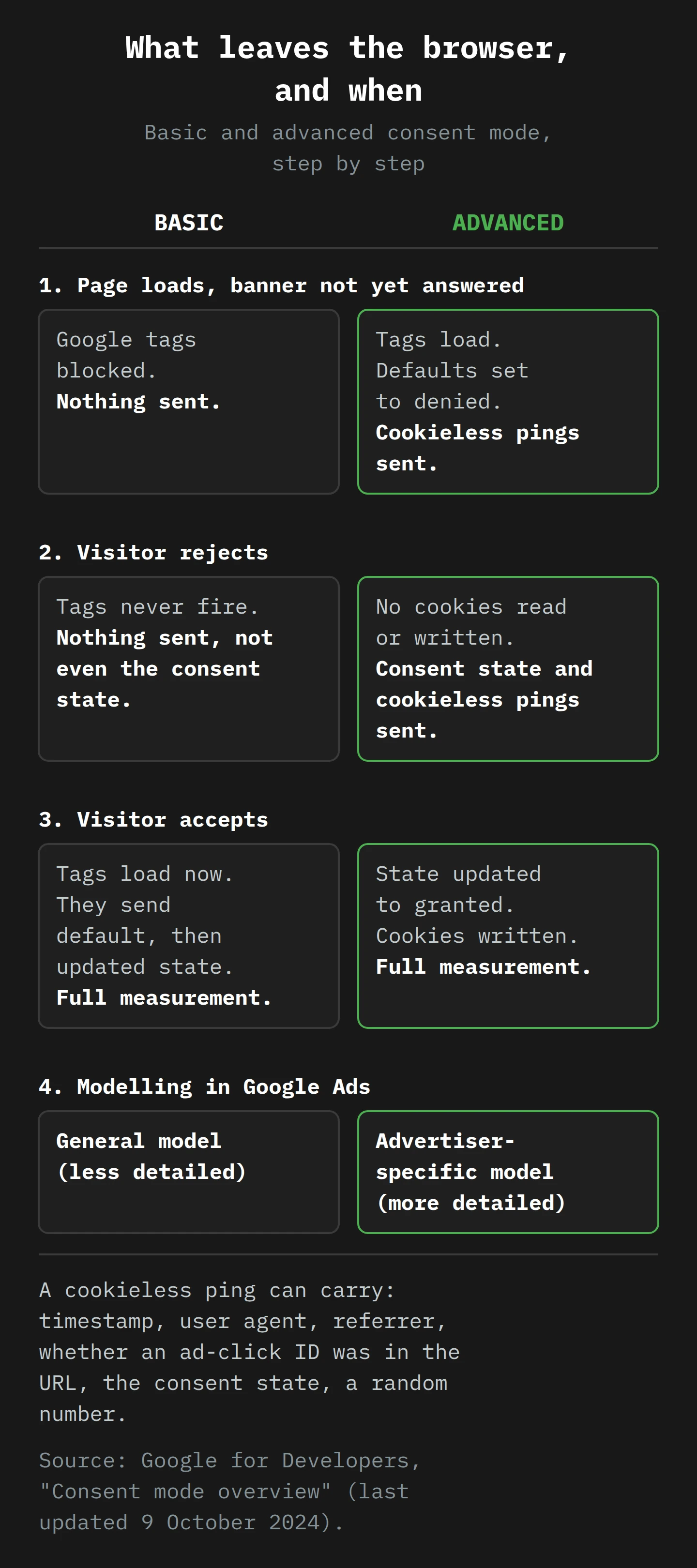
What is in a cookieless ping?
Most posts skip the obvious question: what, exactly, do the tags send before consent?
Google's developer overview says the pings can include "functional information", meaning headers the browser adds anyway: a timestamp, the user agent (the string that says which browser and operating system you use) and the referrer (the page you came from). They can also include "aggregate / non-identifying information": whether the current or an earlier page had an ad-click ID in the URL, such as a GCLID (Google Click Identifier, the long code Google adds to a landing page URL after an ad click), "Boolean information about the consent state", and a "Random number generated on each page load". The Google Ads version of the page adds "Information about the consent platform used by the site owner (e.g., Developer ID)".
The consent mode reference adds more, and it is the page I would send to your legal team. For analytics_storage denied, it says cookieless pings, "as part of regular HTTP/browser communication, may include the following information: user agent, screen resolution, IP address". It adds that Google Analytics 4 "does not store or log IP addresses". For ad_storage denied, it says no new advertising cookies are written and none are read, requests go through a different domain "to avoid previously set third-party cookies from being sent", and the "full page URL is collected, may include ad-click information in URL parameters (e.g., GCLID / DCLID)". IP addresses "are used to derive IP country, but are never logged by our Google Ads and Floodlight systems and are immediately deleted upon collection".
So the boot print says: someone, at 10:04, in this kind of browser, from this country, arrived from an ad click (or not), and said no (or has not answered). It carries no cookie and no stable identifier. Google says consent mode cookieless pings "are never used to track individual users across apps or websites, build remarketing lists, or generate user profiles".4

Two optional extras
Advanced mode has two related settings to know about before you switch them on.
URL passthrough. With ad_storage denied, the GCLID cannot be stored in a first-party cookie, so it is lost after the first page. Setting gtag('set', 'url_passthrough', true) tells the tag to carry click information from page to page in the URL instead. Google's guide lists the parameters that may be added to your links, including gclid, gclsrc, _gl and wbraid, and warns you to test that they "do not interfere with your site's behavior". If your shop uses query parameters to filter products, test this one carefully.
Ads data redaction. By default, with ad_storage denied, data sent to Google "will still include the full page URL, including any ad click information". Setting gtag('set', 'ads_data_redaction', true) removes the ad-click identifiers from Google Ads and Floodlight requests. It is the more private choice.
The uncomfortable part
I want to say this plainly, because Google's pages say it around the edges. Basic mode is the more privacy-protective choice. It sends nothing until a person says yes. And Google's EEA page warns that if you "prevent your Google tags from loading until a user interacts with your consent banner, Google won't be able to verify user consent choices and this may lead to loss in data". The choice that respects privacy most is the one Google's own documentation nudges you away from.
Advanced mode is not automatically unlawful. It is a legal decision, and it is not Google's to make for you. The European Data Protection Board's guidelines on the ePrivacy Directive say that tracking pixels, including ones built on the fly by JavaScript, fall under the device-access rule "even if this storage is not permanent". The same guidelines add that this "does not systematically mean that consent needs to be collected", because exemptions may apply. Google's own policy help page says consent for cookies "where legally required" should be obtained "before Google's Advertiser tags are fired". Advanced mode fires the tags first and holds back the cookies. Whether that holds up for your business, in your markets, is a question for a privacy lawyer, not for a vendor or a blog post.
Part 4: What the Model Fills In
Back to the innkeeper, late at night. He has a stack of signed pages and a slate of boot-print tallies. He knows from experience that guests who sign the book are the ones who stay for dinner, and guests who walk straight through mostly do not. So he does not simply double the dinner count. He uses what he knows about the signers to estimate what the walkers-through probably did. Then he checks his method against nights when he watched everybody.
That is consent mode modelling, and the arithmetic matters more than the marketing about it. Before we look at Google's version, it is worth keeping two things apart: there is a Google Ads model for conversions, and a Google Analytics model for behaviour. They have different rules, different thresholds and different outputs. Most confusion about "modelled data" comes from mixing them up, much as most confusion about ad platforms over-reporting comes from comparing numbers that were never counted the same way. That is the innkeeper's arithmetic.

The Google Ads model
Google Ads has offered conversion modelling for consent mode since April 2021. The idea, in Google's words, is to quantify "the relationship between consented and unconsented users", then use consented journeys to "assess attribution paths for the unconsented journeys". Modelled conversions appear in the normal "Conversions" column, and flow into bidding.
There is a threshold: "700 ad clicks over a 7 day period, per country and domain grouping". Below that, nothing is modelled. For Sanne, that is the first hard truth: her Dutch traffic is probably too small to model on its own, so the "modelling will fix it" line in the vendor posts may not apply to her at all.
The second hard truth is that modelling does not restore conversions one for one. Google says consented users "are typically 2-5x more likely to convert than unconsented users". It gives a worked example: an advertiser with a 50% consent rate sees only a 19% drop in conversions (12 out of 62), and an 18% uplift in conversion rate from modelling. Half the visitors said no, but they were not half the buyers. And Google is candid about the limit: "some conversions that in reality occurred may not be accounted for, as they are unattributable to ad-clicks without cookies".
The third point links back to Part 3. In advanced mode, the cookieless pings let Google build what it calls "advertiser-specific calibration factors". In basic mode there are no pings for declined visitors, so modelling "may still be available", but Google's systems "will be unable to generate advertiser-specific calibration factors, which may impact modeling accuracy". That is the "general model" versus "advertiser-specific model" row in the diagram. The innkeeper can still guess from other inns' ledgers. He just cannot calibrate against his own hallway.
The Google Analytics model
GA4's behavioural modelling does a different job. It estimates user and session metrics, such as daily active users, for visitors who declined analytics cookies, "based on the behavior of similar users who accept analytics cookies". Google says it checks its estimates with "holdback validation": it hides some observed data from training and compares the model's guesses with it.5
The rules for GA4 are stricter than for Ads, and they rule out basic mode entirely:
- Consent mode must be on across all pages.
- It must be the advanced implementation, so "Google tags load in all cases, not only if the user consents".
- The property must collect at least 1,000 events a day with
analytics_storagedenied, for at least 7 days. - It must have at least 1,000 daily users with
analytics_storagegranted, for at least 7 of the previous 28 days.
Even then, eligibility is not guaranteed. If there is not enough consented traffic, "events triggered by users who decline consent aren't reported" at all. When modelling is on, you see it by choosing the Blended reporting identity in GA4's Admin settings.
The short version: modelling fills in what Google can confidently estimate, for sites big enough to train on, and only for users who were visible in some way. It does not fill in visitors who were never seen. And it does nothing at all for the other way to lose a conversion.
Part 5: Two Ways to Lose a Conversion
This is the distinction I promised at the start, and it is the one that makes sense of Sanne's zero.
Way one: per visitor. A visitor in Munich declines the banner. Google's tags respect that. Depending on basic or advanced mode, Google sees nothing, or sees a cookieless ping. The conversion is missing from observed data, and may come back as a modelled conversion if the thresholds are met. Every advertiser with EEA traffic lives with this. It is the system working as designed.
Way two: per account. Google's auditors visit the site, find the banner does not meet the policy (or that no consent signal reaches Google), write to the advertiser, wait, write again, and then switch off "personalised and non-personalised ads, remarketing and conversion tracking functionality". Even visitors who happily click "Accept all" stop counting, because the account has lost the feature for that site.
Sanne's zero is way two. Modelling cannot help, because there is nothing to model from. A new banner does not help on its own either, unless it fixes what the auditor found and you then tell Google. The letter itself points to the fix: a form, or the [email protected] address, "for further details on the non-compliance identified and the steps required to come into compliance".
The vendor posts this month mostly blur the two, and make it sound as if consent mode alone is being audited. Google's help page says the audit looks at the banner a person sees: whether it explains ad personalisation, names the third parties, gives a real choice, and keeps records. Consent mode carries the answer. The auditor also reads the question.
There is also a quieter version of way two, with no letter at all. If your banner collects answers but never calls the consent update command, every visitor stays at the default, and a visitor who clicked "Accept all" still looks like a no. Google's consent mode reference treats "not set" the same as "denied" when consent is not granted, and ad_user_data is the type that tag-based conversion tracking needs. Nobody at Google took action. Your setup simply never said yes. You find it the same way you find an auditor's problem: by reading the wire.
Part 6: Reading the Wire: gcs and gcd
As of August 2025, every Google tag request carries the consent state in its URL. You can read it in the browser's developer tools, which is the fastest way to settle an argument between a marketer, a developer and a CMP vendor.
Open your site in Chrome, open DevTools, go to the Network tab and filter for collect. Each Google Analytics request is a URL with a long list of parameters. Google's overview says that consent is "translated into HTTP request parameters such as dma, gcd, and gcs". It also warns that these fields "may be subject to change as these services evolve", so treat what follows as a reading guide for mid-2025, not a contract.
gcs: the short version
Google says gcs carries ad_storage and analytics_storage. Baersch's guide decodes the format as G1xy, where x is Google Ads storage and y is analytics storage, each 1 for granted or 0 for denied:
G100: no consent granted.G110: ads storage granted, analytics denied.G101: analytics granted, ads denied.G111: both granted.
He adds a useful test: "G100 is only possible in 'Advanced Consent Mode'". So if you see G100 on a site that claims to use basic mode, the tags are running before anyone has said yes.
gcd: the long version
The gcd parameter is the more interesting one, for two reasons. First, Google says it "is always sent to Google services, regardless of whether consent mode is activated or not". Second, it carries all four main consent types, and records how each state got there.
A typical value before anyone answers the banner looks like 11p1p1p1p5. Google does not document the letters. Baersch's post does, and Gianluca Campo noticed the pattern that makes them memorable: the string starts with 11, ends with a digit such as 5, and in between has one letter for each of ad_storage, analytics_storage, ad_user_data and ad_personalization, in that order. The nine letters fall into three groups of three, by the default state.
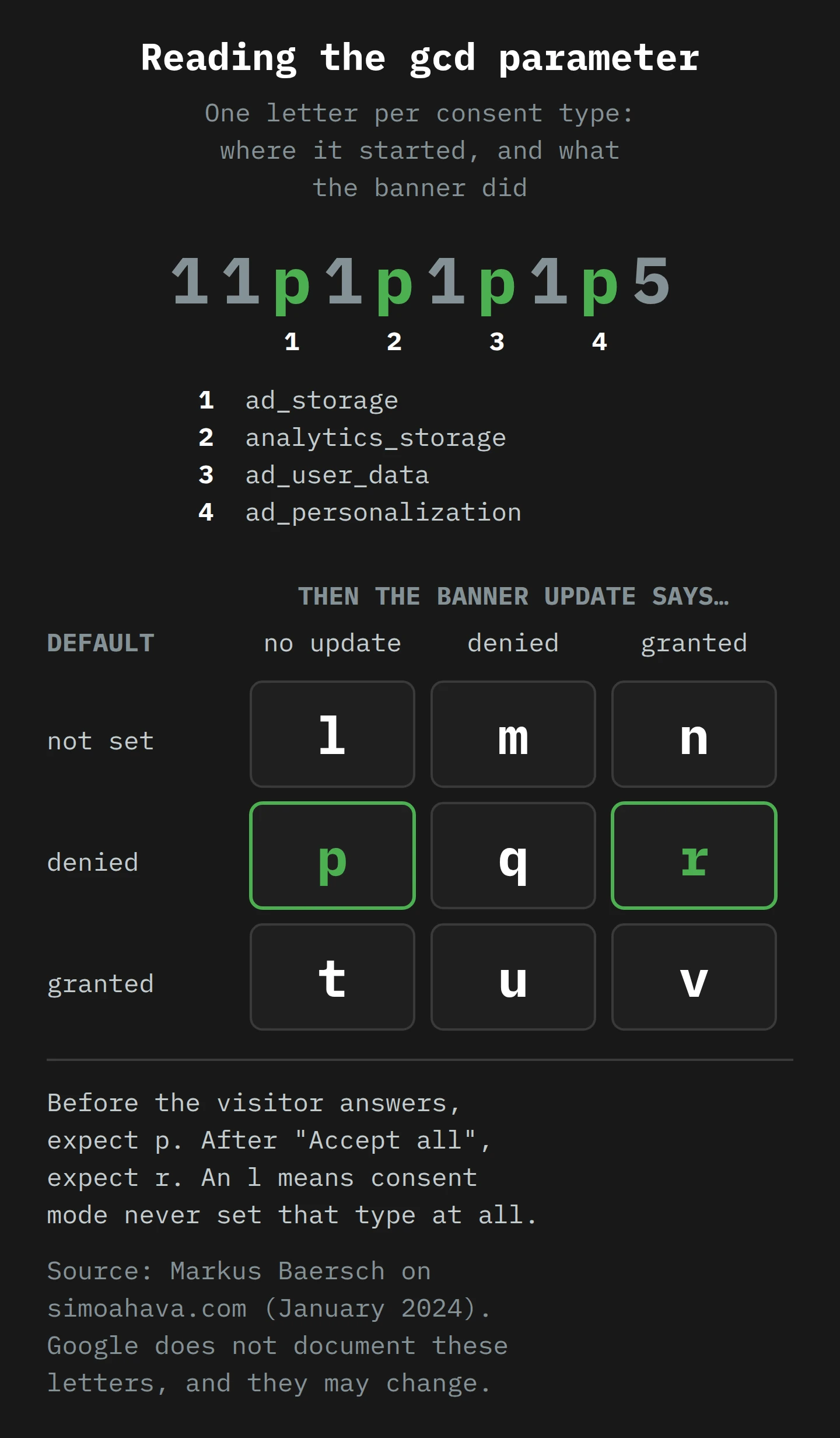
Read the grid like this:
l: "the signal has not been set with Consent Mode". This is the smoking gun for a missing default.p: denied by default, no update yet. Expect this before anyone answers.q: denied by default and denied again after the update. A visitor who said no.r: denied by default, then granted. A visitor who said yes.t,u,v: the same three outcomes when the default was granted.m,n: an update arrived with no default before it, which means the default is missing or late.
Baersch's caveat is fair: "These letters are obscure and they might change in the future." For a decision, use Google's Tag Assistant. For a quick check, the letters are hard to beat.6
The overview also mentions dma and dma_cps. Google says consent to Google services "is encoded using dma_cps", and gives no more detail than that, so I will not guess.
Part 7: Sanne Checks Her Site

Sanne spends a little of each morning on this for a week. (If you have been nodding at your own dashboard, this is the part where you borrow her week.) Her site uses Google Tag Manager, a CMP from Google's partner list, Google Ads and GA4.
Day 1: read the letter, then read the banner as an auditor would
She opens the letter properly, fills in Google's form to ask what was found, and writes down the date. Then she opens her own site in a private window, using a VPN set to Germany, because the banner may only appear for EEA visitors. She checks it against Google's checklist, one line at a time:
- Does the first layer of the banner mention ads personalisation specifically?
- Does it name Google, and the other third parties that get data?
- Is there a clear "I agree" action, and a real way to say no?
- Does it link to Google's Business Data Responsibility Site, directly or through a privacy policy link on the first layer?
- Can a visitor withdraw consent as easily as they gave it?
- Does the CMP keep records that include "the text and choices presented to users" and "the date and time of the user's affirmative consent"?
Her banner fails the first line. It says "We use cookies to improve your experience", and nothing about ads. That is probably what the auditor saw.
Day 2: check the order of events
Next, she runs Tag Assistant on her site. She clicks the earliest Consent event in the summary and checks that all four parameters were set: ad_storage, ad_personalization, ad_user_data and analytics_storage. Then she accepts the banner and checks the most recent Consent event to see the update.
She finds the classic failure from Part 2: "Default consent set too late". The guide's fix is blunt: move the default commands above any tag code, and "Don't set default consent states asynchronously."
In Tag Manager, the fix is a trigger. Her CMP's template tag must fire on Consent Initialization - All Pages, which Google says "will always fire before all other tags, including any Initialization triggers". Her developer had it on "All Pages", a few milliseconds too late. I covered this kind of container detail in my post on the Google tag, and it is one of the most common consent faults there is.
If a CMP genuinely has to load asynchronously, the gtag.js default can include wait_for_update, which gives the banner a set time, such as 500 ms, to send its update "before tags fire".
Day 3: the other tags
Google's tags check consent for themselves. Her Meta pixel and her email platform's tag do not. In Tag Manager she turns on the Consent Overview page (Admin › Container Settings › Enable consent overview), which lists every tag under "Consent Not Configured" or "Consent Configured". For each third-party tag she opens Advanced Settings › Consent Settings and chooses "Require additional consent for tag to fire", with the consent type that matches its purpose. That tag will now "only fire if the status of all specified consent types are 'granted'".
Day 4: decide basic or advanced, on purpose
She makes this decision on purpose, not by accident. She writes down the trade-off from Parts 3 and 4: basic sends nothing before consent and gets the general model; advanced sends cookieless pings from the first second and gets the advertiser-specific model, and it is the only way into GA4's behavioural modelling. She checks her traffic against the thresholds (700 ad clicks in 7 days per country for Ads; 1,000 users and 1,000 denied events a day for GA4) and finds she meets none of them in the EEA. For her, advanced mode buys little modelling and adds legal questions. She chooses basic, and is at peace with it.
A bigger shop might choose differently. Either way, she scopes the default to the regions where her banner appears, using the region field, as Google recommends. That way her Australian visitors are not treated as if they were in Utrecht, and her German visitors are. When two defaults overlap, the more specific region wins.
Day 5: confirm on the wire
With the fixes live, she repeats the DevTools check from Part 6, from the German VPN. Before she answers the banner, she sees no Google requests at all, which is right for basic mode. After she clicks "Accept all", the requests show gcs=G111 and a gcd full of r. When she tries again and clicks "Reject", nothing is sent. No l anywhere.
Days 6 and 7: check what Google sees
Finally, she looks at the systems. In GA4, Admin › Data collection and modification › Consent settings shows her share of traffic from the EEA and flags any missing advertising consent signals. Google warns that "it may take 48-72 hours for the notifications to update", which is why this comes last. In Google Ads, the conversion action's Diagnostics tab should now say "Consent mode is implemented". It will not say "modeling is active", because she is below the threshold, and that is fine.
Then she replies through Google's form, describes what she changed, and asks for a re-review. Until then, her European conversions stay dark. She has no switch to flip herself.
Final Thoughts
Go back to Sanne at the kitchen bench, staring at a zero for Germany. It looked like a tracking bug, or a war on small shops. It was neither. It was an inspector who had walked in the front door, read a banner that said "We use cookies to improve your experience", and written two polite letters, the second of which landed under a newsletter about lanolin.
If you take one thing from this, make it the distinction. A visitor who says no costs you one observed conversion, and Google may model some of it back. A banner that fails an audit, or a consent signal that never reaches Google, can cost you every conversion from a whole region, and no model will bring that back. The first is privacy working. The second is a setup problem, and you can check for it before anyone writes to you.
So this week, open your site from a European connection, read your banner as an auditor would, and open the Network tab. If you see an l in your gcd, or a G100 on a site you thought was running basic mode, you have found your problem before Google did.
Now, if you'll excuse me, my tea has been denied by default for about forty minutes. I am updating that state to granted.
Notes
-
The same post also claims that consent mode recovers conversion data for a set percentage of ad clicks from users who decline. It gives no source for the figure, so I have left it out. Google's own worked example is in Part 4. ↩
-
Google also accepts consent signals through the IAB Transparency and Consent Framework (TCF), a standard format used mostly by publishers. For most advertisers, consent mode through a CMP is the simpler route, and it is the one this article follows. ↩
-
Google keeps a list of certified CMP partners, but its help page is clear that the list is "not exhaustive" and that Google "does not require advertisers to use a CMP from the partner Program". A certified CMP also does not guarantee compliance, because the banner text is still yours. ↩
-
Baersch's guide notes one more detail: when a visitor grants consent part-way through a page, hits already sent from that page are reprocessed with the new state. Hits from earlier pages are not, because without a cookie there is nothing to link them. ↩
-
Holdback validation is the same trick a teacher uses when they keep some exam questions back from the practice test. If the student only scores well on questions they have already seen, the teacher knows the practice did not work. ↩
-
The letters are easier to remember than they look. The middle row of the grid is the one you want to see:
pbefore the banner is answered, thenqorrafter it, depending on the answer. ↩