CrowdStrike: How One File Grounded the Planes
It is ten past three on a Friday afternoon, and you are at a supermarket self-checkout with a loaf of bread, a block of cheese and a box of Earl Grey that has been on the shopping list since Tuesday. The screen in front of you is blue. Not the cheerful blue of "Scan your first item". The other blue. The one that apologises in white text and then sits there, thinking about what it has done.
You try the next checkout. Blue. The one after that has a shopping basket upside down on top of it, which is the supermarket's internationally recognised symbol for "please do not ask me". At the service desk, the EFTPOS terminal is also blue. Your phone buzzes: your evening flight is "delayed", in the special airline sense of the word that means nobody at the check-in desk can currently see any planes. The car radio says the banks are wobbling, the airports have stopped and even some of the ABC's own screens have gone blue. Somewhere in Perth, a bottle shop has closed its doors on a Friday afternoon, which in Western Australia is roughly a constitutional crisis.
That was last Friday, 19 July. Across Australia, reports of the outage began flooding in at about 3 pm AEST. In Canberra, a Coles really did put baskets on top of its self-checkouts. People were stuck at fuel pumps with no way to pay. Qantas check-in desks went down in Sydney and Canberra, and New South Wales police and fire systems were affected. A florist in Rockhampton summed up the afternoon for the ABC: "Having point of sales down, EFTPOS down, and emails down, it makes it really hard for us to operate."
The obvious explanation was an attack. A coordinated, nation-state, end-of-days cyber offensive, timed for the start of the weekend. It was not. On Friday, Australia's National Cyber Security Coordinator, Lieutenant General Michelle McGuinness, said there was "no information to suggest it is a cybersecurity incident". The cause was a routine update. Not a new version of Windows, not a new piece of software, not even a new feature. One small data file, sent by a security company called CrowdStrike to its own protection software, the way it sends such files several times a day.
Nobody broke in. The software paid to stop computers being broken was the thing that broke them.
The numbers are large. On Saturday, Microsoft estimated that 8.5 million Windows devices were affected, "less than one percent of all Windows machines". The percentage is small, Microsoft noted, but the machines belonged to "enterprises that run many critical services". Yesterday, the insurance firm Parametrix put the direct cost to the US Fortune 500 alone at $5.4 billion, excluding Microsoft. A quarter of those companies were hit, including every airline in the group. Also yesterday, CrowdStrike published its preliminary review of what went wrong.
So this is a post about how one file grounded the planes. We will start in the basement of your computer, in a place called the kernel, and work out why a crash there takes everything with it. Then we will read CrowdStrike's preliminary review closely enough to see how a file that is "not code" crashed millions of machines, why the safety net of a staged rollout was not under this one, and why the fix needed a human with a USB stick and a 48-digit number at each affected computer. Then a (made-up) IT manager spends her weekend recovering, and you get a list of things to check before the next one.
Let's get into it.
Part 1: What Happened, in Order
Before the mechanism, the timeline. CrowdStrike's preliminary Post Incident Review (the "PIR", published on 24 July) is short and fairly plain, and it is the best primary source we have. I will use its words where they matter.
CrowdStrike sells a security product called Falcon. On each protected computer, Falcon runs a program it calls a sensor. If you have heard the term EDR, short for endpoint detection and response, this is that: software that watches what happens on each computer (the endpoint), spots behaviour that looks like an attack, and stops it. The sensor watches what runs on the machine, and it reports back to CrowdStrike's cloud.
At 04:09 UTC on Friday 19 July, CrowdStrike released what it calls a "content configuration update for the Windows sensor to gather telemetry on possible novel threat techniques". That was 2:09 pm in Hobart. Windows computers running sensor version 7.11 or later, which were online and received the update, crashed. Mac and Linux computers were not affected.
At 05:27 UTC, 78 minutes later, CrowdStrike reverted the update. Computers that came online after that, or did not connect during the window, were fine. Computers that had already received the bad update were not fine, and as we will see, many of them could not get far enough into their own start-up to receive the good one.
About five and a half hours after the release, CrowdStrike's chief executive, George Kurtz, posted this:
CrowdStrike is actively working with customers impacted by a defect found in a single content update for Windows hosts. Mac and Linux hosts are not impacted. This is not a security incident or cyberattack. The issue has been identified, isolated and a fix has been deployed. We refer customers to the support portal for the latest updates and will continue to provide complete and continuous updates on our website. We further recommend organizations ensure they're communicating with CrowdStrike representatives through official channels. Our team is fully mobilized to ensure the security and stability of CrowdStrike customers.
— George Kurtz (@George_Kurtz), 19 July 2024 on X
"A fix has been deployed" was true, and it is the sentence that caused the most confusion. The fix was deployed to the cloud. The crashed computers were not in a position to collect it.
In Australia, the Prime Minister said there was "no impact to critical infrastructure, government services or triple-0 services at this stage". Hamish Hansford of the Cyber and Infrastructure Security Centre said he hoped the incident would "self-resolve" over "the next hours and days". For a lot of machines it did. For a lot of others, it needed someone to go and stand in front of them.
On Tuesday, CrowdStrike added the bad file to a known-bad list in its cloud, which could let some machines with a strong network connection recover on their own. On Wednesday, it published the PIR. As of today, Thursday 25 July, the full Root Cause Analysis is promised but not yet out. So everything below about the cause comes from the preliminary review, and I will be clear where it stops.
Part 2: The Kernel, or Why One Crash Takes the Whole House
You already know the difference between your own flat and the building it is in. If you burn the toast, the smoke alarm goes off in your flat. Your neighbours carry on with their evening. But if the building's foundations crack, everybody's evening is over, whatever they were cooking.
Computers are built the same way, on purpose.
Two rooms with very different rules
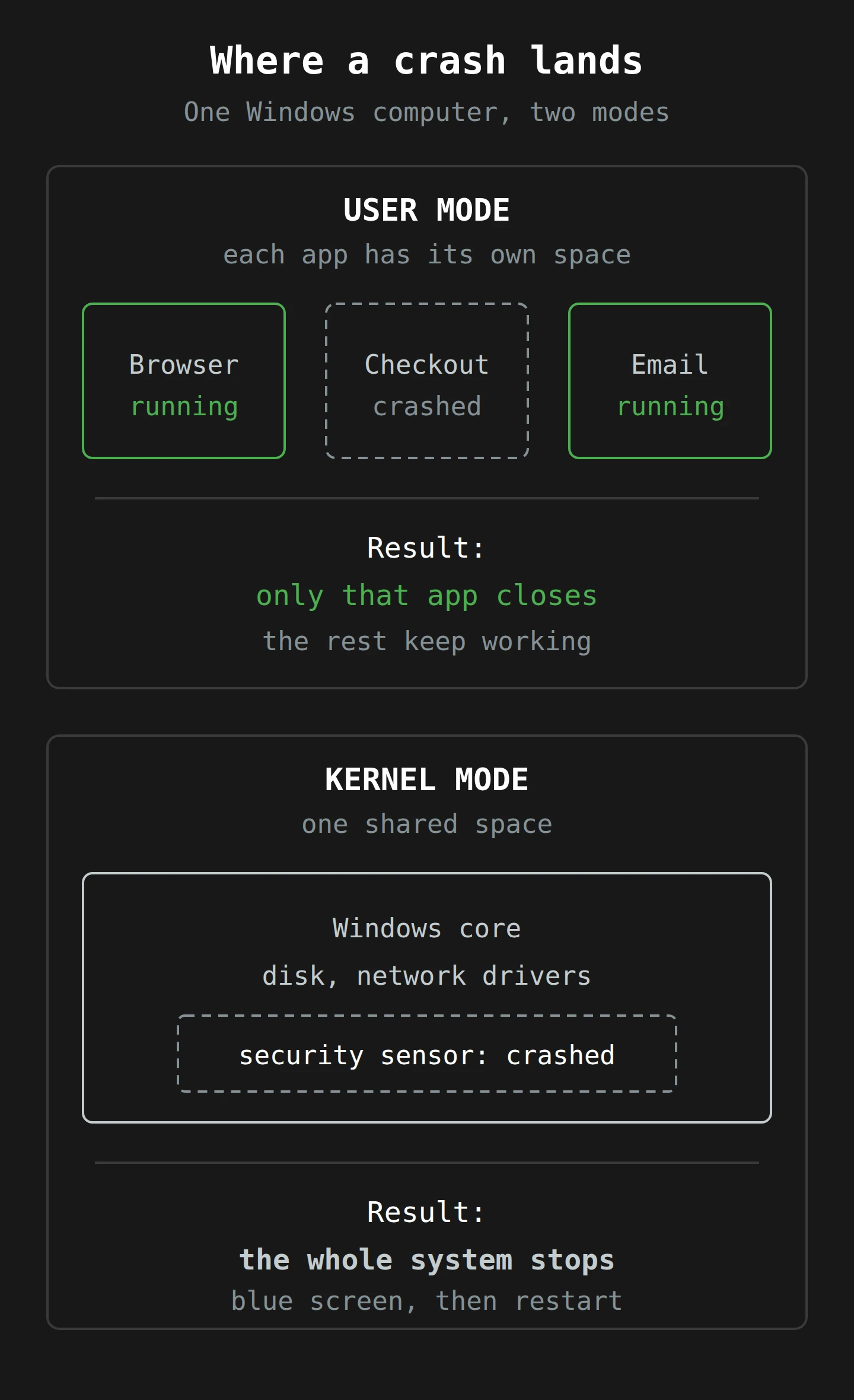
A Windows computer runs code in two modes. Microsoft's own documentation, User mode and kernel mode, puts it simply: "Applications operate in user mode, while core operating system components function in kernel mode."
User mode is the flats. Each application (your browser, your spreadsheet, the supermarket's checkout software) gets its own private space in memory. One application cannot scribble on another's data. If one crashes, Microsoft says, "it doesn't affect other applications or the operating system." The program closes, you swear quietly, you open it again.
Kernel mode is the foundations, and the caretaker who holds every key. The kernel is the core of the operating system: it decides which program runs next, manages memory, and talks to the hardware. Many drivers, the small programs that let Windows talk to a disk, a network card or a printer, run there too. And here is the rule that matters for last Friday: "All code running in kernel mode shares a single virtual address space." There are no separate flats down there. A few lines later, Microsoft gives the whole story in miniature: "If a kernel-mode driver crashes, it causes the entire operating system to crash."
That is the whole difference between a program that closes and a screen that turns blue. A crash in user mode is caught by the kernel, which cleans up and carries on. A crash in the kernel has nobody above it to catch it. Windows does the only safe thing it can: it stops everything, shows the blue screen and restarts. Microsoft's name for this is a bug check, and its support articles for this incident list the stop codes people saw as 0x50 or 0x7E.1
Stopping is the responsible choice. Kernel code that has gone wrong might be about to write over a file system, and halting beats carrying on with corrupted memory.
Why security software lives in the basement
So why would anybody put a security product down there, where a mistake costs the whole machine?
Because that is where the attackers go. Andy Prow, a security expert speaking to the ABC on Friday, put it plainly: "The bad guys are writing exploits and malware and viruses that get very deep inside your computer. So, for something like CrowdStrike to work it has to be very deep in your computer."
A security tool in the kernel can see every process start, every file open and every network connection, before anything in user mode gets a chance to hide them. It is also much harder for malware to switch off. And it can start early. Windows has a whole feature, Early Launch AntiMalware, that exists so antimalware drivers can start "before other third-party components" and decide whether later boot drivers are safe to load. Security vendors want to be the first thing awake, because malware likes to be the second.
That is a sensible design, and it has a cost. The tool that starts first and sees everything is also the tool that can stop everything. On Friday, it did. The sensor loads as Windows starts, and the bad file was still sitting on the disk. So the computer would restart, load the sensor, read the same bad file, crash again, and restart. That loop is the reason "just turn it off and on again" did not work for millions of people.2
Is there another way?
There is, and one large vendor has already taken it. In 2019, Apple told developers that it was beginning to deprecate kernel extensions on the Mac. In their place, it offered System Extensions, which run "in user space outside the kernel", including a kind built for endpoint security tools like EDR. Apple's pitch was blunt: a bug in a kernel extension means "the entire machine has to restart", while "if a System Extension crashes, the rest of the system and apps are unaffected and keep running".
I want to be careful here. CrowdStrike says Macs were not hit on Friday because they do not use the file that broke, not because of Apple's design. Linux is no fairy tale either. The Register reported on Monday that Falcon on Linux had its own crashes earlier this year, with Red Hat warning in June of a "kernel panic observed after booting" with the Falcon sensor process. An update on Wednesday traced that to a bug in the Linux kernel itself. Moving a security tool out of the kernel does not make it bug-free. It changes what a bug costs. Upstairs, a bad update closes one program. Downstairs, it closes the airport.
Part 3: How a File That Is "Not Code" Crashed the Kernel
This is the part that most of the coverage has skipped, and it is the part I find most useful. CrowdStrike is very keen to say that what it sent on Friday was not code. In the PIR's words, the content was "stored in a proprietary binary file that contains configuration data. It is not code or a kernel driver." So how does a file of settings crash a kernel?
The cook and the recipe card
Think of a cook in a busy kitchen. The cook has trained for years. You do not retrain the cook every morning. Instead, you hand them a card with today's specials: which dishes, which ingredients, which quantities. The card is not a cook. It cannot pick up a knife. But the cook reads it and does exactly what it says, very fast, many times an hour.
If the card says "take the jar from the seventh shelf", and the pantry only has five shelves, a good cook stops and asks. A cook trained to trust the card reaches for a shelf that is not there.
Code and content, in CrowdStrike's terms
The PIR describes two kinds of update.
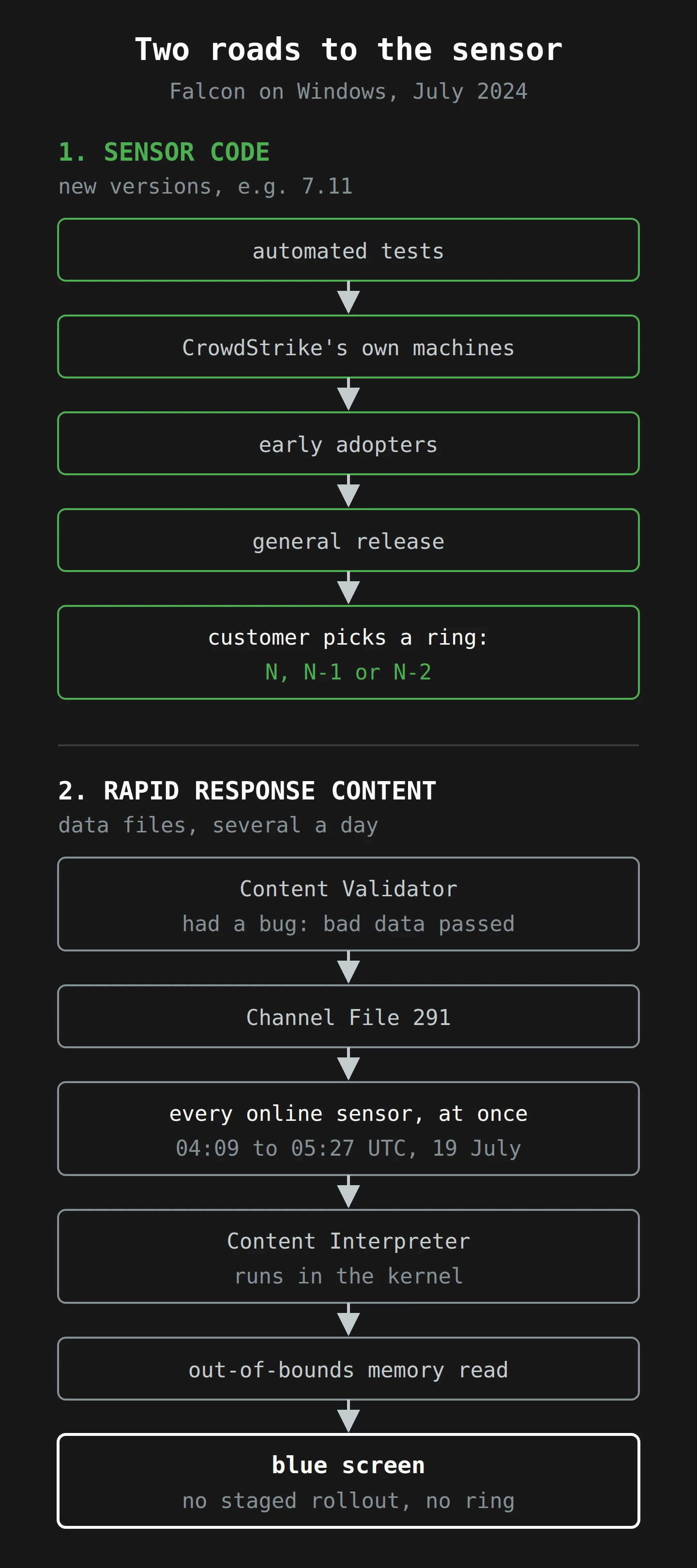
Sensor Content ships with each new version of the sensor itself. This is the cook's training. It includes what CrowdStrike calls Template Types, which are "expressed in code": new abilities for the sensor, each with a set of fields that can be filled in later. Sensor releases go through unit, integration, performance and stress testing, then a staged rollout that "starts with dogfooding internally at CrowdStrike, followed by early adopters", then general release. Customers then choose, through what CrowdStrike calls Sensor Update Policies, whether each part of their fleet runs the latest version (N), one older (N-1) or two older (N-2).3
Rapid Response Content is the recipe card. Each piece of it is a Template Instance: a filled-in copy of a Template Type that tells the sensor which behaviour to look for. It exists so that CrowdStrike's threat researchers can react to a new attack technique the same day, "without requiring sensor code changes". These instances reach the sensor in files called Channel Files. According to CrowdStrike's technical details post, updates to channel files "occur several times a day".
Three systems handle that content. In CrowdStrike's cloud, the Content Configuration System creates the Template Instances, and a Content Validator checks them before they are published. On each machine, the Content Interpreter reads the channel file, and the Sensor Detection Engine acts on what it says.
Here is the important sentence. The PIR says the Content Interpreter and the Sensor Detection Engine "are components of the Falcon sensor". The sensor runs in the kernel; a crash in user mode cannot produce a blue screen, so the blue screens are themselves the evidence. So the file may be data, but the thing reading it is kernel code. A data file cannot crash a computer by itself. A data file that makes kernel code do something wrong can.
Channel File 291 and named pipes
The file in question was Channel File 291. It sits in C:\Windows\System32\drivers\CrowdStrike\ with a name that starts C-00000291- and ends .sys, which is the extension Windows normally uses for drivers. CrowdStrike is firm on the point: "Although Channel Files end with the SYS extension, they are not kernel drivers."4
Channel File 291 controls how Falcon watches named pipes. A named pipe is, in Microsoft's description, "a named, one-way or duplex pipe for communication between the pipe server and one or more pipe clients". Think of a labelled pneumatic tube between two offices. Programs use them to pass messages, on one computer or across a network.
Attackers use them too. Once an attacker has a foothold on a machine, their tools need a way to take orders from a command-and-control (C2) server, the attacker's remote control. Some of those tools pass their messages through named pipes. Friday's update, CrowdStrike says, "was designed to target newly observed, malicious named pipes being used by common C2 frameworks in cyberattacks." In other words, it was the security product doing exactly its job: new trick spotted, new card written, sent to every kitchen.
What went wrong on Friday
The PIR gives a timeline for this particular capability:
- 28 February 2024: sensor version 7.11 is released, with a new Template Type for inter-process communication (IPC), to detect attacks that abuse named pipes.
- 5 March: that Template Type passes a stress test in CrowdStrike's staging environment. The same day, the first Template Instance for it goes out to production in Channel File 291.
- 8 to 24 April: three more instances go out. They "performed as expected in production".
On Friday, 19 July, two more instances were deployed. In CrowdStrike's words: "Due to a bug in the Content Validator, one of the two Template Instances passed validation despite containing problematic content data." Based on the March testing, on trust in the validator and on the earlier successful instances, they were released.
Each Windows sensor that was online in the window received the new Channel File 291 and handed it to the Content Interpreter. The PIR's key sentence: the problematic content "resulted in an out-of-bounds memory read triggering an exception. This unexpected exception could not be gracefully handled, resulting in a Windows operating system crash (BSOD)."
What an out-of-bounds read is
Back to the pantry. A program's memory is a long row of numbered shelves. When code builds a list, it asks for a certain number of shelves next to each other, and it is meant to stay within them. An out-of-bounds read is the code reaching for shelf seven of a five-shelf list. Whatever sits there belongs to something else, or to nothing at all.
In user mode, reaching for memory you do not own usually ends with the kernel stopping your program. In kernel mode, there is nobody further down to stop you. If the address is invalid, the processor raises an exception. The PIR notes that the Content Interpreter "is designed to gracefully handle exceptions from potentially problematic content", and this one, unexpectedly, was not handled. So Windows did what it is designed to do when kernel code fails, and stopped.

The great NULL pointer argument
Over the weekend, a post claiming the crash was a "NULL pointer" bug (code following an address of zero) spread widely. The security researcher Tavis Ormandy took it apart in a thread, noting that the post had more than 25,000 reposts, and that a crash dump shared by another researcher, Patrick Wardle, showed an address "nowhere near NULL!" Ormandy also wondered whether the bad data might have looked fine during testing. On Wednesday, the PIR settled the label:
No surprises here, but @CrowdStrike confirms @taviso's analysis, that the bug was indeed not due to a NULL-pointer deference 🧠 ...but rather "an out-of-bounds memory read"
— Patrick Wardle (@patrickwardle), 24 July 2024 on X
This matters for more than bragging rights. "NULL pointer" sounds like a programming language problem. "A validator let through bad data, and the interpreter trusted it" is a process problem, and you can ask your own vendors about process.5
What the preliminary review does not say
The PIR does not say what was actually wrong with the content data. It says "problematic", and stops there. It does not say why the stress test in March did not catch the same shape of data, or exactly which check the validator was missing. CrowdStrike says it will release a full Root Cause Analysis once its investigation is complete. Until then, anybody who tells you the precise byte that broke the world is guessing.
Part 4: Canaries, Rings and the Rollout That Wasn't

Miners once carried canaries underground. The birds breathe faster and are smaller than people, so bad air reaches them first. A bird in trouble meant everyone out, while everyone could still walk. Software engineers borrowed the bird, and the name.
Google's Site Reliability Workbook defines canarying as "a partial and time-limited deployment of a change in a service and its evaluation". You send the change to a small part of the system first, compare it against the rest, and only continue if nothing has gone wrong. The same chapter gives a finding that should be printed on every change request form: "In Google's experience, a majority of incidents are triggered by binary or configuration pushes". Configuration. The boring files, not the clever code. And then the sentence that describes Friday almost exactly: "If a release deploys instantly everywhere, any defects will deploy in the same way."
Two roads to the same sensor
Look again at the two kinds of update. CrowdStrike's sensor code took the slow, careful road: tests, then CrowdStrike's own machines, then early adopters, then everyone, with customers choosing how far behind to stay.
Rapid Response Content took the fast road. The PIR describes testing and validation before release, but no staged rollout. It went to every Windows sensor of version 7.11 or later that was online in those 78 minutes.
So if your IT team had carefully set its fleet to N-1, holding the sensor one version behind just in case, it did not help. That setting governs the sensor code. The bad content was not code, so it did not wait. Any machine on sensor 7.11 or later was in scope, whatever its policy said.
There is a real reason for the fast road. A detection that arrives a week late has missed the attack. The trouble is that "everywhere at once" works for bad updates exactly as well as for good ones.
What CrowdStrike says it will change
The PIR lists the changes CrowdStrike says it will make. They are promises as of today, not things that have shipped:
- More testing of Rapid Response Content: local developer testing, update and rollback testing, stress testing, fuzzing and fault injection, stability testing and content interface testing.
- More checks in the Content Validator, with "a new check" in process for this type of problem.
- Better error handling in the Content Interpreter, so a bad file is less likely to take down the kernel.
- A staggered deployment, "starting with a canary deployment", gradually reaching "larger portions of the sensor base", with monitoring of sensor and system performance guiding each step.
- Customer control over when and where Rapid Response Content is deployed, and release notes customers can subscribe to.
A later update to CrowdStrike's remediation hub added independent third-party reviews of its code and of its quality processes.
The list amounts to one idea: treat content like code. If kernel code acts on a file, that file is part of the kernel's behaviour, and it deserves the same canary, rings and customer choice as the code. None of this is new, which is both reassuring and slightly maddening. The hardest item is the canary, because a canary costs time, and the fast road exists to save time. But even an hour on a small slice of real machines would have meant the bad file broke a small slice of machines. That trade-off, between speed of protection and size of blast, is now a fair question for every buyer of security software.
Part 5: Recovery, One Machine at a Time

CrowdStrike reverted the file at 05:27 UTC. So why were some flights still cancelled on Tuesday?
The reboot race
A crashed machine restarts. During start-up, the sensor loads and, if the network comes up fast enough, it can reach CrowdStrike's cloud and download the fixed Channel File 291 before it reads the old one again. If it wins that race, it recovers. If it loses, it crashes and tries again.
This is why CrowdStrike's first advice was to reboot, and to plug the machine into a wired network first, because "the host will acquire internet connectivity considerably faster via ethernet" than over Wi-Fi. For virtual machines in its Azure cloud, Microsoft reported that "several reboots (as many as 15 have been reported) may be required". Fifteen restarts, each one a small bet on the network. It is the most expensive game of musical chairs ever played.
Machines that kept losing the race needed the file removed by hand.
Removing one file, the hard way
The manual fix is short. Start Windows in a way that does not load the sensor, delete every file in the CrowdStrike folder that matches C-00000291*.sys, and restart. CrowdStrike's hub notes that the bad version has a timestamp of 04:09 UTC and the good one 05:27 UTC or later.
The trouble is "start Windows in a way that does not load the sensor". On a crashed machine, that means safe mode or a separate recovery environment, and that means someone at the keyboard. On Saturday, Microsoft released a recovery tool that builds a bootable USB stick (between 1 GB and 32 GB, and it wipes it), with two options:
- Recover from WinPE. The machine starts from the USB stick into the Windows Preinstallation Environment, a small, separate copy of Windows, and a script deletes the file. No local administrator account is needed. But "you may need to manually enter the BitLocker recovery key".
- Recover from safe mode. The USB stick sets the machine to start in safe mode. Someone signs in with a local administrator account and runs a repair script, which deletes the file and sets the machine back to normal start-up (
bcdedit /deletevalue {current} safeboot, for the curious). This route "may enable recovery on BitLocker-enabled devices without requiring the entry of BitLocker recovery keys", for devices using TPM-only protection.
For machines that cannot boot from USB, Microsoft added a network boot option. For machines that could not do that either, it suggests that "reimaging the device might be a solution", which is IT for "start again".
Virtual machines in the cloud were easier, but only a little: detach the virtual disk, take a snapshot first, attach it to a healthy server, delete the file, put it back. Or roll the whole machine back to a snapshot from before 04:09 UTC, if you have one.6
Why BitLocker turned minutes into days
BitLocker is Windows' full-disk encryption. It scrambles everything on the drive, so a stolen laptop is a brick with no secrets in it. On most business machines, the key is held by a security chip on the motherboard (the TPM, or Trusted Platform Module), which releases it only when the machine starts in the normal, expected way. You never see it. You just turn the computer on.
Starting from a USB stick is not the normal, expected way. That is the point: it is exactly what a thief with a stolen laptop would do. So the chip keeps the key, and the machine asks for the recovery password instead. Microsoft's BitLocker recovery documentation describes it as "a 48-digit number", which can be printed, saved to a file or stored in Microsoft Entra ID or Active Directory.
Now multiply. Every encrypted machine that fails the reboot race needs a person to find its own 48-digit number, read it out (perhaps over the phone to someone at a remote office), and type it in correctly. That is good security working as designed, and it is also why a five-minute fix became a weekend. If you are reading this on a laptop that spent Friday afternoon in a boot loop, welcome back. I hope the 48 digits went in first time.
A recovery weekend, step by step
Let me make this concrete. Meet Tamsin. She runs IT for a made-up engineering firm in Glenorchy with 140 Windows laptops, 12 Windows servers and a CrowdStrike contract. (Tamsin is invented. Glenorchy is real, and I will hear no word against it.)
Friday, 2:09 pm. The content update reaches her fleet. Within minutes, the laptops in the office go blue and restart. So do two of her servers, including the one that runs Active Directory.
Friday, 2:15 pm. Tamsin's phones light up. Her own laptop is also blue, so she follows the news from her phone.
Friday, evening. CrowdStrike reverted the file at 3:27 pm her time, and by evening the advice is clear. Tamsin reads "a fix has been deployed" and asks everybody to restart. About half the office comes back, mostly the desktops on network cables. The laptops on Wi-Fi keep losing the race.
Friday, later still. She tries the manual fix on her own laptop. It starts in recovery mode and asks for the BitLocker recovery password. Her firm stores those in Active Directory. The Active Directory server is in a boot loop.
Pause here, because this is the trap in many recovery plans. Nobody has published a count of how often a key store was stuck behind the same blue screen on Friday, but it is the first thing I would check. Where are your keys, and does the system that holds them run the same agent as the machines that need them?
Tamsin gets lucky. The server is a virtual machine, so she detaches its disk, deletes the file from another server and brings Active Directory back. She exports the recovery passwords for the affected laptops to a spreadsheet and prints it.
Saturday. She builds four USB sticks with Microsoft's recovery tool, and the office comes in by appointment. Each person hands over their laptop, Tamsin boots it from USB, types in 48 digits from the printout, and the script deletes the file. About ten minutes a machine, if nobody mistypes. Somebody always mistypes.
Monday. Three staff who work from home cannot come in. Tamsin talks them through safe mode over the phone, using a local administrator password for each machine. One of them receives a polite email from "CrowdStrike Support" offering a recovery script. It is not from CrowdStrike.
Tuesday. The last laptop recovers.
What does each system record? The sensor folder on each laptop holds both versions of Channel File 291, one stamped 04:09 UTC and one 05:27 UTC or later; CrowdStrike says it is normal for more than one to be there. Windows records a bug check for each crash. The BitLocker key store can record each recovery password lookup, if auditing is on. Tamsin's spreadsheet records 140 names, 140 ticks and one note in the margin: find a way to get to the keys when AD is down.
Scammers, right on time
That email to Tamsin's colleague is not made up for colour. On Friday, CrowdStrike's own threat intelligence team warned that attackers were already using the outage: phishing emails posing as CrowdStrike support, phone calls impersonating its staff, fake "independent researchers" claiming the outage was an attack, and people "selling scripts purporting to automate recovery". It listed newly registered domains such as crowdstrike-bsod.com, crowdstrikefix.zip and, my favourite, fix-crowdstrike-apocalypse.com. A frightened person with a broken computer is the perfect phishing target. If your team does not already know how to spot a lookalike sender, my introduction to email security is a good place to start.
The outage after the outage
One more lesson, from the United States. By Tuesday, Delta Air Lines was still struggling. That afternoon, Delta had cancelled more than 400 flights and delayed about 860 for the day, according to NPR, citing FlightAware. Its chief executive, Ed Bastian, had said on Monday that the airline was working to restore "the software that tracks and schedules its flight crews". The US Transportation Secretary, Pete Buttigieg, opened an investigation into whether Delta was looking after its passengers: "This is not just the right thing to do, it's the law."
The bad file was gone by Friday afternoon. But Delta's crew tracking and scheduling software still had to be restored, and the cancellations went on while it was. Parametrix estimates that the six Fortune 500 airlines lost about $860 million between them.7
When you plan for recovery, "the computers are back" is not the finish line. The finish line is when the systems that depend on those computers have caught up with the world.
What to Do This Week
You probably do not run an airline. You almost certainly run a kernel-level agent. Here is what I would check, in roughly this order.
- List every agent that runs in your kernel. Security tools first (EDR and antivirus), then anything else that installs a driver. For each, note the vendor, the version, the machines, and who can reach the vendor at 3 pm on a Friday.
- Ask each security vendor how its content updates reach you. Not the software updates: the detection rules, signatures and configuration files. Are they staged? Is there a canary? Can you choose a ring, or delay them? Are there release notes? CrowdStrike has now promised all of these. Write down your other vendors' answers.
- Put your own canaries in place for what you control. For sensor versions, set most machines to N-1 and keep a small, real group (IT's own machines are a good start) on N. It would not have stopped Friday, but it is the habit you want when content controls arrive.
- Test BitLocker recovery for real. Pick five machines at random. Find each recovery password, time how long it takes, and type one in. Then answer the Tamsin question: if every Windows server you own were down, including the one that stores the keys, could you still reach them? If not, keep a secured offline copy, and protect it like the keys to the building.
- Make recovery media before you need it. Microsoft's tool needs a 64-bit Windows machine with 8 GB free and a USB stick between 1 GB and 32 GB. Build a few, label them, and put them somewhere you will find them on a bad day.
- Know your local administrator route. Safe mode recovery needs a local administrator account on each machine. Make sure someone can get those passwords when the usual systems are down.
- Snapshot your cloud servers, and practise the disk swap. Detaching a disk and fixing it from another machine is easy the second time.
- Warn your staff now, not during the next outage. Recovery help comes only through your IT team and your vendors' official channels. No one should run a "fix" script from an email. Phone calls from "support" get a call back on a known number. (If you need a refresher on why a second factor matters when a scammer does get a password, here is my two-factor explainer.)
- Map the systems that must catch up. For each critical system, ask: if it were down for six hours, what else would fall behind, and how long would it take to catch up? Delta's crew scheduling is the example to beat.
- Rehearse it. Run a tabletop exercise: "Your security agent crashes every Windows machine at 2 pm on a Friday." Walk through who does what and where they find the keys. Rehearsing failure on purpose is the same discipline I wrote about in red teaming: find the weak point while it is cheap to find.
And one question for your next vendor meeting: "If one of your updates breaks my machines, how many does it reach before you know?" A good vendor has a number.
Final Thoughts
Go back to the blue self-checkout with the upside-down basket on top. It was not hacked. It was protected, very thoroughly, by software that started before everything else, saw everything, and trusted a small file it was given, because it trusts the files it is given several times a day. That trust is why the protection is fast. On Friday, it is also why the failure was fast.
If you remember one thing, make it this: the most trusted software on your computer runs with the most power, so its updates deserve the most caution. CrowdStrike's preliminary review says, in effect, that it will now treat content like code: staged, and in the customer's control. Hold it to that, and ask the same of every vendor that runs in your kernel. Then do the dull work on your side, starting with the BitLocker test. Five random machines, five recovery passwords, this week.
Somewhere, someone is still typing 48 digits into a laptop, slowly, from a printed spreadsheet. I salute them. Now, if you'll excuse me, my kettle runs no kernel drivers and has never needed a recovery key, so I think my tea is ready.
Notes
-
The "blue screen of death" is the informal name. Microsoft's formal term is a bug check, and the stop code on the screen tells an engineer which kind of failure stopped the system. ↩
-
This has happened before, on a smaller scale. In April 2010, a McAfee antivirus update flagged a core Windows file,
svchost.exe, as a virus on Windows XP SP3 machines, and SANS reported that affected systems would "enter a reboot loop and loose all network access" (their spelling). The tool that pushed the update could not pull it back, because the machines were offline. ↩ -
"Dogfooding" is industry slang for using your own product before your customers do, from the phrase "eating your own dog food". It is less appetising than it sounds and more useful. ↩
-
The folder is called
driversand the files end in.sys, so to a tired human at 4 pm on a Friday they look exactly like drivers. CrowdStrike's point is that the sensor reads them as data; it does not run them as programs. ↩ -
A second rumour said the bad file was full of zeros. CrowdStrike's technical details post says the problem "is not related to null bytes contained within Channel File 291 or any other Channel File". ↩
-
CrowdStrike's hub gives this order: detach the operating system disk, snapshot it "as a precaution against unintended changes", attach it to a new virtual server, delete the
C-00000291*.sysfiles, then reattach it. The alternative is to roll back to a snapshot from before 04:09 UTC on 19 July. ↩ -
Parametrix expects insurance to cover only 10% to 20% of the Fortune 500 losses, because many large companies keep a lot of the risk themselves and their policy limits are low relative to an outage this size. ↩