Strangers in node_modules: A Plain Guide to Software Supply-Chain Attacks
You start a new project on a Monday morning. It is a small thing: a web page that shows the tide times for the Derwent, because you are tired of opening an app with three pop-ups to find out whether the boat ramp is under water. You type one line into your terminal to add a date library, and npm answers with a cheerful summary that says it has added a few hundred packages.
A few hundred. You asked for one.
So you pull the thread. The date library depends on a formatting library, which depends on something that colours text in your terminal, which depends on something that checks whether your terminal can show colour, which depends on twenty lines that one person wrote in 2015 and has maintained, for free, ever since. By lunchtime you have a list of names you do not know, and each of them can publish code that will run on your laptop the next time you type npm install. You did not hire any of them. You have given a spare key to your house to several hundred strangers, and one of them had a stressful week.
Put the kettle on. This is less hopeless than it sounds, and it is a lot more interesting.
That stressful week happened. On 8 September 2025, a maintainer called Josh Junon fell for a fake npm support email, and within minutes his account had published malicious versions of 18 packages, including chalk and debug. According to Aikido, which spotted it, those 18 packages had "more than 2 billion downloads per week". Wiz later found that 99% of cloud environments had at least one of them, and that the malicious code turned up in at least 10%. One person, one email, one in ten cloud environments.
That was the start of a long year for npm. Since then we have had a worm that publishes itself, a second worm that registers your laptop as its servant, a state actor with a patient social-engineering campaign, a release pipeline that signed malware as genuine, and, in early August 2026, a worm that sets up home in your code editor so that opening a folder is enough.
So we will walk down the supply chain one link at a time: what a dependency is, when a stranger's code runs, how npm decides who may publish, and what each security feature proves. Then six npm incidents and one cousin, and the link each one broke, and a checklist with the questions to ask your vendors.
Let's get into it.
Part 1: The Sandwich You Did Not Make

You already understand supply chains. You buy a sandwich from the café near the office. The café bought the bread from a bakery, which bought flour from a mill, which bought wheat from a farmer. You trust the café. The café trusts the bakery. Nobody at the café has met the farmer, and the system works because, most of the time, everybody in the chain does their job.
Software works the same way. A dependency is code your project uses but did not write. Your project lists its direct dependencies in package.json: the café's shopping list.
The trouble is the ingredients' ingredients. Each package has its own package.json, with dependencies of its own. These are transitive dependencies, and they are the farmer you never met. A project with a couple of dozen direct dependencies can easily end up with hundreds of packages in its node_modules folder. Packages like debug and chalk sit near the bottom of that tree, which is why they have hundreds of millions of weekly downloads: almost nobody installs them on purpose. They come along with everything else.
Version ranges: "whatever the bakery has today"
When you add a dependency, package.json usually does not record one exact version. It records a range. npm's documentation shows the common forms: ~1.0.4 accepts new patch releases (1.0.5, 1.0.6), and ^1.0.4 accepts new minor releases too (1.1.0, 1.9.2). The caret is npm's default prefix when you run npm install something.
In café terms, you did not order "the sourdough baked at 6 am on Tuesday". You ordered "sourdough, any batch". That is usually what you want, because new releases carry fixes. But it also means that when a maintainer publishes chalk 5.6.1 at 13:16 UTC, every project with ^5 in its tree can pull it in on the next fresh install, with no human deciding to.
That is exactly how the chalk and debug releases spread. Nobody chose to upgrade. Their ranges chose for them.
The lockfile: writing down which batch you got
npm's answer is the most useful file most developers ignore in code review. When npm installs your dependencies, it writes package-lock.json, which, in npm's words, "describes the exact tree that was generated, such that subsequent installs are able to generate identical trees". For every package it records two fields worth knowing:
resolved: where the package was actually fetched from, usually a URL to a tarball on the registry.integrity: a hash of that tarball, usually SHA-512, in the same format browsers use for Subresource Integrity.1
The hash is the batch number stamped on the loaf. If a later install gets a different tarball for the same version, the hash will not match, and npm refuses it.
But a lockfile only protects you if you install from it. npm install treats the lockfile as a strong suggestion and may update it. npm ci treats it as law. According to the npm docs, if the lockfile and package.json disagree, npm ci "will exit with an error, instead of updating the package lock", and it "will never write to package.json or any of the package-locks: installs are essentially frozen".
So the first defence is dull and cheap: commit your lockfile, review changes to it, and use npm ci in your build pipeline. On the afternoon of 8 September 2025, a project with a committed lockfile and npm ci kept building the old chalk. A project that ran a fresh npm install in its pipeline during those two hours got the new one.
The lockfile has a limit, though. The moment somebody runs npm install or merges an automated update, it records whatever the registry had that minute. It is a good record of what you got, not a verdict on whether it was safe.
Part 2: When a Stranger's Code Actually Runs
It helps to separate two moments, because the incidents in this story used both.
Moment one: inside your users' browsers
The chalk and debug malware did nothing to the developer's laptop. It waited. According to Aikido's analysis, the injected code ran in the browser, hooked fetch, XMLHttpRequest and crypto wallet interfaces such as window.ethereum, and "silently intercepts crypto and web3 activity in the browser, manipulates wallet interactions, and rewrites payment destinations". It chose replacement addresses that looked like the real ones.
Think about the path. A developer installs a package, a build tool bundles it into a website, and a customer visits and tries to send money. The attacker's code runs in the customer's browser. That is why Wiz counted environments where the code was "present in bundles or assets". The poison was in the sandwich, and the sandwich had already been sold.
Moment two: on your machine, during the install
The second moment is closer to home. npm packages can declare lifecycle scripts: commands that npm runs automatically at set points. npm's documentation lists the order for npm install: preinstall, install, postinstall, then prepare and friends. These exist for honest reasons. Some packages need to compile native code, or download a binary for your operating system.
But look at what that means. When you type npm install, every package in the tree with a preinstall or postinstall script runs a command on your computer, as you: with your home folder, your SSH keys, your cloud credentials, your npm publishing token and your pipeline's environment variables. It needs no vulnerability. It asks politely, because asking politely is how the feature works.
npm can turn this off. With ignore-scripts set to true, "npm does not run scripts specified in package.json files", although scripts you run yourself, like npm test, still work. A few packages will break without their install step, and you will allow them one at a time. That is the point: code that runs at install time becomes a decision, not a default.
Part 3: The Keys to the Registry
The more important question is how a bad version gets published at all. Every incident here is a story about who the registry believed was the maintainer.
A password and a one-time code
The simplest way to publish is from your own laptop. You log in to npm with a password, and if you have two-factor authentication on, npm also asks for a second factor. Often, that second factor is a TOTP code: the six digits from an authenticator app that change every 30 seconds.
TOTP is much better than a password alone. But it has one weakness that matters here: the code is just six digits, and a person can type it into the wrong website. A fake login page can pass it on to the real site within those 30 seconds. That is why security people talk about phishing-resistant MFA, meaning methods like security keys and passkeys, which are tied to the real website's address and will not work on a fake one.
Tokens: the password that never logs out
Nobody wants to type a code into a build server at 3 am, so npm also has access tokens: long random strings that act like a logged-in session. Put one in CI, and CI can publish.
If you have read my piece on session hijacking, you already know the problem. A token is a session cookie with a longer life. MFA protects the login. The token is what you get after the login, so whoever holds it has already passed the MFA check. Steal the token, and you do not need the password or the phone.
npm's old "classic" tokens gave broad access to the whole account. Newer granular tokens can be limited by permissions, IP ranges and an expiry date. The npm docs also show one checkbox worth knowing by name: Bypass two-factor authentication. It is unticked by default, and when ticked, "the token will bypass 2FA for write actions even if 2FA is enabled at the account or package level". It exists so that automation can publish. It is also exactly the kind of token a worm is looking for.
Trusted publishing: no stored key at all
The better answer is not to store a publishing key anywhere. npm's trusted publishing lets a CI system such as GitHub Actions publish using OpenID Connect (OIDC), "eliminating the need for long-lived npm tokens". Without the acronyms: you tell npm, "this package may be published by this workflow file, in this repository". When the workflow runs, GitHub gives it a short-lived signed statement saying who it is. npm checks that statement against your settings and accepts a publish from that one run, with a token that expires soon after.
In café terms: instead of giving the delivery driver a permanent key to the back door, you tell the café, "Only accept deliveries from the bakery's own van, with today's docket." There is no key to steal from the driver's glovebox.
The docs also mention a setting that matters later in this story. After you enable trusted publishing, you can set the package to "Require two-factor authentication and disallow tokens". Without that setting, the old token path is still open next to the new one.
Provenance: a receipt, not a review
The final piece is provenance. When a package is published from a supported CI system, npm can attach a signed statement that, in npm's words, lets you "publicly establish where a package was built and who published a package". It links the package on the registry to a specific repository, commit and workflow run. Under the hood it uses Sigstore and the SLSA framework, and you can check it with npm audit signatures.
This is useful: if a well-known package suddenly publishes a version without provenance, when earlier releases had it, something is wrong. But be precise about what provenance says: "This package was built from this commit by this workflow." It is a delivery docket. It does not say the commit was a good idea, or that the person who pushed it was allowed to, or that the workflow did only what its authors intended. Hold that thought, because in 2026 attackers learned to get genuine dockets for poisoned bread.
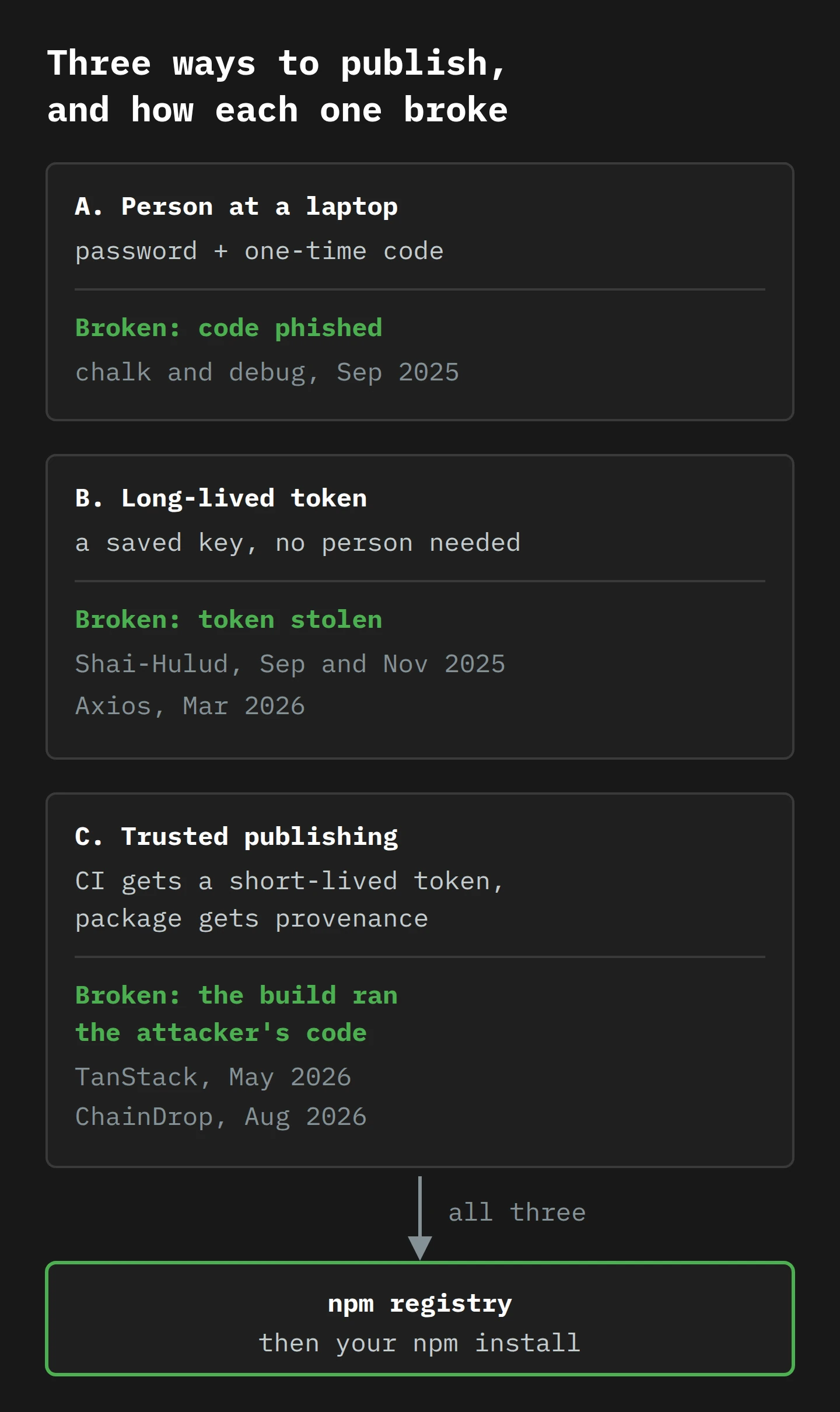
Part 4: One Year of Break-Ins
Now that the links have names, we can watch them break, roughly in date order.
September 2025: chalk and debug (the phished code)
On 5 September 2025, according to Sygnia's timeline, someone registered the domain npmjs.help. Three days later, an email from [email protected] reached Josh Junon, the maintainer of a large family of small, foundational packages. It warned that his account would be locked unless he updated his two-factor settings within 48 hours. Sygnia records a phishing link ending in setup-totp. The email went out at 13:00 UTC, and the first malicious release appeared at 13:16.
Sixteen minutes. Junon confirmed it himself two hours later:
Yep, I've been pwned. 2FA reset email, looked very legitimate.
Only NPM affected. I've sent an email off to @npmjs.bsky.social to see if I can get access again.
Sorry everyone, I should have paid more attention. Not like me; have had a stressful week. Will work to get this cleaned up.
— Josh Junon (@bad-at-computer.bsky.social), 8 September 2025 on Bluesky
I include that post because it is the most honest thing anybody wrote all year, and because it corrects the idea that supply-chain attacks happen to careless people. The lure was a 2FA reset, and the fake page's address ended setup-totp. Junon was tired, and the email was good. The link that broke was the type of second factor: a code a human can be persuaded to type into the wrong page. A security key or passkey would not have worked on npmjs.help. (I wrote about the social side of this in the helpdesk post: attackers aim at the moment a person is trying to be helpful.)
August 2025: Salesloft Drift (a detour, in a different building)
A short step back in time, because it came to light the same fortnight and it is the same idea wearing a suit.
Between 8 and 18 August 2025, according to Unit 42 at Palo Alto Networks, a threat actor used "compromised OAuth credentials" from the Salesloft Drift integration to pull data out of customers' Salesforce environments. Drift is a chat and sales tool that companies connect to Salesforce, and that connection is an OAuth token: a standing permission for one app to act inside another. After taking the data, the actor appeared to be "actively scanning the acquired data for credentials". Unit 42 told customers to search their own data for secrets such as AWS access keys and Snowflake logins, because those are the keys to somewhere else.
Unit 42's follow-up made the point plainly: the stolen token "bypassed traditional defenses like MFA" and gave "legitimate, persistent access to hundreds of customer Salesforce instances". It also has the best single line on the topic: "Dormant integrations are forgotten backdoors."
It is not npm, but it is the same shape. Your supply chain includes every app you have clicked "Allow" for, and each of those permissions is a token that does not log out.
September 2025: Shai-Hulud (the package that publishes itself)
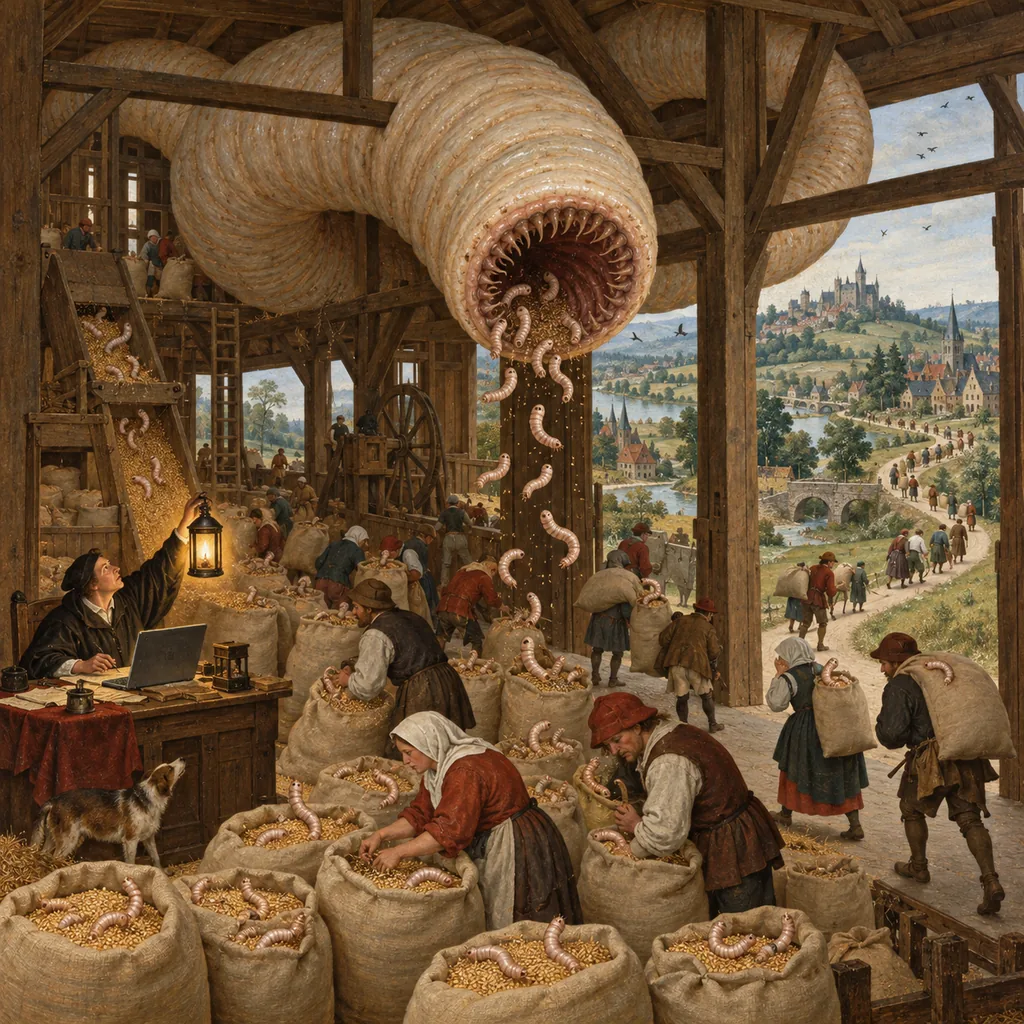
A week after chalk, something much nastier appeared. Sonatype's write-up on 17 September counted "over 180 compromised packages", including some published under CrowdStrike's npm scope, and described malware "explicitly designed to spread itself, persist, and magnify its impact".2
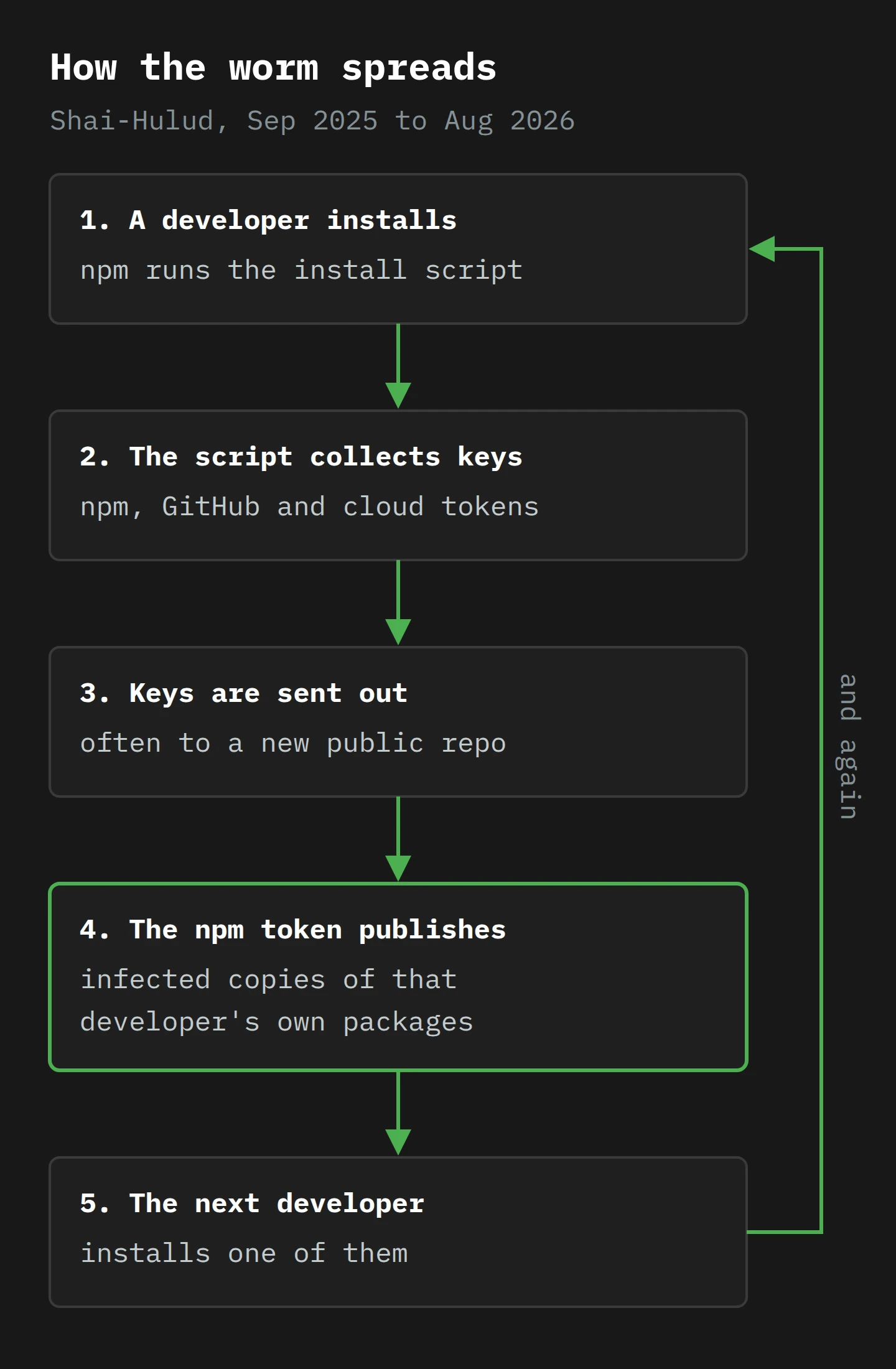
Here is what the malware did once it ran on a developer's machine or build server, according to Sonatype:
- It collected environment variables and tokens for npm, GitHub, AWS and GCP, and ran TruffleHog, a secret-scanning tool, to find more.
- It created a public GitHub repository called "Shai-Hulud" under the victim's own account and committed the stolen data to it.
- It pushed a GitHub Actions workflow to a new branch in each of the victim's other repositories and opened a pull request, so that, once merged, their secrets would be sent out as well.
- It used any npm token it found to publish infected versions of the packages that developer maintained.
Step 4 is the one that matters. Every developer it infected became a publisher of new infections, using the long-lived tokens sitting on their machines and in CI. After the first few victims, it did not need to phish anybody.
By 22 September, GitHub, which runs npm, said it had removed more than 500 compromised packages. CISA's alert the next day advised organisations to pin dependencies to releases from before 16 September, rotate every developer credential and require phishing-resistant MFA.
GitHub also announced the fix: deprecate classic tokens and TOTP, make publishing tokens short-lived, and push everyone to trusted publishing. The changelog on 29 September set the dates: new write-enabled granular tokens would default to seven days and last no longer than 90, new TOTP setups would stop, and classic tokens would be revoked in mid-November 2025.
It was the right direction. The next year showed how long "direction" takes.
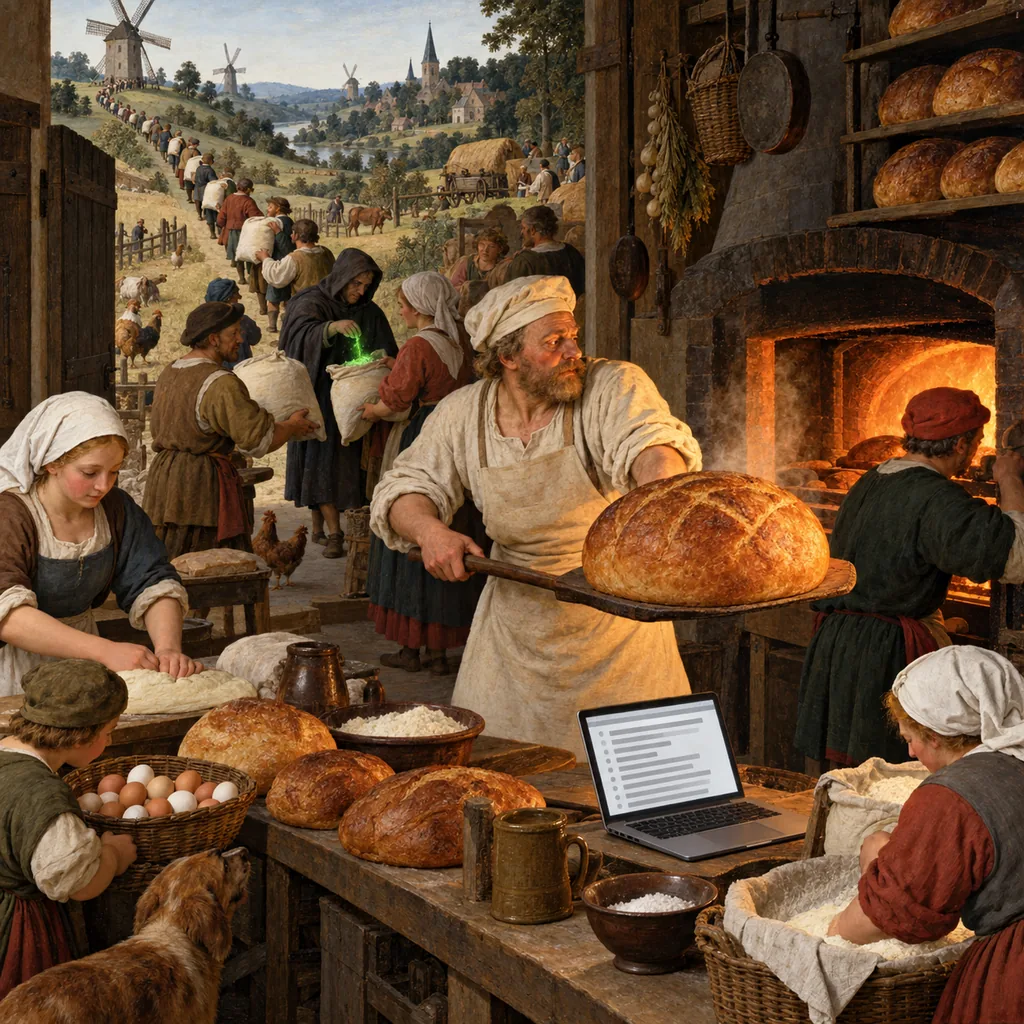
November 2025: Shai-Hulud 2.0 (earlier, wider and spiteful)
On 24 November 2025, the worm came back. Wiz's analysis found about 700 infected packages, including ones from Zapier, ENS Domains, PostHog and Postman, and more than 25,000 GitHub repositories full of stolen data, appearing at a rate of about a thousand every 30 minutes.
Three things changed. First, it moved earlier. The new version ran "only during the preinstall phase", through new files called setup_bun.js and bun_environment.js. preinstall is the first script npm runs, so the payload started before anything else in the install, on every laptop and build server that pulled the package.
Second, it spread the damage. Wiz saw "cross-victim exfiltration": secrets from one victim could land in a repository created under another victim's account. In a verified, de-duplicated sample, Wiz counted 775 GitHub access tokens, 373 AWS credentials, 300 GCP credentials and 115 Azure credentials.
Third, it stayed. The malware registered the infected machine as a self-hosted GitHub Actions runner named SHA1HULUD, and added a workflow that let the attacker run commands on it by opening a discussion in a repository. Your laptop became somebody else's build server. GitHub's December summary added that the new wave included "destructive functionality" and that its speed "signals an organized adversary".
The broken link was the same: publishing tokens, sitting where install-time code could read them. Classic tokens were being revoked that month. Bypass-2FA granular tokens were not.
March 2026: Axios (the old key next to the new lock)
Axios is a widely used JavaScript HTTP client: the thing many apps use to talk to APIs. On 31 March 2026, two malicious versions appeared: 1.14.1 and 0.30.4. Datadog found that 1.14.1 did not change a line of Axios' own code: its source was "identical to 1.14.0". The only meaningful change was a new dependency, [email protected], whose postinstall script downloaded a remote access trojan for macOS, Windows or Linux and then deleted the evidence, replacing its own package.json with a clean copy.
The maintainer's post-mortem says the attacker reached his computer "through a targeted social engineering campaign and RAT malware" that began about two weeks earlier. The first malicious version went live at 00:21 UTC, and npm removed them at 03:15. While they were up, the attacker used the compromised account to delete the issues that community members opened to warn everyone. Microsoft attributed the attack to Sapphire Sleet, a North Korean state actor.
Here is why it matters. Axios had already moved its main release line to trusted publishing. Datadog shows that the previous release, 1.14.0, carried the trustedPublisher marker that trusted publishing adds, and 1.14.1 did not. So how did the attacker publish it at all?
According to Huntress, the publish workflow "still passed NPM_TOKEN as an environment variable alongside OIDC credentials". And: "When both are present, npm uses the token." Datadog adds that the older 0.x line still relied on a long-lived token. The new lock was on the door. The old key was still under the mat, and it still opened the door. Huntress says the exact way the token was stolen "remains undetermined", which, given a RAT on the maintainer's machine, is not a large mystery.
The post-mortem's lesson is blunt: "Detection depended entirely on the community noticing." A release with no trusted-publisher marker and the attacker's email on the maintainer record went out on one of the most downloaded packages on the registry, and nothing on the project's side raised an alarm.
CISA's alert on 20 April included two settings worth copying: ignore-scripts=true to stop install scripts, and min-release-age=7, so that npm installs only versions that have been published for at least seven days. npm's own description of the second setting is that npm "will build the npm tree such that only versions that were available more than the given number of days ago will be installed". A three-hour attack cannot reach you through a seven-day wait.
May 2026: TanStack and the genuine docket
TanStack makes widely used JavaScript libraries, including a router for React. On 11 May 2026, between 19:20 and 19:26 UTC, an attacker published 84 malicious versions across 42 @tanstack packages. TanStack's post-mortem is refreshingly direct: "No npm tokens were stolen", and the publish did not go through a maintainer's account. TanStack used trusted publishing. There was no key under the mat.
So the attacker got the bakery's own van to carry the poison. The post-mortem describes three weaknesses chained together, and "none alone is sufficient":
- A workflow that ran strangers' code. A bundle-size workflow ran on pull requests from forks, using a GitHub Actions trigger called
pull_request_target, which runs in the main repository's context. It checked out and built the attacker's code. - A shared cache. The attacker's code wrote into the pnpm package cache under the same key that the release workflow would later look for. Pull-request runs and main-branch runs shared the cache, so when the next real release ran, it restored the poisoned cache "entirely as designed".
- A token in memory. The release workflow legitimately had permission to request an OIDC token for trusted publishing. The attacker's code, now running inside that workflow, found the runner process and read the token straight out of its memory. Then it published directly to npm.
The result was, as Snyk put it, "the first documented case of a malicious npm package carrying valid SLSA provenance". The provenance was not forged. These packages really were built by TanStack's release workflow on TanStack's main branch. TanStack's own summary of the lesson is short: "OIDC trusted-publisher binding has no per-publish review."3
An outside researcher spotted the release about 20 minutes later. The post-mortem admits: "No internal alerting."
Two days later, OpenAI said that two employee devices had been hit, and this is the most useful detail of the year. After the Axios incident, OpenAI had sped up the rollout of package manager settings "with controls like minimumReleaseAge". The rollout was phased, and "the two impacted employee devices did not have the updated configurations that would have prevented the download". The Register reported that OpenAI said "only limited credential material was successfully exfiltrated", but it still rotated the certificates that sign its macOS apps and asked users to update by 12 June.
Read that again, slowly. The updated settings, release-age delay included, would have stopped it. The two machines without them were hit. A control you have on most machines protects exactly those machines.
August 2026: ChainDrop (the worm that moves into your editor)
Which brings us to this month. On 4 August 2026, Datadog found a malicious commit in the repository of keyv, a small key-value storage library that sits under a lot of caching code. The commit went straight to the main branch, without a merged pull request, and the project's own release workflow then built and published it. Datadog found "Genuine SLSA provenance for [email protected]" and gave the clearest statement of the problem I have read: "a valid attestation can faithfully bind a malicious source and an attacker-controlled build to the resulting package. It is neither forged nor a safety verdict."
By the time Elastic Security Labs wrote it up on 6 August, more than 400 packages were affected, with a combined 1.3 billion monthly downloads. It is recognisably Shai-Hulud: a preinstall hook, Bun, heavy obfuscation, and a collector that looks for "over 300 unique patterns" of secrets, now including credentials for Anthropic, Claude, Codex, Cursor, OpenAI and Gemini as well as the usual cloud, GitHub and npm tokens. To spread, it looks for an npm token with write access and bypass_2fa, then republishes every package that token can reach. It even reads its command server's address from an Ethereum smart contract, so the attacker can move servers without changing the malware.4
The new part is where it hides. According to Elastic, the worm writes two small configuration files into repositories it can reach:
- a
SessionStarthook in.claude/settings.json, which runs a script each time a Claude Code session starts; - a
folderOpentask in.vscode/tasks.json, which runs a script when the folder is opened in VS Code.
If the stolen credential is a GitHub App token, it commits these to up to 50 branches in each repository it can reach. Elastic's conclusion is that a developer can be infected just by opening the repository.
Both are real, documented features, which is the uncomfortable part. Claude Code's hooks documentation lists .claude/settings.json as project-level settings that "can be committed to the repo", and notes that SessionStart "runs on every session". VS Code's tasks documentation describes "runOn": "folderOpen" as a task that "will be run when the containing folder is opened". They exist so a team can share its setup. They also mean a repository is no longer just files you read. It is instructions your tools may follow when you open it.
So in one year the attack moved from the registry login, to the developer's tokens, to the build pipeline, to the source repository, to the developer's editor.
Part 5: Wren Locks the Pantry
Meet Wren. Wren is the lead developer at a made-up software company in Hobart that builds booking systems for tour operators. (Wren is not real. The tour operators are, and they would like their bookings to keep working.) She has six developers, a few dozen repositories, two npm packages the company publishes for partners, and a Salesforce instance full of customer data. After the ChainDrop news, her manager asks: "Would that have hit us?"
Wren spends a week finding out, in the order of the supply chain: what comes in, what runs, what goes out and who is connected.
Monday: what comes in
Two repositories have no committed lockfile, because someone added package-lock.json to .gitignore in 2022 to "stop merge conflicts". Wren commits them, and changes every CI pipeline from npm install to npm ci. Then, in a shared .npmrc in each project and in the team's development image, she sets:
min-release-age=7
ignore-scripts=true
A version must now have been on the registry for seven days before it can be installed. The chalk releases lasted about two hours, Axios' about three, and TanStack's were all deprecated within two. On those timelines, a seven-day delay keeps them out, as long as nobody overrides it. The catch is that a real security fix waits too, so Wren writes down who may override the delay, one named package at a time, with a second person checking the release first.
Tuesday: what runs
ignore-scripts=true breaks three things: an image library that compiles native code, a database driver that downloads a binary, and a Git hooks tool. Wren checks each script, then runs those three by name in a documented install step. The list of packages allowed to run code at install time is now three names long. Before Tuesday, it was "all of them".
Next, the editors. Wren has each developer keep VS Code's Workspace Trust on and open unfamiliar repositories in Restricted Mode, which limits "AI agents, terminal, tasks, debugging, workspace settings, and extensions". The tasks docs say that "Automatic tasks never run in an untrusted workspace", and task.allowAutomaticTasks asks once per workspace, so the team answers no unless they wrote the task. Any pull request that changes .claude/settings.json or .vscode/tasks.json now needs a named reviewer, like a CI workflow change. For looking inside a suspicious repository, Claude Code has a disableAllHooks setting.
Finally, client work moves into dev containers, so an install script that gets through finds one project's code, not a home folder with every SSH key the developer owns.
Wednesday: what goes out
Now the company's own two packages, because Wren is somebody else's stranger in node_modules. She moves both to trusted publishing and, as the Axios lesson says, makes it the only path: she deletes the NPM_TOKEN secret, revokes the team's npm tokens and sets each package to "Require two-factor authentication and disallow tokens". Then she checks the release workflow against the TanStack and ChainDrop lessons:
- The job that publishes runs only on tags from the main branch, and it is the only job with permission to request an OIDC token.
- No workflow that runs on pull requests from forks uses
pull_request_targetwith a checkout of the fork's code. - The release job does not restore a cache that pull-request jobs can write to.
- The main branch is protected: no direct pushes, every change through a reviewed pull request. (ChainDrop's
keyvcommit went straight to main.) - Third-party actions are pinned to a commit hash, not a tag that can move.
Last, a small scheduled job checks the registry every hour and posts to the team channel if a new version of their packages appears without the expected provenance. Axios and TanStack both heard about their releases from strangers. Wren would like to hear it from her own robot first.
Thursday: who logs in, and how
Every developer's npm and GitHub accounts move to a security key or passkey, with TOTP removed as a fallback. This is the chalk lesson: the lure targeted a typeable second factor. A passkey will not sign in to npmjs.help, however good the email is.
Then she hunts long-lived credentials. GitHub's advice this July was blunt: "The number one thing you can do to disrupt these attacks is to remove long-lived credentials from your CI/CD pipeline." Wren finds a GitHub token with no expiry in a deploy script, an AWS key in a shell profile, and an npm token with bypass-2FA ticked on the laptop of someone who left in 2024. She revokes all three and sets an expiry policy for the organisation.5
Friday: who is connected
The job people skip, because it is not about code. Wren lists every connected app in GitHub, Google Workspace, Slack and Salesforce: every OAuth grant that lets one service act inside another. There are 41. Eleven were authorised by people who have left. One is a chat widget marketing trialled in 2023, which can still read every Salesforce contact. This is the Salesloft Drift lesson, and GitHub's December guidance puts it plainly: "Audit and revoke access for unused GitHub/OAuth apps." She removes the dormant ones, narrows the rest and books a quarterly review.
On Friday afternoon, she answers her manager. Before Monday: probably, because they used keyv indirectly, CI ran npm install, and a bypass token was lying around. After Friday, a malicious keyv would wait seven days, could not run its install script, would find no publishing token, and could not start from an untrusted folder. Her manager makes her a cup of tea, which in Hobart is a formal commendation.
What to Do This Week
Here is Wren's week as a checklist. The first three items cost almost nothing.
- Commit your lockfile and use
npm ciin CI. Review lockfile changes like code, because they are code. - Add a release-age delay:
min-release-age=7in.npmrc(npm 11), or your package manager's equivalent. Write down who can override it. - Turn off install scripts by default with
ignore-scripts=true, and allow the few that need them by name. GitHub says npm 12 will make this the default; you do not need to wait. - Develop in containers or VMs, so one bad script sees one project.
- Treat editor and agent config as code. Review changes to
.vscode/tasks.json,.claude/settings.jsonand CI workflows, and open unfamiliar repositories in Restricted Mode. - Publish with trusted publishing only. Delete stored npm tokens and set packages to disallow tokens.
- Harden the release workflow: protected main branch, no
pull_request_targetwith untrusted checkouts, no caches shared with pull-request jobs, actions pinned to hashes. - Watch your own releases for any version without the expected provenance.
- Use phishing-resistant MFA (security keys or passkeys) on npm, GitHub and email.
- Give every token an expiry, and revoke bypass-2FA npm tokens you cannot justify.
- Review connected apps every quarter, and remove the dormant ones.
- If you were hit, rotate everything the machine could reach: GitHub, cloud, SSH, CI secrets and AI tool keys, not only npm.
Questions to ask your software vendors. Your vendors run npm install too, and their build servers are part of your supply chain. Ask them:
- Do you install from a committed lockfile in CI, and do you use a release-age delay? How long?
- Are install scripts off by default in your builds?
- Do you publish with trusted publishing only, with tokens disallowed? Do your releases carry provenance, and do you alert when one does not?
- Do your developers use phishing-resistant MFA on code and package accounts?
- How quickly did you check your exposure to the Axios, TanStack and ChainDrop releases, and what did you find?
- Which of our systems does your app hold an OAuth token for, with what scope, and how would we revoke it in a hurry?
"We use a scanner" answers one question out of six.
Final Thoughts
Think back to that Monday morning, and the one line you typed that brought in a few hundred strangers. None of that has changed. The tide-times page still needs its date library, and the date library still stands on a tower of small packages maintained by tired, generous people who owe you nothing.
What has changed is where the attacks land: from the registry login to the editor you open every morning. Each defence the ecosystem added was worth adding, and each one showed the attackers where to go next. The single idea I would like you to keep is this: every security feature proves one specific thing, and you need to know which thing. A lockfile proves you got the same package as last time. Provenance proves where it was built. 2FA proves who logged in. None of them proves the code is safe. A delay, a disabled script and a missing token do not prove anything either, but they give the rest of the internet a week to notice before the code reaches you.
So this week, commit the lockfile, add seven days of patience to your .npmrc, and go and find the oldest token you own. You will be surprised how old it is.
Now, if you'll excuse me, my tea has been steeping for seven days, which I am told is best practice. It has passed the release-age check. I am less sure it has passed the taste test.
Notes
-
Subresource Integrity is the browser feature where a
<script>tag carries a hash, and the browser refuses the file if it does not match. The lockfile'sintegrityfield uses the samesha512-…format, so if you have seen one, you can read the other. ↩ -
Shai-Hulud is the name of the giant sandworms in Frank Herbert's Dune. Later waves kept up the theme, which tells you something about the attackers' reading habits and nothing reassuring about their plans. ↩
-
The Register quoted researcher Nicholas Carlini's warning that the TanStack payload installed a "dead-man's switch": if the stolen GitHub token was revoked, it would wipe the disk. So the order matters in a clean-up. Isolate the machine first, then rotate its credentials. ↩
-
Elastic also found commits containing the stolen GitHub token next to a message claiming that blocking the key will crash the live production servers of all third-party clients. Elastic reads it as a way to scare developers out of revoking the token. Revoke the token. ↩
-
As of 31 July 2026, npm tokens with bypass-2FA can no longer create tokens, add maintainers or change trusted publishing settings, and GitHub says they are due to lose direct publishing from January 2027. Until then, a bypass token can still publish, which is the exact permission the worms look for. ↩