The Visitors' Book: Why Your Analytics Vendor Is Part of Your Attack Surface
Your phone buzzes at 9:40 on a Thursday morning. It is an email, and it is the most polite email you have had all week.
"Hi Priya," it begins. That is your name. "We noticed a sign-in to your organisation, org-Hk3r9, from a Chrome browser on macOS near Hobart, Tasmania. If this was you, no action is needed." That is your organisation ID. That is your browser, your laptop and, as it happens, your suburb, give or take a hill. "Because you recently arrived from our documentation page, we have prepared an updated billing verification link for your API account. Please confirm your details within 24 hours to avoid interruption to service."
You did come from the documentation page, last Tuesday. You do use Chrome on a Mac. You do live near Hobart, where the mountain is currently wearing a hat of cloud and there is, statistically, a 60% chance of a second cup of tea. Every fact in the email is true. The only false thing in it is the link.
And the thing that makes your skin prickle is that nobody should know all of this. You have never told a stranger your org ID. You cannot remember telling anyone your org ID. It feels as if someone has been standing behind your chair for a month with a clipboard, taking notes, and has now written to you in the warm tone of a colleague.
Put the phone down for a moment. Nobody was behind your chair. Nobody read your chats or your API requests. What happened is less dramatic and much more common: the clipboard was a small piece of JavaScript on a website you use, and the notes were sent, as designed, to a company that helps the website count things. That company is an analytics vendor. Its job is to be told about you.
I made Priya's email up. The data in it I did not make up. On 26 November 2025, OpenAI told users of its API platform that an attacker had exported a dataset from Mixpanel, the analytics provider it used on platform.openai.com. The exposed fields: the name on the API account, the email address, an approximate location from the browser (city, state, country), the operating system and browser, referring websites, and organisation or user IDs. The next day, Mixpanel's chief executive wrote that it all began when "Mixpanel detected a smishing campaign". Smishing is phishing by text message. So a phish led to a dataset, and OpenAI's own advice was that the dataset "could be used as part of phishing or social engineering attacks". Phishing all the way down.
Here is the plan. We will open up an analytics event and see what the vendor's code writes into it without asking you. We will walk the November timeline, work out why "just analytics" is a phisher's starter kit, and move the vendor from the "marketing tools" column of your risk register into the "attack surface" column where it belongs. Then a (made-up) growth lead in Hobart will read his own tags, field by field, and strip them back before Friday.
Let's get into it.
Part 1: What a Visitors' Book Knows
Start with something you have signed a hundred times without thinking about it: the visitors' book at the front desk of an office building.
You write your name, your company, who you are there to see and the time you arrived. Sometimes there is a column for your car registration. Nobody thinks of the visitors' book as sensitive. It is on a lectern in the lobby. It exists for a dull, sensible reason: so the building knows who was inside if the fire alarm goes off.
Now think about what the book knows as a whole. After a month, it lists every supplier who visits your finance team, the name of the person each one sees, and the days they come. It knows that a partner from a law firm came three times in the week before an announcement. It knows the name of the new contractor on level four. Each line is harmless. The book is a map of who trusts whom.
Hold that picture, because an analytics event is a line in a visitors' book, and an analytics vendor keeps the book.1
Naming the line: events, properties and identity
In analytics terms, each line is an event: a record that something happened. It has three parts.
- An event name: "Page Viewed", "Sign Up Clicked", "API Key Created". This is the thing you actually wanted to count.
- Properties: key-value pairs that describe the event.
plan: "pro",button: "upgrade",page: "/billing". - An identity: some ID that says which visitor did it, so that the vendor can join this event to the others from the same person.
When you write your own tracking code, you choose the event name and the properties. That part feels under control, because you typed it. The trouble is the rest of the line, which the vendor's software development kit (SDK: the vendor's library of code that runs in your visitor's browser) fills in for you.
What the machine writes in the book
Mixpanel publishes the list of what its JavaScript SDK adds by default, which is to its credit, and I wish more vendors made it this easy to read. According to its default properties reference as it stood in November 2025, every web event carries, among others:
$device_id, an ID generated in the browser, and$user_id, "the identified ID of the user", once you have told the SDK who they are;$osand$browser, plus the browser version and the screen width and height;$current_url, the full address of the page the event happened on;$referrerand$initial_referrer, the page that sent the visitor to you, now and on their first visit, plus any UTM campaign tags from the link they clicked;$city,$regionandmp_country_code.
That last group deserves a closer look, because nobody types it. The SDK sends each event from the visitor's browser, so the request arrives with the visitor's IP address attached. Mixpanel's servers look that address up in a local copy of MaxMind's GeoIP database, write down the city, region and country, and, in Mixpanel's words, the IP address "is discarded once geolocation data is derived". So the vendor does not keep the address. It keeps where the address was. The same page notes that there is "no means to selectively disable one or two of the three geolocation properties". You get city, region and country together, or none of them.
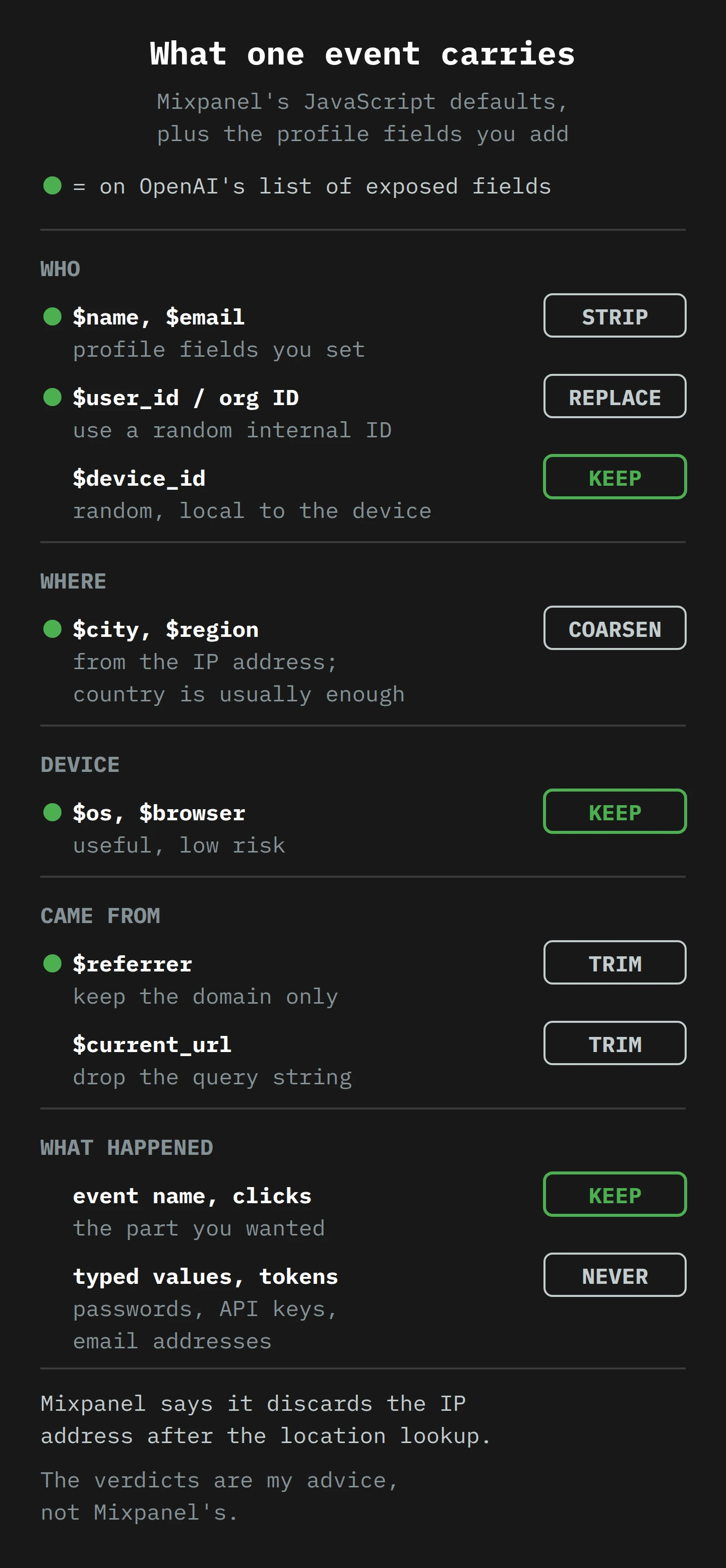
Put the defaults next to OpenAI's list of exposed fields and they line up almost perfectly. "Approximate coarse location based on API user browser (city, state, country)" is $city, $region and the country code. "Operating system and browser" is $os and $browser. "Referring websites" is $referrer. I do not know how OpenAI configured its tags, and its disclosure does not say. But nothing on that list needs an exotic setup. It is what a normal installation collects.
The column that turns a line into a person
So far, the book has a device ID, a city and a browser. That is behaviour data about a visitor. The step that turns it into data about a person is the one most teams take on purpose, on day one, because the vendor's reports are much nicer with names in them.
In Mixpanel's SDK it is two calls. identify() ties the current device to your own user ID. The JavaScript SDK documentation recommends doing it "at account registration and at log in", and recommends against calling it for anonymous visitors. Then people.set() writes properties onto that user's profile, a separate record that every event from the user is joined to. Mixpanel's user profile docs recommend the reserved properties $name, $email and $phone "if you're uploading a user's name, email, or phone", because the interface shows them by default.
That is the rest of OpenAI's list: the name on the account, the email address, and "Organization or User IDs associated with the API account". Visitors' book, name column, company column. Everyone signs it, because the pen is right there.
The ink you did not know you were using
There are two more ways that a vendor ends up with more than you meant to send, and both are worth knowing even if you never switch them on.
The first is autocapture: the SDK records clicks, form submits and page views by itself, so you do not have to write tracking code for each button. Mixpanel's version, as documented in November 2025, is careful. The input option records "when an input is provided" but "will not capture input content", and form submits are tracked "but not submission content". But it does collect, by default, a set of HTML attributes from whatever was clicked, including aria-label, href and name. If your developers put a customer's email address into a button's label, or a password-reset token into a link, autocapture will write it down. It is doing exactly what it was told. It just was not told what your markup contains.
This is not a hypothetical. In February 2018, Mixpanel published a post about its older Autotrack feature. A customer had noticed it "sending the values of password fields in events". The cause was a March 2017 change to React, which placed copies of hidden and password field values into the elements' attributes, where Autotrack then read them. About 4% of Mixpanel projects were affected. Mixpanel deleted the data, fixed the SDK and turned Autotrack off by default for new projects. Nobody at either end intended to collect a single password. A framework update did it.
The second is session replay, which records the structure of the page and the visitor's interactions so you can watch a reconstruction later. Mixpanel's privacy controls page says Mixpanel "attempts to mask all user input text", and that you cannot turn this off. Other text is masked by default. You can turn the text masking off with one setting, and "other elements not listed in this table are captured by default". Replay tools in general have a history here. In 2017, researchers at Princeton found replay scripts on 482 of the top 50,000 websites and watched a pharmacy's pages send prescription details, alongside customers' names, to a replay vendor. Their verdict on relying on each site to mark what is sensitive: "a fundamentally insecure model".2
The lesson of Part 1 is simple, and a little uncomfortable. The data that leaked in November was not an accident of collection. It was the collection, working as designed.
Part 2: A Text Message, a Dataset and a Very Long Fortnight
Now the incident itself, in the order it happened. I will stick to what the companies said in November, because the gaps matter as much as the facts.
On 8 November 2025, according to Mixpanel's own post, it "detected a smishing campaign and promptly executed our incident response processes". OpenAI's account says that on 9 November, Mixpanel "became aware of an attacker that gained unauthorized access to part of their systems and exported a dataset containing limited customer identifiable information and analytics information". The two dates probably describe two moments in the same week (the texts, and then the discovery of the export), but neither company spells that out.3
Mixpanel has not said who received the text messages, or how a text turned into access. Its list of what it did next is the best clue. It "revoked all active sessions and sign-ins", "rotated compromised Mixpanel credentials for impacted accounts" and "performed global password resets for all Mixpanel employees". My reading, and it is only mine, is that people at Mixpanel were the target, and that what the attacker gained was a way to sign in as one of them. The same list mentions "impacted accounts", which could also mean customer logins, so treat this as a guess. If that is right, this is the same shape as the helpdesk attacks I wrote about in July, where a kind person gives a stranger the key. It is also a cousin of session hijacking: revoking every active session is what you do when you are not sure whose badge is in whose pocket.
Then there is a quiet stretch. Mixpanel says it "proactively communicated with all impacted customers". According to Protos, Mixpanel shared details of the attack on 21 November with at least one affected firm, reported to be CoinTracker, a crypto portfolio and tax service. OpenAI says Mixpanel told it an investigation was under way, and "on November 25, 2025, they shared the affected dataset with us". On 26 November, OpenAI published its notice, which says it had already removed Mixpanel from its production services and had terminated its use of Mixpanel.
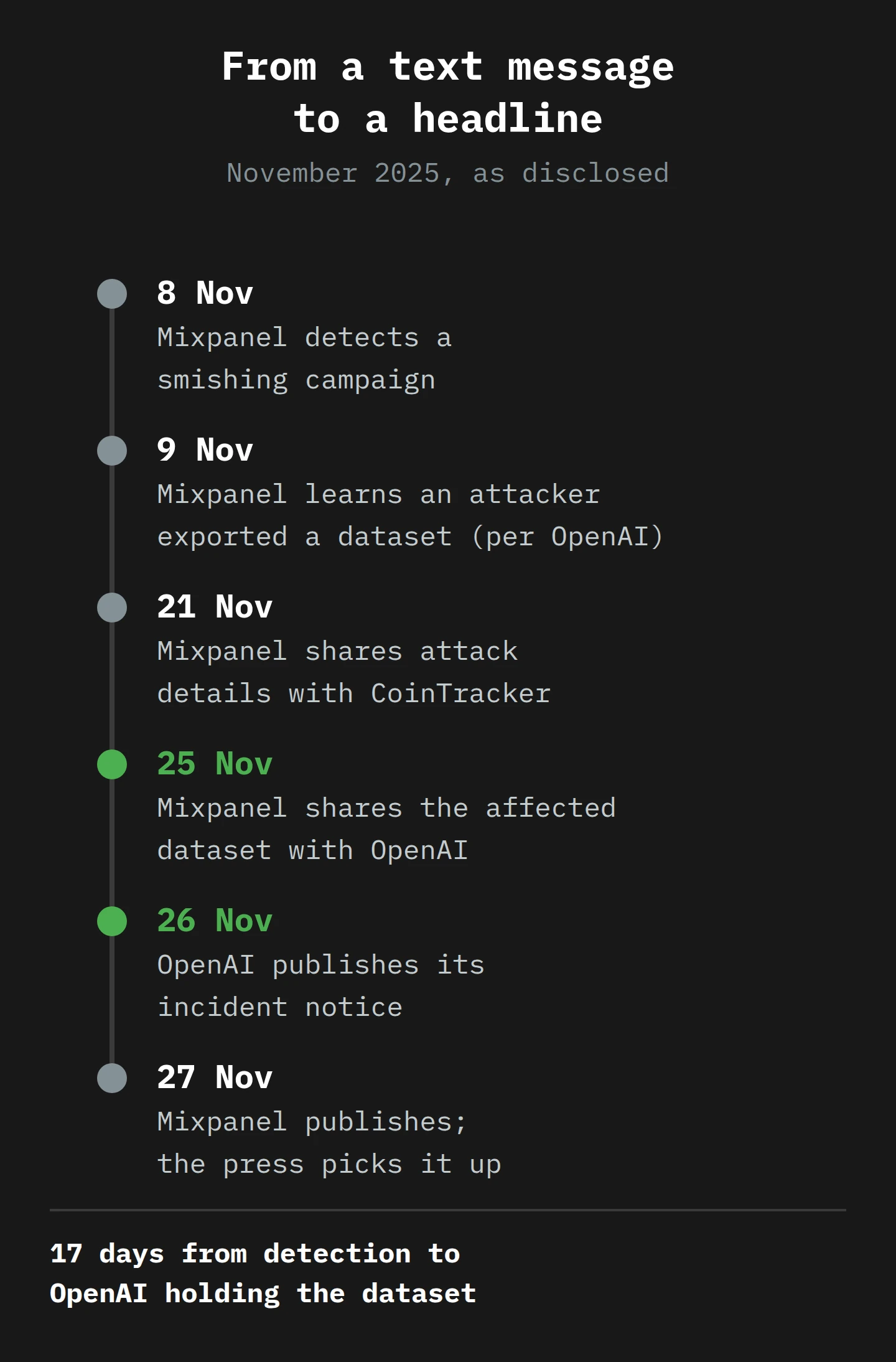
On 27 November, Mixpanel published its post and BleepingComputer reported the story, noting that users had reported CoinTracker was affected too. Mixpanel's summary was that the incident "impacted a limited number of our customers", and its plainest line was reassurance by elimination: "If you have not heard from us directly, you were not impacted."
What OpenAI said was not in the book
OpenAI's notice is careful about what was not exposed, and the list is long: "No chat, API requests, API usage data, passwords, credentials, API keys, payment details, or government IDs". Its FAQ adds that session and authentication tokens were not affected. Because passwords and API keys were not affected, it did not recommend password resets or key rotation.
That is good news, and it is also the whole point of this article. The attacker did not need any of the things on that list. The list of things that were exposed is a list of the things you need to write a convincing letter.
What the book looked like for someone else
CoinTracker's slice of the book was different, because CoinTracker sent different things. Protos reports that CoinTracker warned the export included "email addresses, locations derived from IP addresses, device metadata, and summaries of users' transactions". Same vendor, same incident, different payload. For OpenAI's users, the book said "this person builds with AI at this company". For CoinTracker's users, it said something closer to "this person has crypto, and roughly this much activity".
That difference was decided long before 8 November, by whoever wrote each company's tracking plan. The vendor did not choose what went into the book. Each customer did, one property at a time.
Part 3: Why "Just Analytics" Is Enough

When a breach "only" involves names and email addresses, the usual reaction is relief. No passwords, no card numbers, no crisis. I want to take that relief apart slowly, because it rests on a wrong model of how phishing works.
A phish is a forgery, and forgeries need reference material
Think about how a forger works. A forged letter from a bank is not convincing because of the forger's handwriting. It is convincing because of the details: the right logo, the customer's real name, the last four digits of a real account, a reference to something the customer actually did. Each true detail buys a little trust, and the forger spends all of it on the one false detail: the link, the phone number, the request.
Security people call a targeted, detail-rich phish spear phishing, as opposed to the mass "Dear Customer" kind. The difference in success is the difference between a stranger shouting in the street and a stranger who knows your name, your employer and where you were last Tuesday. The first you ignore. The second you hesitate over, and hesitation is all a phish needs.
Now go back to the six fields. Each one is a piece of reference material:
- Name and email address: who to write to, and how to greet them.
- Organisation or user ID: an internal-looking string that almost no outsider should know. Quoting it back is the single most convincing move a forger can make, because it feels like proof of an inside view.
- City, region and country: the "sign-in near Hobart" line, and a way to pick a local time zone for sending the email.
- Operating system and browser: "a sign-in from Chrome on macOS", which matches the reader's own machine and so reads as genuine.
- Referring websites: context about how the person uses the service. "Because you came from our documentation…" is the kind of line that makes a reader think "yes, I did".
None of these is a secret in the password sense. Together, they are a template. That is why OpenAI's advice in its notice was about phishing rather than passwords: "remain vigilant for credible-looking phishing attempts or spam", check that messages come "from an official OpenAI domain", and remember that "OpenAI does not request passwords, API keys, or verification codes through email, text, or chat".

And the prize is the key, not the name
It is worth asking what the forger wants at the end. For an API platform, the answer is obvious: API keys, and the billing account behind them. A developer who pastes a key into a fake "verification" page has handed over something that can be used, and billed, at once.
We have seen the same appetite this year from a different direction. In August 2025, Google's threat intelligence team described a campaign in which an attacker used stolen OAuth tokens (delegated access passes) for the Salesloft Drift chat app to export large volumes of data from Salesforce instances. Then the attacker searched the exports for "AWS access keys (AKIA), passwords, and Snowflake-related access tokens". Different vendor, different method, same pattern: get into a third party that holds your data, take the data, look for the keys to the next door. The analytics dataset is the address list. The keys are what the letters are for.
"We hash the email, so it's anonymous"
At this point someone in the meeting usually says, "It's fine, we hash the email before we send it." A hash is a one-way scramble: feed in [email protected], and out comes a long, fixed string that looks random. You cannot run the scramble backwards. Mixpanel's own privacy page suggests hashing a user's ID if you only want aggregate analysis.
Hashing has a use, but it is a weaker shield than it sounds, and the US Federal Trade Commission put this bluntly in July 2024: hashes "aren't 'anonymous' and can still be used to identify users". The reason is in the mechanism. A hash is deterministic: the same input always gives the same output. So you cannot reverse it, but you can guess it. Take a list of a million likely email addresses, hash each one, and compare. The FTC's note says email addresses and phone numbers are "trivially reversible through guess and check", and that modern computers can do it "in a matter of seconds". Worse, a hash is a stable identifier in its own right. It "still creates a unique signature that can track a person or device over time".
So a hashed email in an analytics export is, for an attacker who already has a leaked list of emails (and there are many), the same as the email. Hash with a secret key that the vendor never sees, or better, do not send the email at all.4
Why the vendor's book is a better target than yours
There is one more reason attackers like analytics vendors, and it is structural. A vendor serves thousands of customers from one platform. Its staff have accounts that can see into many projects. Compromise one of those accounts and you do not get one company's visitors' book. You get the shelf.
Verizon's 2025 Data Breach Investigations Report, released in April, found that third-party involvement in breaches had doubled to 30%. In Australia, the Privacy Commissioner's statistics for the first half of 2025, published on 4 November, warned that "organisations are responsible for the actions of third-party providers". That is the regulator's version of the visitors' book problem: the book is kept by a contractor at the front desk, but it is your building, and your visitors.
Part 4: The Vendor Is on Your Boundary
So far this has been a phishing story. I want to turn it into an architecture story, because that is where you can actually do something.
What "attack surface" means
NIST, the US standards body, defines an attack surface as the set of points on the boundary of a system "where an attacker can try to enter, cause an effect on, or extract data from" it. Most teams draw that boundary around the things they run: servers, login pages, APIs, laptops. That drawing leaves out a lot. Every script tag on your site that sends data to another company extends the boundary to that company's systems, and to its staff's phones.
A useful test: if an attacker could take data about your customers out of a system, that system is on your attack surface, whoever runs it. By that test, your analytics vendor is on it. So is your session replay tool, your chat widget, your A/B testing tool and your customer data platform. The OpenAI notice says so in its own words: "This was not a breach of OpenAI's systems." True. It was a breach of OpenAI's data, held in someone else's systems, and OpenAI still had to write to its users.
Minimisation is a security control
Privacy law has a name for sending less: data minimisation. The European GDPR says personal data must be "adequate, relevant and limited to what is necessary" for the purpose. Australia's regulator, in its November 2024 guidance on tracking pixels, asks organisations to configure third-party tools "to limit the collection of personal information to the minimum amount necessary in the circumstances", which it ties to Australian Privacy Principle 3. It adds that this "should not amount to a 'set and forget' approach", and recommends regular reviews of every tracking technology on the site.
Most teams file this under compliance, in a folder labelled "Legal". I think that is the wrong folder. A field you never sent cannot be exported. Minimisation is the one control that still works after the vendor has been breached, after the phish has landed and after the session has been hijacked, because it acts on the thing the attacker wants, not on the path to it. Every other control is a lock. This one is an empty room.
Who is responsible for the book
Mixpanel's documentation is clear about who owns the problem. For GDPR purposes, "Mixpanel is considered the data processor, where as you (the customer) is considered the data controller. Your end user's data is your responsibility." And the same page says the quiet part out loud: "Mixpanel does not know, or need to know, any identifying information about users (like email or phone number). Mixpanel only needs to know that a set of events were performed by a particular user ID."
Read that again. The vendor itself says it does not need the name and email. Most teams send them anyway, because the dashboard looks friendlier with "Priya" than with u_8841. That friendliness is a real benefit to maybe three people in your company. The risk is carried by every user in the export.
A note on server-side tagging
One architecture helps a great deal here. In What is Server-Side Tagging, I described moving tags off the visitor's browser and onto a server you control, which then forwards data to vendors. The security benefit is simple: you get a checkpoint. The browser sends everything to your server, and your server decides what each vendor receives.
Google's server-side Tag Manager has a feature for exactly this, called transformations. They "include, exclude or modify event parameters" before any tag sees them. The strictest, Allow parameters, works like a guest list: anything you do not name is discarded. Google's own caution is that this removes "even values required by Google tags", so you have to know what your tags need. That is not a bug. It forces you to write down what you send, which is the whole exercise.
A server in the middle does not make the vendor safe. It makes the vendor's book thinner, and it lets you strip the visitor's IP address before a vendor ever sees it.
Part 5: Tomasz Reads His Own Tags

Meet Tomasz. Tomasz is the growth lead at a small invoicing software company in Hobart. (He is made up. The company is made up. Hobart is real and I will not hear a word against it.) The company uses Mixpanel for product analytics, Google Analytics 4 for the marketing site, and a session replay tool that a designer installed in 2023 and nobody has looked at since.
On the morning the OpenAI news lands, his chief executive forwards the BleepingComputer article with one line: "Are we exposed to this?" Tomasz does not know. That is the honest answer for most teams, and it is where this week starts.
Monday: read the requests, not the tracking plan
Tomasz does not start with the tracking plan document, because the tracking plan describes what someone intended in 2022. He starts with what the browser actually sends.
He opens the company's web app in a private window, opens the browser's developer tools, and goes to the Network tab. He types mixpanel into the filter box, then clicks through a normal day's work: log in, open an invoice, change a setting, log out. Each matching request is an event on its way to the vendor. He clicks one and reads the Payload tab. Simplified, it looks like this:
{
  "event": "Invoice Viewed",
  "properties": {
    "$device_id": "18c2f…",
    "$user_id": "[email protected]",
    "$os": "Mac OS X",
    "$browser": "Chrome",
    "$current_url": "https://app.example.com.au/invoices/4471?client=Harbour%20Joinery",
    "$referrer": "https://app.example.com.au/search?q=harbour+joinery",
    "invoice_total": 1840,
    "company_name": "Tasman Tiles Pty Ltd"
  }
}
He writes down three problems before his tea is cold. The user ID is his email address, because a developer called identify() with the email years ago. The current URL contains a client's name in the query string. And the referrer contains a search the user typed. None of these was in the tracking plan. All of them go to the vendor on every event.5
He does the same for Google Analytics (filter: collect) and the replay tool. Google's own PII guidance predicts exactly what he finds: "PII is often inadvertently sent in these URLs and titles", and visitors "sometimes enter PII into search boxes and form fields".
Tuesday: list every field and give it a verdict
Tomasz makes a table with one row per field that leaves the browser. For each he writes three things: what it is, who uses it, and a verdict. He uses the same verdicts as the diagram in Part 1.
- Strip:
$emailand$nameon the profile. He asks the three people who use Mixpanel whether they ever look someone up by name. One does, about once a month, to answer support questions. That can be done by looking up the ID in the company's own admin tool. - Replace: the user ID. It becomes the internal database ID, a random string, not the email.
- Coarsen: location. The product team uses country for pricing analysis. Nobody uses city.
- Trim:
$current_urland$referrer. Keep the path, drop the query string. - Keep: event names,
$os,$browser,$device_id, plan and feature flags. These are the reason the tool exists. - Never: anything a user typed, and anything that looks like a token. He finds none today, and adds a check so he will notice if one appears.
The company_name property gets a long discussion. The sales team likes it. But it is the organisation column of the visitors' book, and it is exactly what makes a phish credible. They replace it with an internal account ID, and sales can join the two in their own warehouse.
Wednesday: change the settings
Now the settings, one by one. All of these come from Mixpanel's JavaScript SDK and privacy documentation as of November 2025.
- Stop sending the email as the ID. Change
identify(email)toidentify(internalId). This is one line, and it is the most important change of the week. Changing the ID changes how users are joined across old and new events, so the product team agrees a cut-over date for their reports. - Remove the profile fields. Stop calling
people.set()with$nameand$email, then use the vendor's deletion tools to remove the old values from existing profiles. Stopping new data does not delete old data. - Turn off IP-based location. Initialise with
ip: false. Because the three location fields cannot be split, Tomasz sends country himself from the server, where the company already knows it from the billing address. - Block default properties he does not need. Add them to
property_blacklist, for example['$referrer', '$initial_referrer'], if the team only needs campaign tags and not full referring URLs. - Clean the URL before it leaves. Where query strings carry names or searches, strip them in the app before the event is sent. For the marketing site, turn on GA4's data redaction for email addresses and for named query parameters. Note its limits: it is "best-effort", web streams only, and it "won't prevent the collection of PII via Measurement Protocol or Data Import".
- Fence off sensitive pages. If autocapture is on, add
.mp-sensitiveto elements that show personal data, and useblock_url_regexesto keep autocapture off login, billing and API key pages. - Check the replay tool. Confirm that text masking is still on, that images are blocked, and that the replay does not run on account settings pages at all. Or ask whether anyone has watched a replay since 2023, and switch it off.
Thursday: ask the vendor the questions procurement did not
With the payload smaller, Tomasz turns to the vendor itself. The Australian regulator recommends due diligence on third-party tools and reading the agreement's safeguards before signing, and the Privacy Commissioner's November statistics say to consider outsourcing risk "at the earliest stage of procurement". The company is well past the earliest stage. It is never too late to ask, though. His questions:
- Staff access: which of your staff can see or export our project data, and what sign-in protection do they use? Codes sent by text can be phished. Passkeys and hardware keys cannot, as I covered in the helpdesk article.
- Exports: do you log and alert on large exports from customer projects? How fast would you tell us?
- Notification: what is your contractual deadline to notify us of an incident, and to give us the affected data so we can notify our own users? A vendor who takes weeks to hand over the dataset takes those weeks out of your own response.
- Residency: where is our data stored? Mixpanel, for example, offers EU and India data residency through the
api_hostsetting. Overseas storage brings in APP 8 obligations for Australian organisations. - Retention: how long do you keep raw events, and can we shorten it?
He writes the answers into the vendor register, next to the date. The regulator's word was "ongoing", so he sets a reminder for six months.
Friday: close the loop with the users
The last step is the one teams forget. Tomasz updates the privacy policy so it names the analytics vendor and says what it receives. Then he checks the company's own email authentication. OpenAI's advice to its users was to check that messages come from an official domain. That advice only works if the domain has SPF, DKIM and DMARC set up to reject forgeries, which I covered in Introduction to Email Security. If attackers are going to impersonate you with your own users' data, make sure your real domain is hard to fake.
On Friday afternoon he replies to his chief executive. "We sent the vendor names, email addresses and client names in URLs. As of today we send internal IDs, country and what people clicked. If the vendor is breached tomorrow, the export is a list of random IDs." The chief executive replies with a thumbs up, which is the highest honour a chief executive can give.
What to Do This Week
You do not need a breach notice to start. Here is the short version of Tomasz's week.
- Read the network requests. Open your site and app with developer tools, filter for each vendor, and read the payloads while you do normal tasks. What leaves the browser is your real tracking plan.
- List every field that leaves. For each one: what it is, who uses it, and a verdict (strip, replace, coarsen, trim, keep, never).
- Stop using emails as IDs. Identify users with a random internal ID. Stop writing names, emails and phone numbers onto vendor profiles, and delete the ones already there.
- Turn off what you do not use. IP-based location, full referrers, full URLs with query strings, autocapture on sensitive pages, and replay tools nobody watches.
- Put a checkpoint in the middle. If you can, send events through your own server-side container and allow only the parameters each vendor needs.
- Ask your vendors five questions. Staff access and MFA, export alerts, notification deadlines, data location, retention. Write the answers down and date them.
- Make your own domain hard to forge. Check SPF, DKIM and DMARC, so that "check the sender" is advice your users can actually follow.
Final Thoughts
Go back to Priya's email for a moment. Every fact in it was true: her name, her organisation ID, her browser, her suburb near Hobart, the documentation page she came from. None of it was stolen from her laptop. It was written into a visitors' book, one line at a time, by a script doing its job, and the book was kept at someone else's front desk.
The one idea to take away is this: the data you send to an analytics vendor is on your attack surface, and the only protection that survives a vendor breach is the data you never sent. Locks matter. Vendors should use phishing-resistant sign-in, and OpenAI was right to widen its security reviews across its other vendors. But you do not control your vendor's staff or their phones. You control what goes into the book.
So this week, open the Network tab and read one payload. Just one. If it has an email address in it, you know where to start.
It takes about as long as a cup of tea.6 Now, if you'll excuse me, I have a visitors' book to thin out, and my tea is ready.
Notes
-
The metaphor is generous to the vendor. A real visitors' book at least sits in plain sight. An analytics SDK writes its lines in a request most visitors will never see, which is why regulators keep asking for it to be named in privacy policies. ↩
-
The Princeton team also found that some replay dashboards played recordings back over plain HTTP, so the recording could be read on the network as well. That was 2017, and many vendors have improved since, but it shows how a tool built to watch customers becomes one more place their data can leak from. ↩
-
OpenAI's timeline says Mixpanel "became aware" on 9 November. Mixpanel's own post and BleepingComputer's report say detection was on 8 November. The diagram counts from 8 November, which makes the gap to OpenAI receiving the dataset 17 days. ↩
-
A keyed hash (for example HMAC with a secret that stays on your own server) is much harder to guess, because the attacker would need the secret too. It still gives the vendor a stable ID for the same person, so it is a replacement for an email, not for thinking about whether the vendor needs an ID at all. ↩
-
The exact request format differs between vendors and SDK versions, and some send events in batches or encoded bodies. The browser's Payload or Request tab usually decodes them. If not, most vendors have a debugging view that shows the same fields after they arrive. ↩
-
Reading one analytics payload takes about a cup of tea. The full field-by-field table from Tomasz's Tuesday takes longer, and usually needs a second cup and a developer who remembers why
company_namewas added. ↩