23andMe and Credential Stuffing: Your Reused Password, Their Family Tree
Picture a woman called Margit. She is 61, she lives in a tidy brick house outside Leeds, and in 2018 her son gave her a spit kit for Christmas. She did the test. She ticked the box that said yes, she would like to find her relatives, because what is the point of a family history if nobody can find you in it. She has a long, sensible password. She has never reused it. She once cut up a supermarket loyalty card on principle.
Now picture a man called Doug, on the other side of the Atlantic. Doug shares 0.8% of his DNA with Margit, which makes him something like a third cousin. Neither of them knows the other exists. In 2016, Doug signed up to a forum about restoring outboard motors, using his email address and the password Bluefin1972, and in 2019 he used the same email address and the same Bluefin1972 to sign up to the same genetics company as Margit. The outboard motor forum was breached years ago. Doug's email and password have been sitting in a text file on the internet ever since, next to a few hundred million others, waiting for someone to try them somewhere new.
This year, someone did. They logged in as Doug, with Doug's real password, on the first try. And because Doug, like Margit, had ticked the box to find his relatives, the stranger logged in as Doug could see Doug's relatives. Margit's display name. Her birth year. Her rough location. How much DNA she shares with Doug, and her ancestry reports. Margit did everything right, and her data still walked out the door, because a third cousin she has never met used the same password for his genome as for his boat motor.
If that feels like being burgled because a neighbour three streets away left his own key under his own doormat, that is roughly correct, and the rest of this article is about why.
Before the panic sets in, though: nobody broke into the genetics company's servers. There was no zero-day, no rogue employee, no hooded genius typing green text. The stranger used the front door, with a key that worked. That is the uncomfortable part, and also the useful one, because it means this is a problem you can understand from end to end, and most of the fixes are already sitting in standards that are years old.
The company is 23andMe, and this is not a hypothetical. On 1 December, 23andMe told the US Securities and Exchange Commission in an amended Form 8-K that an attacker had accessed "a very small percentage (0.1%) of user accounts" where the usernames and passwords "were the same as those used on other websites that had been previously compromised". That weekend, a spokesperson gave TechCrunch the numbers, and on 5 December the company's own blog confirmed them: roughly 14,000 accounts out of 14 million customers, and through those accounts, about 5.5 million DNA Relatives profiles and about 1.4 million Family Tree profiles. TechCrunch did the sum: 6.9 million people, roughly half of the company's customers. Margit and Doug are made up. The ratio is not.
So my plan, over a large pot of tea, is to take this apart in the order it happened to Margit. First, why Doug's old password still worked, and why the attack has a name: credential stuffing. Then why the login page did not notice. Then the part that makes this breach different from the usual "change your password" story: how one login reached hundreds of other people. And then the defences, down to the actual mechanism, plus a list you can check on your own site before the year runs out.
Let's get into it.
What Actually Happened (and What Didn't)
The story has come out in pieces since October, so here it is in order, with who said what.
The first sign was not a 23andMe announcement. On 11 August, according to TechCrunch, someone on a cybercrime forum called Hydra advertised a set of 23andMe user data, claimed to hold 300 terabytes of it, and asked for $50 million. Hackers exaggerate for a living, so treat those numbers as a sales pitch, not a measurement.1 Then, on 1 October, a threat actor "posted online a claim to have 23andMe users' profile information", which is the date 23andMe gives in its SEC filing. Samples appeared on another forum, BreachForums, allegedly covering one million users of Ashkenazi Jewish descent and 100,000 Chinese users, with profiles offered for between $1 and $10 each. On 18 October, a user called Golem posted a further set of what was claimed to be four million records, this time said to be people from Great Britain. 23andMe said at the time that it was "reviewing the data to determine if it is legitimate".
Pause on that ethnic sorting. It is the most chilling detail in the affair. The attacker packaged the records by ancestry, because ancestry was what the data was about, and because some buyers want lists of people by ethnicity for reasons that are never good. Your genome is the one thing about you that does not stop at you.
23andMe's public line moved over the same weeks. On 6 October, the company posted Addressing Data Security Concerns and added updates as it went. By 9 October, it had said it believed attackers got in "where users recycled login credentials", and that it had no "indication at this time that there has been a data security incident within our systems". In the same October posts, it said it had offered multi-factor authentication since 2019 and encouraged its use. On 10 October, it made every customer reset their password. On 20 October, it "temporarily disabled some features within the DNA Relatives tool". On 6 November, it started requiring two-step verification for everyone. Then came the 1 December filing, and on 5 December, the numbers on the blog.
The filing adds a few details that the blog does not. For a subset of the 14,000 accounts, what the attacker reached included "health-related information based upon the user's genetics", not only ancestry. The company expects to spend between $1 million and $2 million on the incident in its fiscal third quarter, which ends on 31 December. And, as of 1 December, multiple class actions had been filed against it in California and Illinois, and in British Columbia and Ontario.
So, two facts to hold onto, because the rest of the article hangs off them. First, the way in was a correct password, reused from somewhere else, on about 0.1% of accounts. Second, the damage was not 0.1%. It was about half of the customer base, and it got there through a feature working exactly as designed.
Part 1: The Key Under Every Doormat
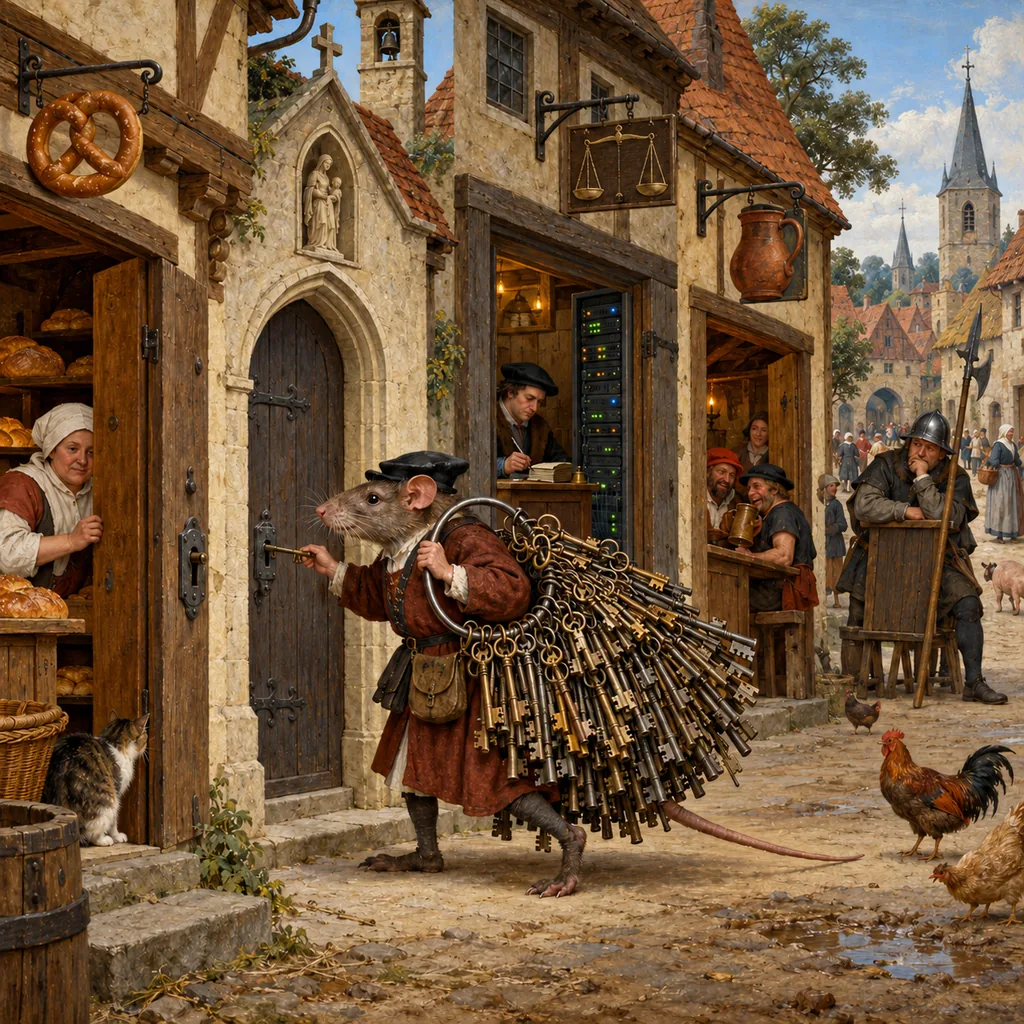
Start with something you have probably done, or at least seen done. A house key, a shed key and a letterbox key, all cut from the same blank, because the locksmith offered and it seemed tidy. One key on the ring instead of three. Lovely. Until the day you drop it in the car park at North Hobart Oval, and somebody picks it up, and now they have your house, your shed and your letters.
That is password reuse, and you know it is a bad idea. So does nearly everyone else, and most of them do it anyway. In early 2019, Google published a Harris Poll survey of 3,000 American adults, and 52% said they reused the same password for multiple (but not all) accounts. Another 13% used the same password for all of them. Only 35% used a different password for every account, and only 24% used a password manager. In the same survey, 69% gave themselves an A or a B for protecting their online accounts, which is the most human statistic I have read this year.
Now the machine version. When a website is breached, the attacker often gets its user table: email addresses and passwords, sometimes properly protected, sometimes not. The weakly protected ones get cracked, and the results get bundled with other breaches into large text files called combo lists. "Combo" is just short for combination: a username (usually an email address) and a password, one pair per line. In January 2019, Troy Hunt, the security researcher who runs Have I Been Pwned, wrote up one of these bundles, which he called Collection #1. It had 2,692,818,238 rows. After he removed the duplicates, it held 772,904,991 unique email addresses and 21,222,975 unique passwords, spread across more than 12,000 files and 87 GB of data. And that was one list.
Notice the shape of those numbers: 773 million email addresses, but only 21 million distinct passwords. A lot of people chose the same few passwords, and a lot of the same people turn up again and again across breaches. To an attacker, every row is a key that has already opened one door. The only question is which other doors it fits.
The real mechanism: credential stuffing
That question has a name. OWASP, the open community that maintains the closest thing the web has to a shared security textbook, defines credential stuffing as "the automated injection of stolen username and password pairs ('credentials') in to website login forms, in order to fraudulently gain access to user accounts". In plain words: take a list of keys that worked somewhere else, and try each one, once, in your door.
It helps to put it next to its two cousins, because they get mixed up and they need different defences. The OWASP Credential Stuffing Prevention Cheat Sheet sorts them like this:
- Brute force: many passwords against one account. Lots of keys, one door.
- Password spraying: one weak password against many accounts. One very common key (
Summer2023!), every door on the street. - Credential stuffing: known pairs from another breach against many accounts. Each key tried once, in the door of the person it was stolen from.
The last one is the nasty one, because each attempt is not a guess. The attacker already knows Doug's password. They only need to know whether Doug used it here as well. Google's researchers measured how often the answer is yes. In a 2019 study presented at USENIX Security, they built a privacy-preserving checker on top of more than 4 billion breached credentials and watched anonymised telemetry from nearly 670,000 people. They found that 1.5% of logins on the web involve breached credentials. Not 1.5% of attempts by attackers. 1.5% of ordinary logins, by real people, typing a username and password that had already leaked somewhere.
So the attacker's arithmetic is simple. Take a list of millions of pairs. Try each one on your target site. Most will fail, because most people either never signed up or used something else. A small fraction will work. With a big enough list, a small fraction is thousands of accounts. 23andMe's 0.1% was about 14,000 of them.
Part 2: Why the Front Door Didn't Notice
The obvious question at this point is why the login page let it happen. Surely a website notices when someone tries millions of logins?
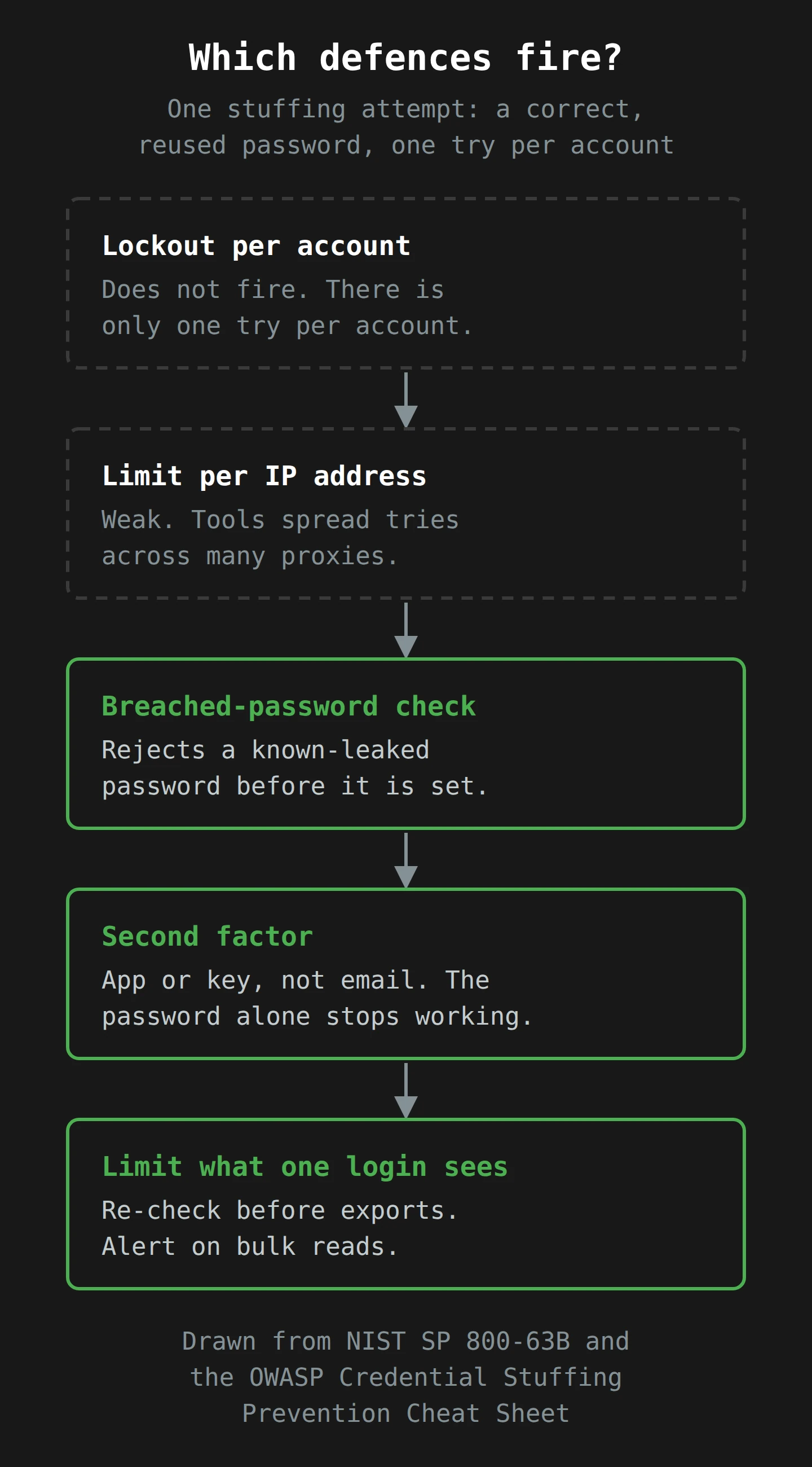
Here is the problem. Most login pages are built to stop the first kind of attack, brute force, because brute force is the one everybody pictures. The classic control is a lockout: get the password wrong too many times on one account, and the account locks for a while. NIST, the US standards body whose digital identity guidelines most of the industry quietly copies, writes this into SP 800-63B: the verifier "SHALL limit consecutive failed authentication attempts on a single account to no more than 100". Read that sentence again with credential stuffing in mind. On a single account. A stuffing attack tries each account once. It fails once on most of them and succeeds once on a few. The counter on any one account never gets past one. The lockout never fires, because from its point of view nothing is wrong.
Put that in a story, because it is easier to see with a person in it. Meet Doug's attacker, whom we will call the Clerk, because the job is clerical. Nothing in this section is drawn from 23andMe's own logs, which are not public; it is how the attack works in general, as OWASP describes it.
Monday, 2016. The outboard motor forum is breached. Doug's email and Bluefin1972 go into a file. The forum's log records nothing useful, because the forum is the thing that was breached.
Some years later. The file has been merged into a combo list with a few hundred million other rows. It is traded, sold, then given away. Nobody's system records anything at all. A text file sitting on a forum makes no noise.
Night one. The Clerk loads the list into a stuffing tool and points it at the genetics site's login form. The tool is patient. It does not fire a million requests from one computer, because that would light up every dashboard. OWASP notes that toolkits like Sentry MBA offer built-in use of proxy networks to spread requests across a large number of IP addresses, which "may defeat both IP block-lists and rate limiting".2 So the tool sends a trickle from each of thousands of addresses: a few attempts here, a few there, many of them from home internet connections that look like ordinary customers.
What the site records for a failed attempt. An unknown email address, or a known one with the wrong password. One failure on that account. Below every threshold.
What the site records for Doug. A login for Doug's account, with the correct password, on the first try, from an IP address that has made only a handful of requests. As login events go, it is one of the most normal-looking things on the whole server. The site says, quite reasonably, "welcome back".
What the site does not record. That the same tool, in the same hour, made hundreds of thousands of attempts across hundreds of thousands of accounts, and that the share of attempts naming email addresses the site has never seen was suddenly enormous. That signal exists, but only if someone looks across accounts instead of at each one.
If you keep one sentence from this section, keep this one: credential stuffing is invisible per account and obvious in aggregate. Every defence that counts failures on one account, or requests from one address, is looking at the wrong unit. The useful signal is the population view: the failure rate of logins site-wide, the share of attempts for non-existent accounts, the number of distinct accounts touched by a small set of devices or network fingerprints. OWASP's cheat sheet makes the same point in drier words: each defence "should generate volume metrics for use as a detective mechanism", because watching those metrics "may identify defense failures or the presence of unidentified attacks".
One more detail helps the attacker: the username. OWASP points out that most sites use the email address as the username, and most people use one email address everywhere, so the pair carries straight across from one breach to every other site. The attacker already has half the key before they start.
Part 3: One Login, Hundreds of Relatives
So far, this is a sadly ordinary story. OWASP calls credential stuffing "one of the most common techniques used to take-over user accounts". If it had stopped at 14,000 accounts, we would have had a bad week for 14,000 people and a stern email to the rest.
What turned it into a story about half the customer base is the part I want to spend the most time on, because it applies far beyond genetics.
Start with your phone. If someone steals it and gets past the lock screen, they get your messages, and they also get your contacts: the names, numbers and sometimes the birthdays of everyone you know, none of whom agreed to be in a thief's pocket. You do this every day without a name for it. Your account holds other people's data, because that is useful to you.
Call that data reach: how much data, about how many other people, one account can see. Most systems have a little. A shared calendar shows your colleagues' meetings. A team chat shows everyone's messages in the channels you are in. Each one means that a stolen login opens a window onto everyone that person is connected to. For most systems, the window is small, and the people in it chose to be close to you.
23andMe's DNA Relatives feature is a large window by design, because that is the point of it. The feature finds your relatives by comparing your DNA with the DNA of other customers who have also opted in, looking for long, identical stretches of DNA that point to a shared ancestor. The longer and more numerous the shared stretches, the closer the predicted relationship. "The number of relatives listed is different for each person and grows over time as more people join 23andMe." Siblings and first cousins, yes, but also anyone who shares enough DNA with you to show up.
Now the mechanism, in 23andMe's own words. If you opt in, the DNA Relatives privacy page says other participants can see your display name, how recently you logged in, your relationship labels, your predicted relationship and the percentage of DNA you share with them, and, if you chose to share them, your ancestry reports and matching DNA segments, your location, your ancestors' birth locations and family names, your profile picture, your birth year and a link to your family tree. And then this sentence, which I think is the most important one in the whole incident:
"It is important to note that each user participating in DNA Relatives has the option to download a file containing their list of DNA Relatives, including display names, and predicted relationships, as well as any additional information the match has chosen to share through the 'enhance your profile' step."
That is not a vulnerability. It is a feature, documented on the help site, doing what it says. Each logged-in participant can look at their relatives, and can export them. Hand an attacker one participant's login, and you have handed them that participant's whole list of genetic relatives, with whatever each relative chose to share with family. Margit shared her birth year and location with her relatives because she wanted to be found by family. She did not share it with Doug's attacker. But to the system, Doug's attacker was Doug, and Margit is on Doug's list, and the rest of the clipboard comes with it.
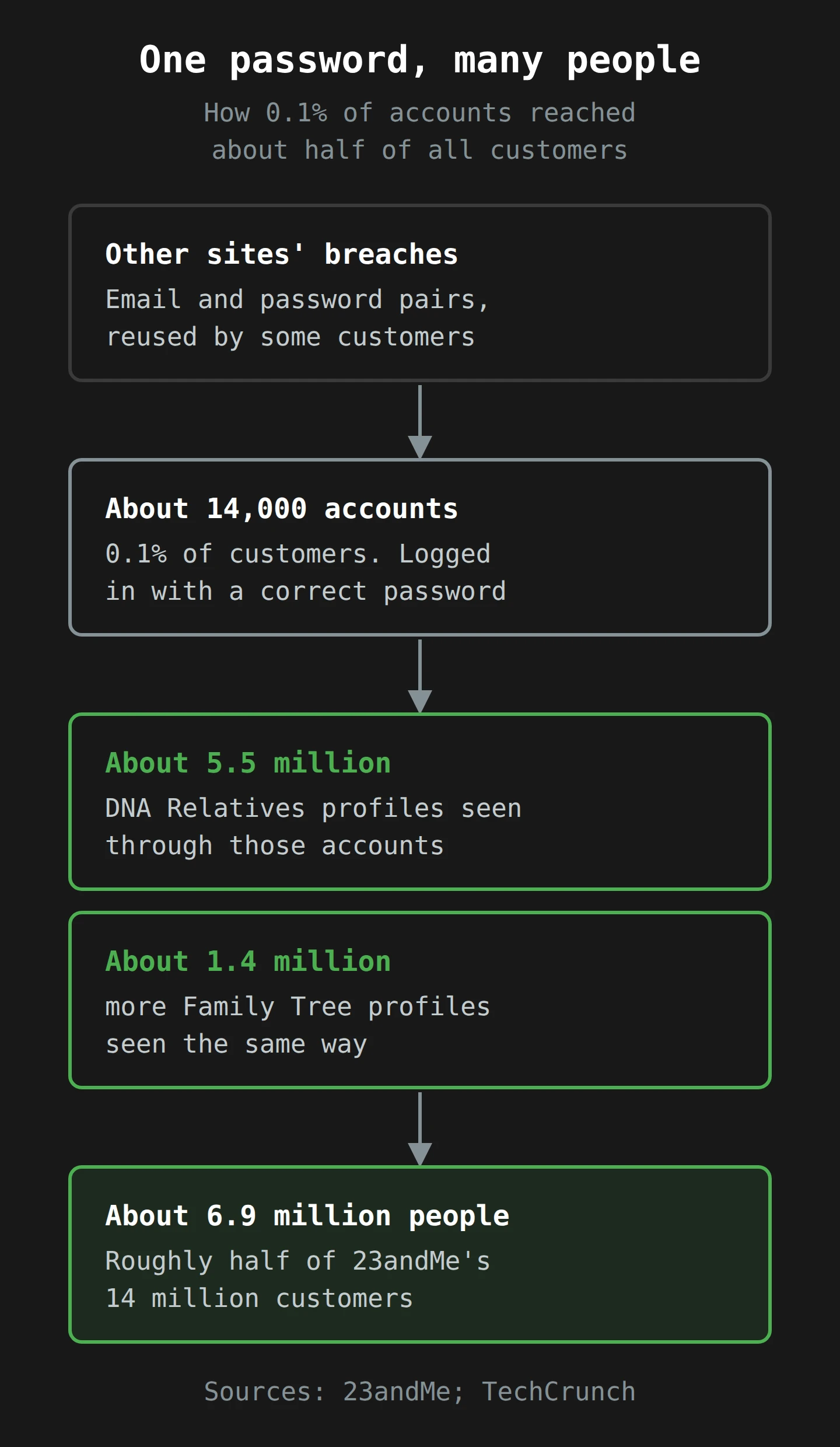
23andMe has not said exactly which screens, files or requests the attacker used to collect the data, and I am not going to guess. It does not change the lesson. Through about 14,000 accounts, the attacker reached about 5.5 million DNA Relatives profiles and about 1.4 million Family Tree profiles. According to TechCrunch, the DNA Relatives data included names, birth years, relationship labels, the percentage of DNA shared, ancestry reports and self-reported location.
Here is a back-of-the-envelope number, and it is mine, not 23andMe's: 6.9 million people divided by 14,000 accounts is about 490 people per stolen login. The real lists were probably longer than that, because relatives overlap; your third cousin is also your sister's third cousin, so the same person can turn up on many lists and only count once in the total.3 Either way, the multiplier is in the hundreds. Stuffing works by finding a small fraction of open doors. A feature with this much reach turns a small fraction into most of the house.

Why genetic data makes this worse
A reused password is a problem you can fix in five minutes. You change it. The attacker's copy goes stale.
Nothing about Margit's data goes stale. Her birth year is not going to change. Neither are her relationships, her ancestry reports, or the fact that she shares 0.8% of her DNA with a man in another country. You can rotate a password. You cannot rotate your great-grandmother. That is why the forum seller packaged the data by ancestry, and why the same records will still be worth something in twenty years.
There is also a consent problem that is worth naming plainly, because I write about consent a lot. Every one of those 5.5 million people agreed to share with their relatives. They made a choice about who, based on how the feature described itself. None of them made a choice about their relative's password hygiene, and none of them could see it. This is what makes data reach a design problem, not a user problem: one person's security decision quietly sets the security level for everyone connected to them, and the people with the most to lose have no say.
Part 4: Whose Fault Is It, Anyway?
This is where the conversation gets heated, so I will take a position and give you my reasons.
23andMe's framing, from its October updates to its December summary, has been that its own systems were not breached. It says it has no "indication that there was a data security incident within our systems, or that 23andMe was the source of the account credentials used in these attacks". In the narrow sense, I think that is true, and it matters. Nobody stole a database. The passwords came from somewhere else.
But I do not think "our systems were not breached" is the end of the story, for two reasons.
The first is about the login. The company says it had offered multi-factor authentication since 2019. Offered, not required. Most people never turn on optional security. After the incident, 23andMe made two-step verification mandatory on 6 November. A day later, TechCrunch reported that Ancestry and MyHeritage were moving to two-factor by default for their DNA customers, with MyHeritage citing the 23andMe theft. When an entire industry switches the same control on within weeks, it is fair to say the control was available and not used.
The second is about the reach. Doug's reused password is Doug's mistake, and it cost Doug his own data. But Margit's data did not leave because of anything Margit did. It left because the system let one login see, and export, hundreds of other people. That is a design decision. It might be the right one for a family-finding feature. But it carries a duty: if one account can reach hundreds of people, then that account's login has to be protected as if it holds hundreds of people's data, because it does.
So my answer to "whose fault is it" is: the user's for the reused password, and the platform's for the size of the blast. Both are real. Only one of them is in the platform's hands, and only one of them could protect Margit.
There is an Australian angle here that I think gets too little attention. In its Notifiable Data Breaches report for January to June 2023, the OAIC, our privacy regulator, recorded 409 notified breaches. Of the cyber incidents, "compromised or stolen credentials (method unknown)" was the second-largest source, at 29% (50 notifications), affecting 658,794 people on average. The OAIC also names credential stuffing directly, and its first example scenario reads like a smaller 23andMe: a retailer's customer portal hit by a credential stuffing attack, 500 accounts accessed, and "the entity's identity authentication for customer accounts was limited to email address and password". The fix, after the fact, was "mandatory multi-factor authentication for all customers". If our regulator is already writing teaching examples about credential stuffing on customer portals, it has formed a view on what a reasonable customer login looks like.
Part 5: The Defences, From the Doormat Up
Now the useful part: four layers, each working at a different point in the attack, from the cheapest to the most structural.
Layer one: a second factor (and which kind)
Multi-factor authentication, or MFA, means a login needs something you know (the password) plus something you have (a phone app, a security key) or something you are (a fingerprint). I wrote a whole piece on two-factor authentication and why we use it, so the short version: if a stolen password is no longer enough on its own, a list of stolen passwords is worth a lot less.
OWASP calls MFA "by far the best defense against the majority of password-related attacks", and points to Microsoft's estimate that it would have stopped 99.9% of account compromises. Microsoft's own wording, from 2019, is that MFA "can block over 99.9 percent of account compromise attacks". That is a vendor's number, so I treat it as "very large" rather than gospel, but the direction is not in dispute.
If you cannot force MFA on everyone, OWASP suggests asking for it when the login looks unusual: a new browser or device, a new country, an IP address that has tried several accounts, or a login that looks scripted. Doug's stuffed login was "correct password, new device, odd network". A risk-based check would have asked that login for a code.
Now the catch, and it is a fair one to raise about 23andMe's fix. The company's 6 November update says it is requiring all customers to use email 2-step verification, and that existing customers "who do not already use an authenticator app" are automatically enrolled in email codes. So email is the default, and an authenticator app is the stronger option for anyone who sets one up. Email codes are much better than nothing. They are also the weakest second factor there is, for a reason that loops straight back to Part 1. NIST's guidance says that methods that do not prove possession of a specific device, "such as voice-over-IP (VOIP) or email, SHALL NOT be used for out-of-band authentication". And OWASP adds the practical reason: "due to frequent reuse of passwords across multiple sites, the possibility that the users email account has also been compromised should be considered". Doug reused Bluefin1972 on his genetics account. What do you suppose his email password is?
So: require a second factor. Make it an authenticator app, a security key or a passkey wherever you can, and treat email codes as a floor, not the goal. Passkeys are worth a special mention, because a passkey has no shared secret to leak and reuse in the first place. I covered how they work in passkeys and passwordless authentication.
Layer two: check passwords against breaches
The second layer stops the reused password from being set at all. NIST tells verifiers that when someone creates or changes a password, they "SHALL compare the prospective secrets against a list that contains values known to be commonly-used, expected, or compromised", and the first item on its example list is "Passwords obtained from previous breach corpuses". If the password is on the list, the site has to reject it and say why.
That raises an obvious worry. To check whether a password has leaked, do you have to send the password to someone else's server? No, and the way around it is a neat bit of engineering that is worth understanding properly.
Start with something you already know: a cloakroom ticket. You do not hand the attendant your coat's description; you hand them a number, and they find the coat. Now imagine the number tells them only which rack to look at, and they bring you the whole rack. You pick out your own coat. The attendant knows which rack you asked for, but not which coat was yours.
That is k-anonymity, and it is how Troy Hunt's Pwned Passwords service works. The idea came from Junade Ali at Cloudflare. Here is the real mechanism, step by step:
- Your site takes the candidate password and computes its SHA-1 hash, a fixed-length fingerprint of the text. For
P@ssw0rd, Hunt's own example, that is21BD12DC183F740EE76F27B78EB39C8AD972A757. - It sends only the first five characters,
21BD1, to the service. That is the rack number. - The service returns every leaked hash suffix that starts with that prefix, with a count of how often each one has been seen. For
21BD1, Hunt says there were 475 of them; on average, a prefix returns 478. - Your site compares the rest of its hash with the list, on its own server. If there is a match, the password has leaked, and you reject it.
The service never sees the full hash, let alone the password. From its side, the request "could be any one of 475 different possible values". When Hunt launched this version in February 2018, the set held 501,636,842 passwords. OWASP's cheat sheet recommends exactly this check and names Pwned Passwords as "a well known free service", which you can call through the API or host yourself.4
Google's 2019 study adds one more useful number: when people were warned that their login used breached credentials, 26% of the warnings led them to a new password at least as strong as the old one. Not a majority, but a free 26% is a good deal.
Layer three: rate limits that look at the right unit
Per-account lockouts are still worth having, because they stop brute force. They just do not stop stuffing, for the reason we saw in Part 2. The fix is to add limits that look across accounts.
OWASP's guidance here is specific. Do not rely on a single volume limit per IP address, because tools spread across proxy networks. Look at short bursts and long, low, steady trickles. Classify addresses (home internet or hosting provider) and treat hosting ranges with more suspicion; OWASP's example is requiring a CAPTCHA for every request from a hosting provider. Use connection fingerprinting (the way a client sets up its connection, which is harder to fake than the browser name it claims) to spot a Python script pretending to be a phone. And keep the metrics, because the population view is where stuffing shows up: a spike in logins for accounts that do not exist, or a login success rate that suddenly drops while volume rises.
OWASP also suggests one quiet control that I like a great deal: tell the customer. If a login uses the correct password but then fails the MFA check, the cheat sheet says "the user should be notified so that they can change their password". A correct password with a failed second step is about as clear a sign of a stuffed credential as you will get, and the person who owns it is the one who can fix it everywhere else.
Layer four: limit what one login can reach
This is the layer the 23andMe story adds, and it is the one most security checklists skip, because it is not about login at all. It is about what a logged-in session is allowed to do.
If one account can see hundreds of other people, protect the reach, not only the door:
- Ask again before bulk actions. Require a fresh second factor before a session can download a full export of other people's data, even if the user logged in five minutes ago.
- Limit and watch bulk reads. A real person looks at a few relatives' profiles in an evening. A script reads all of them, quickly, and then does the same on the next account. Rate limit the reads, and alert when many accounts each pull their whole list in a short window.
- Share less by default. Every optional field (location, birth year, ancestry reports) is a field a stuffed account can read. Make the default the smallest useful set, and make richer sharing an explicit choice.
- Treat a session like a key. Once the attacker is logged in, the session cookie is what lets them keep going. I wrote about how that goes wrong in session hijacking, and the same discipline applies here: short sessions for sensitive actions, and a log of where each session came from.
None of these layers is enough alone, and the order matters less than having more than one.
What to Check Before the Year Runs Out
You came here for something to do, so here it is, split in two: the site you run, and the accounts you own.
If you run a site with logins
- Make a second factor mandatory for anything that reaches other people's data. At minimum, ask for it on risky logins (new device, odd network, scripted behaviour). Offer an authenticator app or a passkey, and treat email codes as the floor.
- Add a breached-password check at sign-up and at every password change, using the k-anonymity range API or a self-hosted copy of the list. It is a small piece of code, and NIST has expected it since 2017.
- Look at your login metrics as a population, not account by account. Chart the failure rate, the share of attempts for unknown accounts, and the number of distinct accounts per device or network fingerprint. Set an alert on each. If you cannot chart them today, that is the first finding.
- Notify customers after a correct password and a failed second factor. Tell them to change that password everywhere they used it.
- Map your data reach. List every feature where one account can see or export other people's data: shared folders, team views, referral lists, family features. For each one, ask: how many people can one account reach, can it export them, and would we notice if 14,000 accounts did it in a week?
- Put a re-check and a rate limit on bulk exports of other people's data, and log them.
- If you are in Australia, read the OAIC's Scenario 1 in the January to June 2023 report, and ask whether your customer portal is still "limited to email address and password".
If you have accounts (so, everyone)
If you opened your password manager halfway through Part 1 to check something, good. That was the plan all along.
- Use a password manager, and let it make a unique password for every site. I compared the options in choosing a password manager. This is the single change that makes credential stuffing useless against you.
- Change any password you have reused, starting with your email account. Your email is the reset button for everything else.
- Turn on an authenticator app or a passkey wherever it is offered, starting with email, banking and anything that holds data about other people.
- If you use 23andMe, review your DNA Relatives settings. The help page explains which fields are optional and how to opt out entirely. Decide what you want your relatives to see, knowing that a relative's account is only as safe as their password.
- Have the awkward conversation. If you got a family member into genetic testing, ask them, gently, whether they used a unique password. You are, in a small and very literal way, in this together.
Final Thoughts
Go back to Margit in her brick house outside Leeds, with her long, unique password and her cut-up loyalty card. She did everything we tell people to do. Her data left anyway, because a third cousin reused a password from an outboard motor forum, and because the feature that connected them showed his account everything she had chosen to share with family.
If you remember one thing, make it this: your login is only as safe as the reuse habits of everyone who can see you, and a feature's reach decides how far one stolen password travels. Credential stuffing is old and boring. The attacker does not guess; they try a key that already worked somewhere else, once per door, slowly enough that no single door complains. The defences are old and boring too: a second factor that is not email, a breached-password check, rate limits that look across accounts, and a hard limit on what one logged-in account can pull out about other people.
So this week, if you run a site, find the feature where one account can see a crowd, and put a second lock on it. If you have accounts, which you do, install a password manager and retire every reused password, starting with your email. Both jobs fit in an afternoon. Neither is exciting. Both would have kept Margit out of a forum sale.
Now, if you'll excuse me, I need to change a password I have been meaning to change since about the second pot of tea, and then make a third.5
Notes
-
TechCrunch also reported that the Hydra seller said they had contacted 23andMe and that the company "asked irrelevant questions". That is the seller's account. 23andMe's public timeline starts with the 1 October post. ↩
-
OWASP names Sentry MBA as one example of a credential stuffing toolkit with proxy support built in. The attacker does not need to write anything clever; the hard parts of the job come packaged. ↩
-
An average also hides the spread. 23andMe says each person's list of relatives differs and grows as more people join, so an attacker gains the most from the accounts with the longest lists. That is why the number of people one account can reach matters more than the number of accounts. ↩
-
SHA-1 is a poor choice for storing passwords, because it is fast to compute and easy to attack in bulk. Here it is only used as a lookup key into a list of passwords that are already public, so its speed does not matter. ↩
-
Three pots before dinner is within normal limits for this household. It keeps the annual count on track for about 1,820 cups, which is a number I am more confident about than most of the forum sellers' figures in this article. ↩