Super Funds and Stuffed Credentials: Why Your Retirement Needs MFA
Some time on Friday afternoon, the fourth of April, you did something you do perhaps twice a year. You opened your super fund's app. Not because you wanted to. Because a news alert on your phone used the words "superannuation", "cyber attack" and "stolen" in the same sentence, and a small, cold voice at the back of your head asked when you last checked.
The app took a long time to load. When it did, the balance said $0.
There is a very particular silence that follows seeing a zero where your retirement used to be. The tea goes cold in your hand. You begin a mental inventory of everything that balance was meant to pay for: the cottage, the trips, a modest but dignified supply of Earl Grey from now until the end. You start to wonder whether a person can live on goodwill and the apples off the neighbour's tree. You picture yourself at seventy-eight, explaining to a polite young bank officer that you had savings once, they were right there in the app, and then a Friday happened.
Then, if you were an AustralianSuper member, you might have noticed the bold paragraph the fund had added to its statement at 1.45pm: "Even though you may not be able to see your account, or you are seeing a $0 balance, your account is secure." Its app and call centre were buckling under a high volume of traffic from members doing exactly what you were doing.
So put the kettle back on. For almost everyone, the zero was a traffic jam, not a theft.
For a few people, though, it was not a traffic jam. AustralianSuper says criminals "may have used up to 600 members' stolen passwords to log into their accounts in attempts to commit fraud". Reuters, citing a source who was not authorised to speak publicly, reported that four of those members had a combined A$500,000 drained from their balances. Rest, Hostplus, Australian Retirement Trust and Insignia Financial all confirmed attacks over the same weekend. And here is the part I want you to hold onto: by every account published so far, nobody broke into anything. Nobody found a clever bug. The criminals typed in usernames and passwords that worked, because those passwords had already leaked from somewhere else.
That attack has a name, credential stuffing, and it is one of the dullest, cheapest and most effective attacks on the internet. It is also very beatable, which is the frustrating part. My plan is to walk through what actually happened the weekend before last, take credential stuffing apart from the spare key under the mat down to the bots and the hash prefixes, look at why a super account is a strange and tempting target, and finish with what to switch on—as a member, and as anyone who runs a login page—before the week is out.
Let's get into it.
Part 1: What Happened the Weekend Before Last
Most of the first coverage blended five funds and a dozen numbers into one frightening blob. The numbers are not all measuring the same thing, so let me lay them out fund by fund, with who said what.
The timeline
Over the weekend of 29–30 March, someone ran large numbers of login attempts against the member portals and apps of several of Australia's biggest super funds. Rest says it became aware of "some unauthorised activity" on its MemberAccess portal that weekend and responded by shutting the portal down. Toby Murray, a professor of cyber security at the University of Melbourne, noted in The Conversation that the attack began in the early hours of the weekend, probably because the account holders would be asleep.
The funds went public on Friday 4 April. At lunchtime that day, the National Cyber Security Coordinator, Lieutenant General Michelle McGuinness, posted this:
I am aware cyber criminals are targeting individual account holders of a number of superannuation funds.
I am working with agencies across the Australian Government including with the financial system regulators, and with industry stakeholders to provide cyber security advice and coordinate the whole-of-government response to this incident.
The Australian Prudential Regulation Authority (APRA) and Australian Securities and Investments Commission (ASIC) are engaging with all potentially impacted superannuation funds to support safe outcomes for members.
— National Cyber Security Coordinator (@AUCyberSecCoord), 4 April 2025 on X
The Association of Superannuation Funds of Australia, the industry body, put it in one sentence: "While the majority of attempts were repelled, unfortunately a number of members were affected." This week the Treasurer, Jim Chalmers, said the Council of Financial Regulators had met on Friday for an update, and that "APRA and ASIC are engaging with all of the potential impacted super funds to support safe outcomes for members".
Fund by fund
AustralianSuper, the largest fund, says it saw "a spike in suspicious activity across our member portal and mobile app" over the past week, and that "cyber criminals may have used up to 600 members' stolen passwords". It locked those accounts and told the members. The money figures come from elsewhere: Reuters' source said four members lost a combined A$500,000, and the ABC, citing other reporting, says the fund has reportedly pledged to cover losses from its reserves, including $406,000 stolen from a pensioner. The fund itself has not published a loss figure as I write.
Rest says no member funds were transferred out, and that about 8,000 members "may have had some limited personal information accessed in the form of member first name, email address and member identification number". Reuters reported that Rest said around 20,000 accounts, about 1% of its two million members, were impacted. Those two numbers do not contradict each other. One counts accounts the attackers touched; the other counts members whose details they actually read.
Australian Retirement Trust told Reuters it detected "unusual login activity" affecting "several hundreds" of accounts, locked them, and found no suspicious transactions or changes. Insignia Financial found suspicious logins on 100 accounts on its Expand Wrap Platform and, according to Cyber Daily, said the incident was the result of credential stuffing. Hostplus said no member losses had occurred and, in Tuesday's ABC report, that this was in part because of safeguards including multi-factor authentication.
Remember that last line. We will come back to it.
Nobody broke in
The most useful sentence in all of the coverage came from Alastair MacGibbon, the former head of the Australian Cyber Security Centre, now at CyberCX. He said it did not appear that there was any evidence of hacking or of criminals compromising any software systems, and described the attack in one line: "They're taking usernames and passwords that have been stolen in other data breaches."
That is the whole crime. No zero-day, no insider, no ransom note. Someone collected logins that leaked from other websites, assumed some people use the same password for their super as they did for a shopping site in 2019, and asked the funds' login pages, politely and many thousands of times, whether that was so. For a few hundred people, it was.
That raises the uncomfortable question. Why did a password alone get anyone into an account holding hundreds of thousands of dollars?1
Part 2: Credential Stuffing, From the Spare Key Up

Start with something you already do, or know someone who does. You have a front door, a back shed, a car and a holiday shack on the east coast, and life is short, so you had a locksmith key them all alike. One key on the ring. It is very convenient. It is convenient right up until someone copies it at the shack, at which point they have the house, the shed and the car as well, and they did not have to pick a single lock.
That is password reuse. Most of us know it is a bad idea, the same way we know about flossing. And it is the only ingredient credential stuffing needs.
Naming it
The Open Worldwide Application Security Project (OWASP), the volunteer group that writes much of the web's security guidance, separates three attacks that the news tends to lump together as "hacking passwords". Its Credential Stuffing Prevention Cheat Sheet defines them like this:
- Brute force: "Testing multiple passwords from dictionary or other source against a single account."
- Password spraying: "Testing a single weak password against a large number of different accounts."
- Credential stuffing: "Testing username/password pairs obtained from the breach of another site."
The difference matters. Brute force guesses. Spraying guesses, but spreads the guesses thin. Credential stuffing does not guess at all. Every attempt uses a real password that a real person really chose, and the only question is whether they chose it twice.
It is also not new, and it is not only an Australian problem. In late 2023, 23andMe said attackers had used reused passwords to get into about 14,000 accounts, 0.1% of its customers, and through its relative-matching features reached data on millions more. Almost exactly a year ago, Roku said about 576,000 accounts had been accessed by credential stuffing, with fraudulent purchases in fewer than 400 of them, and rolled out two-factor authentication in response. The pattern repeats. The only thing that changes is what is behind the door.
Where the keys come from
Credential stuffing needs a list, and the lists come from two places.
The first is old breaches. A website gets breached, its user table leaks, and if the passwords were stored badly, or later cracked, the email and password pairs end up in what attackers call "combo lists". These get merged, de-duplicated, resold and given away for years.
The second is newer and nastier: infostealer malware. The Australian Signals Directorate describes info stealers as malware that collects, from an infected device, "user names and passwords, card details, cryptocurrency wallets, local files, browser data (including cookies), user history and autofill form details". It grabs what your browser remembers and sends it to the people who run it.
To get a sense of scale, look at what Troy Hunt, the Australian who runs Have I Been Pwned, wrote about in February. He processed one corpus of stealer logs called ALIEN TXTBASE: 1.5 terabytes, 23 billion rows, 284 million unique email addresses, much of it distributed through Telegram channels. The malware behind such logs, he notes, often arrives in pirated software or fake installers. Each line is the web address of the login page, the email and the password, separated by colons. From that one corpus, he added 244 million passwords he had never seen before to his Pwned Passwords service.
Notice the first field. A stealer log records which login page each password was typed into. For a criminal, that is a list already sorted by target.2
How the machine does it
Now the bots. A credential stuffing run is a small program with three inputs: a combo list, the target's login page, and a pool of IP addresses to send requests from. For each pair on the list, it submits the login form once. It records what comes back: success, wrong password, account locked, a challenge. Successful pairs go into a "hits" file, which is either used straight away or sold on.
The pool of IP addresses is the clever part. OWASP notes that toolkits such as Sentry MBA come with built-in support for proxy networks that spread requests across a large number of unique IP addresses, so that each address sends only a few requests, even in a very large attack. From the login page's point of view, it does not look like one attacker hammering the door. It looks like thousands of slightly forgetful people, each trying once.
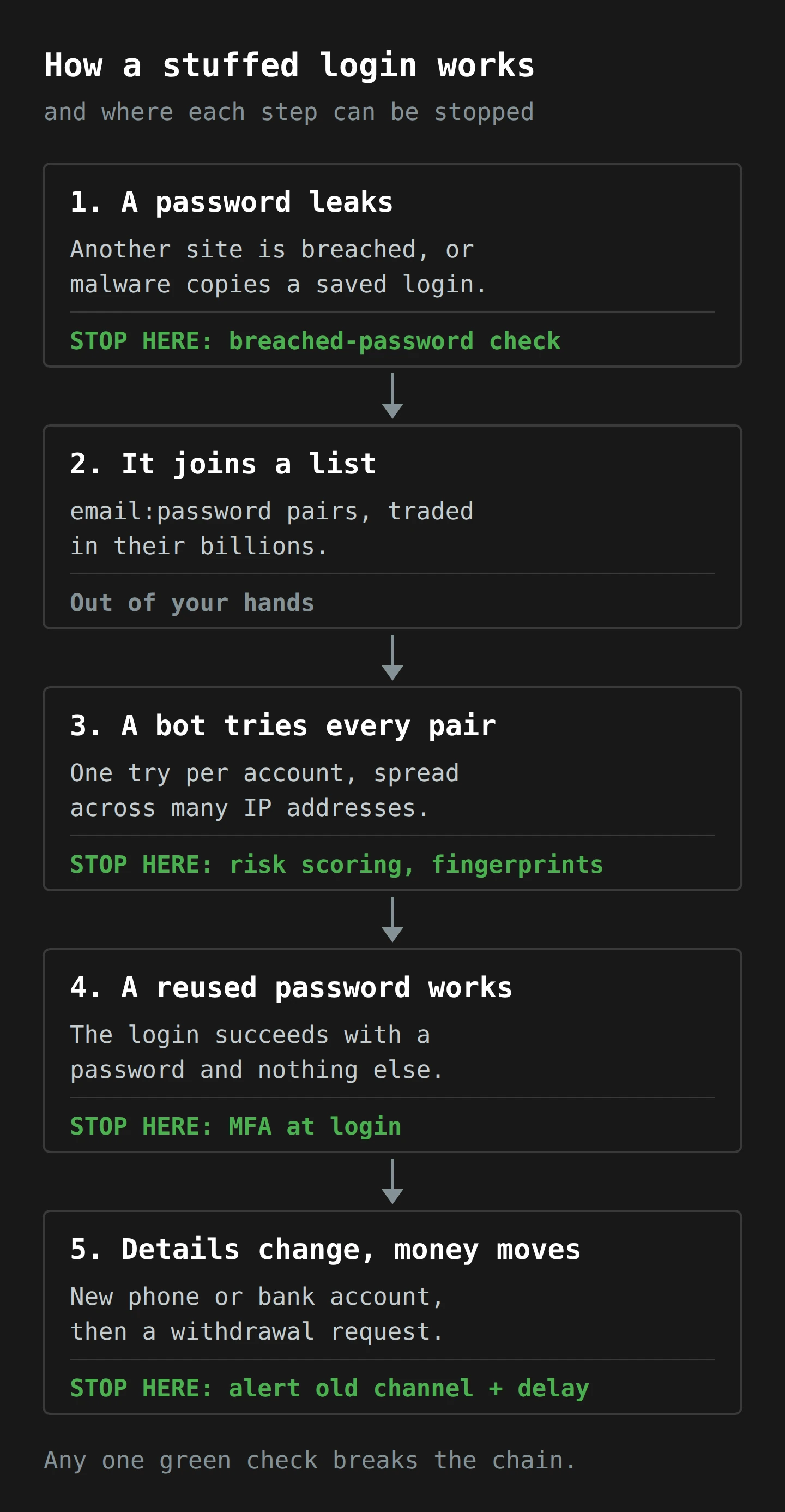
Put the pieces together. A password leaks. It joins a list. A bot tries the list, one pair per account, from a crowd of addresses. Most pairs fail. The ones that belong to people who reused a password succeed, and the bot walks in with a valid login and nothing to show it is not the member.
Why the usual lockouts do not fire
Here is the part that surprises people who run login pages. The classic defence against password guessing is the lockout: too many wrong passwords on one account and the account locks. The United States standards body NIST, in its digital identity guidelines, requires verifiers to limit consecutive failed attempts on a single account to no more than 100. That is a fine rule against brute force.
Credential stuffing makes about one attempt per account. It never gets near 100, or 10, or 3. Every account sees a single failed login, or a single successful one, and the lockout counter never moves.
The second classic defence is a per-IP rate limit: too many requests from one address and you block it. The proxy pool beats that, by design. So the two controls most login pages rely on are tuned for an attacker who no longer turns up. If your defences count failures per account or per address, credential stuffing walks between the counters.3
Part 3: The Defender's View
So what does catch it? Each step in the diagram has a check, and none of them is exotic. Let me take them in the order the attack meets them.
Breached-password checks: refuse the key before it is cut
The cheapest place to stop credential stuffing is the moment someone sets the password. NIST says that when a user chooses or changes a password, verifiers "SHALL compare the prospective secrets against a list" of values known to be commonly used, expected or compromised, and the first example it gives for that list is "Passwords obtained from previous breach corpuses". The check is a SHALL, not a SHOULD, and the guidance has said so since 2017.
The obvious objection is privacy. "You want me to send my members' new passwords to a third-party breach database?" No. The clever trick here is called a k-anonymity range query, and it is worth knowing in detail, because it is the reason this check has no good excuse not to exist.
Start with something you already use: a library catalogue that lets you search by the first few letters of an author's surname. You type "Rob", and you get Robbins, Roberts, Robertson, Robinson and a few hundred others. The librarian knows you are interested in someone whose name starts with "Rob". They do not know whether you were looking for Robertson.
Now the machine version. Cloudflare's Junade Ali described how it works for Pwned Passwords in 2018:
- Your server takes the new password and computes its SHA-1 hash, a 40-character fingerprint. The same password always gives the same hash, and you cannot run the hash backwards to get the password.
- It sends only the first five characters of that hash to the service.
- The service returns the rest of every breached hash that starts with those five characters. At the time of that write-up, each of these buckets held 478 hashes on average.
- Your server checks, on its own side, whether the rest of its hash is in the list.4
The service never sees the password, or even the full hash. It sees a five-character prefix shared by hundreds of unrelated breached passwords and an astronomical number of unbreached ones. If the full hash is in the list, the password has appeared in a breach, and your sign-up form can say so and ask for another. The database behind it got 244 million passwords bigger in February alone.

Risk-based checks: notice the stranger at the door
The second check works at the moment of login. Instead of treating every correct password the same, the login page asks: does this attempt look like this member?
Google has done this for years, and in 2019 it published how well it works. When it detects a suspicious sign-in, "say, from a new location or device", it asks for more proof before letting the person in. Google says most of the hijacking attempts it sees come from automated bots with access to third-party password breaches, which is credential stuffing by another name. In a year-long study with New York University and the University of California, San Diego, it measured what each kind of challenge stopped. A code sent by SMS to a recovery phone blocked 100% of those bots, 96% of bulk phishing and 76% of targeted attacks. A prompt on a phone already signed in did better still: 100%, 99% and 90%. Knowledge questions, like "where did you last sign in?", still stopped bots but did as badly as 10% against phishing, because a phishing page can simply ask you the same question.
NIST lists the signals such a system can use: "IP address, geolocation, timing of request patterns, or browser metadata". OWASP adds a newer one that is harder to fake, connection fingerprinting. When a request claims to come from a phone browser but the way it set up its encrypted connection looks like a Python script, the request is lying about something. OWASP also suggests treating logins from hosting-provider IP ranges with extra suspicion, because real members rarely log in to their super from a data centre.5
Here is the useful thing to understand about risk-based checks. They are a gate, and the gate is only as strong as what is behind it. If "suspicious" leads to a challenge the attacker can answer (a date of birth, a postcode, a member number from a leaked list), the gate is decoration. If it leads to a code on a device the attacker does not have, it works.
MFA at login: the second lock
Which brings us to the obvious one. Multi-factor authentication (MFA) means proving who you are with more than one kind of thing: something you know (a password), something you have (a phone, a security key) or something you are (a fingerprint). I wrote about the basics of two-factor authentication a few years ago, and the argument has only become stronger.
Credential stuffing steals the thing you know. It cannot steal the thing you have. That is why OWASP calls MFA "by far the best defense against the majority of password-related attacks, including credential stuffing and password spraying". Microsoft researchers measured it across a large population of real accounts in 2023 and found MFA reduced the risk of compromise by 99.22%, and by 98.56% even where the password had already leaked. Authenticator apps did better than SMS, though both were far better than nothing.
Australia's own baseline says the same. The Australian Signals Directorate's Essential Eight is the baseline set of security controls it recommends to Australian organisations. Its first level above zero, Maturity Level One, includes this line: "Multi-factor authentication is used to authenticate customers to online customer services that process, store or communicate sensitive customer data." Not Level Three, for organisations worried about nation states. Level One. If your members' retirement savings are not "sensitive customer data", it is hard to think what is.
Two honest limits, so you do not oversell it. First, not all second factors are equal. NIST classes codes sent by SMS or voice call as "RESTRICTED", because phone numbers can be ported or SIM-swapped; the Essential Eight's higher levels ask for phishing-resistant MFA, such as security keys or passkeys. Second, MFA protects the login, not what happens after it. An infostealer that takes your browser's cookies can sometimes skip the login entirely by replaying a session that has already passed MFA. For credential stuffing specifically, though, SMS MFA is still a wall where there was a curtain.
The quiet one: tell the member
OWASP has a lovely, underused recommendation. When someone enters the correct password but then fails the MFA check, the member should be told, so they can change their password. A wrong password tells you nothing. A right password followed by a failed code tells you the password is out in the world.
Part 4: Why Super Is a Strange Kind of Target
If MFA is this well understood, why did a password alone get into some super accounts? Part of the answer is how super works, and part is how one fund chose to use MFA.
Money you cannot touch, until you can
Most Australians cannot get at their super at all. The Australian Taxation Office's conditions of release say you can withdraw it when you turn 65, or reach your preservation age and retire, or in a handful of narrow early-access cases. For anyone born from 1 July 1964, the preservation age is 60.6 For a 35-year-old, stealing their login gets you their name, their address and a number you cannot spend for three decades.
Once a member retires and moves into the pension phase, that changes. Their account is now designed to pay money out, often as lump sums on request. Cyber Daily's reporting points at exactly these accounts, members in the pension drawdown phase, as the ones who lost money, and the one individual loss reported in detail so far was a pensioner's. So the attack is a filter: thousands of logins tested, a few hundred that work, and among those, a handful of accounts that can actually pay out.
Add two more features of super. Murray points out that many people do not check their balances for months at a time, so an odd login or a changed phone number can sit unnoticed. And the attack ran at night, at a weekend. Nobody was looking at the app, and the fraud team, if it works weekends, was looking at a quiet queue.
Step-up on the money, not at the door
Here is the detail that turned a frustrating incident into a much harder conversation for one fund. On Tuesday the ABC published an email AustralianSuper sent to a member in February 2024. The fund told him that, for logging in, it did not "currently offer" MFA, but that it did use it for "high-risk transactions (withdrawals, supermatch, member updates)". Another member, Seth Rappe, said he asked about MFA last month and was told, "No, we don't offer that." Two or three weeks later, the attack happened.
On paper, MFA on high-risk transactions sounds reasonable. It even matches the industry's own standard: the Financial Services Council's scams and fraud standard for super funds, published in July last year, requires "multifactor authentication on all high-risk transactions", and it is only mandatory from 1 July 2026. (Not every fund that was targeted is an FSC member, either.) The idea is called step-up authentication: let people look around with a password, and ask for more when they try to do something that matters.
The weakness is in the question nobody asks out loud: where does the code go?
Here is the general pattern, and it is one security people have worried about for as long as SMS codes have existed. A password-only login gets the attacker into the account. If the account lets them change the mobile number or email on file without a code sent to the old one, they change it to their own. Now the "high-risk transaction" check does exactly what it was designed to do: it sends a one-time code to the phone on file. Which is the attacker's phone. Step-up authentication has stepped up, politely, to the wrong person.
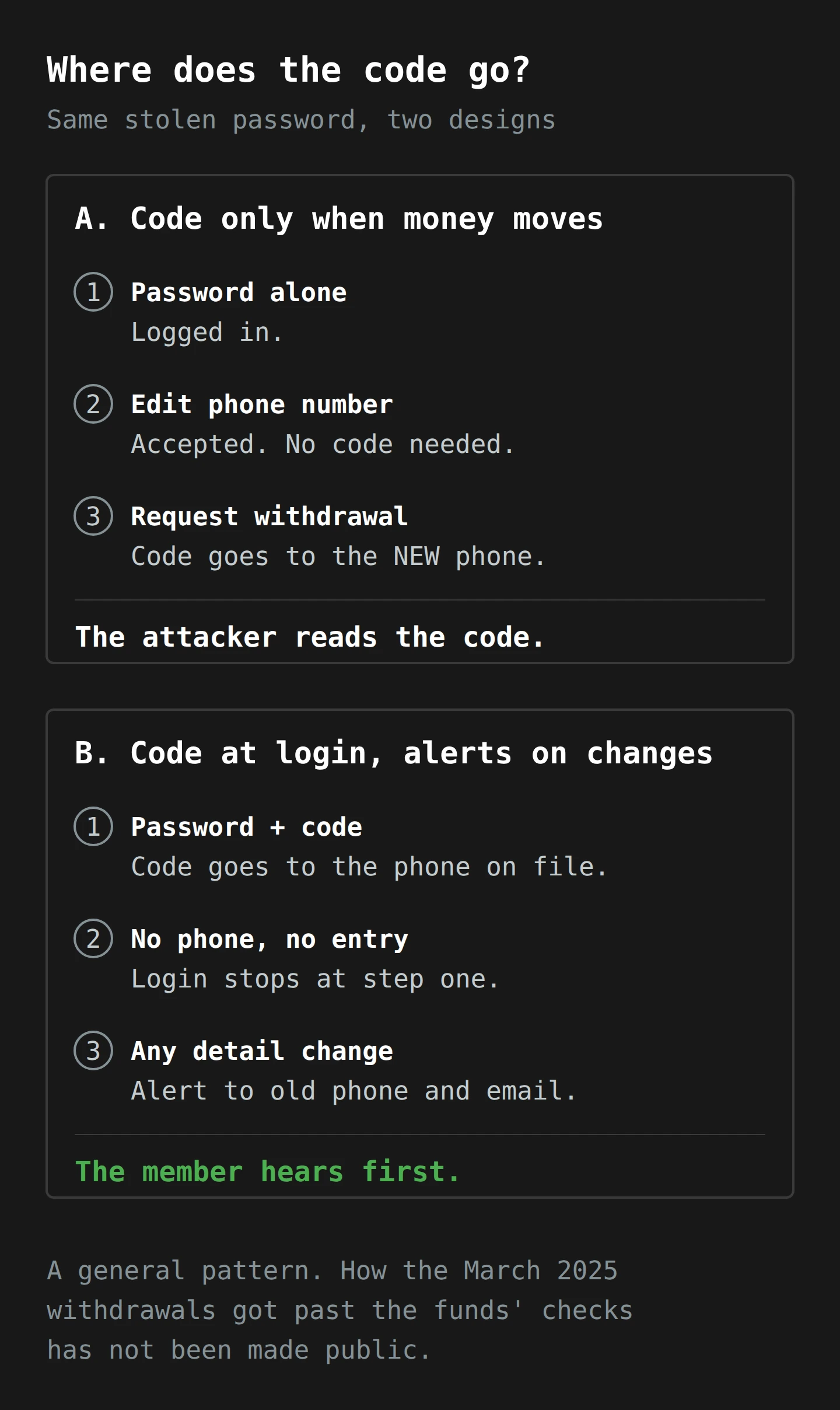
I want to be careful here, because this is where speculation would be easy. The Conversation reports that in the four AustralianSuper accounts that lost money, the scammers "changed login details and transferred out lump sums". The fund's own email says member updates were meant to require MFA. How the attackers got from one to the other has not been made public as of today, and I am not going to invent it. It could be the pattern in the diagram. It could be a gap in one channel, such as the app versus the website, or a call-centre process, or something else. What the diagram shows is the reason a second factor only on transactions is weaker than it sounds: everything depends on the contact details being trustworthy, and a password-only login is exactly the thing that lets someone edit them.
Now go back to Hostplus. Same weekend, same kind of attack, and the fund says no member lost money, in part because of safeguards including MFA. One data point is not a study. But it is the comparison every fund's board will be making this week.
MacGibbon's line to the ABC is the one I expect to hear repeated: "We've all seen the banks really radically improve security … We need to do the same thing for super accounts." Banks have spent years tightening how their customers log in. Super funds are now being asked to catch up, with their members' money as the lesson.
Margaret's Saturday
Let me make this concrete with a person. Margaret is invented. She is not a client and not any real member; she is a worked example so we can watch both versions of the attack happen.
Margaret is 67, lives in Devonport and retired three years ago. Her super moved into an account-based pension, and she draws a regular amount each fortnight. She is sensible. She does not click on strange links. She has, however, used the same password since about 2016 for her email, a knitting-pattern site, an online garden centre and her super fund, because it is a good password: her late dog's name, the year she married, and an exclamation mark for safety.
2021. The knitting-pattern site is breached. Nobody tells her. Her email and password join a combo list.
2024. That list is merged into larger lists, which are sold and shared. Her line sits among millions of others, waiting.
Saturday, 2:47 am. A bot tries her email and password on her super fund's login page. It is the only attempt ever made on her account. It comes from a residential IP address in another state, routed through a proxy pool. In the same ten minutes, thousands of other accounts receive one attempt each, from thousands of other addresses.
Here is what the fund's systems record in the first version of the story, where the login asks for nothing but a password:
- Login log: one successful login, correct password, new device, new location, 2:47 am. Lockout counter: zero failures. Rate limiter: one request from this IP.
- 2:51 am: mobile number changed. If the change only needs the password, the log shows a routine profile update.
- 2:58 am: lump-sum withdrawal requested. One-time code sent to the mobile on file, which is now the attacker's. Code entered correctly.
- Monday: payment processed. Margaret notices on Thursday, when her fortnightly payment arrives and the balance looks wrong.
Every individual record is normal. The only thing that is abnormal is the shape: a first-ever login from a new device at 2:47 am, followed within minutes by a contact change and a lump sum. No single counter sees it, because each counter was built for a different attacker.
Now replay the same Saturday with the checks we covered:
- Breached-password check: the fund checks passwords against Pwned Passwords at every login, not only when a password is set. The first time Margaret logged in after the 2021 breach, the full hash matched one of the breached hashes that came back for its prefix, and the fund made her choose a new password. The bot's attempt fails. End of story.
- If that did not exist, risk scoring: first login from this device, hosting or proxy address, 2:47 am, a browser fingerprint that does not match her usual phone. Challenge required.
- MFA at login: the challenge is a code to the phone on her bedside table. The bot does not have it. Login stops. Because the password was right but the code failed, the fund texts her: "Someone signed in with your password. If this wasn't you, change it." She reads it with her morning tea.
- If the attacker somehow got in anyway: the mobile number change triggers an alert to the old number and email, and a hold of a day or two on any withdrawal to new details. Margaret rings the fund at 8 am on Monday, and the money never moves.
Any one of those four was enough. The first version of Margaret's Saturday needs all four to be missing.
What to Do This Week

If you skimmed straight to this heading, I do not blame you, and welcome. Here is the short version, in two lists: one for you as a member of a fund, and one for anyone responsible for a login page with money or sensitive data behind it.
If you have super (so, you)
- Change your super password to one you have never used anywhere else. Not a variation. A new one. This is the single step that makes credential stuffing useless against you. AustralianSuper's own advice is to change it "to one you've never used before".
- Use a password manager so that "never used anywhere else" is possible for every account, not just this one. I wrote a guide to choosing one; the best one is the one you will actually use.
- Turn on MFA if your fund offers it, and use an authenticator app over SMS if you have the choice. If your fund does not offer it, ask them, in writing, when it will. Members asking is how this changes.
- Log in and check your contact details and bank account. The phone number and email on file are where every future code and alert will go. Make sure they are yours.
- Check your email address at Have I Been Pwned. If it appears in breaches, assume every password you used on those sites is known, and change it wherever you reused it.
- Expect the follow-up scams. The National Cyber Security Coordinator warned this week that "Scammers are taking advantage of reports of cyber attacks on superannuation funds". Nobody legitimate will text you a link to "recover" your super. Ring your fund on a number you look up yourself.
If you run a login page
- Check new passwords against breach data, at sign-up and at every change. The k-anonymity range query means you never send a password anywhere. NIST has required a check against known-compromised passwords since 2017, with breach corpuses as its first example.
- Monitor the login page as a whole, not only each account. Watch the overall failure rate, the share of logins from new devices, and logins from hosting-provider ranges. A spike in all three at 3 am on a Saturday is a credential stuffing run, even if no single account has more than one failure.
- Put MFA at login, not only on transactions. If you can only do one thing on this list, do this one. Offer an authenticator app or passkeys, keep SMS as a fallback rather than the only choice, and plan for members who cannot use a smartphone without making them the default.
- Protect the contact details as if they were the money. Any change to mobile number, email or bank account should need a code sent to the existing channel, should alert the old channel, and should put a hold on withdrawals to new details for a short period. This is the step that closes the gap in the diagram.
- Tell members when the right password fails the second check. It costs one text message and catches the password before the attacker tries again.
- Run your login through the Essential Eight lens. Maturity Level One already expects MFA for customers of online services holding sensitive data. If you are reporting yourself at Level One without it, the report is wrong.
None of this is new technology. Every item on the second list was published guidance before most of the affected members opened an account.
Final Thoughts
Go back to that Friday afternoon, the cold tea and the $0 on the screen. For almost everyone, the zero was a busy server, and the money was fine. For a few people it was not, and what took their money was not a genius or a nation state. It was a list of old passwords, a login page that asked for nothing else, and a weekend when nobody was watching.
If you remember one thing, make it this. Credential stuffing does not break locks; it uses keys that already fit. So the fixes are about keys: never let one key fit two doors, refuse keys that are known to be copied, and add a second lock that a copied key cannot open. And when you do add the second lock, check where its key gets delivered.
This week, change your super password to one you have never used before, turn on MFA if your fund offers it, and check that the phone number on your account is yours. If you run a login page, ask your team one question: if someone logs in with a correct password from a new device at 3 am and changes the phone number, what happens next? If the answer takes longer than a sentence, you have your project for April.
Now, if you'll excuse me, I have one old password left to retire, and then I am putting the kettle on. The tea, at least, is not stored in an online account. I checked.
Notes
-
Professor Murray also told the ABC that the funds should have flagged irregular transactions at unusual hours, and put it more bluntly: "It doesn't pass the pub test." The pub test is the highest standard of Australian public policy, and it is applied without appeal. ↩
-
Hunt's example line is a streaming-service login URL, then an email address, then a password, all joined by colons. It is about the least glamorous file format imaginable, and it is the one that empties accounts. ↩
-
Password spraying has the same shape for the same reason: few tries per account, many accounts. The defence that catches both is to look at the whole login page's failure rate, not each account's. ↩
-
The "k" in k-anonymity is the size of the crowd you hide in. A prefix shared by hundreds of breached hashes means the service cannot tell which of them, if any, you were asking about. ↩
-
CAPTCHAs are on the OWASP list too, with a frank caveat: they "are not perfect, and in many cases tools or services exist that can be used to break them". There are companies whose entire business is solving other companies' CAPTCHAs, which is a sentence I find unreasonably funny. ↩
-
The ATO is careful to add that your preservation age is not the same as your pension age. Two different ages for two different pots of retirement money is, I think, the most Australian sentence in this article. ↩