Search Agents: The Customer Who Never Visited
It is a Monday morning, some months from now, and you run a small online tea shop out of a converted garage in North Hobart. You open Search Console first, because you are a responsible adult. Impressions are up 30% on last month. Clicks are down. You open Google Analytics, and organic sessions are down too, by a margin that makes you put your cup back on the saucer very gently, the way you would near a sleeping animal.
Then you open the order system. Orders are up.
You scroll through them. Most look normal. Then there is one from a customer called Priya, for 250 grams of a Tasmanian-grown green tea and a small ceramic pot. The order note says it was placed through Google. You look for her visit in Analytics. There is no visit. You look in the server logs. There is no page view, no product page, no basket, no checkout page. There is one short, polite request from something that called itself a checkout agent, and then there is money.
By 10 am you have a theory. There is a very small person in a trench coat walking up and down the virtual aisles of your shop, reading the labels, and buying things for other people. They do not use the front door. They do not look at the specials board you spent all Sunday on. They never ask where the toilets are. They are the best customer you have ever had and you have no idea what they look like.
Sit down. Nobody is haunting your shop. That Monday is a fair description of what Google announced at its I/O conference on 19 May, although most of it has not reached Australia yet.
In the Search keynote post, Google's head of Search, Elizabeth Reid, said that one year after launch, AI Mode "has surpassed one billion monthly users", and that its queries have been "more than doubling every quarter". The same post announced information agents that run "in the background, 24/7" and watch blogs, news sites and social posts for you. It also announced agentic booking for local services, and a companion shopping post introduced a Universal Cart that watches prices for you and lets you pay through Google Pay without leaving Google. The brand, Google adds, "stays the merchant of record". So the shop still gets the sale. It just may never get the visit.
I wrote about AI Overviews last June and about generative search before that. This is not a third lap of the same track. AI Overviews are now the first stage of a longer pipeline, and the far end of that pipeline is an agent that does not need your page at all. So this article follows a question down through that pipeline, then goes into the plumbing of how a visit gets labelled, then meets the two kinds of agent that will turn up in your logs. After that, we follow Priya's order step by step and see what each of your reports records. We finish with the checks you can do this week.
Put the kettle on. Let's get into it.
Part 1: One Pipeline, Four Doors

Start with something you already do. You walk into a good hardware shop with a vague problem ("the back door sticks in winter") and ask the person at the counter. A good counter person does three things you never see. They split your problem into smaller questions (is it the hinge, the frame, or the timber swelling?). They check a few aisles in their head. Then they either answer you, walk you to one shelf, or offer to order the part in and ring you when it arrives.
Google's AI features in Search now do all three of those jobs, and each one has a different door out to your website.
Door one: the answer with links
An AI Overview is the summary at the top of a normal results page. It has links to its sources. At I/O on 19 May, Google said it is bringing AI Overviews and AI Mode together into one "seamless AI Search experience". In the Search post, Google says you can ask a follow-up "right from an AI Overview" and continue in AI Mode, and "your context stays with you". That is live worldwide on desktop and mobile. So the old line between "a results page with a summary on top" and "a chat with Google" is now a line that one person crosses without noticing, several times a day.
Door two: the fan-out
AI Mode is the chat end of that experience, and the mechanism under it is the part worth knowing. When AI Mode launched in the US in May 2025, Google described it as breaking your question into subtopics and "issuing a multitude of queries simultaneously on your behalf". Google's site owner documentation calls this query fan-out: "issuing multiple related searches across subtopics and data sources" to build a response.1
That is the hardware shop assistant checking three aisles in their head, done by a machine that can check a few hundred. For you, it means your page can be read and cited for a question nobody typed. Priya asks "a green tea for someone who hates bitterness, and a pot to brew it in". The fan-out may search for low-bitterness green teas, brewing temperatures, and small ceramic pots as separate queries. Your page about brewing temperature can end up as a source for a question about gifts.
It also changes how people ask. Semrush studied almost 69 million US desktop search sessions from May to July 2025 and found that AI Mode queries averaged 7.22 words, against 4.0 in normal search. AI Mode users asked two or three queries per session instead of about five. Fewer, longer questions, and more of the searching done out of sight.
Door three: the agent that watches
The information agents announced on 19 May do not wait for a question. You tell one what you care about. Google's examples are apartment hunting and sneaker releases. Ours might be "tell me when that Tasmanian green tea is back in stock under $30". Google says it then reasons across blogs, news, social posts and real-time data, and sends you a "synthesized update, with the ability to take action". These arrive "this summer", first for paying AI Pro and Ultra subscribers.
Next to it sits Gemini Spark, described as a "24/7 personal AI agent" that keeps working "in the background on your phone or laptop even while they're turned off". Sundar Pichai told reporters that it runs on "dedicated virtual machines on Google Cloud", TechCrunch reports, and it interacts with the web through Chrome. Google says it is "designed to check with you before taking major actions".
Hold on to the phrase "on Google Cloud". It becomes important in Part 4, because an agent on Google's servers and an agent in your customer's browser leave very different footprints.
Door four: the order without the visit
The last door is the one in our Monday morning. In Search, Google is extending agentic booking to "local experiences and services". It shows prices and availability "with direct links to finish booking through the provider of your choice", and for home repair, beauty and pet care, "you can ask Google to call businesses on your behalf". That is for everyone in the US, this summer.
For shopping, the Universal Cart collects items from Search, Gemini, YouTube and Gmail, watches for "deals and price drops", and gives you two ways to buy. You can pay through Google Pay "in just a few taps", or "transfer your items to the merchant's site to complete your purchase". Only the second one sends a person to your site.
The first one runs on the Universal Commerce Protocol (UCP), which Google launched in January with Shopify, Etsy, Wayfair, Target and Walmart. Google calls it "a common language for agents and systems". The developer guide shows how plain the machinery is:
- The shop publishes a JSON file at
/.well-known/ucp. It lists what the shop supports (checkout, discounts, fulfilment) and where the endpoints are. - The agent reads that file and identifies itself with a
UCP-Agentheader on its requests. - The agent sends
POST /checkout-sessionswith the items, the buyer and the currency. The shop replies with a checkout ID, prices and totals. - The agent can update the session with a
PUT, for example to add a discount code, and the shop recalculates.
The protocol works over normal APIs, the Model Context Protocol (MCP) or the Agent2Agent (A2A) protocol. At no step does anyone load your product page. The shop, the guide says, remains "the Merchant of Record". For Australian shops, the date to note is on the Universal Cart post: UCP checkout on Google comes to "Canada and Australia in the coming months".2
So here is the pipeline as of May 2026. A summary, then a conversation, then an agent that watches, then a cart that buys. Each stage has a door out to your website, and each door is narrower than the one before.
Part 2: What Happened to the Click
Before we look at how you would measure any of this, it is worth asking how much the doors have narrowed already. There are two stories, and they appear to disagree.
The outside measurements
The cleanest study is from Pew Research Center. Pew tracked the browsing of 900 US adults for March 2025, covering 68,879 Google searches, and then re-ran those searches a few weeks later to see which produced an AI summary. When there was no summary, people clicked a result in 15% of visits. When there was a summary, they clicked a result in 8%. They clicked one of the sources cited inside the summary in 1% of visits. And they ended their browsing session altogether after 26% of pages with a summary, against 16% without.
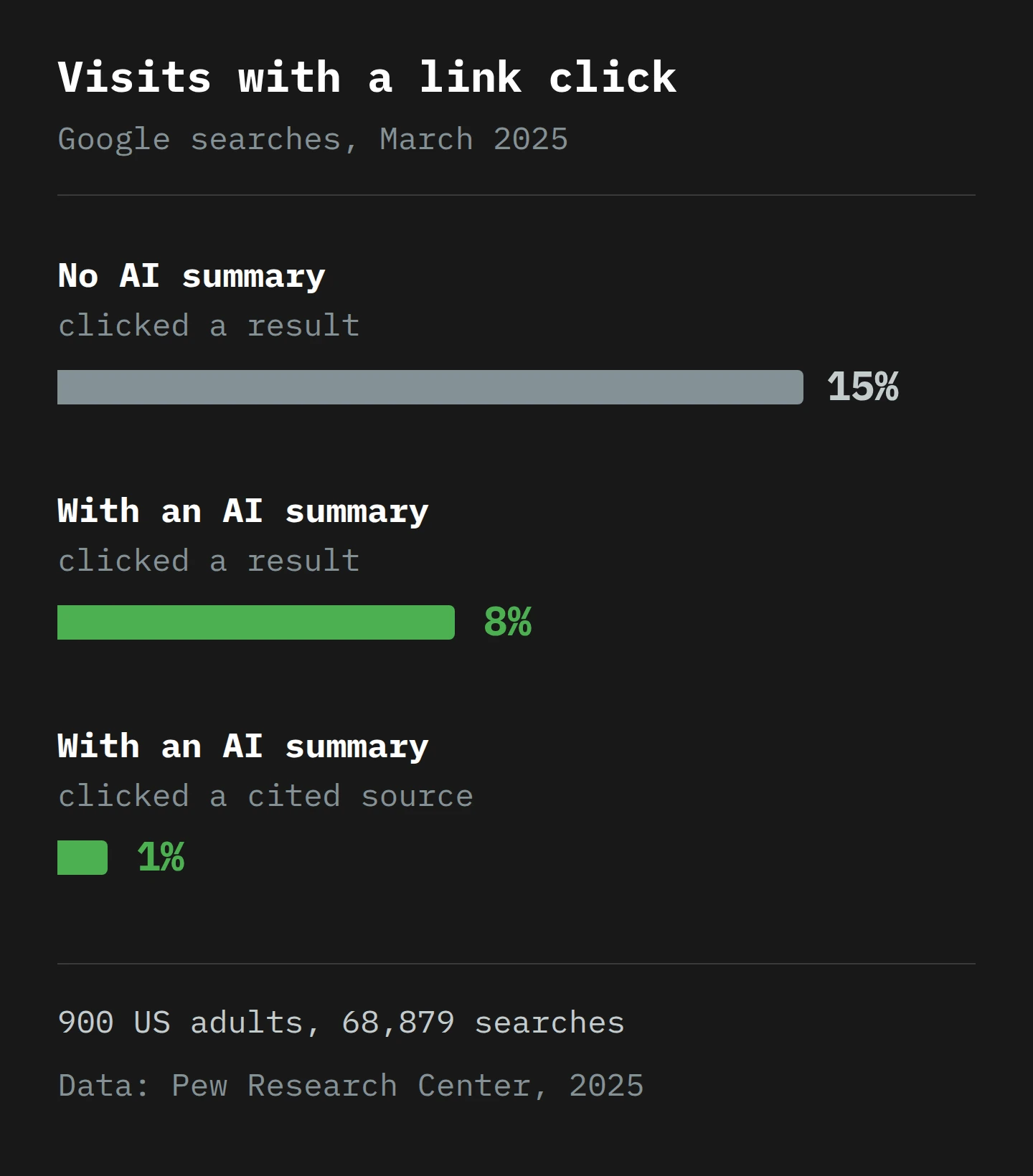
Pew also found which questions get summaries. Only 8% of one- or two-word searches produced one, against 53% of searches with ten words or more, and 60% of searches that started with a question word such as "who", "what", "when" or "why". Keep that in your pocket. It becomes a practical filter in Part 7.3
The same Semrush study from Part 1 found that only 6 to 8% of AI Mode sessions led to a visit to any other website. That was US desktop data from the first weeks of AI Mode, so treat it as an early reading. But it is a very low number. In ordinary search, by Semrush's earlier estimate, the zero-click share was between about 35% and 46%, depending on whether an AI Overview appeared.
And in February, Ahrefs repeated a study of 300,000 keywords using aggregated Search Console data. For keywords that now show an AI Overview, the average click-through rate at position one fell from 0.073 in December 2023 to 0.016 in December 2025. Informational keywords without an AI Overview fell too, from 0.076 to 0.039, which says something about search in general. After allowing for that, Ahrefs finds that AI Overviews correlate with a position-one click rate about 58% lower than expected, with smaller drops at positions two and three.
Google's measurement
Google's answer, in a post by Liz Reid in August 2025, is that "total organic click volume from Google Search to websites has been relatively stable year-over-year". Google says it sends "slightly more quality clicks", which it defines as clicks where users "don't quickly click back". It blames reports of steep declines on "flawed methodologies, isolated examples" or changes that came before the AI features. The post gives no numbers.
How both can be true
Here is my view. These two stories measure different things, and both can be accurate.
The studies measure clicks per search, or per result. Google measures total clicks across the whole web. If searches go up (and Google says queries hit an "all-time high" last quarter), then the total can stay flat while each search sends fewer people out. Reid's own post says that traffic is shifting, "resulting in decreased traffic to some sites and increased traffic to others". Stable in total can mean terrible for you.
So I would not plan on the total. I would plan on this: for questions that an AI feature can answer, the click is becoming rare. And as the pipeline moves from summaries to agents, the thing you measure has to move from the click to the outcome. That means you need to know exactly how your tools decide where a visit came from, because that is where the pipeline goes dark.
Part 3: How a Visit Gets Its Label
Everybody knows how a postmark works. A letter arrives, you look at the stamp, and it tells you roughly where it came from. Web analytics depends on the same idea, and the stamp has a name.
The Referer header
When you click a link, your browser asks the next site for the page, and it usually attaches a line saying where you came from. That line is the Referer header.4 MDN's reference puts it plainly: for a link click, it contains "the address of the page that includes the link".
How much of the address gets sent depends on the referrer policy. The default in modern browsers is strict-origin-when-cross-origin. When a link sends a person from one site to another, only the origin is sent: https://www.google.com/, not the full address of the page they came from. A click from Google arrives saying "Google" and nothing about the question. A site can also switch the header off completely with no-referrer, or with rel="noreferrer" on a single link. Then the letter arrives with no postmark at all.
From postmark to channel
Google Analytics 4 reads that postmark and turns it into a source and a medium. A click from Google's results arrives with a Google referrer, and GA4 records google / organic. A visit with no referrer and no campaign tags gets (direct) / (none).
Then GA4 sorts each session into a channel using a fixed set of rules, the default channel group. In the version of that page captured on 14 May 2026, the rules say three things that matter here:
- Organic Search is non-ad links in search results, "including Google's AI Overviews and AI Mode". So a click from an AI Overview is organic search, and nothing separates it from a click on a blue link.
- Direct is a source of exactly
(direct)with a medium of(none)or(not set). In other words: no postmark. - Unassigned is what GA4 uses "when there are no other channel rules that match". If you have ever met that bucket, I wrote a whole article on unassigned traffic, and it has not become less relevant.
The week the postmark went missing
We have a real example of how thin this stamp is. In late May 2025, days after AI Mode launched in the US, an SEO director named Maga Sikora noticed that AI Mode traffic was showing up as direct in Google Analytics. Google had put rel="noopener noreferrer" on AI Mode's links, so no referrer was sent. Google's John Mueller said, "it looks like a bug on our side", and within days Aleyda Solis confirmed the attribute was gone. For several days, AI Mode clicks looked, in Analytics, like people typing your URL from memory. One small HTML attribute moved a whole traffic source between channels.5
The new AI Assistant channel
On 14 May this year, Search Engine Journal reported that GA4 has added an AI Assistant default channel. When the referrer matches a known AI assistant, GA4 sets the medium to ai-assistant, the campaign to (ai-assistant) and the channel to AI Assistant. Google's examples are ChatGPT, Gemini and Claude. Google has not published the full list, and when that article was written, the channel definitions page had not yet been updated. The capture I read from the same day still has no AI Assistant entry.
Two limits. First, it only works when there is a referrer. SEJ notes that AI traffic with no referrer still lands in Direct. Second, it is about chat assistants. In the 14 May capture of Google's channel definitions, Google's own AI Overviews and AI Mode are still in Organic Search.
What Search Console counts
Search Console sits on the other side of the click. It records what Google showed and what people clicked, before your site is involved. Its counting rules for AI features, as captured in April 2026, are specific:
- In AI Mode, clicking a link to an external page counts as a click. Normal impression rules apply. Position uses the same method as a normal results page.
- A follow-up question in AI Mode is "essentially performing a new query". Its impressions and clicks count under the new question, not the first one.
- An AI Overview takes a single position, and every link inside it gets that same position. A link must be scrolled or expanded into view to count as an impression.
And all of it goes into the Performance report "within the 'Web' search type", mixed with everything else. As of May 2026, Google's guidance for site owners does not describe a separate filter for AI features.
That explains the Monday morning numbers. Every fan-out and every follow-up can create an impression for your page. Each click still counts as one click. So impressions rise faster than clicks, and your average click-through rate falls, even if nothing changed on your site. Bing is a step ahead here, oddly enough, which I did not expect to write when I covered Bing AI in 2023. Its AI Performance report, in public preview since February, counts how often Copilot and Bing's AI summaries cite your pages. It reports citations and the "grounding queries" the AI used, with no click figures at all. That is a measurement tool designed for a world where a citation is the result.

Part 4: When the Visitor Is an Agent

So far, a person has always clicked. Now take the person out. An agent that acts for someone can reach your website in two very different ways, and the difference decides whether you can see it at all.
Picture a town gate. One messenger arrives in the lord's livery with a wax seal on a cord. The gatekeeper checks the seal against the book of impressions and writes down "messenger of the lord, 10:14". A second visitor arrives in ordinary clothes, walks like a local and says good morning. The gatekeeper nods. The second visitor was also a messenger. Yes, we are doing a medieval gate now. It will be worth it, I promise.
The messenger with the seal: agents on Google's servers
Agents that run on Google's own infrastructure fetch pages from Google's servers. Since March, Google's list of user-triggered fetchers has included Google-Agent, described (in the version captured on 2 May 2026) as used by "agents hosted on Google infrastructure to navigate the web and perform actions upon user request". The example it gives is Project Mariner. Search Engine Roundtable reported in March that the user agent was "rolling out over the next few weeks".
This is the livery. Look at the end of the desktop user agent string:
Mozilla/5.0 (X11; Linux x86_64) AppleWebKit/537.36 (KHTML, like Gecko; compatible; Google-Agent; +https://developers.google.com/crawling/docs/crawlers-fetchers/google-agent) Chrome/W.X.Y.Z Safari/537.36
Most of it is the usual browser boilerplate that claims to be Chrome. But the Google-Agent token is in the middle, and you can search your logs for it.
Three details on the same page matter:
- User-triggered fetchers "generally ignore robots.txt rules", because a person asked for the fetch. Your
robots.txtis the wrong tool for these. - "The user agent string can be spoofed." Anyone can type
Google-Agentinto a script. Google publishes this agent's IP addresses in a file calleduser-triggered-agents.json, so you can check the address against the list. - Google is "experimenting with the web-bot-auth protocol, using the
https://agent.bot.googidentity".
That third point is the wax seal. Web Bot Auth is an IETF draft whose goal is "to allow automated HTTP clients to cryptographically sign outbound requests". Cloudflare explains why this matters: IP ranges "may be shared by other services, or change over time", and the user agent is "easily spoofable". With Web Bot Auth, the agent's operator publishes its public keys at /.well-known/http-message-signature-directory. Every request carries a Signature-Agent header that points at that directory, a Signature-Input header that lists what was signed and carries the tag web-bot-auth, and a Signature header with the signature itself. Your server, or your CDN, fetches the key and checks the signature. A forged user agent is a costume. A valid signature is much harder to fake without the private key.
Would Gemini Spark, on its virtual machines, arrive as Google-Agent? Google's documents do not say. It is a reasonable guess, and it is only a guess. Your own logs will tell you once these agents reach you.
The visitor in ordinary clothes: agents in the browser
The second kind of agent runs inside a real browser on the customer's own computer. In January, Google started a preview of Chrome auto browse for US AI Pro and Ultra subscribers. Google says it "handles multi-step chores on your behalf", and that it is designed to "pause and explicitly ask for your confirmation or prompt you to complete some tasks", such as a purchase or a social media post. 9to5Google notes that it can "scroll, click, and enter text" in the customer's own Chrome, and that you still press the buy button yourself. Google's announcement says nothing about how auto browse identifies itself to websites.
We have a good test of what this kind of agent looks like in analytics, from OpenAI's Operator in early 2025. Seer Interactive sent it to their own website and watched what GA4 recorded. When they told Operator to go to a URL, the visit was direct / (none). When they told it to find their website, it searched on Bing first, and the visit came in as Bing organic. They checked browser, version, operating system, user agent "and more", and "none of them reliably distinguished Operator traffic from normal user sessions".6
That is the visitor in ordinary clothes. A browser agent runs your analytics tag, accepts your cookies and follows your links, because it is a real browser. It inherits whatever referrer its path gives it. In GA4 it is a person. Some of your "engaged sessions" this year will be agents doing a very thorough job of shopping for someone else.
The visitor who never comes through the gate
There is a third case, and it is the one from our Monday. A UCP checkout never goes through the gate at all. The agent reads /.well-known/ucp, sends POST /checkout-sessions to your API, and the order appears. No page loads, so no analytics tag runs. Your server log has an API request with a UCP-Agent header. Your order system has an order. GA4 has nothing, unless you send the order in yourself.
Part 5: Priya Buys Some Tea
Let's follow one purchase through the whole pipeline. This is a made-up example, and some steps are features Google has announced for later this year and for the US first. But every record in it follows Google's documentation as of May 2026.
Priya lives in Launceston. Her father is visiting, and he is famously hard to please about tea. This is the tea shop from our Monday.
Step 1. Priya asks AI Mode: "green tea that isn't bitter, for someone who's fussy, plus a small pot to brew it in". AI Mode fans the question out. The answer cites your page on brewing temperatures and your product page for a Tasmanian sencha. She reads the answer and does not click.
Step 2. She asks a follow-up: "is Tasmanian green tea actually any good?" Search Console counts this as a new query. Your "About our growers" page is cited. She still does not click.
Step 3. She clicks the link to your sencha. Search Console records a click. Her browser sends Referer: https://www.google.com/, and GA4 records google / organic, in the Organic Search channel. She reads the page, looks at the price and leaves without buying.
Step 4. That evening, she asks Chrome auto browse to compare the sencha with two similar teas on other sites and add the best one to her Google cart. The agent opens your product page in her Chrome, in a new tab. GA4 records a second session. Depending on how the agent got there, it is organic, referral or direct. It looks like Priya, because in every way GA4 can measure, it is Priya.
Step 5. Two days later, her information agent (when those arrive) checks whether the tea is back in stock in the larger size. If that agent runs on Google's servers, your server log may show a fetch with Google-Agent in the user agent. GA4 probably shows nothing. I say "probably" because Google has not documented whether its hosted agents run analytics scripts, and that is exactly the kind of thing to check in your own data.
Step 6. Universal Cart sees a price drop, and Priya pays with Google Pay. Google's side calls your UCP endpoints. Your order system records an order, with you as merchant of record. Your server log shows the POST /checkout-sessions request. GA4 records nothing.
Now put each record next to the others:
| Step | Search Console | GA4 | Server log | Order system |
|---|---|---|---|---|
| 1. AI Mode answer cites you | Impression | Nothing | Nothing (the page was fetched earlier by Googlebot) | Nothing |
| 2. Follow-up question | Impression, under a new query | Nothing | Nothing | Nothing |
| 3. Priya clicks a citation | Click | Organic Search session | Page request, Google referrer | Nothing |
| 4. Browser agent compares | Nothing | A session that looks like a person | Normal Chrome request | Nothing |
| 5. Hosted agent checks stock | Nothing | Probably nothing | Request with Google-Agent | Nothing |
| 6. Cart checkout through UCP | Nothing | Nothing | API request with UCP-Agent | The order |
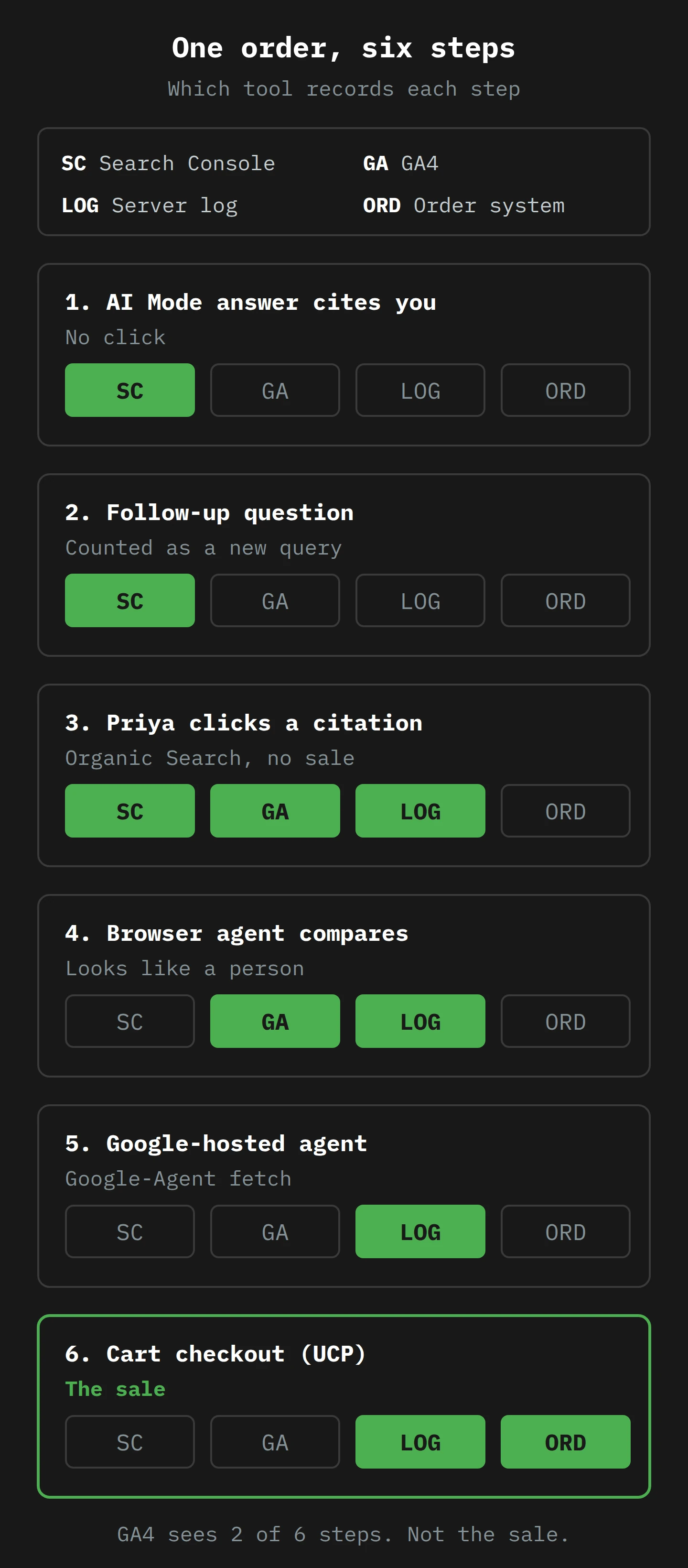
Look at the GA4 column. It saw two of the six steps. The first one ended with no purchase. The second one was an agent that GA4 counted as a person. The sale itself is invisible to it. If you judge your content by GA4's conversion reports, the page that won the sale (the brewing guide in step 1) gets no credit at all, and the last-click report gives the order to nobody.
No single tool is wrong here. Each one records its own part of the path, and none of them sees all of it. The only complete record is the one you build by joining them, and the key for the join is the order, not the session.
Part 6: What Still Earns a Visit
If the click is getting rare, what content still earns one, or earns a citation, or earns the order? The sources point the same way, and it is more specific than "write good content".
Content that is only a fact gets absorbed. If your page answers "what temperature should I brew green tea at?" and nothing more, the answer is now at the top of Google, with your page as one of several small citations. Pew found that people clicked those cited sources in 1% of visits. The fact still had value. The value went to the summary.
Content that is a point of view still gets visits. In her August post, Reid said people increasingly look for "an in-depth review, an original post, a unique perspective or a thoughtful first-person analysis", and for "authentic voices and first-hand perspectives". You can be cynical about Google's motives and still take the hint. A summary can say that some growers pick tea by hand. It cannot be the person who stood in the row at 6 am and knows which slope gives the sweeter leaf. A reader who wants that goes to the source.
Content that is a transaction gets the order, if the machines can read it. For agents, your product data is your content. Google's guidance for AI features tells you to keep Merchant Center and Business Profile information up to date and to make sure structured data matches the visible text on the page. The same page also says, plainly, that "you don't need to create new machine readable files, AI text files, or markup" to appear in AI features in Search. Checkout through an agent is a separate matter. That needs UCP, through your commerce platform or your own endpoints. Price, stock and shipping that are accurate in the machine-readable data are what an agent works from, and an agent will not forgive a stale price the way a person might.
Your controls are the old ones. Google says robots.txt for Googlebot "is the control" for AI features in Search, and nosnippet, data-nosnippet, max-snippet and noindex limit what is shown. Google's page does not list a control that takes you out of the AI features and leaves you in normal results. Blocking Googlebot to avoid AI Overviews would take you out of Search altogether, which is a very dramatic way to make a point.7
Part 7: What to Do This Week
None of this needs new software. It needs you to look at the tools you already have in a slightly different order.
1. Make the order system your source of truth
Decide now that the number you report to the business is orders (or leads, or bookings) by source, from the system where the money lands. Traffic becomes a supporting number. Put an annotation in GA4 and in your reporting deck for 19 May 2026, and another for late May 2025 (the AI Mode referrer bug), so that nobody investigates a change that was caused by Google.
2. Split your Search Console queries by shape
Pew found that long queries and questions trigger AI summaries much more often. Search Console's Performance report has a Custom (regex) filter for queries, using RE2 syntax, not case-sensitive by default. Use it to split your queries into "likely to get an AI answer" and "not":
- Question queries:
^(who|what|when|where|why|how)\b - Queries of ten words or more:
^(\S+\s+){9,}\S+$ - Everything else: the same patterns, with "Doesn't match regex".
Export the clicks and impressions for each group, month by month, back as far as the report allows. If click-through rate falls in the first two groups and holds in the third, you have your own evidence, for your own site, of where the click went. It is not proof, but it is far better than a vendor's average.
3. Look at your logs for agents
Ask whoever runs your hosting or CDN for a month of raw logs, and search them:
- For
Google-Agentin the user agent. Check each IP address against Google'suser-triggered-agents.jsonlist. A match is Google. No match is somebody wearing Google's livery. - For
Signature-AgentandSignature-Inputheaders. They mean a bot that signs its requests. If you are on Cloudflare, its Verified Bots programme checks these signatures at the edge. - For
UCP-Agentheaders and requests to/.well-known/ucpor/checkout-sessions, if your platform supports UCP.
Most servers do not log request headers by default, so you may need to ask for the three header checks to be switched on for a while. Write down what you find, with dates. Right now the numbers will be small. The point is to have a baseline before the summer releases, so you can see the change when it comes.
4. Check what GA4 is doing with AI traffic
Open Reports, then Acquisition, then Traffic acquisition, and look for the AI Assistant channel. If you built your own "AI referrals" channel group with a regex (many of us did), keep it and compare the two. Remember that Google's AI Overviews and AI Mode are inside Organic Search, not AI Assistant. Also check any segment or audience built on "medium does not contain" rules, because a new medium (ai-assistant) can move sessions in or out of it without warning.
5. Get orders from agents into your analytics yourself
If you take orders through UCP or Google Pay on Google, no analytics tag will see them. Send them from your server. GA4's Measurement Protocol exists for "server-to-server and offline interactions". Read Google's own warning first, though: its intent "is to augment automatic collection… not to replace it". An order from an agent has no browser session to join to. So store the order with its channel ("Google agentic checkout") in your own database or warehouse first. Send it to GA4 second, so that your reports show it, and so that nobody believes GA4's attribution for it.
6. Rewrite one page, not the whole site
Pick one page that ranks well for a question query and has lost clicks. Keep the factual answer (the summary will take it anyway). Then add the thing a summary cannot: the first-hand test, the photo you took, the number from your own data, the opinion you would defend at a dinner party. Check that the product data under it (price, stock, shipping) is correct in Merchant Center. Measure that page, by the group method in step 2, for three months.
Final Thoughts
Back to that Monday morning in North Hobart, some months from now. The impressions went up because a machine read your pages hundreds of times on behalf of people asking long, specific questions. The clicks went down because the machine answered many of those questions itself. Organic sessions fell because fewer people came through the door. The orders went up because some of them never needed the door. Priya's father got his tea, and it was not bitter.
Nothing in that picture is a bug. It is four tools, each recording its own part of one path, and a pipeline that Google has just made much longer. As of May 2026, AI Overviews flow into AI Mode, AI Mode fans one question out into many searches (hundreds, in Deep Search), agents are coming that watch and buy, and a cart can check out through a protocol that never loads your page. The click was never the point. It was only the easiest thing to count.
So this week, change what you count. Make the order the key. Split your Search Console queries by shape. Search your logs for the messenger with the seal. Write the pages that only you can write, and make the product data under them correct, because the next visitor to read it carefully may not be a person.
I drink about 1,820 cups of tea a year, and I would like to keep choosing the tea myself, thank you. The agents can carry the parcel. Now, if you'll excuse me, I think my tea is ready.
Notes
-
Google's May 2025 launch post says Deep Search, a mode for longer research inside AI Mode, "can issue hundreds of searches" for one question. Most visitors will never know that happened on their behalf. ↩
-
The payments side has its own protocol, the Agent Payments Protocol (AP2). Google says a person sets the brands, products and spending limit, and the agent "only makes the purchase when your criteria are met", with tamper-proof digital mandates as a record. Google says AP2 arrives in its products in the coming months, starting with Gemini Spark. ↩
-
Pew found that Wikipedia, YouTube and Reddit together made up 15% of the sources cited in AI summaries, and 17% of the sources in standard results. So the summaries do not favour those three sites more than normal search does, but they already had a large share. ↩
-
MDN notes that the header name is a misspelling of "referrer". The related
Referrer-Policyheader is spelled correctly, so the web spells the same word two ways, sometimes in the same request. ↩ -
Referrers also go missing for reasons that have nothing to do with bugs. Cloudflare found that traffic referred by Claude's native app arrives without a
Refererheader, and said it believes the same holds for other native apps. Any visit from an app tends to look like direct traffic. ↩ -
Seer found one clue, for a while: Operator reported itself as Linux running Chrome 130, which was unusual enough to spot. A fingerprint like that lasts only until the next browser update, so it is not a reliable way to find agents. ↩
-
Google also has a separate token, Google-Extended, for training and grounding in some of its other AI systems. Google's documentation points to it for those systems, not for AI features in Search. ↩