Google Signals Goes Quiet: Why ad_storage Will Hold the Keys
Tomasz runs a small online shop in Launceston that sells hand-thrown ceramic teapots. They are lovely teapots, heavy and blue-grey, with a lid that sits so snugly it makes a faint tock when you put it on. About a quarter of his orders go to Europe, mostly Germany and Denmark, where it seems people appreciate a teapot that could survive being dropped down a flight of stairs.
Three years ago, Tomasz paid a lawyer to help him write a privacy policy. It is a good one. In the section about Google Analytics, it has a sentence he is quietly proud of, because it was his idea: "We have turned off Google Signals, so Google does not use your visit to our site to link your activity to your Google account for advertising." He switched the toggle off himself, in Admin, and took a screenshot for his records. As far as Tomasz is concerned, it is the privacy equivalent of a deadbolt.
Then, in mid-April, a friend who runs a candle shop forwards him a Google help page with one line of commentary: "isn't this your deadbolt?" The page is short. It has no date on it. And it says that from 15 June, the switch he turned off will no longer control what reaches Google Ads.
He reads it again. He opens GA4. The toggle is still off. Nothing on the screen has changed. Nobody has touched his settings, his banner, his tags or his policy. And yet the sentence he is proud of, which was true when he wrote it, has a use-by date. On 15 June it goes off, like milk, whether or not anyone opens the fridge.
He looks at the teapot on his desk. He wonders whether a privacy policy can carry a best-before sticker, and whether the lawyer would charge for one.
Put the kettle down for a moment. Nothing has broken yet, and for a lot of sites nothing will change at all. As of April 2026, two separate settings decide whether the Google Analytics tag collects Google Ads cookies and identifiers for a GA4 property linked to Google Ads: the Google Signals setting in Analytics, and the ad_storage consent state from consent mode. Google's help page says that "starting June 15, 2026, Google Analytics will transition to using Consent Mode (within Google Ads) as the single control for data." After that date, the Signals setting "will only control the association of your Google Analytics sourced data with signed in user information for behavioral reporting." Signals stays. It just stops guarding the door to Ads. As Search Engine Land put it on 13 April, "Brands with Google Signals turned off should pay particular attention".
That is Tomasz. It may also be you.
So here is the plan. We start with what Google Signals actually is, down at the level of who is signed in to what. Then the two keys that guard Ads data today, the one key that will guard it from June, and what that costs you in the way you ask for consent. Last, the practical part: two URL parameters that tell you which key is turned, the sentence to fix in your privacy policy, and a week of short checks for Tomasz, timed to finish before his lawyer's next invoice.
Let's get into it.
Part 1: What Google Signals Actually Is
Start with something you do every day without thinking about it. You are signed in to Google on your phone, because that is how your email arrives. You are signed in on your laptop, because that is how your calendar works. You look up a teapot on the train, then buy it that night from the couch. To you, that is one person doing one errand. To a website, it is two strangers: a phone that browsed and a laptop that bought. Each device has its own cookies, and the cookies have never met.
Google, however, knows both devices belong to you, because you told it so every time you signed in. That is the whole idea underneath Google Signals. It is the difference between a shop that counts devices and a shop that counts people.
The name and the rule
Google's own definition is precise, and worth reading slowly. Google signals "are session data from sites and apps that Google associates with users who have signed in to their Google accounts, and who have turned on Ads Personalization." Note the two conditions. The visitor must be signed in to Google, and they must have Ads Personalization turned on in their own Google account settings. If either condition fails, Signals has nothing to add for that visitor.
When both conditions are met, Google says the association is used "to enable cross-device remarketing, and cross-device key events export to Google Ads". On the reporting side, it gives you demographics and interests, and cross-device reports that count users instead of devices. Google's example is the one from the train: someone who browses "from a phone, and later return[s] to complete purchases from a tablet or laptop".
So Signals does two jobs at once, and this is the part that matters for June:
- A reporting job, inside Google Analytics. Better user counts, demographics, cross-device journeys.
- An advertising job, inside Google Ads. Remarketing to the same person on another device, and sending key events from GA4 to Ads with the cross-device view attached.
Turning Signals off, today, switches off both. Google says so directly: "Deactivating Google signals also deactivates all these features for use cases that rely on third-party advertising identifiers."
How the machine does it
Now the mechanism, with its real terms. A normal GA4 setup identifies a browser with a first-party cookie, the _ga cookie, set on your own domain. It knows nothing about Google accounts. Signals adds a second layer: third-party advertising identifiers, the cookies and IDs that live on Google's advertising domains rather than yours. The Google tag configuration reference describes the code switch for Signals in exactly those terms: "To disable advertising features based on third-party advertising identifiers, set allow_google_signals to false." Its default is true.
You can see this second layer in an unexpected place: a site's security settings. Google's Content Security Policy guide (a CSP is the list of servers a page is allowed to talk to) has one set of hosts for a plain GA4 setup, and a longer set "for Google Analytics 4 (Google Analytics) deployments using Google Signals". The longer set adds *.g.doubleclick.net, *.google.com and a country version of google.com.1 DoubleClick is Google's advertising infrastructure. Signals is not a report setting. It brings Google's ad servers into the conversation.
A few more details from the same help page are useful later:
- When you activate Signals, you become subject to Google's policy requirements for Google Analytics Advertising Features. That is the policy that tells you what your privacy policy must say. We will need it in Part 6.
- Google notes that remarketing "based on consented, first-party data" does not need Signals at all.
There is also a reporting cost. Signals is one of the main causes of data thresholding in GA4, where reports hide rows with small numbers of users to protect privacy. I wrote a whole post on thresholding and how to deal with it, and a lot of people turned Signals off for that reason alone, not for privacy.2 Tomasz turned it off for privacy. Remember that both groups made the same click for different reasons. From June, only one of those reasons still holds.
Part 2: Two Keys, Today
Picture a bank's safe deposit box. The old kind has two keyholes. The bank keeps one key, you keep the other, and the box opens only when both keys turn at once. Neither of you can open it alone. That design has a lovely property: if you want the box to stay shut, you do not have to trust the bank. You just keep your key in your pocket.
As of April 2026, that is how Ads cookies and identifiers from the Google Analytics tag work for a GA4 property linked to Google Ads. There are two keyholes.
Key one: Google Signals
The first key is the Signals toggle in GA4 Admin, or allow_google_signals in the tag. Google's help page describes the current state plainly: "Today, the collection of Google Ads cookies and IDs from the Google Analytics tag and SDK is controlled by both the Google Signals setting in Google Analytics and your Consent Mode Ads settings." Both. If Signals is off, that key stays in your pocket.
Key two: ad_storage
The second key is a consent mode consent type. I covered consent mode in depth in August 2025 (and its basics back in 2022), so here is the short version. Consent mode is the message your cookie banner sends to Google's tags, so they change what they do. It does not draw the banner. It carries the answer.
Each permission in that message is a consent type with a state, granted or denied. Google's consent mode overview lists seven types. The one that matters here is ad_storage, which "enables storage, such as cookies (web) or device identifiers (apps), related to advertising."
What ad_storage does when it is denied is the key detail, so here it is in Google's words, as of mid-April:
- "No new cookies or device identifiers pertaining to advertising may be written."
- "No existing advertising cookies or device identifiers may be read."
- "Google Analytics will not read or write Google Ads cookies, and Google signals features will not accumulate data for this traffic."
Look at the last line. Even today, a denied ad_storage switches off Signals for that visitor. The consent key already overrides the Signals key when the answer is no. And when ad_storage and analytics_storage are both granted, the same page says advertising cookies and device identifiers "may be read and written", IP addresses are collected, and "Third-party cookies previously set on google.com and doubleclick.net" are accessible.
There is one more detail that catches people. Google's consent mode reference groups "not set" with "denied": its list of behaviours applies when consent is "not granted (not set or denied)". And the consent mode setup guide warns that "By default, no consent mode values are set." A site with no consent mode at all has neither a yes nor a no. It has silence, and what silence means depends on the tag.
Why the two keys felt safe
Put the two keys together and you get the arrangement Tomasz was relying on without knowing its name. For Ads cookies and IDs from the GA tag to reach a linked Ads account, Signals had to be on and ad_storage had to be granted. If you turned Signals off, it did not matter much whether your banner worked properly. The GA tag would not hand over Google Ads cookies and IDs, because your key never turned.
That is a strange kind of safety. A site could have a broken banner or a late default, and the Signals toggle would quietly cover for it on the Ads side. PPC Land's April report calls it "a partial safety net against ad data collection, even with an incomplete or delayed Consent Mode setup".
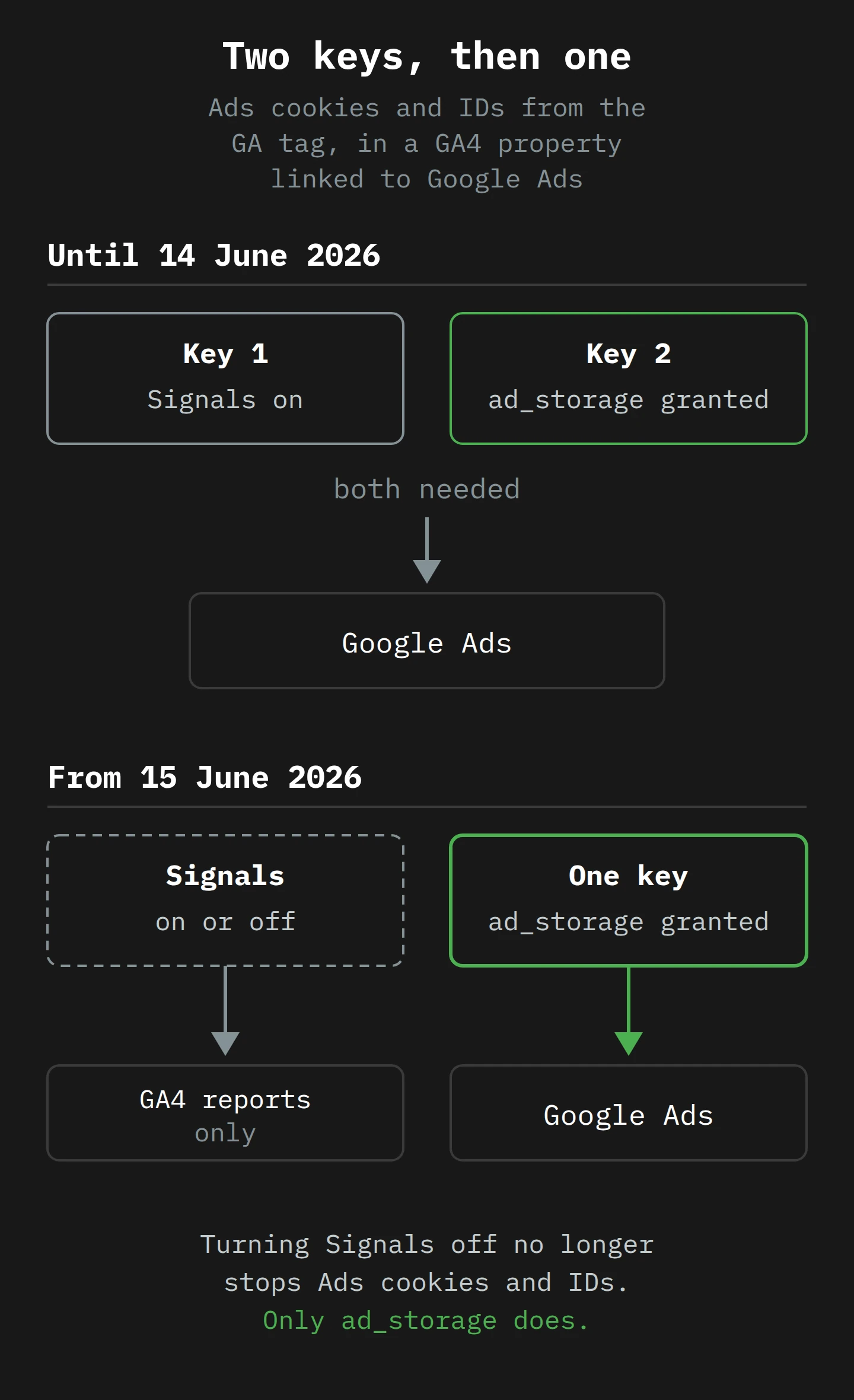
The bottom half of that picture is where we are going next. The bank is changing the lock.
Part 3: One Key, From 15 June
Here is the full change, from the help page that was live by 13 April.3 Google frames it as a tidy-up: "To simplify data controls and remove redundant settings between Google Analytics and Ads, we are planning to consolidate controls based on where the data is used." For linked properties, "Google Ads settings will exclusively control Google Ads data (including data shared by Google Analytics). Google Analytics settings will exclusively control data used within Google Analytics for behavioral reporting."
Then the part with a date on it:
Starting June 15, 2026, Google Analytics will transition to using Consent Mode (within Google Ads) as the single control for data. This means your users' privacy selections, managed via Ads Consent Mode settings, will exclusively govern how data is collected and used.
And the consequence: from that date, "the Google Signals setting in Google Analytics admin and the Google Signals API will only control the association of your Google Analytics sourced data with signed in user information for behavioral reporting".
In bank terms, the Signals keyhole is being moved. It will open only a drawer in your own office: the GA4 reports. The Ads box keeps one keyhole, and your banner holds the key.
What Google says, and what Google does not say
The coverage has started to blur two voices.
What Google says: from 15 June, consent mode is the single control, and Signals only governs behavioural reporting in GA4. That is all the page says about Signals.
What an expert reads into it: Simo Ahava, co-founder of Simmer, wrote a LinkedIn post about the change, and PPC Land quoted it at length. I have not read the post itself, so treat these as his words as PPC Land reported them. His reading of the migration was: "if you have Google Signals currently turned ON, there's no real change in behavior. If Google Signals is OFF, then Ads may start linking user data with their Google login as long as ad_storage consent is granted."
He went further: "If I'm reading this correctly, there's no middle ground here. Either grant ad_storage and Google will use all available ads signals at their disposal (including linking the user with their Google sign-in), or set it to denied and Google will not access any identifiers apart from what's available in the url (e.g. gclid)." (The GCLID is the Google Click Identifier, the long code Google adds to a landing page URL after an ad click.)
Note his own hedges: "If I'm reading this correctly". Google's page does not use the words "Google login" or "sign-in" about Ads at all. But Ahava's reading follows from the page's logic. If Signals used to be one of two keys for Ads cookies and IDs, and it will soon be none of the keys, then the Ads side of what Signals held back will depend on ad_storage alone. Search Engine Land reached the same view: "If ad_storage is granted, Google Ads may use all available advertising signals, including linking activity to a user's signed-in Google account when possible." Note the "may".
Who changes, and who does not
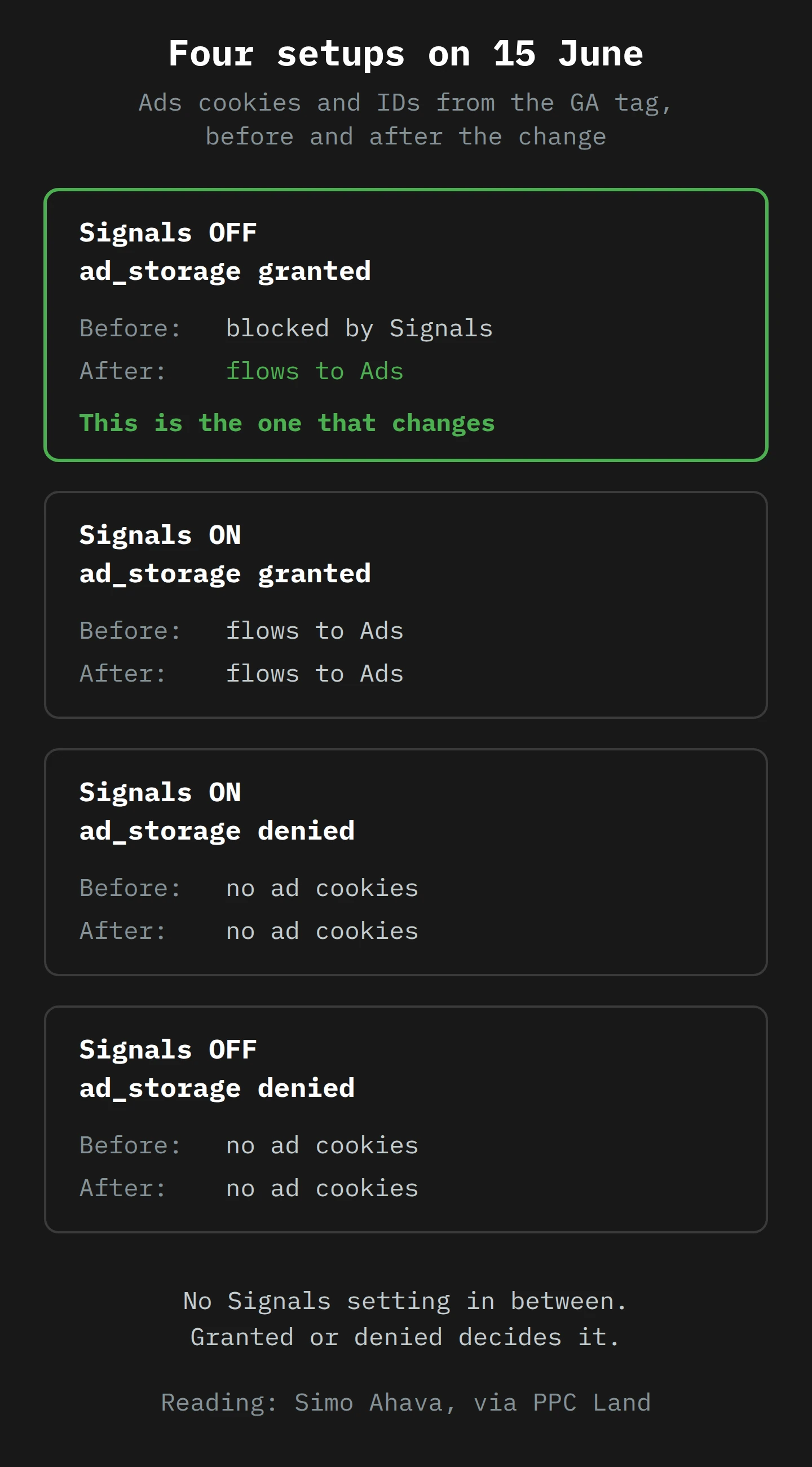
Lay the four combinations out, as in the diagram, and the result is almost anticlimactic:
- Signals on,
ad_storagegranted. Both keys turned before. One key turns after. No change. - Signals on or off,
ad_storagedenied. The consent key never turned before, and it does not turn after. No change. - Signals off,
ad_storagegranted. Before, your Signals key stayed in your pocket, so the Ads side of Signals stayed shut. After, there is no pocket to keep it in. This is the one that changes.
Ceyhun Aksan's analysis from 14 April sorts sites into groups by setup. It adds a group the four cards do not show: sites with Signals on and consent mode "not set up or incomplete". Aksan calls these "The largest impact group", because "there will be no user-preference-based control mechanism", which "creates both legal compliance and data quality risk".
Both groups have the same problem underneath. From 15 June, whatever your ad_storage says is what Google Ads gets. If the signal is right, you are fine. If it is wrong, nothing else in Analytics will catch it.
The two changes still to come
The help page announces two more changes "later in 2026", without dates:
- Ads personalisation. Today it is set at "the account, property, Ads link, and event levels" inside GA4. Later, "the Consent Mode ad_personalization setting will exclusively control if that data is used for personalization in your Ads account." Same pattern: the GA4 toggles lose their say over Ads.
- IP addresses. IP addresses "automatically collected by the Google Tag and SDK will be encrypted and flow to your linked Google Ads account", where Ads settings control them.
Google says the exact dates "will be shared later this year". I would not plan around rumours. I would plan around the pattern, which is now clear: GA4 settings will control GA4, and consent mode will control Ads.4
Part 4: Why Google Is Doing This, and What It Costs You

Imagine a walled town with two gates. The main gate asks every traveller, "May we note your name for the market register?" The side gate, round the back by the tannery, asks a second question: "May we follow you to the next three towns and tell the merchants there what you bought?" Travellers never see the side gate. Some towns bricked it up years ago and told everybody they had.
Now the council announces that from June, the side gate is closing for good. There will be one gate and one question. Whatever you answer at the main gate is your answer for both.
Tidier, yes. Also a bigger question.
The case for the change
I think Google's stated reason is real. PPC Land quotes Ahava's view that "The purpose is no doubt to move towards a single source of truth for Ads consent rather than have obscure (and often hidden) GA settings affect the data flow". Hidden settings are bad for privacy. A visitor cannot see the Signals toggle. They can see your banner. Moving the decision to the thing the visitor actually answers is, in principle, the right direction. It puts the decision where the law expects it to be: in the visitor's hands, on the page.
It also makes auditing easier: one signal to check instead of a signal and a hidden toggle. Aksan's summary line is a good one: "data controls will live where the data is used".

The cost: one "yes" now covers more
Here is the part I find uncomfortable. Before June, a site could ask for advertising consent and still decide, on its own, not to let the GA tag hand Google Ads cookies and IDs to Ads. That was the side gate, bricked up. After June, that option is gone for linked properties. A visitor who clicks "Accept" on advertising cookies gets whatever ad_storage granted means to Google Ads, and on Ahava's reading that includes "linking the user with their Google sign-in".
Piwik PRO, which sells a competing analytics product (so read it with that in mind), makes this point sharply: "There's no separate consent for cross-device linking specifically." Its author notes that under the GDPR, consent "must be specific and informed", and argues that bundling cross-device tracking into one advertising consent does not give users the granular control they expect.
I would not go quite that far, but the question is a fair one, and the European Data Protection Board has already answered the general version. Its guidelines on consent say that "specific" consent needs "Purpose specification as a safeguard against function creep", "Granularity in consent requests", and clear separation of consent information from other matters (paragraph 55). "Function creep", the EDPB explains, is "the gradual widening or blurring of purposes for which data is processed, after a data subject has agreed to the initial collection of the data" (paragraph 56). A controller that seeks consent for different purposes "should provide a separate opt-in for each purpose" (paragraph 60). And for consent to be informed, the visitor must be told at least "the purpose of each of the processing operations for which consent is sought" (paragraph 64).5
I have argued before that whether Google Analytics is GDPR compliant depends more on how you set it up than on the tool. This is the same argument, one layer down. Here is my position, and it is a practical one, not a legal opinion. Google has not changed the law, and it has not changed your banner. It has changed what your banner's "yes" does. If your banner's advertising consent was written on the assumption that Signals was off, the purpose you described may now be narrower than the processing that follows. The fix is not to panic. The fix is to read your banner's advertising purpose again, with June in mind, and ask whether a visitor would expect "advertising cookies" to include being recognised across their devices through their Google account. If the answer is "probably not", say so on the banner. Whether that is enough for your markets is a question for your privacy lawyer, not for a vendor blog or for me.
The other cost: your consent setup has to be right
The second cost is less philosophical. From June, ad_storage carries all the weight. Ahava's advice, via PPC Land, is blunt: "This does place more stress on your consent mode implementation, so make sure the update calls are done appropriately and contain the correct signals."
Google's own in-product warning, as quoted by PPC Land, shows the stakes the other way round. Setting ad_storage to denied "prevents the collection and usage of all advertising cookies and device identifiers from your website or app. This action applies to all data collected by Google Ads and will significantly impact advertising measurement and conversion tracking, and hinder the performance of your campaigns within your linked ads account".
So the one key cuts both ways. Grant it wrongly, and Ads gets more than your visitors agreed to. Deny it wrongly, and your campaigns lose measurement. The only way to know which you have is to look.
Part 5: Reading the Key on the Wire
You do not need to trust your consent vendor, your developer or me. Every Google tag request carries the consent state in its URL. I covered this in detail in the August 2025 post, so this is the short, June-focused version.
Open your site in Chrome, open DevTools, go to the Network tab and filter for collect. Google's consent mode overview says consent is "translated into HTTP request parameters such as dma, gcd, and gcs", and warns that these fields "may be subject to change as these services evolve". Treat the rest of this section as a reading guide for April 2026, not a contract.
gcs: the two-digit answer
Google says gcs "is used to transmit the ad_storage and analytics_storage parameters". Markus Baersch's guide on Simo Ahava's blog decodes the format as G1xy, where x is ads storage and y is analytics storage, 1 for granted and 0 for denied. For this change, only the first of those two digits matters:
G100orG101:ad_storageis denied. The Ads box stays shut.G110orG111:ad_storageis granted. From 15 June, this is the only key the Ads box needs.
Baersch adds a useful test: "G100 is only possible in 'Advanced Consent Mode'". If you see G100 on a site that says it uses basic mode, the tags are running before anyone has answered the banner.
gcd: how the answer got there
The gcd parameter "is always sent to Google services, regardless of whether consent mode is activated or not", and it records more than the state. It records how each state was set. A typical value before anyone answers looks like 11p1p1p1p5. Baersch's guide gives a letter for each consent type, in this order: ad_storage, analytics_storage, ad_user_data, ad_personalization. For June, look at the first letter, the one for ad_storage:
p: denied by default, no update yet. What you want to see in the EEA before the banner is answered.q: denied by default, denied again by the banner. A visitor who said no.r: denied by default, then granted. A visitor who said yes.t,u,v: the same three outcomes, when the default was granted. If you seetin the EEA before anyone has clicked anything, the key is already in the lock.l: "the signal has not been set with Consent Mode". No default at all.morn: an update arrived with no default before it, which usually means the default is missing or late.
Baersch's caveat still applies: "These letters are obscure and they might change in the future." For a decision, confirm with Google's Tag Assistant. For a quick check on a Wednesday afternoon, the letters are hard to beat.6
Three failures that matter more after June
With the August post's full grid in mind, three patterns deserve special attention now that ad_storage is the only key:
- A granted default where the banner applies.
gcdstarts witht, andgcsshowsG11xbefore anyone has answered. Before June, a Signals-off property had a second key covering for this on the Ads side. After June, it does not. - No default, or a late one. An
l,mornin the first slot. - An update that never fires. After "Reject",
pthat never becomesqis mostly harmless, because the default was already denied. After "Reject",tthat never becomesuis not. Test both buttons.
Region defaults, and the override
You do not have to deny ad_storage everywhere to deny it where it matters. Google's setup guide calls it "best practice to scope the default consent settings to the regions where you are surfacing consent banners", using a region parameter with ISO 3166-2 codes. A default with no region applies to everyone not covered by a region-specific one.
If your banner loads late, the setup guide's wait_for_update gives it a set time (its example is 500 milliseconds) to send the update before tags fire.
Part 6: The Sentence in Your Privacy Policy

Back to Tomasz's sentence: "We have turned off Google Signals, so Google does not use your visit to our site to link your activity to your Google account for advertising."
On 14 June, the first half is true and the second half is, broadly, true. On 15 June, the first half is still true. The second half now depends on something the sentence does not mention: whether the visitor granted ad_storage. If they did, Google's help page says consent mode alone "will exclusively govern how data is collected and used" for Ads, and on Ahava's reading that can include the Google sign-in link. The sentence has not been edited. It has simply stopped describing the system.
This is a quiet kind of problem. UniConsent, a consent platform vendor, put it well in late April: "The data handling change happens silently on Google's side." PPC Land noted that Google's announcement "does not specify whether there will be any notification or warning within Google Analytics admin when the transition occurs." Nobody will send you an email that says "your privacy policy is now wrong".
What Google requires the policy to say
Google's Advertising Features policy, which the Signals help page says applies "when you activate Google signals", requires your privacy policy to disclose three things:
- "The Google Analytics Advertising Features you've implemented."
- "How you and third-party vendors use first-party cookies (such as the Google Analytics cookie) or other first-party identifiers, and third-party cookies (such as Google advertising cookies) or other third-party identifiers together."
- "How visitors can opt-out of the Google Analytics Advertising Features you use", including through Ads Settings.
It also says you "must also comply with the European Union User Consent Policy", and that Google "is unable to provide the exact language you need to include in your privacy policy". That policy was last updated on 16 May 2024, and nothing in April's announcement changes it. What changes is the facts your policy describes.
What to look for, and what to write instead
Signals is not going away. It still does its reporting job in GA4, so a policy that says "we use Google Signals for cross-device reporting" can stay true. The sentences that go stale are the ones that present Signals as the control for advertising. Search your policy, your cookie notice and any internal documents for these patterns:
- "We have disabled Google Signals, so Google does not use our analytics data for advertising."
- "Google Analytics data is not linked to your Google account because Google Signals is off."
- "You can rely on our Google Signals setting to…" (anything about ads).
A replacement has to point at the control that actually works from June, which is the visitor's own choice on your banner. Something like this, in plain words, and then checked by your lawyer:
We link Google Analytics to Google Ads. If you accept advertising cookies on our banner, Google may use advertising cookies and identifiers from our site in Google Ads, and may connect your visit with your Google account if you are signed in and have ads personalisation turned on in your Google account. If you do not accept advertising cookies, our Google tags do not read or write advertising cookies. You can change your choice at any time from the link at the bottom of every page.
That paragraph names the purpose in words a visitor would recognise, names the control that is real (the banner), says what "no" means, and names no setting the visitor cannot see.7
The documents nobody reads until they matter
The privacy policy is often not the only document. UniConsent's advice is sound: if your data processing agreement or governance documents rely on Signals being off, audit your ad_storage defaults "now to confirm they reflect your actual privacy intent". Records of processing, data maps and security questionnaires tend to say "Google Signals: disabled" too. Find them before a client's procurement team does.
Part 7: Tomasz Audits His Site
Tomasz gives this one short session a day, over a week in late April, between glazing and packing. (Yes, you may do yours between meetings. Nobody has to know.) His setup is common: GA4 and Google Ads, linked; a consent banner from a CMP (a consent management platform, the software that draws the banner and stores the answer) through Google Tag Manager; Signals off.
Day 1: make the inventory
He starts with a spreadsheet, as Dataslayer's April checklist suggests: one row per GA4 property, with the Ads account ID and Signals status. In GA4, the links are under Admin › Product links › Google Ads links, according to Google's linking guide. Signals is under Admin › Data collection and modification › Data collection, according to Google's Signals guide, where you can also choose the regions it collects data in.
He has one property. An agency might have eighty. Either way, the spreadsheet answers the first question: is this property linked to Google Ads? If not, the June change has no Ads side to touch.
He adds one more column: why is Signals off? For him, privacy. For a lot of people, thresholding. The answer decides what happens next.
Day 2: arrive as a stranger
Tomasz uses a fresh private window and a VPN exit in Copenhagen, so the site sees a Danish visitor with no cookies. DevTools is open before the page loads, with the Network tab filtered to collect. He does not touch the banner. He only reads the first request.
What he wants: gcs=G100, and a gcd that starts 11p. What he gets: G100, and 11p1p1p1p5. So ad_storage starts as denied, consent mode set that state, and it did so before the first hit left the page.
Next, a VPN exit in Sydney, where his banner does not show. His CMP sets a denied default for Europe and a granted default for everyone else, so the first request shows gcs=G111 and a gcd starting 11t. That is a choice, not a law of nature, and it is now his only Ads control for Australian visitors. He writes it down with a reason. If he had set no catch-all default at all, he would see l here instead: no consent state, and no key in either direction.
Day 3: say yes, say no, change your mind
Back in Copenhagen, he accepts everything. On the next hit, gcs reads G111 and the first gcd letter has moved from p to r: a denied start, then a yes. Right.
Fresh window, no cookies, and this time he rejects everything. G100 and q: a denied start, then a no. Also right.
Then he does the test most people skip. He accepts, browses two pages, and withdraws consent from the footer link. The next request should go back to denied. It does not, because his CMP template only sends an update on the first answer. He logs a ticket with the vendor. The Signals toggle used to hide this kind of bug on the Ads side. From June, it will not.
He also runs Google's Tag Assistant, and checks that the earliest Consent event sets all four main types, including ad_personalization, which gets its own turn as the only key later in the year.
Day 4: belt, braces, override
Tomasz's site builder loads the CMP plugin as late as it likes, which is how he once got an m in the first slot. So he opens the Google tag settings and turns on Set consent mode override, which "overrides any default consent settings in your website code and instead sets the default to 'denied' for all the regions you choose". He picks the EEA, the UK and Switzerland. Then he checks that it is on for both tags, the GA4 one and the Ads one, because Google says it "applies only to the tag for which it's configured".
Day 5: decide about Signals on purpose
Now the question from Day 1. He turned Signals off for privacy. From June, turning it off no longer changes what reaches Ads, but it still changes what GA4 does with signed-in data in his reports. So the toggle becomes a reporting decision, not a privacy decision.
He does not need demographics, and he hates thresholding. He leaves Signals off, and writes down that the reason is now "reporting", not "privacy". A shop that relies on cross-device user counts might reasonably turn it back on.
Day 6: rewrite the sentence
He rewrites the paragraph in his privacy policy along the lines in Part 6, and the advertising purpose on his banner to match, and sends both to his lawyer. He also finds "Google Signals: disabled" in the one supplier questionnaire he has ever filled in, and flags it for the next renewal.
Day 7: set a baseline
Finally, he snapshots conversions, audience sizes and remarketing list sizes, as Dataslayer suggests, and sets a reminder to repeat it the week after 15 June. If something moves, he will know whether it was June or just a Tuesday.8
Final Thoughts
Tomasz's teapot still goes tock. His sentence is gone, replaced by a longer one that is less fun to read aloud and more likely to be true in July.
For years, a toggle in GA4 let people make a privacy promise about Google Ads without looking at their banner. From 15 June 2026, that toggle keeps its job in Analytics and loses its job in Ads, and the only thing between your visitors and your linked Ads account is the ad_storage state your banner sends. If it is right, nothing changes. If it is wrong, nothing else will catch it.
So before June, do three things. Read gcs and the first letter of gcd on a cold visit, then after "Accept", then after "Reject", then after a withdrawal. Search your privacy policy and your governance documents for any sentence that treats Signals as an advertising control, and rewrite it around the banner. And decide about Signals again, on purpose, as a reporting choice.
The bank is changing the lock. You still have your old key. It just opens a different drawer now.
Now, if you'll excuse me, my own teapot has gone cold, and that one I can fix myself.
Notes
-
Google's guide says each Google top-level domain, such as a country version of google.com, must be listed on its own. So a strict policy can break Signals for visitors from only some countries, which is a very confusing bug to find. ↩
-
Thresholding is Google's way of stopping you from working out who an individual visitor is from a report with very small numbers. With Signals on, GA4 knows more about each person, so it becomes more careful about showing small groups. The data is still collected; the report just will not show it. ↩
-
Search Engine Land reported the change on 13 April 2026, and the Wayback Machine first captured the help page later the same day. PPC Land's timeline dates the page to 16 April. The page itself has no date, so "by 13 April" is the safest thing to say. ↩
-
Dataslayer's checklist notes that conversion tracking through the Google Ads tag itself is not affected by the Signals change. That fits Google's page, which is about data that flows from Google Analytics to a linked Ads account. The Google Ads tag already takes its instructions from consent mode. ↩
-
The EDPB guidelines are about consent under the GDPR in general, not about Google. The same guidelines accept that one consent can cover several operations "as long as these operations serve the same purpose", so the real question is whether cross-device linking through a Google account is the same purpose as the advertising cookies a visitor thought they were accepting. ↩
-
One way to remember the middle row of Baersch's grid:
pfor "pending", thenqfor "quit" orrfor "right, go on". This is my mnemonic, not Google's, and Google is free to change the letters at any time. ↩ -
The draft paragraph is an example to adapt, not wording to paste. Google says it cannot supply exact policy language because it depends on your business, and the same is true of a blog post. ↩
-
Remarketing lists can drift on their own over a week or two, for reasons that have nothing to do with consent. A single before-and-after pair of numbers is a clue, not proof. Two weeks either side is better than one day. ↩