The Internet Archive Breach: Why Password Hashing Matters
It is a Wednesday in October, and you are doing something perfectly reasonable. You want to see what your company's website looked like in 2009. Not for any serious reason. Someone in a meeting said the old site had "a lot of personality", and you have a strong suspicion that this means a spinning logo, a visitor counter and a background the colour of weak cordial. So you open the Wayback Machine, type in the address, and pick a date.
Before the page loads, your browser throws up a small grey box:
"Have you ever felt like the Internet Archive runs on sticks and is constantly on the verge of suffering a catastrophic security breach? It just happened. See 31 million of you on HIBP!"
You read it twice. You close it. The page never loads. You try again, and now the whole site is down. Somewhere in your memory, a small voice reminds you that you made an Internet Archive account years ago to save a recipe for scones, and you are fairly sure you used the same password you use for… well. For quite a lot of things.
So, to sum up: the library of the entire internet has been robbed, and the robber has left a note on the front door, written in JavaScript, with a citation. The citation is a website whose name is a pun on getting beaten at video games. You have now spent more time thinking about your password than about the scones, and you have done it in a meeting.
Put the phone down for a moment, because there is a detail in the reporting that changes the whole story. The 31 million passwords in that file were not the passwords. They were bcrypt hashes. That one design decision, made by somebody at the Archive years ago, is why a strong, unique password in that file is still safe today, and why a weak or reused one is probably not.
The stakes are not small. Have I Been Pwned, the breach notification service that the pop-up was pointing to, loaded 31,081,179 accounts from the Internet Archive on 9 October. More than half of those email addresses had already turned up in earlier breaches. And for most people, "do I need to worry?" comes down to two questions: how the site stored your password, and whether you used it anywhere else.
So I am going to take the Archive's database apart (figuratively; it has had quite enough done to it literally). We start with what happened over the last fortnight, then go down into how password hashing works: why "hashed" is not "encrypted", what salt does, why bcrypt is deliberately slow, and why none of it saves a password you have used twice. Then we will follow one made-up volunteer through her week, and finish with a list of things to check, whether you have an account somewhere or run the login page yourself.
Kettle on. Here we go.
Part 1: Three Attacks in One Week
The first thing to know is that the Internet Archive had a very bad fortnight, and the bad parts were not all the same bad part. The coverage has blurred them, so let us separate them. (Times here are in UTC. In Tasmania, add eleven hours and a cup of tea.)
The breach
On 9 October, BleepingComputer's Lawrence Abrams reported what was in the stolen file. It was a 6.4GB database export named ia_users.sql, and it held "email addresses, screen names, password change timestamps, Bcrypt-hashed passwords, and other internal data". The most recent timestamp in it was 28 September 2024, which is probably when it was taken.
The file reached Troy Hunt, the security researcher who runs Have I Been Pwned (HIBP), before anybody outside the attacker's circle knew about it. Hunt later posted a chronology on X: someone sent him the data on 30 September; he looked at it properly on 5 October; on 6 October he contacted the Archive and told them he planned to load it into HIBP within 72 hours; on 7 and 8 October he asked for a disclosure notice. He verified the data the usual way, by asking people in it. One was the security researcher Scott Helme, who confirmed that his record's bcrypt hash and password change date matched the entry in his password manager.1
The defacement and the DDoS
Then, on 9 October, while the data was loading into HIBP, the pop-up appeared. Hunt thought at first that it "looks like someone compromised a polyfill JS file on a subdomain to inject the alert".2 At the same time, the site was knocked offline by a distributed denial-of-service (DDoS) attack, which floods a site with junk traffic until it cannot answer real visitors. A group called SN_BlackMeta claimed the DDoS, and Brewster Kahle, the Archive's founder, posted that "Yesterday's DDOS attack on @internetarchive repeated today". Hunt called the timing "entirely coincidental" and said that with "breach + defacement + DDoS, it's clearly not just one attack". The group that claimed the DDoS did not claim the breach.
HIBP announced the breach on X that evening:
New breach: Internet Archive had 31M records breached last month including email address, screen name and bcrypt password hash. 54% were already in @haveibeenpwned. Read more: https://www.bleepingcomputer.com/news/security/internet-archive-hacked-data-breach-impacts-31-million-users/
— Have I Been Pwned (@haveibeenpwned), 9 October 2024 on X
And a few hours later, Kahle gave the Archive's first account:
What we know: DDOS attack–fended off for now; defacement of our website via JS library; breach of usernames/email/salted-encrypted passwords.
What we’ve done: Disabled the JS library, scrubbing systems, upgrading security.
Will share more as we know it.
— Brewster Kahle (@brewster_kahle), 10 October 2024 on X
Keep an eye on the phrase "salted-encrypted passwords". It is going to do a lot of work in Part 2.
The second breach
The Wayback Machine came back on 13 October. Then, from the night of 19 October, people who had once asked the Archive to remove a page started getting replies to those old support tickets. The replies came from the attacker. As BleepingComputer reported, they were sent through the Archive's real Zendesk helpdesk, so they passed every email authentication check,3 and they said the Archive "has still not done the due diligence of rotating many of the API keys that were exposed in their gitlab secrets", including a Zendesk token with access to "800K+ support tickets".
The attacker also told BleepingComputer how it all started, and here the facts and the claims need separating. BleepingComputer confirmed one part itself: a GitLab authentication token, the kind of key that lets a program into a code repository, had been exposed on an Archive development server "since at least December 2022". The rest is the attacker's account: that the token let them download the Archive's source code, that the source code contained more credentials, including those for the database, and that those let them take the user table. They also claimed to have 7TB of data, but would not share samples. And their motive, according to BleepingComputer, was not money or politics. The Archive was breached "simply because the threat actor could", while they were in a group chat with others, in a community where people trade stolen data for "cyber street cred".
On 21 October, the Archive's own services update put archive.org back online in a read-only state, and summed up the incident in a line: "Hackers disclosed archive.org email and encrypted passwords to a transparency website, and also sent emails to patrons by exploiting a 3rd party helpdesk system."
That is a lot of failure in one place, so it is worth saying clearly what did not fail. When the attacker took the user table, they did not get anybody's password. They got a hash of it. And the Archive had chosen the hash function well.
Part 2: Hashing Is Mashing, Encryption Is a Lock
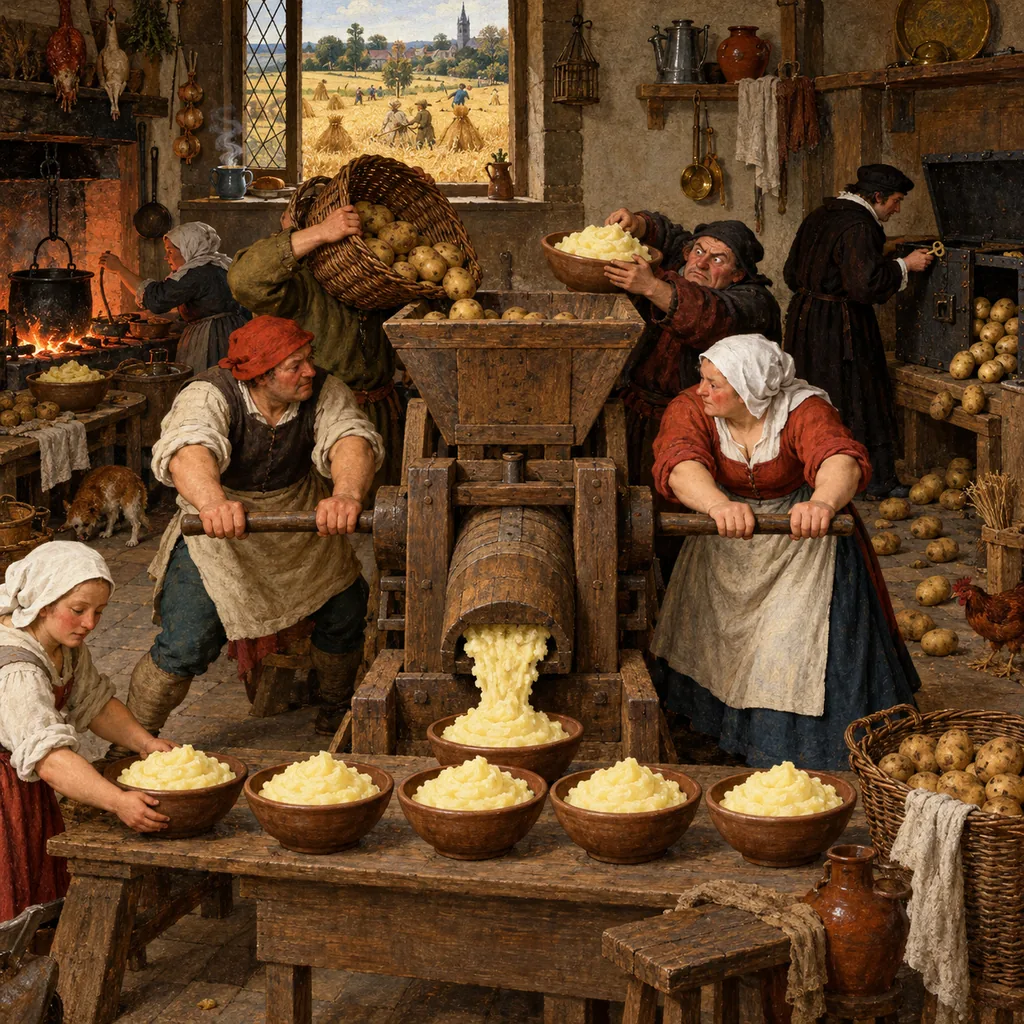
Kahle wrote "salted-encrypted". The Archive's blog wrote "encrypted". The data says bcrypt, which is a hash. In everyday speech these are all just "scrambled", and nobody at the Archive was writing a textbook in the middle of a DDoS. But the difference between hashing and encryption is the most important idea in this whole story, so we are going to make it concrete, and we are going to do it with potatoes, because I live in Tasmania and it is the law.4
You already know a one-way process
Take a potato. Boil it, mash it with a fork, and put it in a bowl. Now give the bowl to a friend and ask them to give you the potato back.
They cannot. Not a smaller potato, not a damaged potato: no potato at all. Mashing destroys the shape of the thing that went in, and there is no fork you can run backwards. But mashing is also consistent. The same potato, mashed the same way, gives the same mash, and two very different potatoes give two noticeably different bowls.
That is the whole of hashing, in a kitchen.
The machine version
A hash function is a recipe that takes any input, of any length, and produces a fixed-length output called a hash (or digest). Good ones have three properties that matter here:
- One way. Given the hash, there is no method for working back to the input. You can only guess inputs and see if they match.
- Deterministic. The same input always gives the same hash.
- Sensitive. A tiny change in the input gives a completely different hash.
Here is the third property in action, using SHA-256, a common modern hash. I ran these myself:
tasmania1→816ffcc8fc6a1f18…tasmania2→6e396ed099f3a210…Tasmania1→8c4d27c9e8d542d6…
One character changed, and nothing about the output gives it away. You cannot look at the second line and see that it is "the first one, plus one".
A website uses this to check your password without keeping it. When you sign up, the site hashes your password and stores the hash. When you log in, it hashes what you typed and compares the two. If they match, you are in. The site never needs to remember the password itself, which means a thief who steals the database does not get it either. OWASP, the open web security project, says it plainly in its Password Storage Cheat Sheet: "in almost all circumstances, passwords should be hashed, NOT encrypted".
Encryption is a lock
Encryption is a different tool. It scrambles data with a key, and anyone with the key can unscramble it. That is the point of it. Your bank encrypts your statement so that you can read it later. In potato terms, encryption puts the whole potato in a strongbox. It is very safe while the key is somewhere else. But the potato is still in there, unharmed, waiting for whoever has the key.
For passwords, that is exactly the wrong property. A site does not need to read your password back. It only needs to check it. So storing passwords with encryption keeps a capability the site never uses, and an attacker would love to have.
What encrypted passwords look like when they leak
We have a famous example. In 2013, Adobe lost a database of about 150 million user records, and the passwords in it were encrypted, not hashed. Troy Hunt imported 152,989,508 of those records into a database and walked through what went wrong.
The encryption key did not leak (as far as anyone knows), but it did not need to. Paul Ducklin at Sophos analysed the data and concluded that the most likely suspects were DES or Triple DES (3DES), old block ciphers, used in a mode called Electronic Code Book (ECB). In ECB, as he put it, "the same input block encrypted with the same key always gives the same output". So every user with the same password had the same scrambled text. Worse, Adobe stored each user's password hint in plain text beside it. As Hunt explained, "all instances of a password of, say "blue" will produce the same cipher". Find all the users with the same scrambled text, read their hints ("sky", "colour", "ocean", "not red"), and you have their password. All of them. Without breaking any encryption at all.
The world's largest crossword puzzle, and each clue was written by the person whose password was the answer.
So when you read "encrypted passwords" in a breach notice, it is worth checking what was actually stored. In the Archive's case, the leaked data and HIBP's listing both say bcrypt hashes, which is the better outcome by a long way. But "hashed" is only the start. The next question is: hashed how?
Part 3: Nobody Reverses a Hash. They Guess.
If a hash cannot be reversed, how do passwords ever get "cracked"? The answer is that crackers do not reverse anything. They guess.
The cracker's recipe
OWASP describes the method in three steps: choose a password you think the victim might have used, hash it, and compare the result with the stolen hash. If they match, you have the password. Then repeat, very fast, with a long list of candidates: passwords from earlier breaches, dictionary words, and every combination of characters up to some length.
Back to the kitchen. You cannot un-mash a potato, but if you have the bowl, you can mash potatoes of your own, one by one, and compare the bowls. Russet? No. Kipfler? No. Pink Eye, from a farm near Cygnet? Same bowl. Got it.
So the strength of a stored password rests on two things: how good the password is (how far down the list the attacker has to go before they reach it), and how much each guess costs. Hashing removes the shortcut. Salt and cost decide how long the long way takes.
Without salt, one guess works on everyone
Remember the second property: the same input always gives the same hash. That is useful for logging in, and terrible in a breach, because everyone with the same password has the same hash.
LinkedIn learned this in public. Its 2012 breach, which came back into circulation in 2016 with about 167 million accounts, used SHA-1 "without a salt". Hunt reported that 1,135,936 members had the password 123456. With no salt, an attacker hashes 123456 once, and over a million accounts fall at the same moment. According to the figures Hunt quoted from the security firm KoreLogic, within days 86% of all the accounts had cracked passwords.
Without salt, an attacker can also do the hashing in advance. They hash a few billion likely passwords once, store the results in a big lookup table (the fancy kind is called a rainbow table), and reuse it for every unsalted breach that uses the same function. Cooking every potato in the country once, and keeping the bowls in the freezer.
Salt: one guess, one user
A salt is a random value, different for every user, that is mixed in with the password before hashing. The salt is not secret. It is stored next to the hash, because the site needs it to check your password at the next login. Its job is different: it makes everyone's hash unique, even when their passwords are the same.
In the kitchen, each person gets their own random pinch of seasoning in their bowl. (Yes, the security term is "salt", and yes, we are mashing potatoes, and no, I did not plan this. We have committed to the analogy now and it is going to have to carry us.) Two people with the same potato now have two bowls that taste different. Ann and Bo can both have tasmania1, and their hashes will look nothing alike. They are just different.
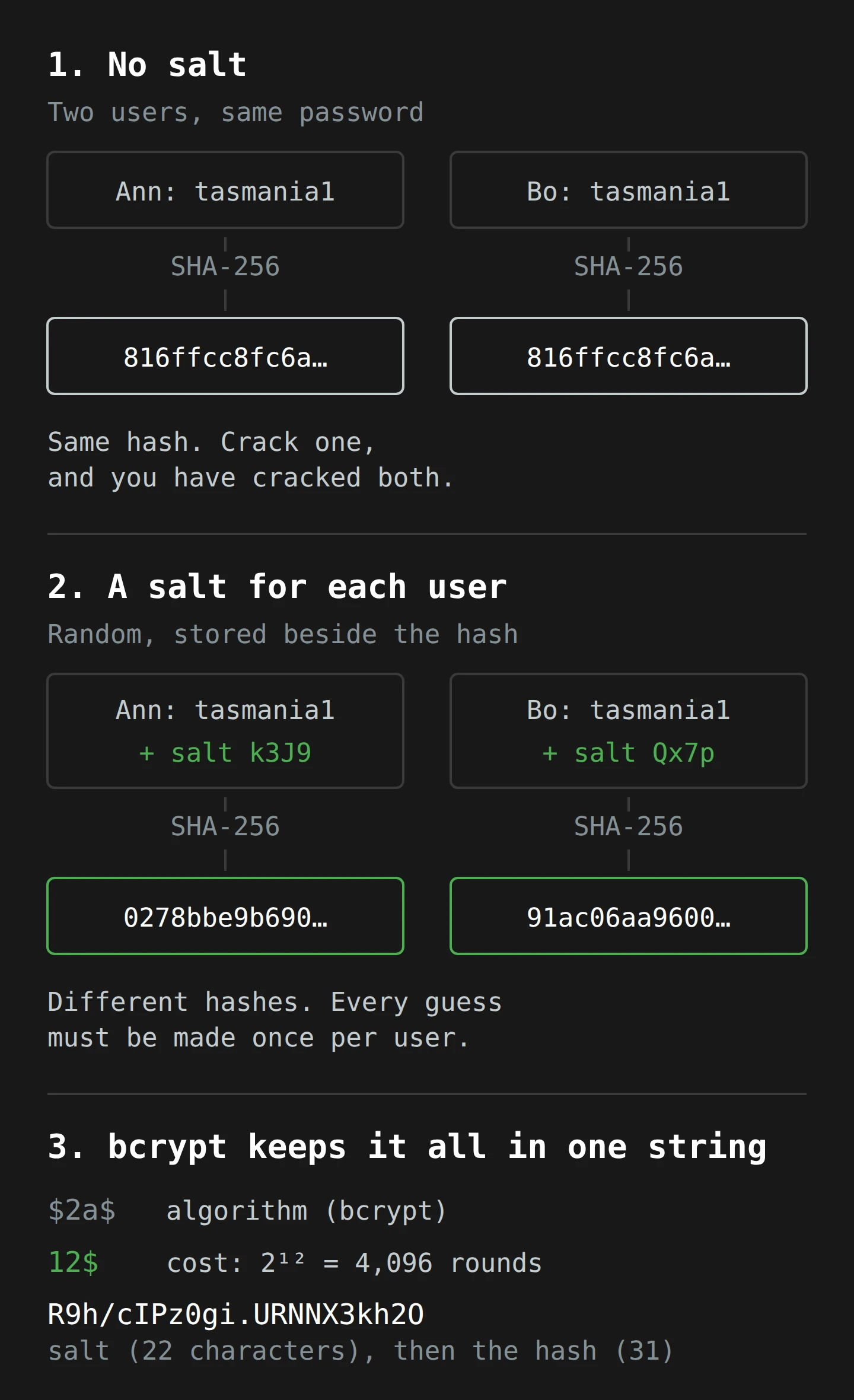
Salt does not make any single password harder to guess. What it does is take away the bulk discount. OWASP puts it this way: with a unique salt, "an attacker has to crack hashes one at a time", so "the time required grows in direct proportion to the number of hashes". A guess of 123456 now has to be hashed once for each of the 31 million users, with each user's salt. Precomputed tables are useless, because nobody can precompute every password with every possible salt. And nobody can tell which users share a password without cracking them first.
NIST, the US standards body, requires the same thing in its Digital Identity Guidelines (SP 800-63B): passwords "SHALL be salted and hashed using a suitable one-way key derivation function", and the salt "SHALL be at least 32 bits in length". bcrypt goes well past that, with a 128-bit salt. And bcrypt does something about the other half of the problem, too. It makes each guess slow.
Part 4: Slow on Purpose
Most hash functions are built for speed. SHA-256 is designed to check large files and network traffic quickly, and that is a good thing for those jobs. For passwords, it is a disaster. OWASP notes that password hashes "should be slow (unlike algorithms such as MD5 and SHA-1, which were designed to be fast)". The faster a hash is for you, the faster it is for the person guessing.
The problem bcrypt was built to solve
In 1999, Niels Provos and David Mazières presented a paper at the USENIX conference called "A Future-Adaptable Password Scheme". They started with the Unix password system. When it was deployed in 1976, its hash function, crypt, "could hash fewer than 4 passwords per second". By 1999, a fast workstation could do "over 200,000 crypt operations per second". The hash had not changed. The computers had. And they put the core problem in one sentence: the strength of user-chosen passwords "does not scale at all with computing power". Hardware gets faster every year. People do not get better at choosing passwords.
Their answer was bcrypt. Under the bonnet, it is based on a cipher called Blowfish, but it uses Blowfish's slowest part on purpose. Blowfish has a setup step, the key schedule, that is expensive to run. Provos and Mazières built a variant they called eksblowfish ("expensive key schedule Blowfish"), which mixes the salt and the password into that setup again and again, as many times as a cost parameter says. Then it encrypts a fixed 24-byte phrase, "OrpheanBeholderScryDoubt", 64 times with the result. The output is the hash.5
The important design choice is that the cost is adjustable, and it is exponential. Each step up in cost doubles the work. Cost 10 means 2¹⁰, or 1,024, rounds of that expensive setup. Cost 11 means 2,048. So as computers get faster, you turn the dial up one notch and stay ahead.
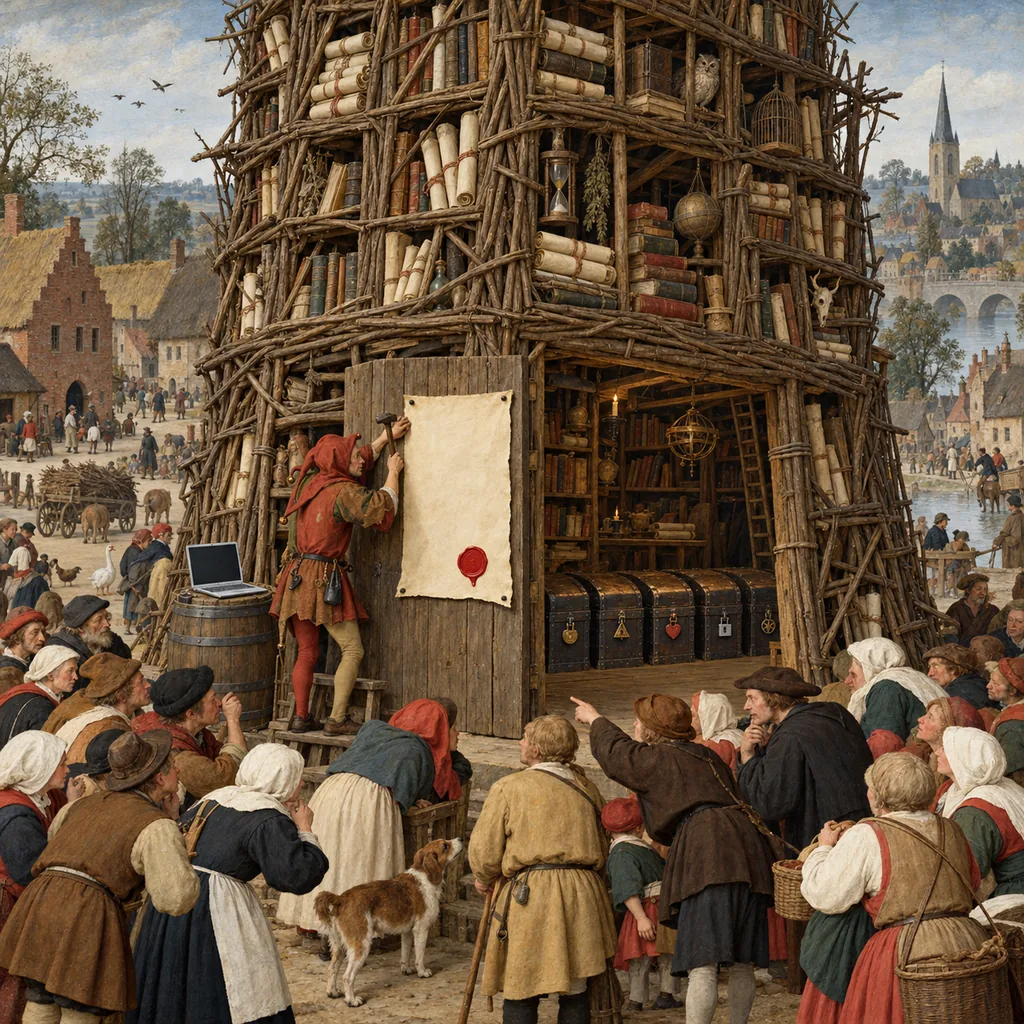
Reading a bcrypt hash
bcrypt stores everything it needs in one string. Wikipedia's example is:
$2a$12$R9h/cIPz0gi.URNNX3kh2OPST9/PgBkqquzi.Ss7KIUgO2t0jWMUW
$2a$says this is bcrypt (version "2a").12$is the cost: 2¹², or 4,096 rounds.- The next 22 characters,
R9h/cIPz0gi.URNNX3kh2O, are the salt. - The last 31 characters are the hash itself.
The one record from the Archive's file that has been published, Scott Helme's, shared with his permission, begins $2a$10$. So that hash was made with bcrypt at a cost of 10, the minimum OWASP recommends for bcrypt today. I have only seen that one record, so I cannot promise every hash in the file uses the same cost. But it is the best evidence we have.
What the cost buys
To see what that means in practice, we need to know how fast an attacker can guess. Password crackers publish benchmarks, and a widely shared one from October 2022 tested hashcat, the popular cracking tool, on an Nvidia RTX 4090, a gaming graphics card you can buy at a computer shop. On that single card, the guesses per second were:
- MD5: 164.1 billion.
- SHA-1: 50.6 billion.
- SHA-256: 22.0 billion.
- bcrypt at cost 5: 184,000.
That is the whole idea. bcrypt at cost 5, which is 32 rounds and quite low by modern standards, is already about 120,000 times slower than SHA-256 on the same hardware. The benchmark did not test cost 10, but each step doubles the work, so cost 10 should be about 32 times slower again: roughly 5,750 guesses a second. That is my arithmetic, not a measurement, and real numbers vary with the card, the tuning and the implementation.
Turn those speeds into time, and the gap is hard to picture without a chart:
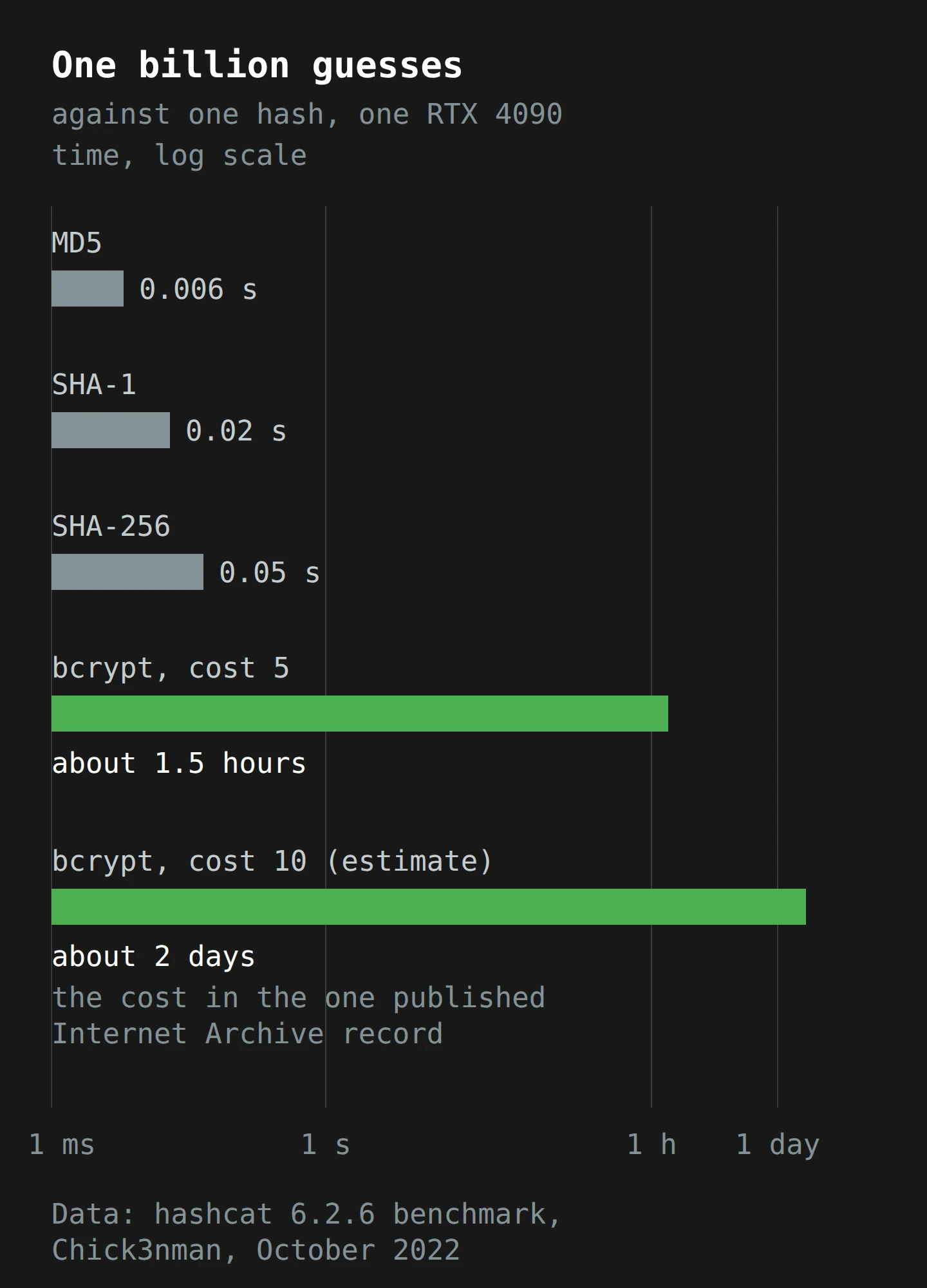
A billion guesses against one MD5 hash takes about six thousandths of a second. Against one bcrypt hash at cost 10, it takes about two days. And with a unique salt for every user, the attacker pays that price separately for every account.
Now scale it up to the Archive's file. Say an attacker wants to try only the 1,000 most common passwords against every one of the 31 million accounts. With unsalted MD5, that is 1,000 hashes, done before you can blink, and then a lookup. With salted bcrypt at cost 10, it is 31 billion bcrypt operations: at 5,750 a second, about 62 days on one card. Rent a hundred cards and it is under a day, and every account that used one of those 1,000 passwords is open.
That is the honest summary. bcrypt does not make a weak password safe. It makes a strong password effectively uncrackable, and it makes each weak one cost something. 123456 will still fall, quickly, because it is guess number one. A random 16-character password from a password manager will not fall in anyone's lifetime, because the attacker would need to make far more guesses than any amount of rented hardware can manage.
What the experts use now
bcrypt is 25 years old and still good, but it is no longer the first choice for new systems. As of October 2024, OWASP's first recommendation is Argon2id, the winner of the 2015 Password Hashing Competition, with "a minimum configuration of 19 MiB of memory, an iteration count of 2, and 1 degree of parallelism". Argon2id is memory-hard: each guess needs a chunk of memory as well as time, and OWASP says the id variant gives "a balanced approach to resisting both side-channel and GPU-based attacks". If Argon2id is not available, OWASP suggests scrypt, then bcrypt at a work factor of 10 or more for legacy systems, then PBKDF2 with 600,000 iterations where FIPS compliance requires it.6
OWASP also gives a simple sanity check for picking the cost: "calculating a hash should take less than one second" on your server. That is slow enough to hurt an attacker making billions of guesses, and fast enough that nobody waiting for a login will notice.
So, on the evidence we have, the Archive did the important thing right. The hashes were salted, slow and adjustable. Which leaves the obvious question: if the hashing was fine, why should anyone in that file change anything?
Part 5: Why Reuse Still Hurts
A cracker does not guess at random. The first guesses they make are the passwords people actually use, and the best source of passwords people actually use is other breaches. Every breach where passwords leaked in plain text, or as fast unsalted hashes, adds to the list.
Your password's history matters more than its hash
Think about what that means for one account in the Archive's file. If your password was a random string that only ever existed for archive.org, an attacker has to search a huge space of possibilities at about 5,750 guesses a second per card. Good luck to them.
If your password was one you also used on a forum that stored it in plain text in 2016, it is already on a list. It is somewhere near the top of the attacker's queue. bcrypt slows each guess down, but if the right answer is guess number 200, slow does not matter.
And remember the other number from HIBP: 54% of the email addresses in the Archive's file were already in its database from earlier breaches. Many of those people will have reused a password at least once.
People reuse, and they reuse in patterns
This is not a guess about human nature. A 2014 study by Anupam Das, Joseph Bonneau and colleagues, "The Tangled Web of Password Reuse", matched accounts across leaked databases and found "42-51% of the users reusing the same password across multiple sites". The more interesting finding was about the other half. People who did not reuse a password exactly tended to change it in small, predictable ways: add a number, change a capital letter, add a symbol at the end. The researchers built a cross-site guessing algorithm that learned those habits, and it guessed 30% of the changed passwords within 100 attempts, against 14% for a standard cracking tool.
So tasmania1 on one site and Tasmania1! on another are not two passwords. They are one password with a hat on.
Credential stuffing skips the hash entirely
There is a second way reuse hurts, and it does not involve the Archive's hashes at all. If your Archive password is the same as your email password, and that password leaked in plain text from some other site years ago, then an attacker who has your email address (which the Archive file does contain, in plain text) can try that old password against your email account, your bank and your shopping sites. This is called credential stuffing: automated logins, at scale, with username and password pairs from old breaches. No cracking is needed. The hash on archive.org does not come into it.
The email addresses in the file are also useful on their own. Each one comes with a screen name and the fact that the person used the Internet Archive. That is enough for a believable phishing email ("Your archive.org account has been compromised, please confirm your password here"). And the Zendesk replies on 20 October showed how convincing that can be: real messages, from the Archive's real helpdesk, about the reader's real old support ticket. The attacker used them to complain about key rotation, but someone else could have used the same access to ask for a password.
Part 6: Margaret Has a Long Week
Let me walk one person through all of this. Margaret is made up. She volunteers at a small historical society in the Huon Valley, and years ago she made an Internet Archive account to save old newspaper scans of the region's apple sheds. Her Archive password is Applesheds1952. She also uses it, with a ! on the end, for her email.
Wednesday 9 October. Margaret opens the Wayback Machine to check a scan, and sees the pop-up. She closes it, assumes it is a prank, and goes to make tea. That evening, an email arrives from HIBP, because she signed up years ago after another breach. It says her email address is in the Internet Archive breach, with her screen name and a bcrypt password hash.
What does the attacker have? A row: her email address, her screen name, the date she last changed her password, and a string that starts $2a$10$. They do not have Applesheds1952. To get it, they must guess it, at about 5,750 guesses a second per card, against her salt alone.
Thursday 10 October. Margaret wants to change her Archive password, but the site is down. (Hunt pointed out the bright side: while it is offline, nobody else can log in with her password either.) So she does the more important thing. She thinks about where else she has used Applesheds1952, or something like it.
Her email is the urgent one. If an attacker guesses her Archive password, they will try it, and its obvious variations, against the email address it sits next to. And if her email falls, every "forgot password" link on the internet falls with it. Margaret is not a security expert, but she knows a skeleton key when she sees one.
Friday 11 October. Her nephew comes over and sets up a password manager. Margaret picks one strong master passphrase and lets the manager generate a new, random password for her email. Then she turns on two-factor authentication (2FA) for her email, with an authenticator app, so that a password on its own is no longer enough to get in. In the logs her email provider keeps, the record now shows: a password change, an added second factor, and no new devices.
Weekend. She goes through the manager's list of saved logins, site by site, and replaces every password that rhymes with apple sheds. Her bank, her council rates account and the historical society's website login get new random passwords. Some sites offer passkeys, and she uses one where she can.
Monday 14 October. The Wayback Machine is back. She can browse, but she still cannot change her Archive password. That is fine. Her Archive password no longer opens anything else, so even if someone cracks it, all they get is access to her saved newspaper scans. They are welcome to read about the 1952 apple harvest.
Monday 21 October. archive.org comes back read-only too. Margaret sets a reminder to change her Archive password as soon as the Archive lets her, and makes a note in the manager. She also finds an email from the weekend, sent from the Archive's helpdesk as a reply to a removal request she sent in 2019. It says her data is "in the hands of some random guy". She does not click anything in it, and she does not reply with any personal details.
Look at what each part did. The Archive's bcrypt hashing meant that the stolen file gave nobody her password directly. HIBP told her within hours, before the Archive had said anything publicly about the breach. The thing that would have hurt her was not on archive.org at all. It was the same password, with an exclamation mark, on her email. bcrypt protected the Archive's copy of her password. Only Margaret could protect the other copies.
Part 7: What to Check This Week
If you have an account anywhere (so, if you are a person)
- Check HIBP. Enter your email at haveibeenpwned.com and subscribe to notifications. It is free, and it loaded this breach on the day it became public.
- Find your reused passwords. If you used your Archive password anywhere else, change it there first. Your email account comes before everything else, because it can reset all the others.
- Use a password manager so that every site gets its own random password, and you only have to remember one. I went through how to choose one in Choosing the Perfect Password Manager.
- Turn on 2FA for email, banking and anything with stored payment details. An authenticator app is better than SMS. The basics are in What is Two-Factor Authentication.
- Use passkeys where a site offers them. A passkey has no password to leak, so it is not in any breach list. More on how they work in Unlocking the Future: Passkeys.
- Be suspicious of breach-themed email for the next few months. A real message can come from a real helpdesk and still be from an attacker.
If you run a login page (or pay someone who does)
- Find out how your passwords are stored. Ask for the algorithm and the cost, in writing. Acceptable answers in October 2024: Argon2id, scrypt, bcrypt at cost 10 or more, or PBKDF2 at the iteration counts OWASP gives. Unacceptable answers: MD5, SHA-1, plain SHA-256, "encrypted", "base64" or a long pause.
- Check the cost against your hardware. OWASP's guide is that one hash should take less than a second. If your bcrypt cost was set at 8 a decade ago, it is time to turn the dial. Most libraries can re-hash a user's password at the new cost the next time they log in.
- Plan the migration from legacy hashes. If you find MD5 or SHA-1, OWASP describes two options in its cheat sheet: expire the old hashes and make users reset, or wrap them, for example
bcrypt(md5(password)), so nothing weak sits in the database while you wait for people to log in. Replace the wrapped hashes with direct ones when each user next logs in.7 - Check new passwords against breach lists. NIST SP 800-63B says that when users set a password, you SHALL compare it against a list of values "known to be commonly-used, expected, or compromised", and that list may include "Passwords obtained from previous breach corpuses". HIBP's Pwned Passwords service does this without your server ever sending the password: you send the first five characters of its SHA-1 hash and get back a few hundred possible matches to check locally.
- Stop forcing password changes every 90 days. The same NIST guideline says you "SHOULD NOT require memorized secrets to be changed arbitrarily (e.g., periodically)", but "SHALL force a change if there is evidence of compromise". Scheduled changes push people towards
Tasmania1!,Tasmania2!,Tasmania3!. - Let people paste passwords. NIST says you should permit it, because paste makes password managers easier to use.
- Get secrets out of code and configuration. According to the attacker, the Archive's breach started with a GitLab token in a configuration file on a development server, and BleepingComputer confirmed the token had been exposed since at least December 2022. Scan your repositories and servers for tokens. Rotate every key after an incident, not just the one you know about.8
- Review third-party JavaScript. The pop-up reached visitors through a script, apparently a compromised file on a subdomain. Every script you load from somewhere else can change what your visitors see. Keep a list, and remove what you no longer need.
- Hash, then also protect. Rate-limit login attempts, offer 2FA, and watch for credential stuffing (many failed logins from many addresses for many accounts). If an attacker gets a session token instead of a password, hashing does not help at all, which is a different problem I covered in Session Hijacking.
Final Thoughts
Go back to that grey pop-up: "runs on sticks and is constantly on the verge of suffering a catastrophic security breach". The attacker meant it as an insult. In fairness to the Archive, its security does look more like sticks than steel this month, with exposed tokens, a second breach through the helpdesk, and keys that, according to the attacker, were still not rotated weeks later. Troy Hunt's response on 9 October still seems right to me: "They're a non-profit doing great work and providing a service that so many of us rely heavily on", and "everyone should cut them some slack".
And one part of the Archive did not run on sticks. Somebody, years ago, chose to store passwords as salted bcrypt hashes and not as anything a thief could read. Because of that choice, the people in that file with strong, unique passwords lost an email address and a screen name. They did not lose a password. "Catastrophic" became "annoying", and that is all a password hash can promise.
So the takeaway is short. A good hash protects the copy of your password that a site stores. It cannot protect the copies of that same password that you stored on other sites. If you build a login page, your job is the first half: Argon2id or bcrypt, a real cost, a breached-password check, and secrets out of your code. If you have a login, your job is the second: one password per site, a password manager to remember them, and 2FA on the email account that can reset everything else.
Pick one job this week. Check what your own site stores, or change the one password you know you have used twice.
Now, if you'll excuse me, the scones recipe is back on the Wayback Machine, and my tea has gone cold while I wrote this. Unlike a hash, a cold cup of tea can be reversed. It is called the kettle.
Notes
-
Helme gave BleepingComputer permission to publish his full record, which is how the rest of us know the format of the file. I have not reproduced his hash here. It is his, and the cost factor at the start of it is what makes every guess against it slow. ↩
-
A polyfill is a small script that adds modern browser features to old browsers. Because sites load polyfills on every page, a tampered polyfill reaches every visitor. Kahle's own summary said only "defacement of our website via JS library". ↩
-
DKIM, DMARC and SPF are the checks that let a mail server confirm a message really came from the domain it claims. They worked perfectly here: the messages really were sent by the Archive's helpdesk. The checks prove where an email came from, not who was typing. ↩
-
It is not actually the law. It is more of a strong local custom, enforced mainly by me. ↩
-
"OrpheanBeholderScryDoubt" is exactly 24 bytes, the 192-bit value the paper calls for. Cryptographers need a fixed message to encrypt, and this pair chose one that sounds like a lost Tolkien chapter. ↩
-
bcrypt has one well-known quirk: most implementations only use the first 72 bytes of a password and ignore the rest. OWASP advises enforcing a 72-byte maximum, and warns against the common workaround of pre-hashing the password with a fast hash first, because it opens up an attack called password shucking. ↩
-
Layering is not as good as a direct hash. OWASP notes that it "can make the hashes easier to crack", so it is a temporary measure for users who have not logged in since the change, not the final state. ↩
-
Rotating a key means issuing a new one and cancelling the old one. A stolen key that still works is a stolen key; a stolen key that has been rotated is a souvenir. ↩